!!IMPORTANT!!
This repository is deprecated. Please use new one: https://github.com/business-service-solution-gmbh/id24.tr-android-sdk-sample
Step 1. You must manually include "design lib" in your project in order to you need to change the design completely. For this you can download the project from github. Then include design lib in your project with this code ;
Description About The Design Module
This design module does not contain logic. It contains only design and resource files. Thanks to this module, you can design the way you want. Within the design module, logic is managed by base classes. The base logic classes are available in our maven repository. The code to fetch the classes from our Maven repository is included in the design module.
This code is ;
api 'com.identify.sdk:android:1.3.2'
You don't need to add. it was added.
You must add in app build gradle ->
implementation project(path: ':design')
and settings.gradle ->
include ':design'
Step 2. Add the Gitlab repository to your build file
Add it in your root build.gradle at the end of repositories:
!!! MinSdk version must be at least 21
allprojects {
repositories {
...
   maven {
            url 'https://gitlab.com/api/v4/projects/26590072/packages/maven'
            name "GitLab"
            credentials(HttpHeaderCredentials) {
                name = 'Private-Token'
                value = 'xxxxxxxxxxxxxxx'
            }
            authentication {
                header(HttpHeaderAuthentication)
            }
        }
}
}
Value = 'XXX' is private token. We will send you when you start to integration sdk.
If you did the integration before version 1.3.1, you should update your "build.gradle" file in your design module to avoid getting an error while building, and you should update your "consumer-rules.pro" file in your design module to ensure that the "nfc" reading phase does not fail when "minifyEnable true" is set in your project and to avoid getting a crash when starting a video call.
Firstly, you have to create options and design for sdk.Later get a singleton object by set the environment variables and options from identify sdk. Then connect to sdk with ID number, thats all.
-
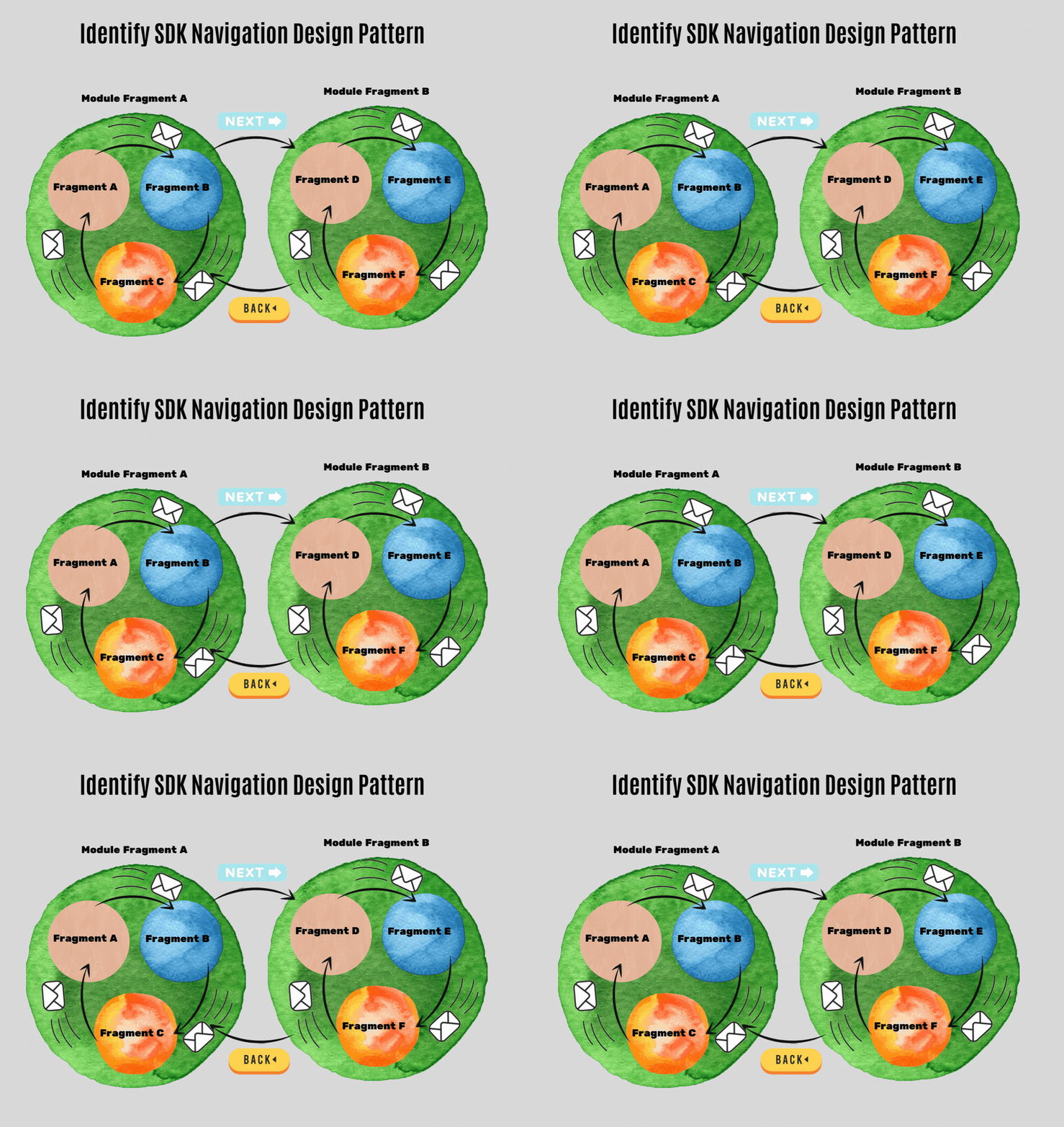
Modules communicate themselves.
-
Module elements communicate themselves.
-
Modules manage their own elements.
-
Activity manages modules.
     val identityOptions = IdentityOptions.Builder()
            .setIdentityType(listOf(
                IdentifyModuleTypes.IDENTIFICATION_INFORMATION_WITH_CARD_PHOTO,
                IdentifyModuleTypes.IDENTIFICATION_INFORMATION_WITH_NFC,
                IdentifyModuleTypes.TAKE_SELFIE,
                IdentifyModuleTypes.VALIDATE_ADDRESS,
                IdentifyModuleTypes.LIVENESS_TEST,
                IdentifyModuleTypes.VIDEO_RECORD,
                IdentifyModuleTypes.SIGNATURE,
                IdentifyModuleTypes.SPEECH_TEST,
                IdentifyModuleTypes.AGENT_CALL
            ))
            .setNfcExceptionCount(3)
            .setCallConnectionTimeOut(20000)
            .setOpenIntroPage(false)
            .setDocumentType(DocType.NONE)
            .setModuleCacheType(ModuleCacheType.CONTINUE_FROM_CALL)
            .setSslCertificateInformation(listOf(SslCertificateInformation("(ssl sha256 finger print)sha256/DGBYYE8aafeisJmKsjlJTnOGA6PfHJ02kdZYS1+SjhY","(domain)api.identifytr.com")))
            .setNfcDependency(NfcDependency(wantToOpenOcr = true,"SerialNo(Z24I06557=example)","DateOfBirth(YYMMDD)","DateOfExpiry(YYMMDD)"))
            .setOpenThankYouPage(false)
            .setVideoRecordTime(5000)
            .build()


        val identifyObject = IdentifySdk.Builder()
                .api("api url")
                .socket("socket url","socket port")
                .stun("stun url","stun port")
                .turn("turn url","turn port","turn username","turn password")
                .lifeCycle(this.lifecycle)
                .options(identityOptions)
                .build()

 identifyObject.startIdentification(this,"xxxx-xxxx-xxxx-xxxx-xxxxxxx","tr")
        ArrayList moduleList = new ArrayList();
        moduleList.add(IdentifyModuleTypes.IDENTIFICATION_INFORMATION_WITH_CARD_PHOTO);
        moduleList.add(IdentifyModuleTypes.IDENTIFICATION_INFORMATION_WITH_NFC);
        moduleList.add(IdentifyModuleTypes.TAKE_SELFIE);
        moduleList.add(IdentifyModuleTypes.VALIDATE_ADDRESS);
        moduleList.add(IdentifyModuleTypes.LIVENESS_TEST);
        moduleList.add(IdentifyModuleTypes.VIDEO_RECORD);
        moduleList.add(IdentifyModuleTypes.SIGNATURE);
        moduleList.add(IdentifyModuleTypes.SPEECH_TEST);
        moduleList.add(IdentifyModuleTypes.AGENT_CALL);

        ArrayList sslCertificateInformations = new ArrayList<>();
        sslCertificateInformations.add(new SslCertificateInformation("(ssl sha256 finger print)sha256/REIUHE8adrsisJmKsjlJTnOUH6PfHJ02yrZYS1+SjhY","(domain)api.example.com"));

        IdentityOptions options = new IdentityOptions.Builder()
                .setIdentityType(moduleList) // Default value IdentityType.FULL_PROCESS
                .setNfcExceptionCount(5) // Default value 3
                .setOpenIntroPage(true) //Default true
                .setCallConnectionTimeOut(5000)
                .setVideoRecordTime(5000)
                .setDocumentType(DocType.NONE)
                .setModuleCacheType(ModuleCacheType.ALWAYS_BACK_TO_TOP)
                .setNfcDependency(new NfcDependency(true,"SerialNo","DateOfBirth(YYMMDD)","DateOfExpiry(YYMMDD)"))
                .setSslCertificateInformation(sslCertificateInformations)
                .setOpenThankYouPage(true)
                .build();


        IdentifySdk identifyObject = new IdentifySdk.Builder()
                .api("api url")
                .socket("socket url","socket port")
                .stun("stun url","stun port")
                .turn("turn url","turn port","turn username","turn password")
                .lifeCycle(this.getLifecycle())
                .options(options)
                .build();

        identifyObject.startIdentification(this,"xxxx-xxxx-xxxx-xxxx-xxxxxxx","language");
- IDENTIFICATION_INFORMATION_WITH_NFC :
-
MRZ read : The customer keeps his/her back side ID card on phone. MRZ field, which is on back side of ID card, should be read and data should be taken by OCR. It should be a module on mobile app. Also, a separate field for MRZ data on agent panel or at back.
-
NFC data : The customer keeps close his/her ID card to phone. NFC data, which is in ID card chip, should be taken and decryption. It should be a module on mobile app. Also, a separate field for NFC data on agent panel.
-
TAKE_SELFIE : The customer takes own selfie and send. It should be a separate module on mobile app. There can be a frame to guiding customer. Selfie photo is characterised differently on agent panel, e.g. standard name like selfie photo is given automatically.
-
IDENTIFICATION_INFORMATION_WITH_CARD_PHOTO : The customer takes photos of front and back side of ID card and send. It should be a separate module on mobile app. There can be a frame to guiding customer. These photos are named differently and shown on agent panel automatically.
-
LIVENESS_TEST : This control has a few steps: Smiling, winking, turning head to right, turning head to left, speech. These are separate steps, and it should be a module on mobile app.
-
SIGNATURE : The customer can write and sign on phone. The data should be taken.
IdentityType -> Indicates the modules. Modules can be added or removed in any order. Modules should be added to a list.
NfcExceptionCount -> This number specifies the maximum number of errors to be received when reading nfc.This process is passed after the number of errors exceeds this number. This is optional(can be null, default value = 3)
CallConnectionTimeOut -> This number indicates the timeout when connecting to the call. This is optional(can be null, default value = 10000ms)
VideoRecordTime -> This number indicates the duration of the video to be recorded.This is optional(can be null, default value = 5000ms)
OpenIntroPage -> If true, the intro pages of the selected modules are shown. This is optional(can be null, default value = true)
OpenThankYouPage -> If true, the kyc finish page(thanks page) are shown. This is optional(can be null, default value = true)
DocumentType -> There are 3 options ;
-
DocType.NONE -> Identity card or passport is selected by pop up on ocr screen. The users chooses. (Default)
-
DocType.ID_CARD -> Pop up are not shown. Default selected is id card. The user continues the processes with the identity card.
-
DocType.PASSPORT -> Pop up are not shown. Default selected is pasaport. The user continues the processes with the pasaport.
ModuleCacheType -> If the sdk is exited before the operations are completed, it is determined where to continue when the user comes back.There are 3 options ;
-
ModuleCacheType.ALWAYS_BACK_TO_TOP -> Always start from the first module.
-
ModuleCacheType.CONTINUE_FROM_REST_OF_PLACE -> Continue from the module you left.
-
ModuleCacheType.CONTINUE_FROM_CALL -> If it has reached the call module, continue from the call module. (Default)
setNfcDependency -> If you use the state's identity sharing system, it is necessary to activate this feature. In this way, there is no need to show the ocr screen. Because you give the user's credentials to the sdk. The information needed are: ( Default Ocr Page Open )
-
ID Card or Pasaport Serial No
-
Date Of Birth(YYMMDD)
-
Date Of Expiry(YYMMDD)
SslCertificateInformation -> You can use it when you want to pin requests made from sdk. Need 2 parameters about ssl certificate :
-
Domain (api.example.com)
-
ssl sha256 finger print (sha256/REIUHE8adrsisJmKsjlJTnOUH6PfHJ02yrZYS1+SjhY)
-
You must give the api, socket, stun, and turn information to the sdk for connection.
-
xxxx-xxxx-xxxx-xxxx-xxxxxxx is ident id for kyc users. it is a unique id. Before starting the sdk, you need to get this id from the service.
-
Language is optional(can be null). Default value is English. Supported languages are English, German and Turkish.
- for Turkish language parameter -> tr
- for English language parameter -> en
- for German language parameter -> de
- IdentifyErrorListener -> "xxxx-xxxx-xxxx-xxxx-xxxxxxx" If the ident id is not found
- IdentifyResultListener -> when processes are over
- SdkLifeCycleListener -> get sdk lifecycle
- IdentifyNavigationListener -> when there are navigation operations
         identifyObject.identifyErrorListener = object : IdentifyErrorListener{
            override fun identError(errorMessage: String) {
                Toast.makeText(this@MainActivity,errorMessage,Toast.LENGTH_SHORT).show()
             }
          }


            identifyObject.identifyResultListener = object : IdentifyResultListener {
                        override fun nfcProcessFinished(isSuccess: Boolean, mrzDto: MrzDto?) {
                            Toast.makeText(this@MainActivity, "nfc process finished", Toast.LENGTH_SHORT).show()
                        }

                        override fun vitalityDetectionProcessFinished() {
                            Toast.makeText(this@MainActivity, "face process finished", Toast.LENGTH_SHORT).show()
                        }

                        override fun callProcessFinished(withRedirect: Boolean) {
                            Toast.makeText(this@MainActivity, "call process finished", Toast.LENGTH_SHORT).show()
                            //  identifyObject.closeSdk() // You can finish sdk with this method when in the process you want
                        }

                        override fun takeCardPhotoProcessFinished() {
                            Toast.makeText(this@MainActivity, "card photo process finished", Toast.LENGTH_SHORT).show()
                        }

                        override fun takeSelfieProcessFinished() {
                            Toast.makeText(this@MainActivity, "selfie process finished", Toast.LENGTH_SHORT).show()
                        }

                        override fun speechProcessFinished() {
                            Toast.makeText(this@MainActivity, "speech process finished", Toast.LENGTH_SHORT).show()
                        }

                        override fun videoRecordProcessFinished() {
                            Toast.makeText(this@MainActivity, "video record process finished", Toast.LENGTH_SHORT).show()
                        }

                        override fun signatureProcessFinished() {
                            Toast.makeText(this@MainActivity, "signature process finished", Toast.LENGTH_SHORT).show()
                        }

                    }


                identifyObject.identifyNavigationListener = object  :
                        IdentifyNavigationListener {
                        override fun redirectCallProcess() {
                            Toast.makeText(this@MainActivity, "Redirect Call Process", Toast.LENGTH_SHORT).show()
                        }

                        override fun backPressed(whereFrom: IdentifyModuleTypes) {
                            Toast.makeText(this@MainActivity, whereFrom.name + " Back Pressed", Toast.LENGTH_SHORT).show()
                        }

                    }


                 identifyObject.sdkLifeCycleListener = object : SdkLifeCycleListener {
                        override fun sdkDestroyed() {
                            // Sdk Activity Destroyed
                        }

                        override fun sdkPaused() {
                            // Sdk Activity Paused
                        }

                        override fun sdkResumed() {
                            // Sdk Activity Resumed
                        }

                    }
        identifyObject.setIdentifyErrorListener(new IdentifyErrorListener() {
            @Override
            public void identError(@NotNull String errorMessage) {
                Toast.makeText(getBaseContext(),errorMessage,Toast.LENGTH_SHORT).show();
            }
        });


              identifyObject.setIdentifyResultListener(new IdentifyResultListener() {
            @Override
            public void callProcessFinished(boolean withRedirect) {
                Toast.makeText(getBaseContext(),"call process finished",Toast.LENGTH_SHORT).show();
                identifyObject.closeSdk(); // You can finish sdk with this method when in the process you want
            }

            @Override
            public void signatureProcessFinished() {
                Toast.makeText(getBaseContext(),"signature process finished",Toast.LENGTH_SHORT).show();
            }

            @Override
            public void videoRecordProcessFinished() {
                Toast.makeText(getBaseContext(),"video record process finished",Toast.LENGTH_SHORT).show();
            }

            @Override
            public void speechProcessFinished() {
                Toast.makeText(getBaseContext(),"speech process finished",Toast.LENGTH_SHORT).show();
            }

            @Override
            public void takeSelfieProcessFinished() {
                Toast.makeText(getBaseContext(),"selfie process finished",Toast.LENGTH_SHORT).show();
            }

            @Override
            public void takeCardPhotoProcessFinished() {
                Toast.makeText(getBaseContext(),"card photo process finished",Toast.LENGTH_SHORT).show();
            }

            @Override
            public void nfcProcessFinished(boolean isSuccess, @org.jetbrains.annotations.Nullable MrzDto mrzDto) {
                Toast.makeText(getBaseContext(),"nfc process finished",Toast.LENGTH_SHORT).show();
            }

            @Override
            public void vitalityDetectionProcessFinished() {
                Toast.makeText(getBaseContext(),"face process finished",Toast.LENGTH_SHORT).show();
            }

        });


      identifyObject.setIdentifyNavigationListener(new IdentifyNavigationListener() {
            @Override
            public void redirectCallProcess() {
                Toast.makeText(getBaseContext(),"Redirect Call Process",Toast.LENGTH_SHORT).show();
            }

            @Override
            public void backPressed(@NotNull IdentifyModuleTypes whereFrom) {
                Toast.makeText(getBaseContext(),whereFrom.toString()+" Back Pressed",Toast.LENGTH_SHORT).show();
            }
        });


        identifyObject.setSdkLifeCycleListener(new SdkLifeCycleListener() {
            @Override
            public void sdkDestroyed() {
                // Sdk Activity Destroyed
            }

            @Override
            public void sdkPaused() {
                // Sdk Activity Paused
            }

            @Override
            public void sdkResumed() {
                // Sdk Activity Resumed
            }
        });
Permissions used within the sdk (don't need to add, attached in the library)
    <uses-permission android:name="android.permission.INTERNET" />
    <uses-permission android:name="android.permission.ACCESS_NETWORK_STATE" />
    <uses-permission android:name="android.permission.CAMERA" />
    <uses-permission android:name="android.permission.RECORD_AUDIO" />
    <uses-permission android:name="android.permission.MODIFY_AUDIO_SETTINGS" />
    <uses-permission android:name="android.permission.NFC" />
    <uses-permission android:name="android.permission.VIBRATE"/>
    <uses-feature android:name="android.hardware.nfc" />
    <uses-feature android:name="android.hardware.camera" />
Identify Android Sdk Copyright (C) 2020 Identify Turkey