- First of all, install RabbitMQ locally
- Then make sur you have composer installed, if not go here
- Then run
php composer.phar installif composer is installed locally orcomposer installif it's installed globally

- In one terminal run the sender
php send.php - Then in another run the receiver
php receiver.php
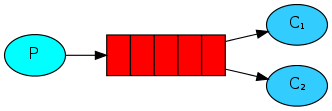
- In one terminal run the sender
php worker.php - Then in another run the receiver
php newTask.php {{task}}
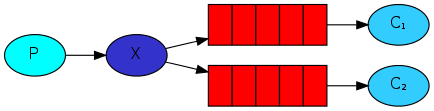
- In one terminal receive logs on screen
php receive_logs.phpor save themphp receive_logs.php > logs_from_rabbit.log - In another terminal do the same as above (2 receivers)
- Now, emit log with
php emit_log.php - Using rabbitmqctl list_bindings you can verify that the code actually creates bindings and queues as we want. With two receive_logs.php programs running you should see something like:
sudo rabbitmqctl list_bindings
Listing bindings ...
logs    exchange        amq.gen-JzTY20BRgKO-HjmUJj0wLg  queue           []
logs    exchange        amq.gen-vso0PVvyiRIL2WoV3i48Yg  queue           []
...done.
This code is under the MIT License (https://github.com/Irvyne/license/blob/master/MIT.md)