Before starting, the following conditions must be met to deploy Kubernetes cluster machines:
- One or more machines, operating system CentOS7.x-86_x64
- Hardware configuration: 2GB or more RAM, 2 CPU or more CPU, hard disk 30GB or more
- You can access the external network, you need to pull the mirror image, if the server cannot access the Internet, you need to download the mirror image in advance and import it to the node.
- Swap partition is prohibited
The code for setting up the environment has been written in the Prepare the environment folder.
This part of the code has been written in the Install kubernetes folder.
This part of the code has been written in the deploy folder.
The test code has been written in the Test folder.
In k8s cluster, resource management and resource object arrangement and deployment can be solved through declaration style (YAML) files, that is, the operations on resource objects can be edited into YAML format files. We call this file a resource manifest file. The kubectl command can directly use the resource manifest file to arrange and deploy a large number of resource objects.
Commonly used yaml files have been written in the yaml folder.
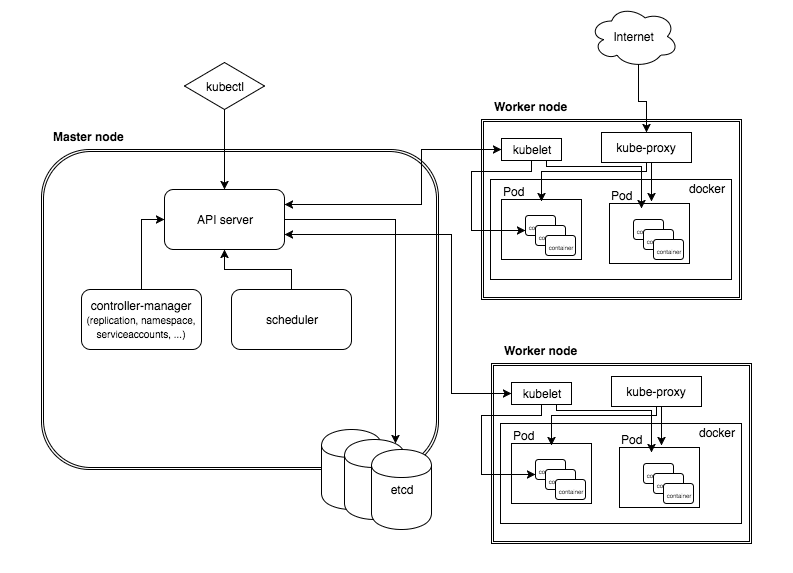
Kubernetes is a master-slave distributed architecture, mainly composed of Master Node and Worker Node, as well as the client command line tool kubectl and other additional items.
- Master Node: As a control node, it manages the cluster; Master Node is composed of API Server, Scheduler, Cluster State Store and Controller-Manger Server.
- Worker Node: As a real worker node, a container for running business applications; Worker Node includes kubelet, kube proxy and Container Runtime.
- kubectl: used to interact with API Server through the command line, and operate Kubernetes, to realize the addition, deletion, modification, and other operations of various resources in the cluster.
- Add-on: It is an extension of the core functions of Kubernetes, such as adding network and network strategy capabilities.
Kubernetes is mainly composed of the following core components:
- etcd saves the state of the entire cluster;
- Apiserver provides the only entry for resource operations, and provides mechanisms for authentication, authorization, access control, API registration and discovery;
- The controller manager is responsible for maintaining the status of the cluster, such as fault detection, automatic expansion, rolling updates, etc.;
- The scheduler is responsible for resource scheduling, and schedules the Pod to the corresponding machine according to the predetermined scheduling strategy;
- Kubelet is responsible for maintaining the life cycle of the container, and is also responsible for the management of Volume (CVI) and network (CNI);
- Container runtime is responsible for image management and the real operation of Pod and container (CRI);
- kube-proxy is responsible for providing service discovery and load balancing within the cluster for Service.
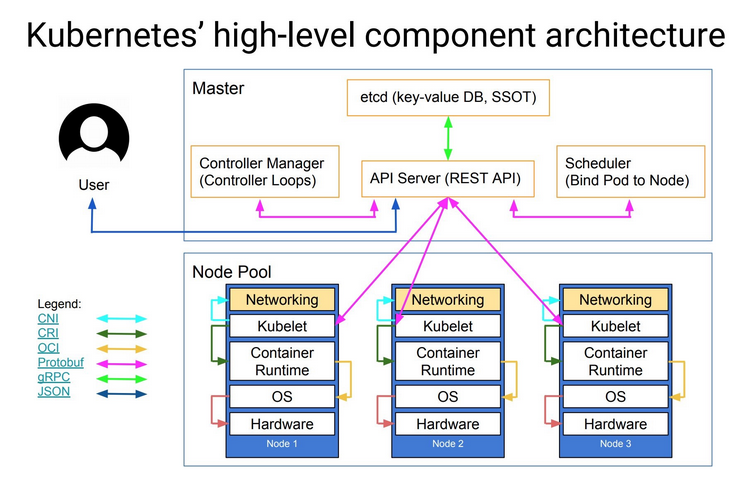
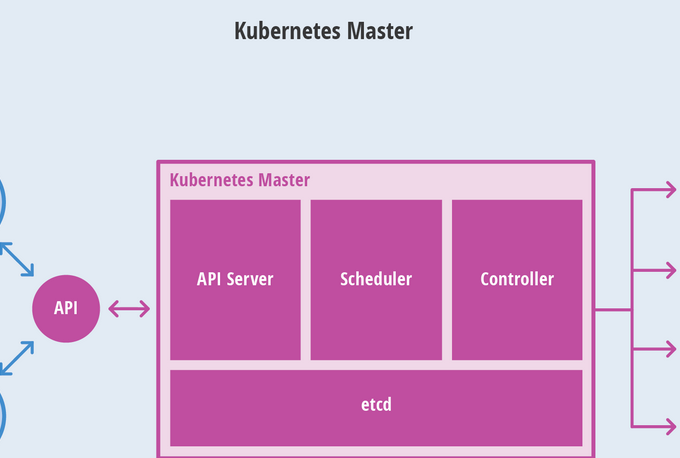
API Server is mainly used to process REST operations, ensure that they take effect, execute related business logic, and update related objects in etcd (or other storage). API Server is the entry point of all REST commands, and its related result status will be stored in etcd (or other storage). The basic functions of API Server include:
- REST semantics, monitoring, persistence and consistency guarantee, API version control, abandonment and validation
- Built-in admission control semantics, synchronous admission control hooks, and asynchronous resource initialization
- API registration and discovery
Kubernetes uses etcd as the overall storage of the cluster by default, of course, other technologies can also be used. etcd is a simple, distributed, and consistent key-value store, mainly used for shared configuration and service discovery. etcd provides a REST API for CRUD operations, as well as a registered interface to monitor the specified Node. All the status of the cluster is stored in the etcd instance, and has the ability to monitor, so when the information in etcd changes, it can quickly notify the relevant components in the cluster.
Controller-Manager Serve is used to perform most of the cluster-level functions. It performs life cycle functions (for example: namespace creation and life cycle, event garbage collection, terminated garbage collection, cascade delete garbage collection, node garbage collection) , Also execute API business logic (for example: elastic expansion of pod). Control management provides self-healing capabilities, capacity expansion, application lifecycle management, service discovery, routing, service binding and provisioning. Kubernetes provides Replication Controller, Node Controller, Namespace Controller, Service Controller, Endpoints Controller, Persistent Controller, DaemonSet Controller and other controllers by default.
The scheduler component automatically selects the host on which the container runs. According to constraints such as the availability of requested resources and the quality of service requests, the scheduler monitors unbound pods and binds them to specific node nodes. Kubernetes also supports the scheduler provided by the user. The Scheduler is responsible for automatically deploying the Pod to the appropriate Node according to the scheduling strategy. The scheduling strategy is divided into a preselected strategy and a preferred strategy. The entire scheduling process of a Pod is divided into two steps:
-
Pre-select Node: Traverse all Nodes in the cluster, and filter out a list of Nodes that meet the requirements according to specific pre-selection strategies. If no Node meets the pre-selected policy rules, the Pod will be suspended until a Node that meets the requirements appears in the cluster.
-
Preferred Node: Based on the pre-selected Node list, score and sort the to-be-selected Nodes according to the preferred strategy to obtain the optimal Node.
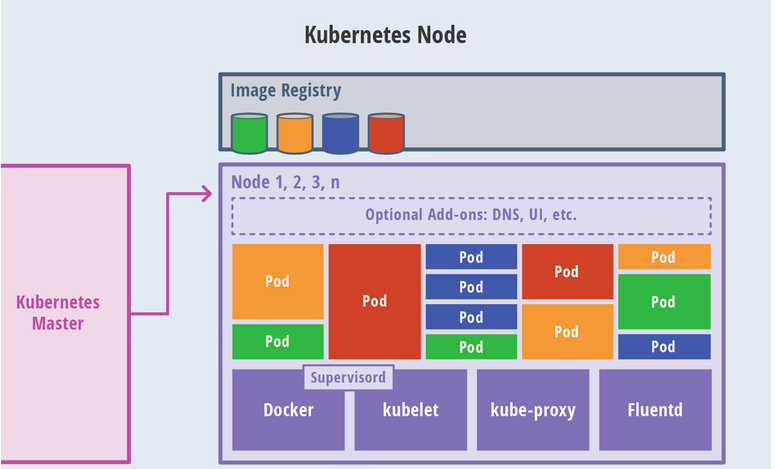
In Kubernets, Pod is the basic execution unit. It can have multiple containers and storage data volumes. It can conveniently package a single application in each container, thereby decoupling the concerns during application construction and deployment. , It has been able to facilitate the migration between physical machines/virtual machines. API admission control can reject or Pod, or add additional scheduling constraints to Pod, but Kubelet is the final arbiter of whether Pod can run on a specific Node, not scheduler or DaemonSet. By default, kubelet uses cAdvisor for resource monitoring. Responsible for managing Pods, containers, images, data volumes, etc., to realize cluster management of nodes, and report the running status of containers to the Kubernetes API Server.
Each Node runs a Container Runtime, which is responsible for downloading images and running containers. Kubernetes itself does not stop the container runtime environment, but provides an interface that can be inserted into the selected container runtime environment. kubelet uses the gRPC framework on Unix socket to communicate with the container runtime, kubelet as the client, and CRI shim as the server.
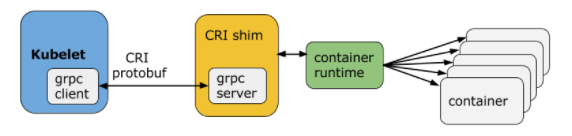
The protocol buffers API provides two gRPC services, ImageService and RuntimeService. ImageService provides RPC for pulling, viewing, and removing images. RuntimeSerivce provides RPC for managing Pods and container lifecycle management, as well as interacting with the container (exec/attach/port-forward). The container runtime can manage images and containers (for example: Docker and Rkt) at the same time, and can provide these two services through the same socket. In Kubelet, this socket is set through the –container-runtime-endpoint and –image-service-endpoint fields. The container runtimes supported by Kubernetes CRI include docker, rkt, cri-o, frankti, kata-containers, and clear-containers.
Based on a public access strategy (for example: load balancing), the service provides a way to access a group of pods. This method is achieved by creating a virtual IP, the client can access this IP, and can transparently proxy the service to the Pod. Each Node will run a kube-proxy. The kube proxy guides access to the service IP through iptables rules and redirects to the correct back-end application. In this way, kube-proxy provides a highly available load balancing solution. Service discovery is mainly realized through DNS.
In Kubernetes, kube proxy is responsible for creating proxy services for Pod; leading access to services; and implementing routing and forwarding from services to Pod, as well as load balancing through applications.
kubectl is the command line interface for Kubernetes clusters. The syntax for running the kubectl command is as follows:
$ kubectl [command] [TYPE] [NAME] [flags]
The command, TYPE, NAME and flags here are:
- comand: Specify the operation to be performed on the resource, such as create, get, describe, and delete
- TYPE: Specify the resource type. The resource type is size-sensitive. Developers can use singular, plural and abbreviated forms. E.g:
$ kubectl get pod pod1
$ kubectl get pods pod1
$ kubectl get po pod1
- NAME: Specify the name of the resource. The name is also case-sensitive. If the name is omitted, all resources will be displayed, for example:
$ kubectl get pods
- flags: Specify optional parameters. For example, you can use the -s or -server parameters to specify the address and port of the Kubernetes API server.