PyPlan is a set of modular Monte-Carlo planning libraries for Python. The main goal of this project is to offer easy-to-use and flexible planning algorithms. Flexibility is offered in terms of input parameters to the algorithms and easily altering the parameters of execution environments.
This python library provides an API to easily create planning algorithms, domains and also easily interface between them. Using this, any developer would be easily able to create various domains and agents, plug various other agents for the same domain and make effective comparisons.
Python version : 2.7.6
Current Stable branch : stable/v1 (Please checkout this branch. Not the master).
Project Wiki : https://github.com/shankarj/PyPlan/wiki
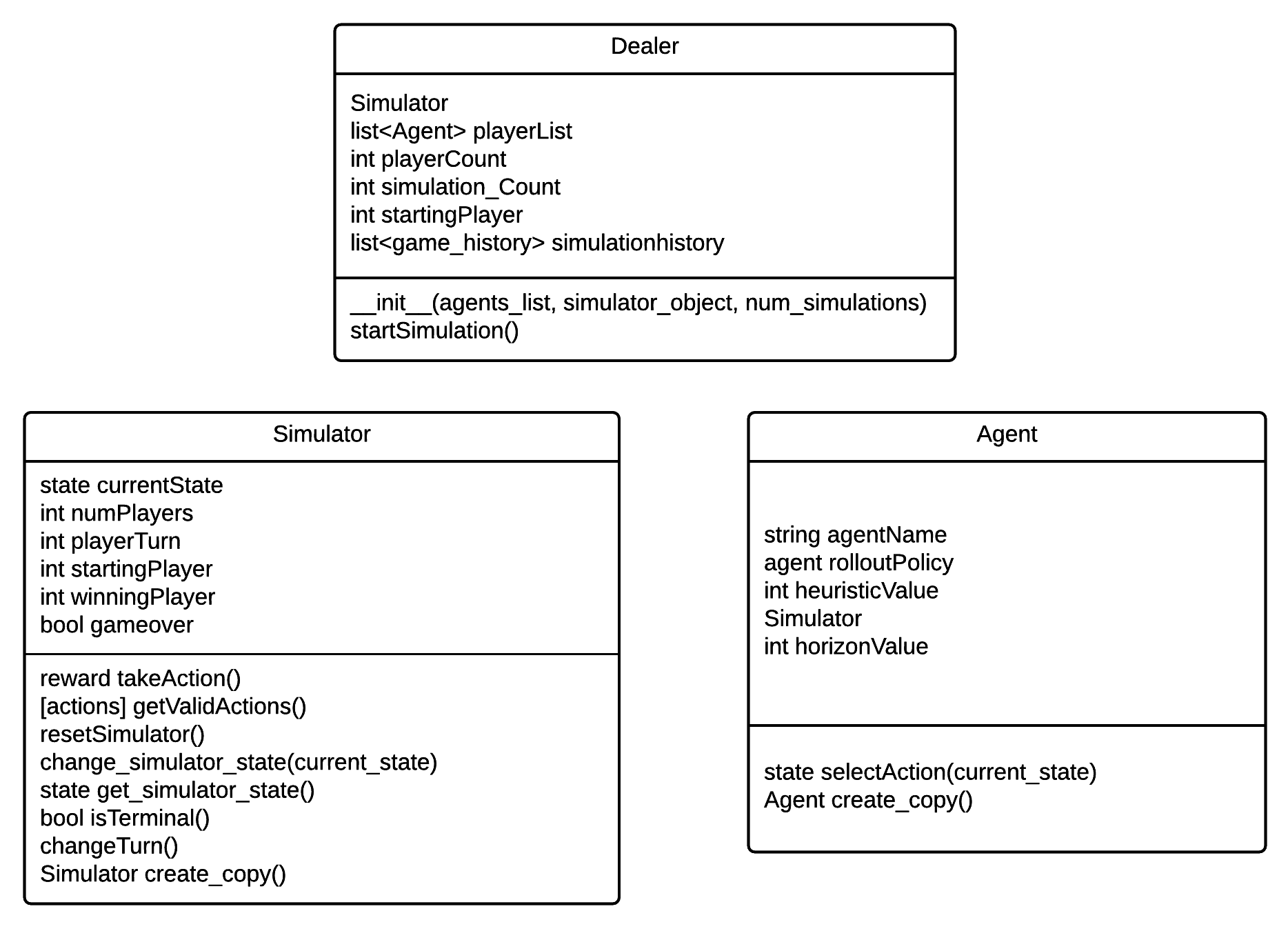
There are three ways of using PyPlan
- Using a XML jobs file.
- Using mysimulation.py.
- Write custom simulations and obtaining the results.
The second way of using mysimulation.py is the quickest way to get your simulations running. The details of using this are given below. For more details regarding the other methods please refer to the wiki.
Open mysimulation.py file and change the variables given below (declared in global scope). All these variables must have a value set before running the simulations.
game_name = "-YOUR-SIMULATOR-NAME-"
output_file_name = "-OUTPUT-FILE-NAME-"
players_count = 2 #AGENTS COUNT
simulation_count = 5 #NUMBER OF SIMULATIONS TO RUN
simulation_horizon = 20 #HORIZON FOR EACH SIMULATION.
You could see the function create_simulation() declared in the file mysimulation.py. This function should be edited to create the necessary agents and the simulator object. This function returns an array of two values containining the simulator object and the list of agents as given below:
return [simulator_obj, agents_list]
Here is a sample code for create_simulation() function that creates two agents (random and UCT) and a Connect4 simulator.
def create_simulation():
    simulator_obj = connect4simulator.Connect4SimulatorClass(num_players = players_count)
    agent_random = randomagent.RandomAgentClass(simulator=simulator_obj)
    agent_uct = uctagent.UCTAgentClass(simulator=simulator_obj, rollout_policy=agent_random, tree_policy="UCB",
                                        num_simulations=100,
                                        uct_constant=0.8,
                                        horizon=100,
                                        time_limit=-1)

    agents_list.append(agent_random)
    agents_list.append(agent_uct)

    return [simulator_obj, agents_list]
Navigate to the PyPlan directory in your local machine using command prompt / terminal. Execute main.py as given below
python main.py
-v - Verbose. Outputs simulation details on the command prompt. Ex: python main.py -v
-j - Run custom jobs files. Ex: python main.py -j jobs.xml
(Available as of now)
Agents:
- Uniform Rollout
- Incremental Uniform Rollout
- e-Greedy Rollout
- Random
- UCT
- Ensemble UCT (Root Parallel)
- Tree Parallel (Local Mutex. With Virtual loss) - Needs more testing
- Tree Parallel (Local Mutex without Virtual loss)
- Leaf Parallel
- Block Parallel (Only on CPU)
- Tree Parallel (Global Mutex)
Simulators:
- Tic Tac Toe
- Connect4
- Yahtzee
- Tetris
- Othello
- starting_player, playerturn are One based indexes.
- Bitboard representation is used for Connect4. Runs pretty good.