Home
Welcome to the restage-py wiki!
REST Modeling Language (RML) is a visual modeling language used by ReStage to describe REST API test flows and the dependencies between API requests, responses, runners, and execution components.
RML provides a graphical view of how REST operations are organized, which operations depend on others, and how a test flow is connected to reusable API calls.
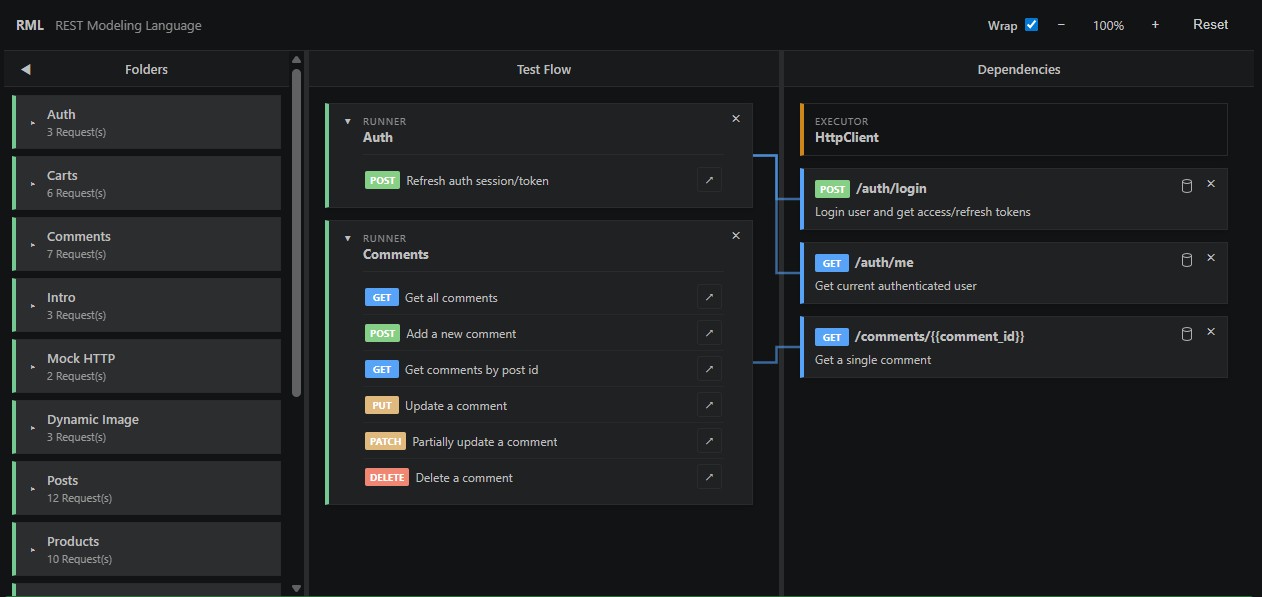
REST API test suites often contain dependencies that are difficult to understand by reading source code alone. For example:
- A request may require an authentication token produced by another request.
- A response test may depend on a setup operation.
- A runner may execute only after one or more prerequisite operations.
- Multiple test flows may reuse the same dependency.
RML makes these relationships visible as a dependency graph.
Its main goals are to:
- Visualize REST API execution flows.
- Show direct dependencies between test components.
- Make reusable setup and authentication operations easy to identify.
- Allow dependencies to be added or removed visually.
- Keep the visual model synchronized with source-code metadata.
A Folder groups related REST API operations.
Examples:
- Auth
- Products
- Comments
- Posts
Folders help organize large API collections and provide the source context for runners and responses.
A Runner represents a REST API test flow or a group of related operations.
A runner may:
- Contain multiple requests.
- Depend directly on another REST operation.
- Provide the parent context for request and response components.
- Represent a reusable workflow such as authentication or product management.
A Request represents a REST API operation that prepares or executes an HTTP request.
A request may define:
- HTTP method
- URL or request name
- Headers
- Query parameters
- Path parameters
- Request body
- Environment values
- Authentication data
A Response represents response processing, verification, or a test that executes after another operation.
A response can have its own dependencies independently of its runner.
For example, both a runner and one of its responses may depend on the same authentication request. RML treats those as two separate dependency relationships.
A Dependency is an operation that must run before another runner or response.
Dependencies are displayed as connections between nodes. A dependency may be referenced by a stable identifier such as:
#Ref1
The identifier allows the relationship to remain stable even when labels or display names change.
An Executor identifies the component responsible for sending REST API requests.
Examples may include:
- HttpClient
- A custom ReStage executor
- A language-specific HTTP adapter
The RML workspace is divided into three main areas.
The Folders panel lists API groups and the number of requests in each group.
Selecting a folder displays its associated test flow.
The Test Flow panel displays:
- Runners
- Requests
- Responses
- Operations included in the selected folder
Each test-flow node may expose a plus connector used to create a dependency.
The Dependencies panel displays:
- The active executor
- Reusable prerequisite operations
- Dependency identifiers
- Dependency-removal controls
RML distinguishes between dependencies owned by different source elements.
When a response is selected, RML highlights only the dependencies directly owned by that response.
When a runner is selected, RML highlights only the dependencies directly owned by that runner.
A runner and a response may both depend on the same dependency node. These remain separate edges.
Removing one relationship does not remove the other.
flowchart LR
    Runner[Runner: Auth] --> Login[POST /auth/login]
    Response[Response: GET /auth/me] --> Login
To add a dependency:
- Select or locate a runner or response in the Test Flow panel.
- Use the plus connector on the source node.
- Connect it to the required operation in the Dependencies panel.
- ReStage assigns or reuses a dependency identifier.
- The corresponding source metadata is updated.
A successful connection is displayed as a line between the two nodes.
When a selected runner or response owns a dependency, RML displays:
- The dependency identifier
- A trash icon
Selecting the trash icon removes only the dependency owned by the selected source element.
The operation does not delete the REST request itself. It removes only the dependency relationship.
RML uses border and connection highlighting to show relationships.
When a node is selected:
- The selected node is highlighted.
- Directly connected nodes are highlighted.
- Relevant connection lines are emphasized.
- Unrelated nodes remain visible.
- Dependencies owned by other elements are not treated as selected relationships.
This keeps the full model visible while making the active relationship easy to follow.
RML is synchronized with source-code metadata.
A response dependency can be represented conceptually as:
@ReStage.Response(
    id = "Ref2",
    folder = "Auth",
    request = "Get current authenticated user",
    dependsOn = {"#hello", "#Ref1"}
)
The same model can be represented naturally in other programming languages.
@restage.response(
    id="Ref2",
    folder="Auth",
    request="Get current authenticated user",
    depends_on=["#hello", "#Ref1"],
)
def get_current_user(ctx):
    ctx.asserts.status_code(200)
Language adapters are responsible for translating between the common RML model and the syntax used by each language.
The Wrap option controls how ReStage annotations are formatted in source code.
@ReStage.Response(
    id = "Ref2",
    folder = "Auth",
    request = "Get current authenticated user",
    dependsOn = {"#hello", "#Ref1"}
)@ReStage.Response(id = "Ref2", folder = "Auth", request = "Get current authenticated user", dependsOn = {"#hello", "#Ref1"})Changing the Wrap option affects formatting only. It does not change the dependency model or execution behavior.
RML is designed around a language-neutral representation.
{
  "type": "response",
  "id": "Ref2",
  "folder": "Auth",
  "request": "Get current authenticated user",
  "dependsOn": [
    "#hello",
    "#Ref1"
  ]
}
Language-specific adapters can map this model to:
- Java annotations
- Python decorators
- Other future language integrations
A simplified ReStage workflow is:
flowchart TD
    Studio[ReStage Studio] -->|RML action| Engine[ReStage AI Engine]
    Engine --> Model[Language-neutral RML model]
    Model --> Java[Java adapter]
    Model --> Python[Python adapter]
    Model --> Go[Go adapter]
    Java --> Source[Updated source code]
    Python --> Source
    Source --> Studio
ReStage Studio is the Visual Studio Code extension that provides the RML interface.
ReStage Studio provides:
- The visual RML editor
- Node selection
- Dependency creation and removal
- Zoom and layout controls
- Wrap preferences
- Source synchronization
To install it:
- Open the Extensions view in Visual Studio Code.
- Search for ReStage Studio.
- Select Install.
You can also install it directly from the Visual Studio Marketplace.
ReStage AI Engine applies semantic source changes such as:
- Adding dependencies
- Removing dependencies
- Assigning reference identifiers
- Updating source metadata
- Formatting generated annotations
Each language adapter handles:
- Parsing source code
- Reading ReStage metadata
- Updating dependencies
- Generating source elements
- Applying language-specific formatting
An authentication flow may include:
-
POST /auth/loginobtains access and refresh tokens. -
GET /auth/medepends on the login operation. -
POST /auth/refreshmay reuse the authentication setup. - A runner groups the operations into an Auth test flow.
flowchart LR
    Login[POST /auth/login]
    CurrentUser[GET /auth/me]
    Refresh[POST /auth/refresh]
    Runner[Auth Runner]

    Runner --> Login
    CurrentUser --> Login
    Refresh --> Login
The graph makes it possible to see both execution order and reuse without manually tracing source annotations.
RML currently focuses on modeling REST API testing and execution relationships within the ReStage ecosystem.
The language and tooling are evolving. Syntax, adapters, and editor capabilities may change as support for additional programming languages and execution environments is introduced.
RML is under active development as part of ReStage.