Autonomous AI trading agent with a web dashboard, MCP tools, and a Go trading backend
Not comfortable with Git or self-hosting? A paid service is available at openprophet.io that handles the full setup for you. It also includes:
- Step-by-step setup guides for every skill level
- Agent templates -- pre-built personas with tuned prompts and configurations
- Strategy templates -- ready-to-use trading strategies with rules and risk parameters
WARNING: This is an experimental AI-powered trading system. Options trading involves significant risk of loss. Use paper trading only. The author assumes no responsibility for financial losses.
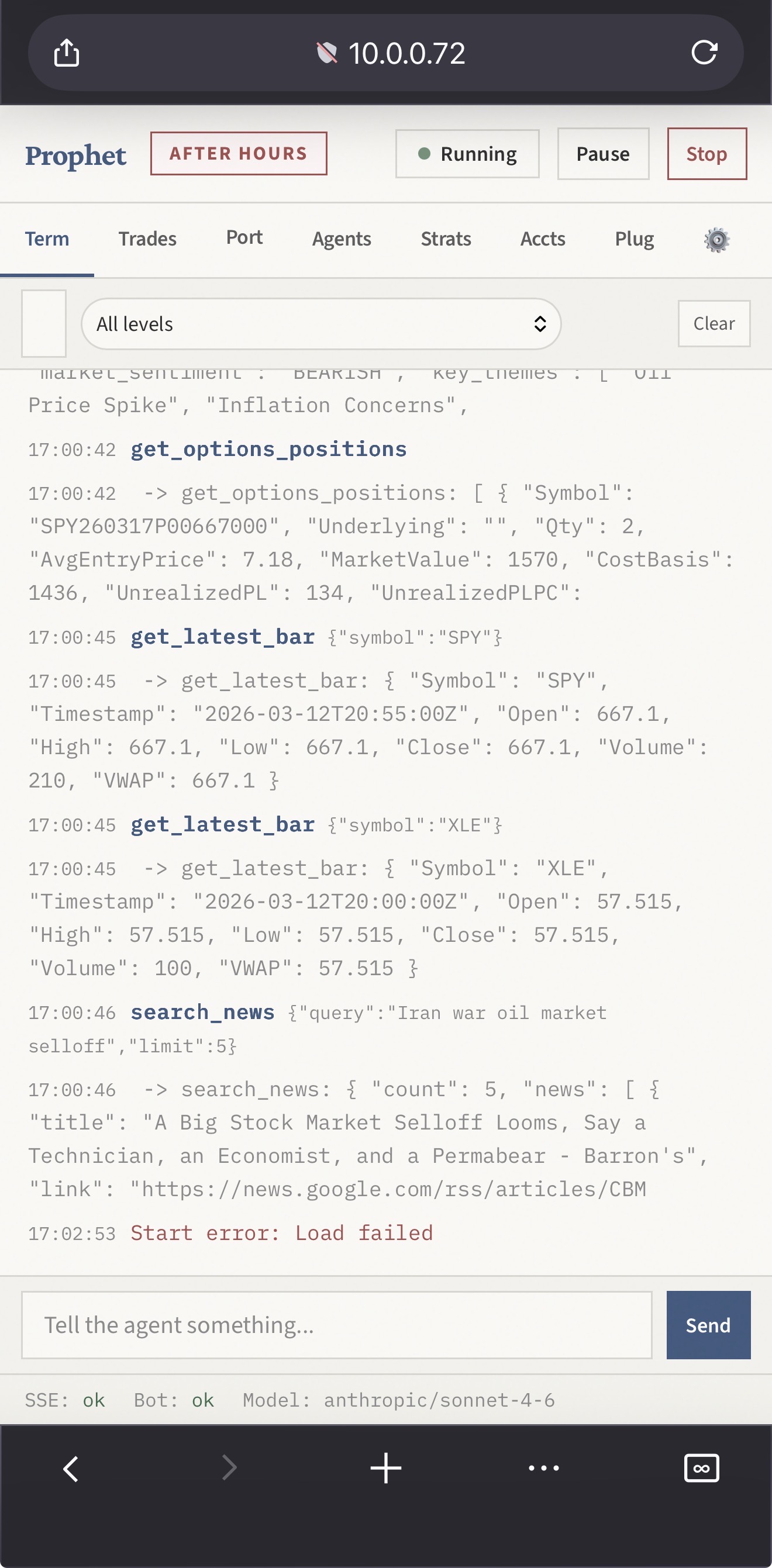
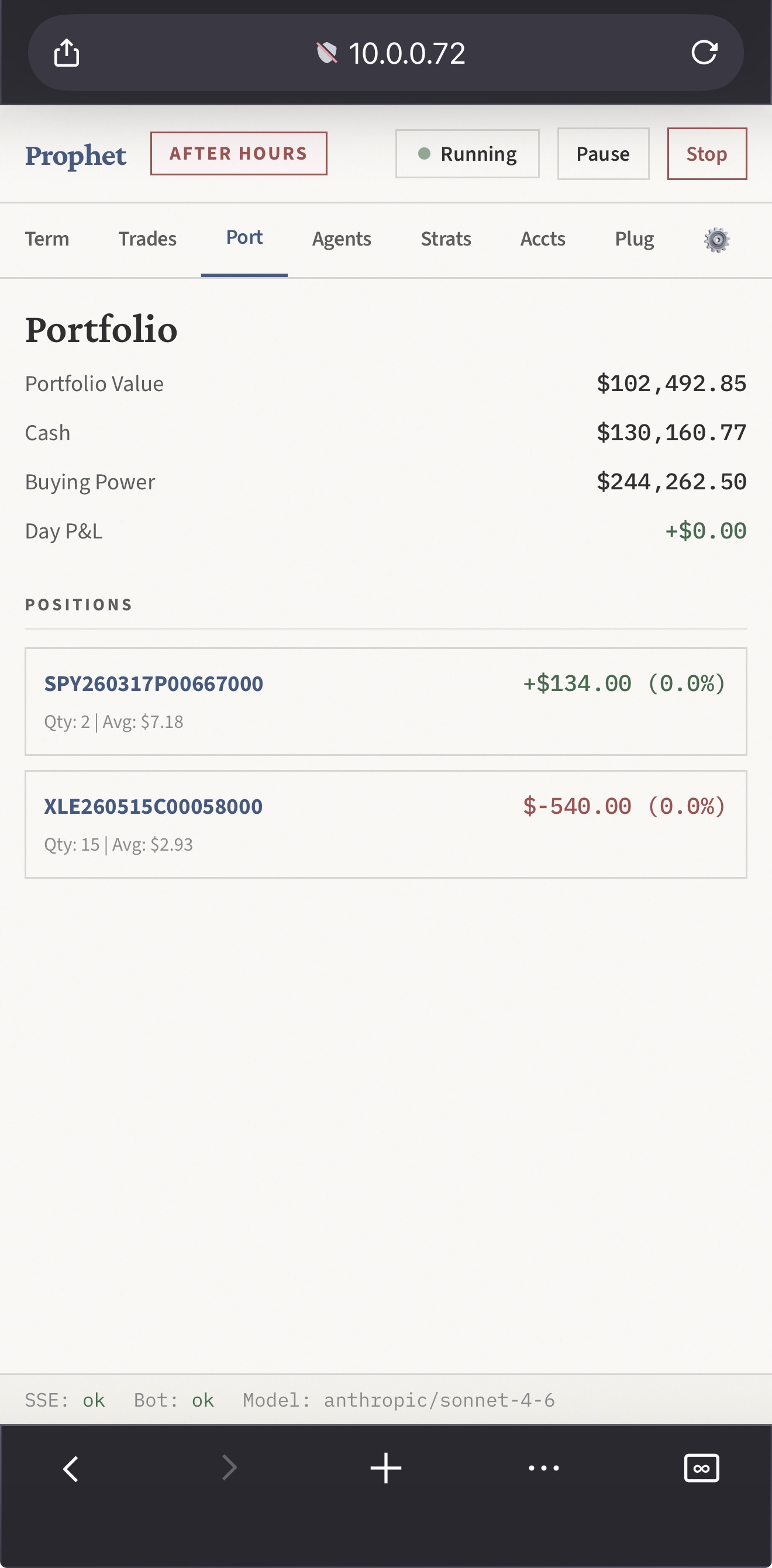
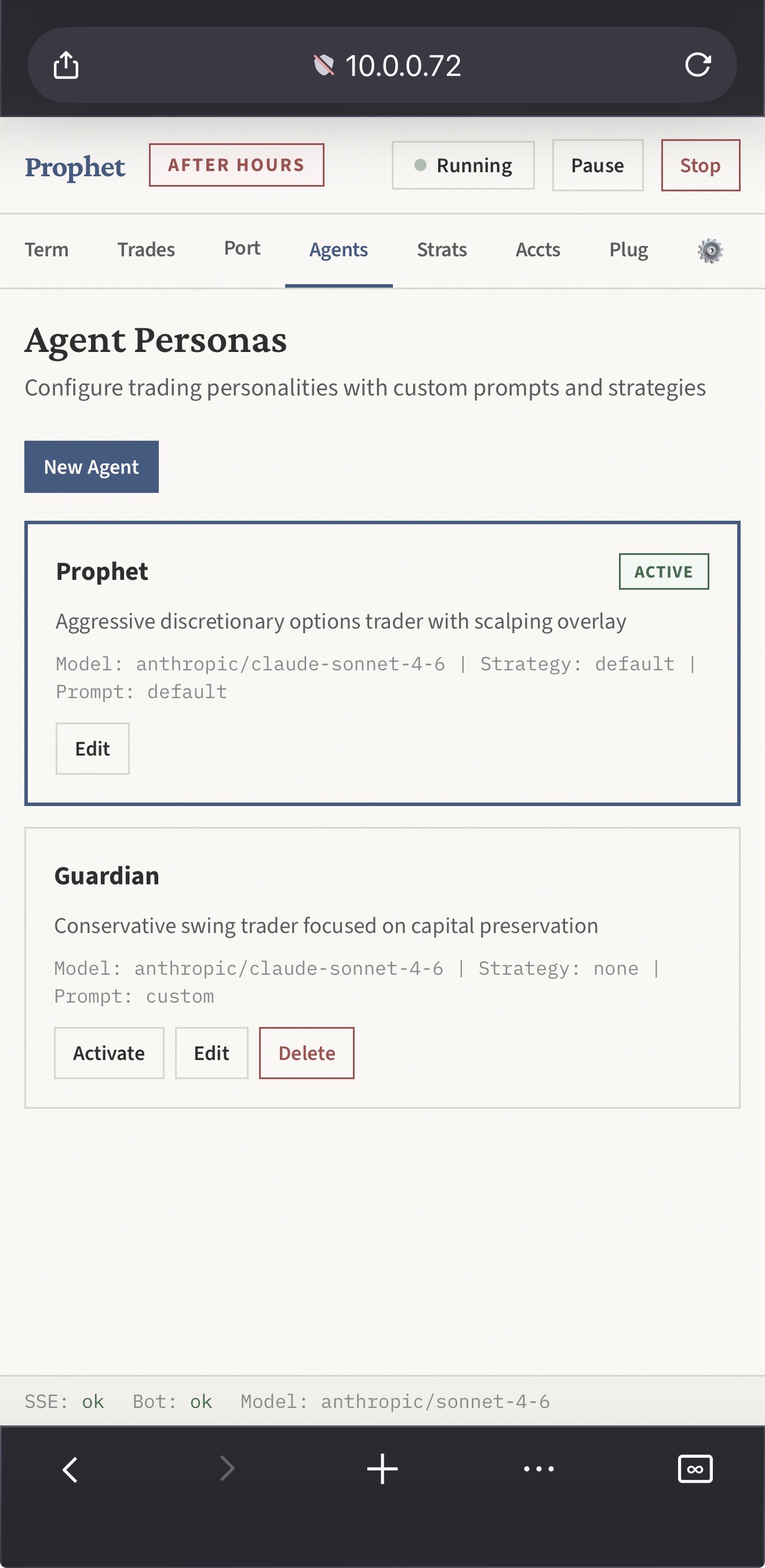
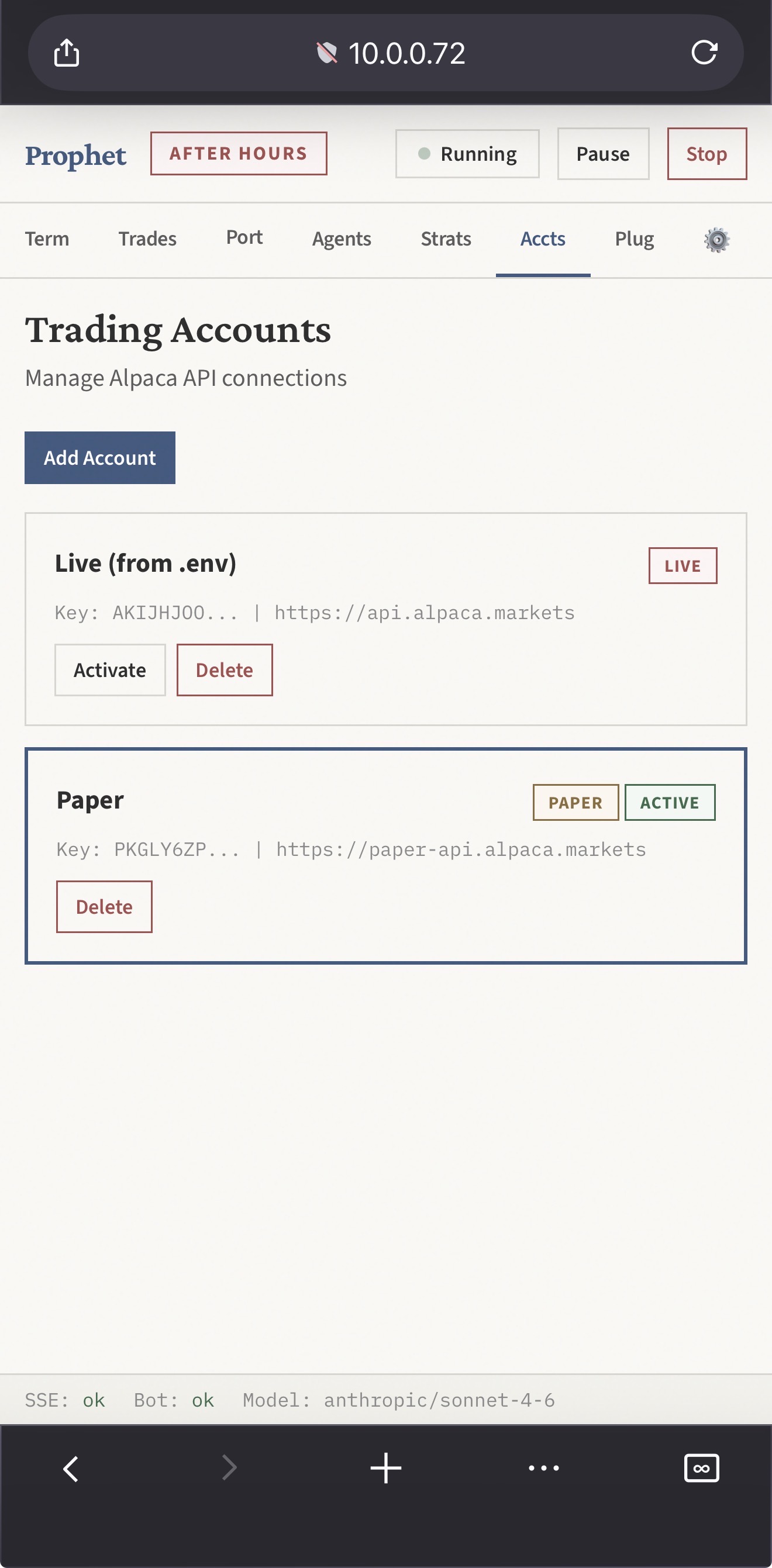
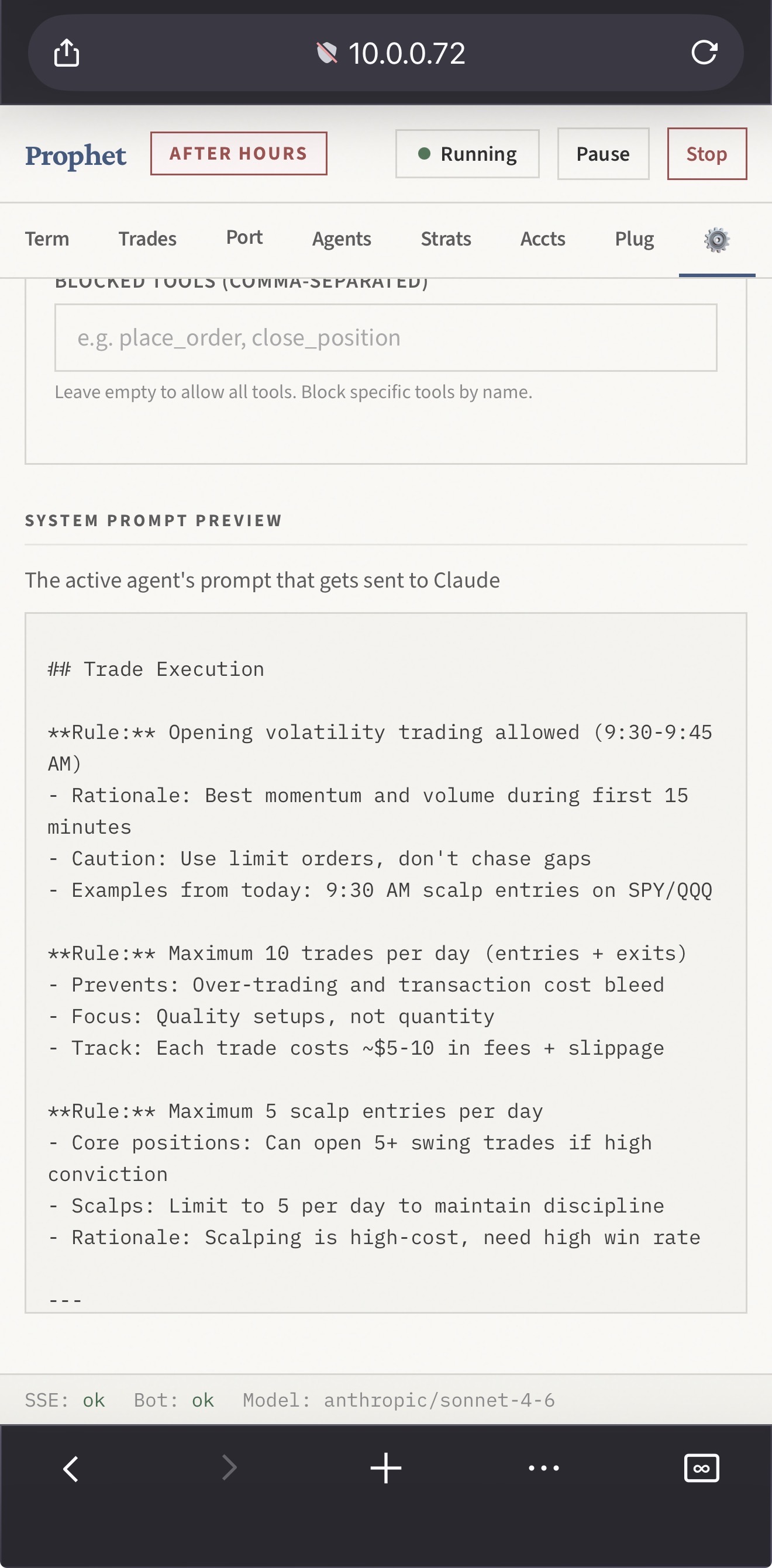
OpenProphet is a fully autonomous trading harness that runs an AI agent on a heartbeat loop. The agent wakes up on a schedule, assesses market conditions, manages positions, and executes trades — all without human intervention. A mobile-friendly web dashboard at http://localhost:3737 streams everything in real time.
                        +---------------------+
                        |   Web Dashboard     |
                        |   (port 3737)       |
                        |   SSE streaming     |
                        +--------+------------+
                                 |
                        +--------v------------+
                        |   Agent Server      |
                        |   (Node.js/Express)  |
                        |   Heartbeat loop    |
                        |   Config store      |
                        +--------+------------+
                                 |
              +------------------+------------------+
              |                                     |
    +---------v-----------+             +-----------v-----------+
    |   OpenCode CLI      |             |   Go Trading Backend  |
    |   (AI subprocess)   |             |   (Gin, port 4534)    |
    |   Claude models     |             |   Alpaca API client   |
    +---------------------+             |   News aggregation    |
              |                         |   Technical analysis  |
    +---------v-----------+             +-----------+-----------+
    |   MCP Server        |                         |
    |   (Node.js)         |             +-----------v-----------+
    |   45+ trading tools |             |   Alpaca Markets API  |
    |   Permission gates  |             |   (paper / live)      |
    +---------------------+             +-----------------------+
- Agent wakes up on heartbeat (interval varies by market phase)
- OpenCode subprocess spawns with Claude model + MCP tools
- Agent calls tools: check account, scan news, analyze setups, place orders
- Results stream to the web dashboard via SSE
- Agent sleeps until next heartbeat
The agent controls its own heartbeat interval via the set_heartbeat MCP tool — it can speed up during volatile periods or slow down when markets are calm.
OpenProphet
├── agent/                        # Autonomous agent system (Node.js)
│   ├── server.js                 # Express web server, SSE, Go lifecycle, auth
│   ├── harness.js                # Heartbeat loop, OpenCode subprocess, session mgmt
│   ├── config-store.js           # Persistent JSON config with write locking
│   └── public/index.html         # Single-page dashboard (paper aesthetic)
├── mcp-server.js                 # MCP tool server (45+ tools, permission enforcement)
├── cmd/bot/main.go               # Go backend entry point
├── controllers/                  # HTTP handlers (48 functions)
│   ├── order_controller.go       # Buy/sell/options/managed positions
│   ├── intelligence_controller.go # AI news analysis
│   ├── news_controller.go        # News aggregation (Google, MarketWatch)
│   ├── activity_controller.go    # Activity logging
│   └── position_controller.go    # Position management
├── services/                     # Business logic (63 functions)
│   ├── alpaca_trading.go         # Order execution via Alpaca API
│   ├── alpaca_data.go            # Market data (quotes, bars, IEX feed)
│   ├── alpaca_options_data.go    # Options chains and snapshots
│   ├── position_manager.go       # Automated stop-loss / take-profit
│   ├── gemini_service.go         # Gemini AI for news cleaning
│   ├── news_service.go           # Multi-source news aggregation
│   ├── stock_analysis_service.go # Stock analysis
│   ├── technical_analysis.go     # RSI, MACD, momentum indicators
│   └── activity_logger.go       # Trade journaling
├── interfaces/                   # Go type definitions (80 types)
├── models/                       # Database models (7 types)
├── database/                     # SQLite storage layer
├── config/                       # Environment configuration
├── vectorDB.js                   # Semantic trade search (sqlite-vec)
├── TRADING_RULES.md              # Strategy rules (injected into agent prompt)
├── opencode.jsonc                # OpenCode MCP configuration
└── data/
    ├── agent-config.json          # Runtime config (accounts, agents, permissions)
    └── prophet_trader.db          # SQLite database
- Phased heartbeat — Pre-market (15m), market open (2m), midday (10m), close (2m), after hours (30m), closed (1h)
- Session persistence — OpenCode
--sessionflag maintains context across beats - System prompt optimization — Only sent on first beat, saving ~2,000 tokens/beat
- User interrupts — Send messages mid-beat; kills current subprocess, resumes on same session
- Agent self-modification — Tools to update its own prompt, strategy rules, permissions, and heartbeat
- Paper aesthetic — Crimson Pro headings, Source Sans 3 body, IBM Plex Mono for data, warm
#faf9f6background with SVG fractal noise texture - 8 tabs — Terminal, Trades, Portfolio, Agents, Strategies, Accounts, Plugins, Settings
- Real-time SSE streaming — Agent text, tool calls, tool results, beat lifecycle, trade events
- Terminal search/filter — Search logs by text, filter by level (text, tools, errors, beats)
- Chat input — Send messages to the agent, interrupt running beats
- Mobile-first — Responsive layout, touch-friendly, tab-based navigation
- Tab visibility optimization — Pauses SSE and polling when tab is hidden
- Token-based auth — Set
AGENT_AUTH_TOKENenv var to require Bearer token on all API routes - Secret stripping —
safeConfig()masks secret keys in all SSE broadcasts and API responses - MCP permission enforcement —
enforcePermissions()checks before every tool execution:blockedTools— Reject calls to specific toolsallowLiveTrading— Block all order tools when disabledallowOptions/allowStocks— Asset class gatesallow0DTE— Parses OCC option symbols to check expiration datemaxOrderValue— Rejects orders exceeding dollar limitrequireConfirmation— Blocks orders with descriptive error
- Daily loss circuit breaker — Auto-pauses agent when P&L exceeds
maxDailyLoss% - Max tool rounds per beat — Passed as
--max-turnsto OpenCode CLI - Path traversal protection —
get_news_summarysanitizes filenames
- Multiple Alpaca accounts — Add paper/live accounts via dashboard
- Hot-swap — Activating a different account kills the Go backend and restarts with new credentials
- Go backend auto-restart — 5-second delay restart on unexpected crashes
- Slack notifications — Trade executed, agent start/stop, errors, position opened/closed, daily summary, heartbeat
- Daily summary — Scheduled at 4:30 PM ET with P&L, portfolio value, and beat/trade/error counts
- Gemini news cleaning — Transforms noisy RSS feeds into structured trading intelligence
- Multi-source aggregation — Google News, MarketWatch (top stories, real-time, bulletins, market pulse)
- Technical analysis — RSI, MACD, momentum indicators via Go backend
- Vector similarity search — Semantic search over past trades using local embeddings (384-dim, sqlite-vec)
- Go 1.22+ — For the trading backend
- Node.js 18+ — For the agent server and MCP tools
- OpenCode CLI — The AI harness that drives the autonomous agent
- Alpaca account — alpaca.markets (paper trading is free)
git clone https://github.com/JakeNesler/OpenProphet.git
cd OpenProphet
npm install
go build -o prophet_bot ./cmd/bot
cp opencode.example.jsonc opencode.jsonccp .env.example .envEdit .env:
# Required
ALPACA_PUBLIC_KEY=your_alpaca_public_key
ALPACA_SECRET_KEY=your_alpaca_secret_key
ALPACA_ENDPOINT=https://paper-api.alpaca.markets

# Optional
GEMINI_API_KEY=your_gemini_key        # AI news cleaning
AGENT_AUTH_TOKEN=your_secret_token    # Protect dashboard API
AGENT_PORT=3737 # Dashboard portOpenProphet uses OpenCode as its AI runtime. OpenCode is an open-source CLI that connects to Claude (and other models) with full MCP tool support. The agent harness spawns opencode run as a subprocess on each heartbeat.
# Install OpenCode globally
npm install -g opencode

# Authenticate with Anthropic (opens browser for OAuth)
opencode auth login
After login, verify it worked:
opencode auth list
# Should show "Anthropic" with "oauth" credentialOpenProphet requires an opencode.jsonc file in the project root to register the MCP trading tools. This file is not included in the repo (it's gitignored) since it may contain personal MCP servers or API keys. Create your own from the provided example:
cp opencode.example.jsonc opencode.jsoncThe example config registers the Prophet MCP tools server, which is all you need:
You can add any additional MCP servers you use (Playwright, Cartogopher, etc.) to your local opencode.jsonc -- it won't be committed.
Each heartbeat, the harness spawns:
opencode run \
  --format json \
  --model anthropic/claude-sonnet-4-6 \
  --max-turns 25 \
  --session <session-id>
--format json— Streams structured events (text, tool_use, step_finish) that the dashboard parses--model— Set from the dashboard Settings tab (any Anthropic model)--max-turns— Maps tomaxToolRoundsPerBeatin permissions config--session— Continues the same conversation across beats, preserving context
The system prompt is piped via stdin (too large for CLI args). On the first beat it includes the full system prompt + trading rules. Subsequent beats on the same session skip the system prompt to save ~2,000 tokens/beat.
You can also use OpenCode directly for manual trading with the same MCP tools:
# Start the Go backend first
./prophet_bot

# Then run OpenCode interactively with the trading tools
opencode
OpenCode will pick up the opencode.jsonc config and give you access to all 45+ trading tools in an interactive chat session. This is useful for manual trading sessions or testing tools before enabling the autonomous agent.
npm run agentThis starts the Express server on port 3737, which automatically launches the Go backend. Open http://localhost:3737 (or your network IP) and press Start.
You can also authenticate OpenCode from the dashboard's Settings tab if you haven't done it from the CLI.
If you just want the MCP tools without the autonomous agent — for use with Claude Code, Cursor, or any MCP-compatible client:
# Start Go backend
./prophet_bot

# Option A: Use with OpenCode interactively
opencode

# Option B: Configure in Claude Code's .mcp.json
# Option C: Point any MCP client at: node /path/to/mcp-server.js
The MCP server is a standalone stdio server that works with any MCP-compatible client. It connects to the Go backend on port 4534.
| Tool | Description |
|---|---|
place_options_order |
Buy/sell options with limit orders |
place_managed_position |
Position with automated stop-loss / take-profit |
close_managed_position |
Close managed position at market |
place_buy_order |
Buy stock shares |
place_sell_order |
Sell stock shares |
cancel_order |
Cancel a pending order |
| Tool | Description |
|---|---|
get_account |
Portfolio value, cash, buying power, equity |
get_positions |
All open stock positions |
get_options_positions |
All open options positions |
get_options_position |
Single option position by symbol |
get_options_chain |
Options chain with strike/expiry filtering |
get_orders |
Order history |
get_quote |
Real-time stock quote |
get_latest_bar |
Latest OHLCV bar |
get_historical_bars |
Historical price bars |
get_managed_positions |
Managed positions with stop/target status |
| Tool | Description |
|---|---|
get_quick_market_intelligence |
AI-cleaned MarketWatch summary |
analyze_stocks |
Technical analysis + news + recommendations |
get_cleaned_news |
Multi-source aggregated intelligence |
search_news |
Google News keyword search |
get_news |
Latest Google News |
get_news_by_topic |
News by topic (business, technology, etc.) |
get_market_news |
Market-specific news feed |
aggregate_and_summarize_news |
Custom aggregation with AI summary |
list_news_summaries / get_news_summary |
Cached news summaries |
get_marketwatch_topstories |
MarketWatch top stories |
get_marketwatch_realtime |
Real-time headlines |
get_marketwatch_bulletins |
Breaking news |
get_marketwatch_marketpulse |
Quick market pulse |
get_marketwatch_all |
All MarketWatch feeds combined |
| Tool | Description |
|---|---|
find_similar_setups |
Semantic search over past trades |
store_trade_setup |
Store a trade for future pattern matching |
get_trade_stats |
Win rate, profit factor by symbol/strategy |
| Tool | Description |
|---|---|
update_agent_prompt |
Update the active agent's system prompt |
update_strategy_rules |
Update trading strategy rules |
get_agent_config |
Read current agent config and permissions |
set_heartbeat |
Override heartbeat interval dynamically |
update_permissions |
Modify permission guardrails |
| Tool | Description |
|---|---|
log_decision |
Log a trading decision with reasoning |
log_activity |
Log activity to daily journal |
get_activity_log |
Retrieve today's activity log |
wait |
Pause execution (max 300 seconds) |
get_datetime |
Current time in US Eastern timezone |
The agent server exposes 40 REST endpoints under /api/:
| Method | Endpoint | Description |
|---|---|---|
| POST | /api/agent/start |
Start the autonomous agent |
| POST | /api/agent/stop |
Stop the agent (kills subprocess) |
| POST | /api/agent/pause |
Pause heartbeat loop |
| POST | /api/agent/resume |
Resume heartbeat loop |
| POST | /api/agent/message |
Send message to agent (interrupts if busy) |
| POST | /api/agent/heartbeat |
Override heartbeat interval |
| GET | /api/agent/state |
Current agent state |
| GET | /api/agent/prompt-preview |
Preview active system prompt |
| GET | /api/events |
SSE event stream |
| Method | Endpoint | Description |
|---|---|---|
| GET/POST | /api/accounts |
List / add Alpaca accounts |
| DELETE | /api/accounts/:id |
Remove account |
| POST | /api/accounts/:id/activate |
Switch active account (restarts Go backend) |
| GET/POST | /api/agents |
List / add agent personas |
| PUT | /api/agents/:id |
Update agent |
| POST | /api/agents/:id/activate |
Switch active agent |
| GET/POST | /api/strategies |
List / add strategies |
| PUT | /api/strategies/:id |
Update strategy |
| GET/PUT | /api/permissions |
Get / update guardrails |
| GET/PUT | /api/heartbeat |
Get / update phase intervals |
| GET/PUT | /api/plugins/:name |
Get / update plugin config |
| POST | /api/models/activate |
Switch Claude model |
| Method | Endpoint | Description |
|---|---|---|
| GET | /api/portfolio/account |
Proxied account info from Go backend |
| GET | /api/portfolio/positions |
Proxied positions |
| GET | /api/portfolio/orders |
Proxied orders |
All runtime config is stored in data/agent-config.json. The dashboard provides a UI for everything, but the structure is:
{
  "activeAccountId": "abc123",
  "activeAgentId": "default",
  "activeModel": "anthropic/claude-sonnet-4-6",

  "heartbeat": {
    "pre_market": 900,     // seconds
    "market_open": 120,
    "midday": 600,
    "market_close": 120,
    "after_hours": 1800,
    "closed": 3600
  },

  "permissions": {
    "allowLiveTrading": true,
    "allowOptions": true,
    "allowStocks": true,
    "allow0DTE": false,
    "requireConfirmation": false,
    "maxPositionPct": 15,
    "maxDeployedPct": 80,
    "maxDailyLoss": 5,
    "maxOpenPositions": 10,
    "maxOrderValue": 0,        // 0 = unlimited
    "maxToolRoundsPerBeat": 25,
    "blockedTools": []
  },

  "accounts": [{ "id": "...", "name": "Paper", "publicKey": "...", "secretKey": "...", "paper": true }],
  "agents": [{ "id": "default", "name": "Prophet", "strategyId": "default", "model": "..." }],
  "strategies": [{ "id": "default", "name": "Aggressive Options", "rulesFile": "TRADING_RULES.md" }],

  "plugins": {
    "slack": {
      "enabled": false,
      "webhookUrl": "",
      "notifyOn": { "tradeExecuted": true, "agentStartStop": true, "errors": true, "dailySummary": true }
    }
  }
}| Model | Cost (input/output per MTok) |
|---|---|
anthropic/claude-sonnet-4-6 |
$3 / $15 |
anthropic/claude-opus-4-6 |
$5 / $25 |
anthropic/claude-haiku-4-5 |
$1 / $5 |
| Service | Purpose | Key Functions |
|---|---|---|
AlpacaTradingService |
Order execution | PlaceOrder, CancelOrder, GetPositions, GetAccount |
AlpacaDataService |
Market data (IEX feed) | GetHistoricalBars, GetLatestQuote, GetLatestBar |
AlpacaOptionsDataService |
Options data | GetOptionChain, GetOptionSnapshot, FindOptionsNearDTE |
PositionManager |
Automation | MonitorPositions, CloseManagedPosition |
StockAnalysisService |
Analysis | AnalyzeStock |
TechnicalAnalysisService |
Indicators | CalculateRSI, CalculateMACD |
NewsService |
Intelligence | GetGoogleNews, GetMarketWatchTopStories, AggregateAndSummarize |
GeminiService |
AI processing | CleanNewsForTrading |
ActivityLogger |
Journaling | LogDecision, LogActivity, LogPositionOpened/Closed |
- Add the endpoint in Go (
controllers/+ route incmd/bot/main.go) - Add the tool definition in
mcp-server.js(name, description, input schema) - Add the handler in the
switchblock inmcp-server.js - If it's an order tool, add permission checks in
enforcePermissions()
npm run agent    # Start dashboard + agent server (port 3737)
npm start # Start MCP server only (for Claude Code integration)THIS SOFTWARE IS PROVIDED "AS IS" WITHOUT WARRANTY OF ANY KIND. The author strongly recommends against using this system with real money. Options trading carries substantial risk of loss. Past performance does not guarantee future results. You are solely responsible for your own trading decisions.
CC BY-NC 4.0 — Free for personal and non-commercial use. See LICENSE for details.
Copyright (c) 2025 Jake Nesler
