| Name | Student Number |
|---|---|
| Luke Moss Hughes | C20487654 |
| James Clarke | C20375736 |
| David Lynch | C19500876 |
Our project is a simulation of bee behavior using boids.
The map consists of a beehive at the center, surrounded by patches of flowers.
Bees will exit the hive over time and roam the map looking for pollen. When a bee finds a pollinated flower, the bee collects the pollen and brings it back to the hive. The flower’s pollen will then replenish over time.
Sliders on the screen control the amount of bees and the amount of flower patches in the world.
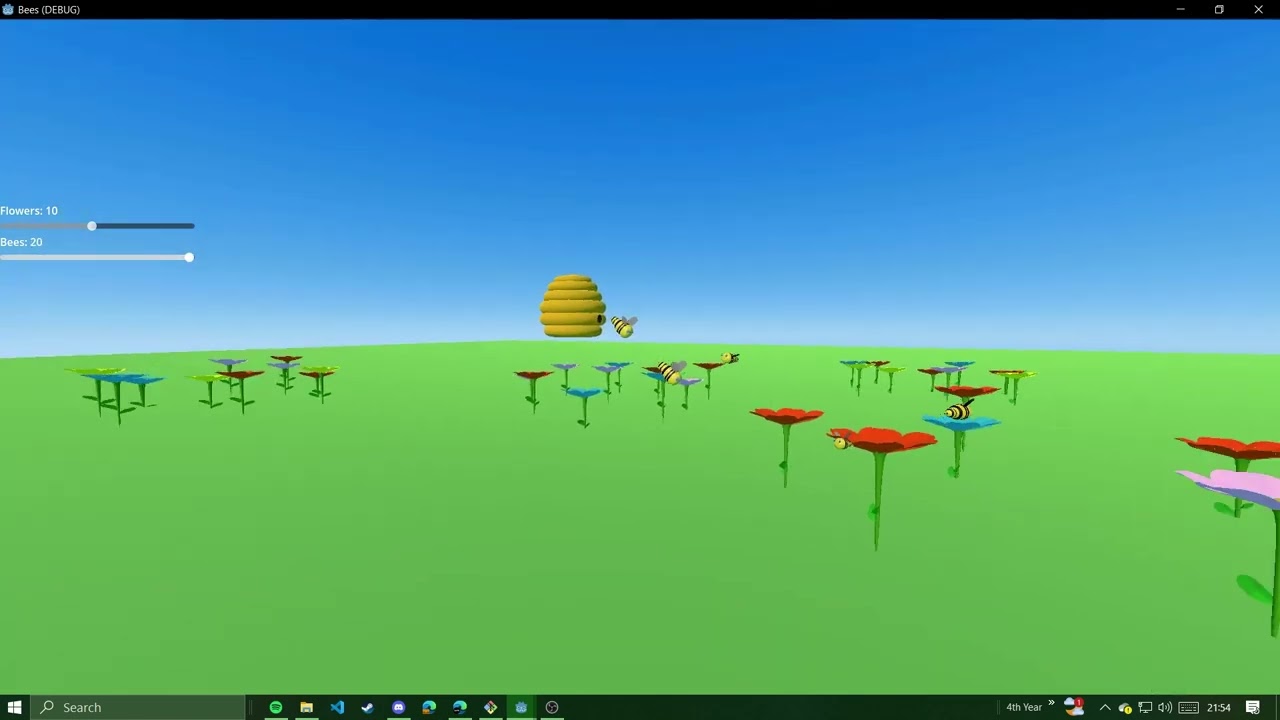


Once you enter the simulation, there is a fixed camera above the scene. Here you can edit the sliders to control variables in the simulation To explore the garden yourself, press ALT. This will change to a first person camera.
| Button | Movement |
|---|---|
| ALT | Change Camera Mode |
| M | Toggle Music |
| Button | Movement |
|---|---|
| A | Left |
| D | Right |
| W | Forward |
| S | Back |
| SPACE | Up |
| CTRL | Down |
| SHIFT | Fast Movement |
The camera view can be switched between a fixed camera and a first person “Creative Mode” camera. The root script cycles through each of these when the ALT key is pressed.
The first person “CreativeMode” camera is attached to a CharacterBody3D. This has a script attached to respond accordingly to WASD movement and mouse control.
The Garden uses a custom algorithm to generate or destroy flower patches around the hive, according to the value of the UI slider. Flower colors are varied between pre defined colors.
Flowers have an Area3D for both their attraction area, and the pollen area at the center of the petals. These Area3D's are used to signal different methods to respond to bee collision. Pollen particles are emitted by the GPUParticles3D child node of flowers. Pollen is rejuvenated when the flower's Timer child node elapses.
There is a timer attached to the hive, and when it times out a bee will be spawned. A reference to this bee is added to an array to keep track. Bees will be spawned up to a maximum limit, which is set using the UI sliders.
When a bee comes in contact with the hive, they “enter”. The bee is despawned and its reference is removed from the bee array.
When the bees are first spawned, they implement a “noise wander” boid behavior, where their movements are determined by random points. Each flower has a sphere around it called the “Attraction Sphere”. When a bee enters this and the flower has pollen, the bee will change its behavior to arrive, making a beeline to the center of the flower.
When the bee enters the pollen (center of the flower), its behavior will be set to arrive with the hive as the target, as the bee returns with its collected pollen. Yellow particles will be applied to the bee to signify that it is carrying pollen.
When the bee makes contact with the hive, the hive will despawn the bee.
If the bee's distance from the hive ever eclipses the MAX_DIST_FROM_HIVE constant, the bee will enter the arrive behavior with the target set to hive.
- Pitch
if direction.length() == 0:
    return
var pitch = asin(-direction.y) * 180 / PI
pitch = clamp(pitch, -90.0, 90.0)
rotation_degrees.x = pitch
The pitch angle (rotation around the X-axis) is calculated using the asin of the Y-component of the direction vector. This is clamped to ensure it stays within the range [-90, 90] degrees and applied to the bee.
- Yaw
var target_yaw = atan2(direction.x, direction.z) * 180 / PI
target_yaw = fmod(target_yaw + 180.0 + 360.0, 360.0)
var current_yaw = rotation_degrees.y
var yaw_diff = target_yaw - current_yaw + 180.0
yaw_diff = fmod(yaw_diff + 180.0, 360.0) - 180.0

if abs(yaw_diff) > 180:
    yaw_diff -= 360.0 * sign(yaw_diff)

rotation_degrees.y += clamp(yaw_diff, -max_rotation_speed * delta, max_rotation_speed * delta)
The target yaw angle (rotation around the Y-axis) is calculated using the atan2 function, which converts the direction vector into an angle. This is then adjusted to ensure it's within the [0, 360] degrees range.
The difference between the current yaw and the target yaw (yaw_diff) is calculated and adjusted to choose the shortest rotation direction. The yaw rotation is then smoothly adjusted towards the target yaw within the bounds of the maximum rotation speed.
- Roll
rotation_degrees.z = -1 * clamp(yaw_diff * 45, -45, 45)The banking angle (rotation around the Z-axis) is set based on the yaw difference (yaw_diff). The yaw_diff is multiplied by 45 to scale the banking effect. The result is clamped within the range [-45, 45] degrees to ensure the banking is not too extreme. The negative sign (-1 *) ensures that the banking direction is correct: when the bee turns left, it banks left, and when it turns right, it banks right.
Every frame the wings of the bee are animated in accordance with how fast the bee is moving. The angle that a bee's wings will rotate each frame is calculated based off the acceleration force being applied to the bee boid. The wings will be rotated downwards until a max rotation is reached, then the wings will be rotated upwards. This is repeated to give the flapping motion seen.
| Class Name | Description | Properties | Methods |
|---|---|---|---|
| root | The "root" class is responsible for toggling camera modes, updating values tied to hud sliders, and muting/unmuting music. | camera_mode: int - Holds state of camera. | _ready() - Sets mouse mode. |
| _process() - Monitors input events and HUD slider values, to respond appropriately. | |||
| hive | The "hive" class is responsible for spawning and destroying bees, when appropriate. | bees_max: int - Bees will not be spawned beyond the value of "bees_max". | _spawn_bee() - If the number of instantiated bees is lower than "bees_max", this method spawns a new bee. |
| bee: PackedScene - Holds a PackedScene/Resource that points to bee.tscn. Used to instantiate bees. | _on_timer_timeout() - Triggered every 2.5 seconds by a timer, calls the _spawn_bee() function. | ||
| bees: Array - Holds all instances of bees. | _on_area_3d_area_entered(area: Area3D) - Used to detect when bees collide with the hive and call queue_free() to despawn and free the bee instance from memory. | ||
| bee | The "bee" class is a boid. Bee's arrive at the "exitPoint" of the hive after spawning. When a bee reaches the exit point it will start wandering. When they find a pollinated flower, they take the pollen and "arrive" at the hive. | movements: Array[Callable] - Holds each behavior that the boid will implement each frame. | _ready() - In this method, some variables are set and the bee is set to arrive at the "exitPoint" of the hive. |
| status: enum - Keeps track of the state the bee is currently in, can be Wandering, Arriving or Returning. | SetupWings() - This method stores the wings of the boid in variables and rotates them to their starting angle. | ||
| MAX_DIST_FROM_HIVE: int - The maximum distance a bee can be from the hive before returning to the hive. | _physics_process(delta) - This method runs 60 times per second. It calls the "animateWings", "applyForce", and "applyRotation" methods to make changes to the bee boid over time. It ensures bee return to the hive if they wander too far from it with "setStatusArrive(hive)" | ||
| MAX_FORCE: float -The maximum force that can be applied to the bee boid. | animateWings() - This method is used to programmatically animate the wings of bee's. This approach was chosen over using an animatableBody3D, due to time constraints. | ||
| mass: int - The mass of the bee boid. | _arrive() - This method calculates the force applied to bees when arriving at a target. | ||
| vel: Vector3 - The velocity of the bee boid. | _noiseWander() - This method calculates the force applied to bees when wandering. | ||
| force: Vector3 - The force being applied to the bee boid. | setStatusArrive(target) - This method changes the boid behavior of a bee to "Arriving" at a target. | ||
| acceleration: Vector3 - The acceleration being applied to the bee boid. | setStatusReturning(target) - This method changes the void behavior of a bee to "Returning" at a target. | ||
| speed: float - The speed of the bee boid (magnitude of the velocity vector). | setStatusWander() - This method changes the boid behavior of a bee to "Wandering". | ||
| max_speed: float - The maximum speed the bee boid can have. | calculate() - This method integrates the forces from each active boid behavior into an accumalated force, used to change the velocity of the bee. | ||
| max_rotation_speed - The max banking speed the bee boid can have. | applyForce(delta) - This method applies changes in force to the bee. | ||
| arriveTarget: Node3D - The target that the bee will arrive to. | applyRotation(delta) - This method applies rotations to the pitch, yaw, and roll of the bee based on it's velocity. | ||
| ARRIVE_MAX_SPEED: float - The maximum speed that the bee boid will arrive at. | _on_bee_area_entered(area: Area3D) - Used to detect when bees reach the "exitPoint" of the hive or enter the attraction sphere, or pollen sphere of flowers. When the exit point of the hive is reached, the bee's boid behavior is set to "Wandering". When the attraction sphere of a flower is entered, the bee's boid behavior is set to "Arriving" with the flower's pollen as it's target. When the pollen sphere of a flower is entered, the bee's boid behavior is set to "Returning" with the hive as it's target. | ||
| SLOWING_DISTANCE: float - The speed that that the bee boid will slow at while arriving at target. | |||
| WANDER_AMP: int - A speed multiplier for noise wander. | |||
| WANDER_DIST: int - distance multiplier used in noise wander. | |||
| AXIS: enum - The axis on which noise wander is applied, this is set to horizontal for our simulation. | |||
| WANDER_FREQ: float - Frequency value used in noise wander. | |||
| WANDER_RADIUS: float - Radius value used in noise wander. | |||
| WANDER_MAX_SPEED: float - Max speed of the noise wander behavior. | |||
| theta: float - angle used in noise wander. | |||
| wanderTarget: Vector3 - The target used in noise wander. | |||
| worldTarget: Vector3 - World target used in noise wander. | |||
| noise: FastNoiseLite - Perlin noise used in noise wander. | |||
| hive: Node3D - The hive scene node. | |||
| exitTarget: Node3D - The point which bees move towards after spawning. | |||
| wingLeft: Node3D - The left wing of the bee. | |||
| wingRight: Node3D - The right wing of the bee. | |||
| flappingUp: boolean - direction the wings are flapping (if false wings are flapping down). | |||
| wingRotation: float - The total amount the wings have rotated. | |||
| Patch | Stores the coordinates of a patch and an array of the flowers that are members of that patch. | point: Vector2 - Stores the coordinated of the patch. | |
| flowers: Array - Stores instances of all flowers that are members of the patch. | |||
| garden | The "garden" class is used to store data relating to flowers and flower patches, as well as dynamically spawning flowers and flower patches. | patch_count: int - Stores of the number of flower patches that should be instantiated. | _ready() - This method is used to initiate the generation of flower patches when the garden is instantiated. |
| flower_min_distance: int - Defines the minumum distance between flowers. | _process() - This method is used to check that the correct number of flower patches are currently instantiated. If the number is too low, new flower patches will be generated. If the number is too high, flower patches will be freed from memory. | ||
| max_flowers_per_patch: int - Defines the maximum number of flowers per patch. | _validate_patch_point() - This method checks if a patch point is valid or not. | ||
| flower_area: int - Defines the radius around a patch point where flowers may be spawned. | _validate_flower_point() - This method checks if a flower point is valid or not. | ||
| patch_min_distance: int - Defines the minimum distance between patch points. | generate_flower_patches() - This method generates the coordinates for patches and flowers to be spawned on. | ||
| hive_buffer: int - Defines the radius around the hive where patches cannot spawn. | |||
| patches: Array - Stores instances of the patch class, containing patch and flower data. | |||
| flower_template: PackedScene - Holds a PackedScene/Resource that points to flower.tscn. Used to instantiate flowers. | |||
| colors: Array - Stores possible colors of flower petals. | |||
| flower | The "flower" class is used to govern the pollination of flowers. | pollination: bool - Stores whether the flower is pollinated or not. | is_pollinated() -> bool - Returns the value of the "pollination" property. |
| set_pollination(state: bool) - Sets the value of the "pollination" property and updates pollen emission. | |||
| update_particles() - Enables or disables pollen emission based on the "pollination" property. | |||
| _on_timer_timeout() - This method is triggered when the repollination timer finishes. It sets the "pollination" property to true. | |||
| CreativeMode | The "CreativeMode" class is used to govern free cam movement. | speed: float - Governs the speed that the camera moves. | _input(event) - captures relative mouse movement. |
| cam_sensitivity: int - Governs the speed that the camera rotates. | _ready() - Sets mouse mode to captured. | ||
| relative: Vector2 - Stores the relative motion of the mouse. | _physics_process(delta) - This method uses the relative motion of the mouse and input axes to move the camera accordingly. |
| Asset Name | Type | Description | Reference |
|---|---|---|---|
| Bee Model.gltf | GLTF 2.0 | Bee mesh custom made in Blender 3.6. | |
| flower.gltf | GLTF 2.0 | Flower mesh custom made in Blender 3.6. | |
| Hive Model.gltf | GLTF 2.0 | Hive mesh custom made in Blender 3.6. | |
| HoneyHiveMusic.mp3 | MP3 | Background music sampled from the game Super Mario Galaxy. | Honeyhive Galaxy Music |
| sky1.png | PNG | Used as a skybox panaroma. | AllSky |
My main contributions are;
- I created the meshes for the Hive, Bees, and Flowers in Blender 3.6.
- I implemented flower patch/flower spawning logic (David refactored this logic into the garden class and added the patch class to store patch data, to follow object oriented principles more closely).
- I implemented the applyRotation function that changes the pitch, yaw, and roll of bees based on their velocity.
- I implemented bees taking pollen (not flower attraction), and pollen rejuvenation.
- I implemented pollen particle emission from both bees and flowers.
Among other smaller contributions.
- I am proud of the algorithm I designed to spawn flower patches, although with more time I could have improved it further.
- I am also proud of the flower mesh I made as I have never used Blender prior to this project, and I think they turned out really nice.
I learned a lot about Blender and Godot, and gained a more thorough understanding of boids throughout this project;
- I learned a lot about the particle and animation systems in godot during research and development, although I did not get a chance to add bones to the bee model to allow the wings to be properly animated, as I had planned to do. I also gained further familiarity and efficiency with the godot editor in general.
- Everything I did in Blender was newly learned, I am excited to use this when modelling for my future games.
- My knowledge of boids was built throughout the year but this project gave me a proper familiarity and understanding of how boids work. I am also excited to bring this forward with me when making games as I feel the ability to implement awesome life-like behavior with simple rules is very valuable knowledge.
My main contributions are:
- Bee Noise Wander Behavior
- Bee Arrive Behavior
- Flower Attraction Logic
- Bee state switching
- Bee Wing Animation
I am most proud of creating a bee creature that closely mimics the behaviors of real life bees.
I learned a lot about boid behaviors, and how to implement them in different contexts to create realistic and lifelike behaviors.
I set up the repo and instructed my teammates on how to employ continuous integration in the project. This was chosen instead of feature branching since it leads to smaller merges and each team member will be merging to the same branch continually. I set up automation using GitHub actions for the project to automate code quality checks.
I implemented the HUD, changing bee and flower counts with sliders,and created a simple version of creative mode controls which were eventually elaborated on by other teammates.
I also implemented the hive spawning logic.
I am proud of setting up continuous integration, and seeing the speed of features being implemented. I’m also proud of making the game respond to the HUD.
I learned how to effectively resolve merge conflicts with godot scenes, and how to manage loading and unloading scene instances.
Before starting on the project, the features we wanted to achieve were defind and sorted into stages of project.
- Bee Wandering
- Beee spawning from hive
- Fixed Camera
- Spawning flowers on init
- Arriving to flowers, and taking nectar back to hive
- Creative mode camera
- Manage flower resource and pollen replenishment
- Patches of flowers (collections of flowers)
- Bee POV camera
- Hive memory of flowers that have been found (Some bees will then go directely from the hive to a found flower)
- When it rains bees go back to hive