


Make a Robot Move using the MSP430 and pulse Modulation... For experts, make robot move based on button presses from an IR Remote
#Pre Lab
This is a picture of the general idea for the Hardward Setup for the Robot:
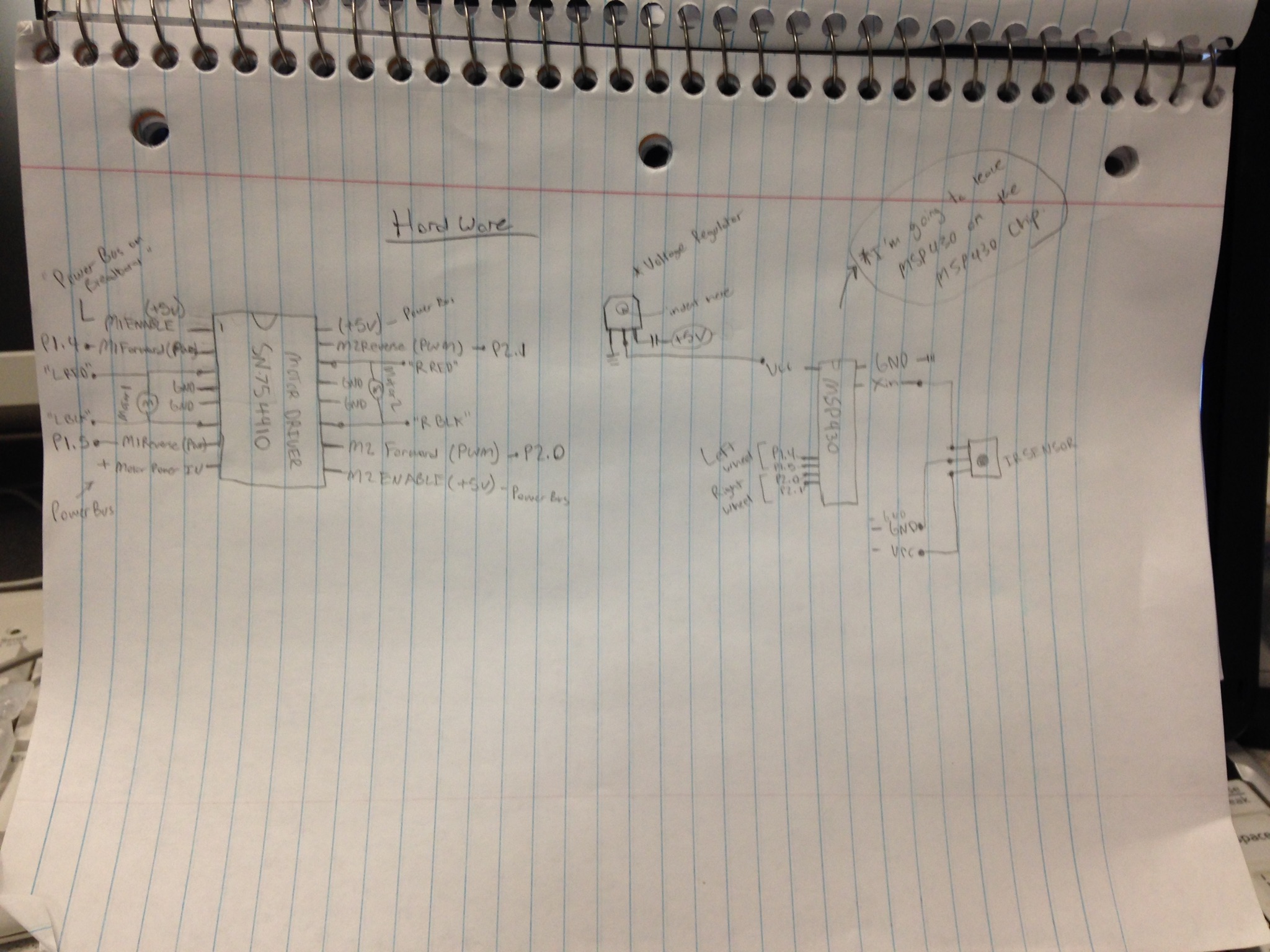
The only difference to the hardware design is that I decided to use two pins for the PWM signal to the robot motor driver and two GPIO pins to set as either Voltage High or Voltage Low depending on whether or not I want the Robot to move Forwards or Backwards.
Here is the general idea for software design:
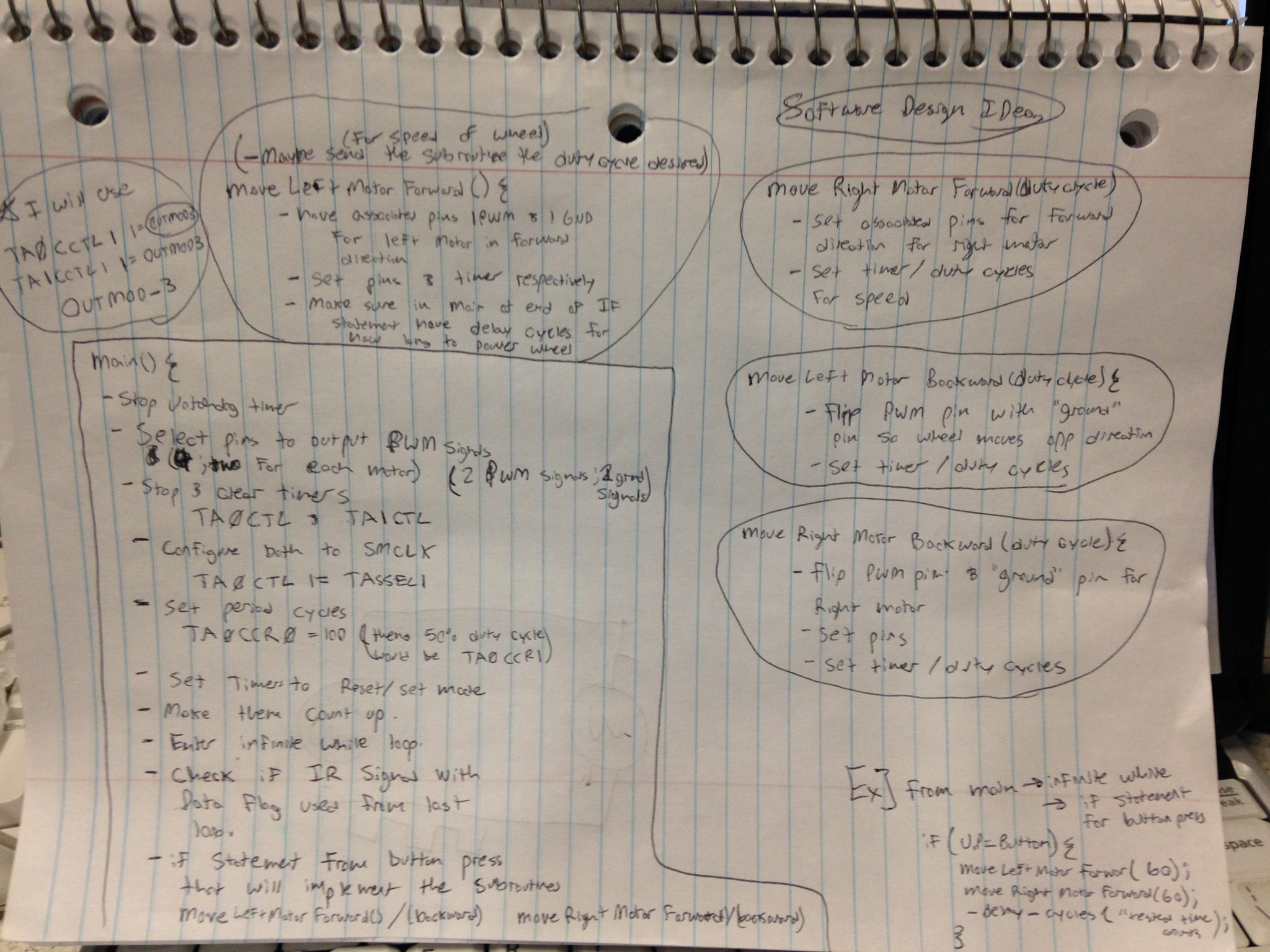
This information was recieved from this url: www.hobbytronics.co.uk/h-bridge-driver-sn754410
Because the datasheet was not very helpful with a general overview on how it actually works and should connect to our robot and MSP430
Here is the picture of the motor driver with all the connections!:
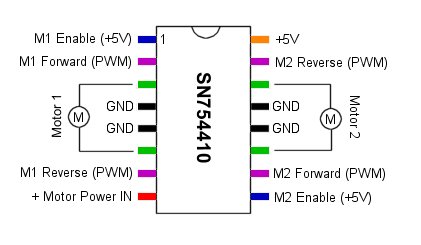
"H-Bridge Motor Driver 1A - SN754410
Faster, cheaper, smaller, better, right? The SN754410 Quad Half H-Bridge is just that. Capable of driving high voltage motors using TTL 5V logic levels, the SN754410 can drive 4.5V up to 36V at 1A continuous output current!
For even higher current applications, it is possible to physically stack two devices on top of each other to get almost 2 A of drive current.
The SN754410 is a quad half H-bridge IC. This allows the chip to either control 4 motors in one direction using the 4 half H-bridges or to control 2 motors in both directions using a full H-bridge for each motor.
The following shows the connections for controlling 2 motors in either direction using 2 full H-bridges."
#Required Functionality and A Functionality
--The method I used for Robot moves was using two PWM signals and then using two GPIOs and set them to either a 1 to move forawrd or a 0 to move backwards.
Once I have to correct PWM signal I want and the GPIOs are set to what I want them to, I delay for a certain amount of time so the robot wheels will make the correct number of rotations forward or backwards to make 45 or 90 degree turn right or left or move forward or backwards properly.
Here is the code for A Functionality; however the code for required functionality is exactly the same minus the IR button press code (so just the code for robot moves).
//-----------------------------------------------------------------
// Name:	Jarrod Wooden
// File:	lab5.c
// Date:	Fall 2014
// Purp:	Demo the decoding of an IR packet
// Documentation: Started with Dr Coulston's code mostly seen in the required Functionality code.
//-----------------------------------------------------------------
#include <msp430g2553.h>
#include "start5.h"

int8	newIrPacket = FALSE;
int16	packetData[40];
int16	bitString;
int8	packetIndex = 0;
int8	packetIndex2 = 0;


#define		TRUE			1
#define		FALSE			0
#define		UP_BUTTON		(P2IN & BIT5)
#define		DOWN_BUTTON		(P2IN & BIT4)
#define		AUX_BUTTON		(P2IN & BIT3)
#define		LEFT_BUTTON		(P2IN & BIT2)
#define		RIGHT_BUTTON	(P2IN & BIT1)

// -----------------------------------------------------------------------
// -----------------------------------------------------------------------
void main(void) {

	// === Initialize system ================================================
	IFG1 = 0; /* clear interrupt flag1 */
	WDTCTL = WDTPW + WDTHOLD; /* stop WD */
	WDTCTL = WDTPW | WDTHOLD;                 // stop the watchdog timer


	initMSP430();				// Setup MSP to process IR and buttons

	_enable_interrupt();

	//The code below is mostly from lab 5 functionality. It will take in a Ir Packet when a
	//Ir packet is created and check to see what button was pressed on the IR Remote
	//then it will do a move on the robot depending on what button was pressed.

	while(1)  {
		packetIndex2 = 0;

		if (newIrPacket) {
			_disable_interrupt();

			while ((packetData[packetIndex2] != 2) && (packetIndex2 < 40)) {
				packetIndex2++;
			}

			int length = 0;

			while (length < 16) {
				bitString+=packetData[packetIndex2++];
				bitString<<=1;
				length++;
			}


				if (bitString == CH_UP) {

					bothForward();
					stopRobot();

				}
				if (bitString == CH_DW) {

					bothBackward();
					stopRobot();

						}
				if (bitString == ONE) {  //left fourty five


					tankLeftForty();
					stopRobot();

						}
				if (bitString == VOL_UP) {
					tankRightNinety();
					stopRobot();
						}
				if (bitString == VOL_DW) {

					tankLeftNinety();
					stopRobot();
						}

				if (bitString == TWO) {

					tankRightForty();
					stopRobot();

				}

				bitString = 0;
				packetIndex = 0;
				newIrPacket = FALSE;

				int i;
				for (i = 0; i<0xFFFF; i++);
				initMSP430();


		} // end infinite loop
	} // end main

}

// -----------------------------------------------------------------------
// In order to decode IR packets, the MSP430 needs to be configured to
// tell time and generate interrupts on positive going edges.  The
// edge sensitivity is used to detect the first incoming IR packet.
// The P2.6 pin change ISR will then toggle the edge sensitivity of
// the interrupt in order to measure the times of the high and low
// pulses arriving from the IR decoder.
//
// The timer must be enabled so that we can tell how long the pulses
// last.  In some degenerate cases, we will need to generate a interrupt
// when the timer rolls over.  This will indicate the end of a packet
// and will be used to alert main that we have a new packet.
// -----------------------------------------------------------------------
void initMSP430() {

	IFG1=0; 					// clear interrupt flag1
	WDTCTL=WDTPW+WDTHOLD; 		// stop WD

	BCSCTL1 = CALBC1_8MHZ;
	DCOCTL = CALDCO_8MHZ;

	P2SEL  &= ~BIT6;						// Setup P2.6 as GPIO not XIN
	P2SEL2 &= ~BIT6;
	P2DIR &= ~BIT6;
	P2IFG &= ~BIT6;						// Clear any interrupt flag
	P2IE  |= BIT6;						// Enable PORT 2 interrupt on pin change

	HIGH_2_LOW;
	P1DIR |= BIT0 | BIT6;				// Enable updates to the LED
	P1OUT &= ~(BIT0 | BIT6);			// An turn the LED off

	TA0CCR0 = 0x8000;					// create a 16mS roll-over period
	TACTL &= ~TAIFG;					// clear flag before enabling interrupts = good practice
	TACTL = ID_3 | TASSEL_2 | MC_1;		// Use 1:1 presclar off MCLK and enable interrupts

	_enable_interrupt();
}


// -----------------------------------------------------------------------
// Since the IR decoder is connected to P2.6, we want an interrupt
// to occur every time that the pin changes - this will occur on
// a positive edge and a negative edge.
//
// Negative Edge:
// The negative edge is associated with end of the logic 1 half-bit and
// the start of the logic 0 half of the bit.  The timer contains the
// duration of the logic 1 pulse, so we'll pull that out, process it
// and store the bit in the global irPacket variable. Going forward there
// is really nothing interesting that happens in this period, because all
// the logic 0 half-bits have the same period.  So we will turn off
// the timer interrupts and wait for the next (positive) edge on P2.6
//
// Positive Edge:
// The positive edge is associated with the end of the logic 0 half-bit
// and the start of the logic 1 half-bit.  There is nothing to do in
// terms of the logic 0 half bit because it does not encode any useful
// information.  On the other hand, we going into the logic 1 half of the bit
// and the portion which determines the bit value, the start of the
// packet, or if the timer rolls over, the end of the ir packet.
// Since the duration of this half-bit determines the outcome
// we will turn on the timer and its associated interrupt.
// -----------------------------------------------------------------------
#pragma vector = PORT2_VECTOR			// This is from the MSP430G2553.h file

__interrupt void pinChange (void) {

	int8	pin;
	int16	pulseDuration;			// The timer is 16-bits

	if (IR_PIN)		pin=1;	else pin=0;

	switch (pin) {					// read the current pin level
		case 0:						// !!!!!!!!!NEGATIVE EDGE!!!!!!!!!!
			pulseDuration = TAR;

			if ((pulseDuration < maxStartPulse) && (pulseDuration > minStartPulse)) {
				pulseDuration = 2;
			} else if ((pulseDuration < maxLogic1Pulse) && (pulseDuration > minLogic1Pulse)) {
				pulseDuration = 1;
			} else if ((pulseDuration < maxLogic0Pulse) && (pulseDuration > minLogic0Pulse)) {
				pulseDuration = 0;
			}

			packetData[packetIndex++] = pulseDuration;

			LOW_2_HIGH; 				// Setup pin interrupr on positive edge
			break;

		case 1:							// !!!!!!!!POSITIVE EDGE!!!!!!!!!!!
			TAR = 0x0000;						// time measurements are based at time 0
			HIGH_2_LOW; 						// Setup pin interrupr on positive edge
			break;
	} // end switch

	if (packetIndex > 40) {
		newIrPacket = TRUE;
	}

	P2IFG &= ~BIT6;			// Clear the interrupt flag to prevent immediate ISR re-entry

} // end pinChange ISR


// -----------------------------------------------------------------------
//			0 half-bit	1 half-bit		TIMER A COUNTS		TIMER A COUNTS
//	Logic 0	xxx
//	Logic 1
//	Start
//	End
//
// -----------------------------------------------------------------------
#pragma vector = TIMER0_A1_VECTOR			// This is from the MSP430G2553.h file
__interrupt void timerOverflow (void) {

	TACTL &= ~TAIFG;
}

// ------------------------------------------------------------------------
//	Function for bothForward();
//	moves the both wheels forward with a specific duty cycle (aka. power)
//
//	This takes some debugging and testing to make sure the right wheel is moving
//	as much as the left wheel (etc) - I left a duty cycle of 50%.
//
//	Use GPIOs to make the wheels move forward.
//
//--------------------------------------------------------------------------

void bothForward() {

	_disable_interrupt();

	P2DIR |= BIT2 | BIT5;		//set port 2 pins 2 and 5 to the PWM outputs
	P2SEL |= BIT2 | BIT5;

	P2DIR |= BIT3 | BIT4;
	P2OUT &= ~(BIT3 | BIT4);	//cleared to zero since we are wanting to move forward

	TA1CTL &= ~MC1 | MC0;       // stop timer A0

	TA1CTL |= TACLR;


	TA1CTL |= TASSEL1;			//clock we are using


	TA1CCR0 = 100;
	TA1CCR1 = 50;
	TA1CCR2 = 50;

	TA1CCTL1 |= OUTMOD_3;		//set/reset mode for the clock
	TA1CCTL2 |= OUTMOD_3;


	TA1CTL |= MC_1;				//clock will count up

	_delay_cycles(10000000);


}

// ------------------------------------------------------------------------
//	Function for bothBackward();
//	moves the both wheels backward with a specific duty cycle (aka. power)
//
//	This takes some debugging and testing to make sure the right wheel is moving
//	as much as the left wheel (etc) - I left a duty cycle of 50%.
//
//	Use GPIOs to make the wheels move backward when set to one.
//
//--------------------------------------------------------------------------

void bothBackward() {

	_disable_interrupt();
	P2DIR |= BIT2 | BIT5;
	P2SEL |= BIT2 | BIT5;

	P2DIR |= BIT3 | BIT4;
	P2OUT |= BIT3 | BIT4;		//set to one when moving backwards.

	TA1CTL &= ~MC1 | MC0;       // stop timer A0

	TA1CTL |= TACLR;


	TA1CTL |= TASSEL1;			//clock


	TA1CCR0 = 100;
	TA1CCR1 = 50;
	TA1CCR2 = 50;

	TA1CCTL1 |= OUTMOD_7;		//need to be reset/set for moving backwards or won't function
								//properly
	TA1CCTL2 |= OUTMOD_7;


	TA1CTL |= MC_1;

	_delay_cycles(10000000);


}


// ------------------------------------------------------------------------
//	Function for tankRightForty();
//	make a forty five degree right turn moving the right wheel backward and left wheel
//	forward for a certain amount of time
//
//	This takes some debugging and testing to make sure the right wheel is moving
//	as much as the left wheel (etc) - I left a duty cycle of 50%.
//
//--------------------------------------------------------------------------

void tankRightForty() {
	_disable_interrupt();
		P2DIR |= BIT2 | BIT5;
		P2SEL |= BIT2 | BIT5;

		P2DIR |= BIT3 | BIT4;
		P2OUT &= ~(BIT4);
		P2OUT |= BIT3;

		TA1CTL &= ~MC1 | MC0;       // stop timer A0

		TA1CTL |= TACLR;


		TA1CTL |= TASSEL1;			//


		TA1CCR0 = 100;
		TA1CCR1 = 50;
		TA1CCR2 = 50;

		TA1CCTL1 |= OUTMOD_3;
		TA1CCTL2 |= OUTMOD_7;


		TA1CTL |= MC_1;

		_delay_cycles(3000000);


}

// ------------------------------------------------------------------------
//	Function for tankLeftForty();
//	make a forty five degree right turn moving the right wheel forward and left wheel
//	backward for a certain amount of time
//
//	This takes some debugging and testing to make sure the right wheel is moving
//	as much as the left wheel (etc) - I left a duty cycle of 50%.
//
//--------------------------------------------------------------------------

void tankLeftForty(){

	_disable_interrupt();
	P2DIR |= BIT2 | BIT5;
	P2SEL |= BIT2 | BIT5;

	P2DIR |= BIT3 | BIT4;
	P2OUT |= BIT4;
	P2OUT &= ~BIT3;

	TA1CTL &= ~MC1 | MC0;       // stop timer A0

	TA1CTL |= TACLR;


	TA1CTL |= TASSEL1;			//


	TA1CCR0 = 100;
	TA1CCR1 = 50;
	TA1CCR2 = 50;

	TA1CCTL1 |= OUTMOD_7;
	TA1CCTL2 |= OUTMOD_3;


	TA1CTL |= MC_1;

	_delay_cycles(3700000);

}

// ------------------------------------------------------------------------
//	Function for tankRightNinety();
//	make a ninety degree right turn moving the right wheel backward and left wheel
//	forward for a certain amount of time
//
//	This takes some debugging and testing to make sure the right wheel is moving
//	as much as the left wheel (etc) - I left a duty cycle of 50%.
//
//--------------------------------------------------------------------------
void tankRightNinety(){

	_disable_interrupt();
	P2DIR |= BIT2 | BIT5;
			P2SEL |= BIT2 | BIT5;

			P2DIR |= BIT3 | BIT4;
			P2OUT &= ~(BIT4);
			P2OUT |= BIT3;

			TA1CTL &= ~MC1 | MC0;       // stop timer A0

			TA1CTL |= TACLR;


			TA1CTL |= TASSEL1;			//


			TA1CCR0 = 100;
			TA1CCR1 = 50;
			TA1CCR2 = 50;

			TA1CCTL1 |= OUTMOD_3;
			TA1CCTL2 |= OUTMOD_7;


			TA1CTL |= MC_1;

			_delay_cycles(5800000);
}

// ------------------------------------------------------------------------
//	Function for tankLeftNinety();
//	make a ninety degree left turn moving the right wheel forward and left wheel
//	backward for a certain amount of time
//
//	This takes some debugging and testing to make sure the right wheel is moving
//	as much as the left wheel (etc) - I left a duty cycle of 50%.
//
//--------------------------------------------------------------------------
void tankLeftNinety(){

	_disable_interrupt();
	P2DIR |= BIT2 | BIT5;
	P2SEL |= BIT2 | BIT5;

	P2DIR |= BIT3 | BIT4;
	P2OUT |= BIT4;
	P2OUT &= ~BIT3;

	TA1CTL &= ~MC1 | MC0;       // stop timer A0

	TA1CTL |= TACLR;


	TA1CTL |= TASSEL1;			//


	TA1CCR0 = 100;
	TA1CCR1 = 50;
	TA1CCR2 = 50;

	TA1CCTL1 |= OUTMOD_7;
	TA1CCTL2 |= OUTMOD_3;


	TA1CTL |= MC_1;

	_delay_cycles(6500000);
}
// ------------------------------------------------------------------------
//	Function for stopRobot();
//
//	stop everything on the robot and make it not move for an extended amount of time
//	in this case 1000 counts
//
//
//--------------------------------------------------------------------------
void stopRobot(){

	P2DIR &= ~(BIT2 | BIT5);

	P2DIR &= ~(BIT3 | BIT4);
	P2OUT &= ~(BIT3 | BIT4);

	TA1CTL &= ~MC1 | MC0;       // stop timer A0

	TA1CTL |= TACLR;

	_delay_cycles(1000);
}
Here is the header code for A Functionality, which was also used for the required functionality (the methods for IR button presses just weren't used for the required functionality)
//-----------------------------------------------------------------
// Name:	Jarrod Wooden
// File:	lab5.h
// Date:	Fall 2014
// Purp:	Include file for the MSP430
//	Documentation: I used Dr Coulston's start code for lab 5 and this was
//	the header for lab five plus the robot move void methods.
//-----------------------------------------------------------------

//-----------------------------------------------------------------
// Page 76 : MSP430 Optimizing C/C++ Compiler v 4.3 User's Guide
//-----------------------------------------------------------------
typedef		unsigned char		int8;
typedef		unsigned short		int16;
typedef		unsigned long		int32;
typedef		unsigned long long	int64;

#define		TRUE				1
#define		FALSE				0

//-----------------------------------------------------------------
// Function prototypes found in lab5.c
//-----------------------------------------------------------------
void initMSP430();
__interrupt void pinChange (void);
__interrupt void timerOverflow (void);

void bothForward();
void bothBackward();
void tankRightForty();
void tankLeftForty();
void tankRightNinety();
void tankLeftNinety();
void stopRobot();


//-----------------------------------------------------------------
// Each PxIES bit selects the interrupt edge for the corresponding I/O pin.
//	Bit = 0: The PxIFGx flag is set with a low-to-high transition
//	Bit = 1: The PxIFGx flag is set with a high-to-low transition
//-----------------------------------------------------------------

#define		IR_PIN			(P2IN & BIT6)
#define		HIGH_2_LOW		P2IES |= BIT6
#define		LOW_2_HIGH		P2IES &= ~BIT6


#define		averageLogic0Pulse	450
#define		averageLogic1Pulse	0x05DF
#define		averageStartPulse	22500
#define		minLogic0Pulse		averageLogic0Pulse - 200
#define		maxLogic0Pulse		averageLogic0Pulse + 200
#define		minLogic1Pulse		averageLogic1Pulse - 200
#define		maxLogic1Pulse		averageLogic1Pulse + 200
#define		minStartPulse		averageStartPulse - 1000
#define		maxStartPulse		averageStartPulse + 1000

#define		PWR		0xC2D0
#define		ONE		0xC284
#define		TWO		0xC244
#define		THR		0xC2C4

#define		VOL_UP	0xC228 //right
#define		VOL_DW	0xC2A8 //left
#define		CH_UP	0xC298 //up
#define		CH_DW	0xC218 //down
The important pieces of code for required functionality is the clearing and setting of the GPIO pins. Clear the pins if I wanted to make the robot move forward. And set the pins if I wanted the robot to move backwards.
###Debugging: Delay Cycles
Hardware Debugging:
To get the hardware functioning properly I plugged up the motor driver using capacitors betweent he power supply to the motor driver chip and ground to smooth the signal. However, when I was doing this there was a short circuit happening with more than one of the capacitors so I took out all of the capacitors and the motor driver chip worked fine. I was able to complete the lab not using any capacitors; however, this method is still not recommended if you can get the capacitors to work properly for their purpose.
The only capacitors that ended up being used were the electrolytic capacitors that when from the +5V and +12V power supply busses to ground and that is it. Also, connecting the reset pin on the MSP430 to anything wasn't necessary either.
Also, if a fuse is blown on the robot. Make sure you check which fuse it is and before plugging everything up reload a new program that fixes the duty cycle of the PWM and take the wheels off of the ground before turning the robot back on or it is likely you will blow more than one fuse on the robot.
Software Debugging Below:
Almost all of the debugging was making the delay cycles for each of the turns long enough to perform a 45 degree turn or a 90 degree turn. Also since the motors weren't precise, it took longer for the right motor to move forward to make the left hand 45 and 90 degree turn than it did for the left motor to move forward to make the right hand turns.
I kept testing the robot turns until I made the turns close to what I wanted for the delay cycles (45 and 90 degrees)
Also from the start of the lab it was difficult to get the method of using all PWM pins for the motor and switching from constantly reseting on one pin and doing the set/reset on the other pin and then just switching the function of the two for moving the opposite direction. -> Which is why I ended up using the GPIO method of making one pin the PWM signal and the other pin a 1 or 0 depending on if I wanted to move the robot forward or backwards. -The problem arising from the first method that wasn't working was that I was unable to change the PWM signal. I would get a signal but then the signal wouldn't be the duty cycle I wanted and when I changed the duty cycle nothing else was changing. Eveything worked when I was working with the second method.
Once I got the turns to work for required functionality I was able to make a simply program to run through all of the methods for the robot moving forward backwards, left or right 45 degrees, and left or right 90 degrees. I was able to demonstrate that my program and robot worked for the required functionality.
Then A functionality was simple. I was able to just run the robot move operation for the desired button pressed. When that button was pressed I used A functionality to tell what button was pressed then perform the desired move. One thing that I had to do was keep reinitiating the MSP430 in the infinite while loop so that the timer was functioning properly for checking if an IR packet was recieved then I changed the timer for the moving of the robot when a button press event happened.
#Thank you and have a great Air Force Day