Overlapping Circles are not displayed correctly #219

Description

Hi there!
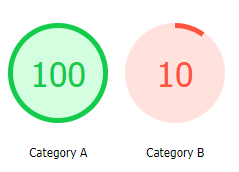
I tried to convert my own HTML-report to PDF. However some graphics I made from overlapping circles are not displayed correctly in the PDF.
I tried to convert the HTML with pdfkit.from_file() and pdfkit.from_string(), the outcome is the same.
This is the HTML, where the circles are displayed correctly:
This is the PDF-output:

Thanks in advance :)
I used the following code to create the circles:
.pie_outer {
  display: block;
  position: absolute;
  top: 0px;
  width: 100px;
  height: 100px;
  border-radius: 50%;
  background-image: conic-gradient( #474747 3deg, transparent 0);
  display: flex;
  justify-content: center;
  align-items: center;
}

.pie_inner_1 {
  display: block;
  width: 100px;
  height: 100px;
  border-radius: 50%;
  background-color: #b0b0b0;
  display: flex;
  justify-content: center;
  align-items: center;
}

.pie_inner_2 {
  display: block;
  position: absolute;
  top: 5px;
  left: 5px;
  width: 90px;
  height: 90px;
  border-radius: 50%;
  background-color: #b0b0b0;
  display: flex;
  justify-content: center;
  align-items: center;
}

.pie_punkte {
  font-size: 34px;
}

<div style="height:200px">
  <div id="pie_cat1" style="width:125px;position:absolute;top:420px;">
    <div class="pie_inner_1" id="pie_inner_1_cat1" style="background-color: rgb(211, 255, 224);"></div>
    <div class="pie_outer" id="pie_outer_cat1" style="background-image: conic-gradient(rgb(21, 203, 76) 360deg, transparent 0deg);"></div>
    <div class="pie_inner_2" id="pie_inner_2_cat1" style="background-color: rgb(211, 255, 224);">
      <p align="center" class="pie_punkte" id="punkte_cat1" style="color: rgb(21, 203, 76);">100</p>
    </div>
    <div style="width:100px;position:absolute;top:100px;left:0px;">
      <p align="center">Category A</p>
    </div>
  </div>
  <div id="pie_cat2" style="width:125px;position:absolute;top:420px;left:125px;">
    <div class="pie_inner_1" id="pie_inner_1_cat2" style="background-color: rgb(255, 226, 222);"></div>
    <div class="pie_outer" id="pie_outer_cat2" style="background-image: conic-gradient(rgb(255, 85, 64) 36deg, transparent 0deg);"></div>
    <div class="pie_inner_2" id="pie_inner_2_cat2" style="background-color: rgb(255, 226, 222);">
      <p align="center" class="pie_punkte" id="punkte_cat2" style="color: rgb(255, 85, 64);">10</p>
    </div>
    <div style="width:100px;position:absolute;top:100px;left:0px;">
      <p align="center">Category B</p>
    </div>
  </div>
</div>