Necessary instructions are given below for setup, build and execution of this applicaiton...
- Compare two identical tables of it's schema, added/delete/changed records and any other changes made.
To clone the repowitory to your local machine run this command. (You must have git installed in your local machine)
git clone https://github.com/JonParvez/TablesComparer.git
- Add your local sql server connection string in the
appsettings.json
{
  "ConnectionStrings": {
    "DefaultConnection": "Data Source=localhost;Initial Catalog=MatchTableDB;Integrated Security=SSPI;"
  }
}- Execute this mandatory database script given in
DatabaseScriptfolder in the repository (DatabaseScript\DatabaseSchemaAndSeedDataScript.sql)- It will create sample tables schema and insert the seed data
There are three ways to provide the required input in the application, You can follow one from these instructed ways:
1. Run the application and there will be reader in the console for the inputs
Example:
-TableName1 : SourceTable1
-TableName2 : SourceTable2
-PrimaryKey : SocialSecurityNumber
2. Build the application and go to the application build path (eg: {YourFolderDirectory}\TablesComparer\MatchTables\bin\Debug\net6.0 and after the console pop up, then put this command
MatchTables.exe -TableName1 SourceTable1 -TableName2 SourceTable2 -Primarykey SocialSecurityNumber
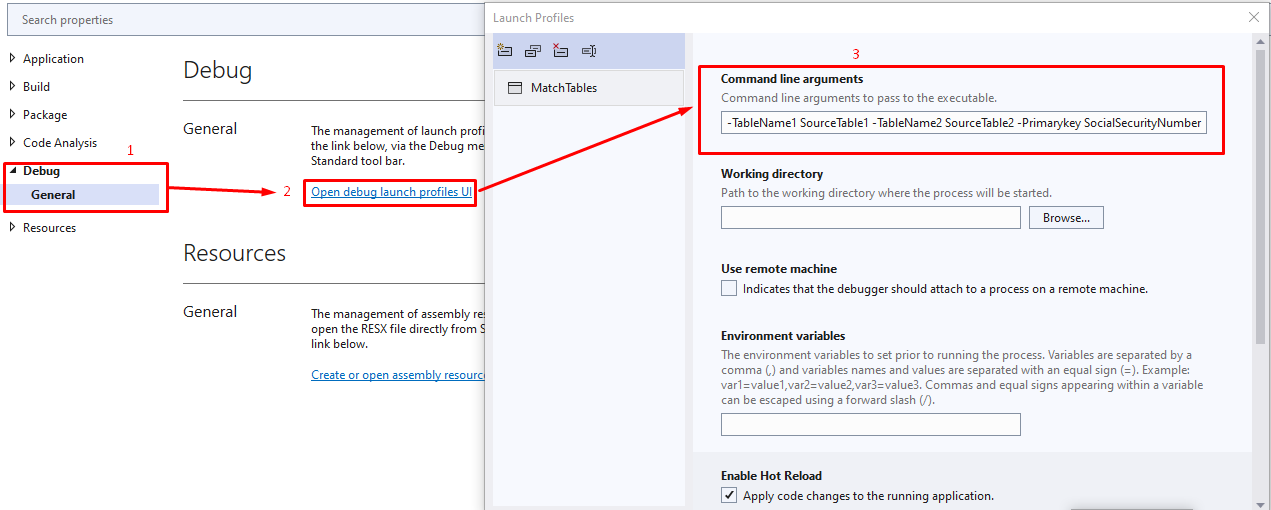
3. Run with predefined command line arguments To setup the arguments in visual studio:
- Right-Click on Project. Go to Properties -> Debug -> General -> Command line arguments
- Put this command in the argument box:
-TableName1 SourceTable1 -TableName2 SourceTable2 -Primarykey SocialSecurityNumber

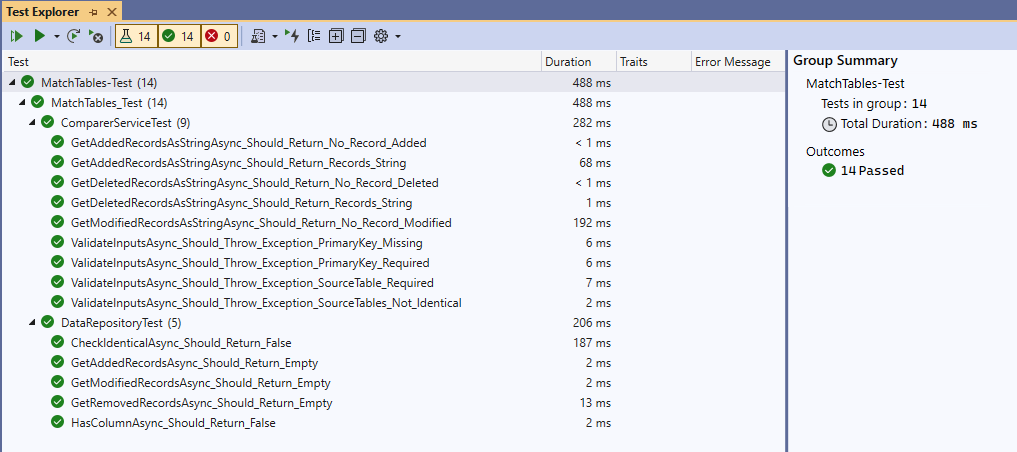
To run unit test cases, go to the Test Explorer and run all the tests at once...
Sample unit test output:
- ASP.NET Core 6
- Repository Pattern
- Dependency Injection
- Generic methods
- Extension methods
- Unit Tests with mocking (xUnit, NSubstitute)
Md Abdul Kuddus Parvez
Email : parvez.mak4132@gmail.com