Repository navigation
Framework
The host application and the core application are two programs on one base. They share the view layer, the look, the keys and the splash. The core application adds the service layer and a descriptor per core; the menus of a core follow from the descriptor. This part explains the framework, the contribution model and the declarative application UI, gives the status of 2026-10-26 (the compact layout of 2026-11-02 is added in part 2) and shows two screens: the boot menu of the host application and the menu of a core.
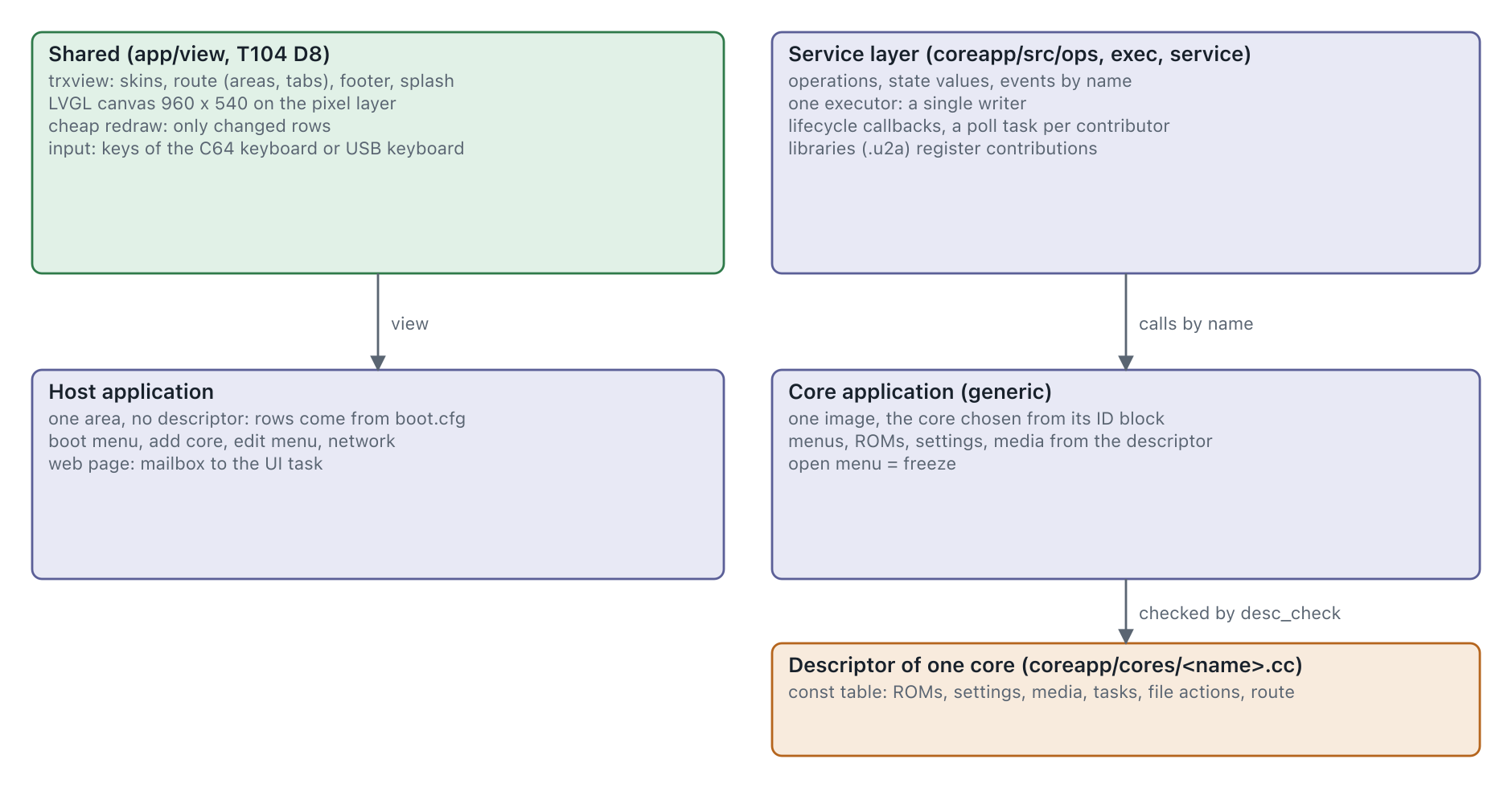
Solid arrows are calls, dashed arrows are shared code. Sources: app/view/trxview.*, coreapp/src/, coreapp/cores/, host-app/software/hostapp/hostui.cc.
- One canvas: LVGL draws a 960 x 540 canvas that the pixel layer of the host shows over the picture. The overlay draws it at the whole factor of the HDMI mode in use (T164); the application offers only the modes the screen names.
- One geometry: sidebar 148, top bar 36, tab strip 38, footer 28 pixels.
-
Compact layout (T164 D10a): a mode narrower than 960 px (576p 720 x 576, 480p 640 x 480, 800 x 600) gets a canvas of its own size at factor 1 and a compact geometry: rail 108, top bar 34, tab strip 34, footer 26. Nothing is cut: the host application uses two footer lines where the key legend is long, the core application narrows its side panels. 1024 x 768 and 1280 x 1024 keep the 960 x 540 canvas. The menu snapshot of the host (T146) is the 960 x 540 canvas only; in the compact modes the first picture is the splash (D10b, deferred). The geometry is one pure function for both applications and the benches (
app/video/trxcanvas.h). - Two skins (panel and terminal) from one style table: one navigation engine, not two user interfaces.
- The route: a function key selects an area, a number key a visible tab. The shell knows no core. It is given a route and a content callback. The host application has one area; a core application takes its route out of the descriptor.
- Cheap redraw: a key redraws only what changed; pages are built once, keys are drained before one refresh.
-
Splash: one widget (
trx_splash_open/step/close) for the host application and the core application, drawn on the top layer, a step is a bar value and a label.
| Kind | Shape | Example |
|---|---|---|
| Operation |
domain.verb(args) -> result, typed |
machine reset, drive mount |
| State value | typed, readable, with a revision counter | image of a drive, network address |
| Event | name and one typed payload, emitted on change | media changed, job progress |
- One writer: every operation runs on one executor task in the order it was queued. The menu, the web page and a service poll put requests into its queue.
- A contribution is one record that a library or a core hands to the base: operations, state values and events; menu nodes with an anchor (area, tab, group), an order key and conditions; file actions by extension, magic, size or parent extension; settings; lifecycle callbacks (core start and stop, freeze and thaw, mount and eject, poll); widgets by name.
-
Settings live in a store with three layers (
.cfgfile, host, default). A setting's effect is an operation by name, applied live or at the next reset. - Widgets stay code (file browser, settings list, terminal, hex view). A menu node names a widget and passes arguments; it never describes pixels.
-
Libraries (
.u2a) register contributions. The loader checks, places, relocates and registers a library and rolls back on a failure; a library states the capabilities it needs.
One const CoreDesc per core in coreapp/cores/<name>.cc, beside the register constants of that core's gateware. It names ROMs (names, sizes, required, the operation that puts them into the core), settings (values, default, when they apply, the operation), media slots, tasks, file actions and the route of areas and tabs. Everything the descriptor makes the machine do is an operation by name. The descriptor checker refuses a name that is not registered or a binding that does not fit its arguments. The handlers run against abstract core and file interfaces, so they run natively in tests/coreapp against a model of the core.
Note: The descriptor is a compiled table. A data file in the package is not built.
| Key | Area | Content |
|---|---|---|
| F1 | Home | Core, application, network, media, ROMs, libraries. |
| F3 | Library | The file browser with the actions of each file type. |
| F5 | the machine | Summary (media slots) and settings. |
| F7 | Actions | Tasks of the core. |
| F8 | System | Reset to host defaults, restart core, return to host menu. The same in every core. |
The golden files tests/coreapp/golden/menu_*.txt hold the menu of every core; the test fails when the built menu differs.
| Host application | Core application | |
|---|---|---|
| Image | In the flash at 0x220000 | In the package, copied to DDR2 at the load address |
| Source of the menu | Entries of Flash:/boot.cfg, added by hand |
The descriptor of the core and the libraries |
| Areas | One area with four screens on F1, F3, F5 and F7 | Five (Home, Library, machine, Actions, System) |
| Open menu | No machine to freeze: the host runs on its own | A freeze of the machine |
| Acts on | Boot configuration, packages, the ICAP | The running core: ROMs, settings, media |
A library (.u2a, kind = lib) contributes operations, state values, menu nodes and file actions. An application is the same file format with kind = app and an entry app_main; it can be transient (loaded when opened, freed with everything it made when it returns) or resident (stays, registers menu nodes, file actions, settings and a poll). Foreign applications load too. The base gives an application a service table (svc, ABI 3): sys, mem, ops, fs and job (long work on a task of its own, progress drawn by the base).
-
The UI is declarative. An application brings a UI description, compiled at pack time into a record in the same way as a core's menu description, and never UI code. The generic core application renders it with its own widgets (lists, settings, dialogs, progress, the 80-column
terminal). - Behaviour is operations, state values and events in the registry. Widgets bind to them by name.
- No application calls LVGL. The application format carries no LVGL headers and no import table. A widget that is missing is added to the base application, not to an application.
- Overlay: a description may mark a container as an overlay that stays open over the running core (first case: the monitor as a terminal overlay).
Note: Status: the runner and the service table are built on a branch and proven in native benches. The container is being reworked from "the application gets an LVGL root" to the declarative form above. The menu hooks and the services
machine,net,trxandringare open. The description of the application API and an SDK for outside developers are planned and not written.
The menu, REST and WebSocket JSON-RPC call the same operation in the same registry, run by the same executor. A setting changed through the menu, through REST and through JSON-RPC ends in the same state, the same .cfg and the same sentence.
| Door | Shape |
|---|---|
| REST (port 80) |
GET /v1/info, GET /v1/ops, POST /v1/ops/<name> with a JSON object, GET /v1/state/<name>, GET /v1/events. An alias table maps the paths the existing scripts use to operations; an alias whose operation nobody registered answers 501 and names it. |
| WebSocket JSON-RPC | The method is the operation name, the parameters are the same object. An operation that ran and refused is an error with the operation's error code. service.subscribe delivers events as notifications. |
| Menu | A node names an operation and its arguments. |
The canonical operation names and the typed result contract are one table in the T104.1 specification, section 3 H; every other document links there. There is no authentication: the door is for the home network. The update operation update.run_record checks a .cfw update file (header, product family, records inside the updater window), loads its records and jumps (T104.2); a .ue2 is not taken.
-
Host application, F3: File Browser (was "Add core"). A general browser over the media.
Aadds the selected file to the boot menu when its type is one the boot menu takes (.cor,.cfw, large.cor). - Format as exFAT: a stick or SD card is formatted in the File Browser, for images above 4 GiB. The user arms it by typing the medium's name and pressing RETURN twice within 10 s; a running format may be cancelled and leaves a blank medium. No volume label.
-
A folder as an Amiga hard disk: the core application turns a folder into a filesystem image on the fly (RDB, Fast File System) and serves it as a hard disk to the Amiga 500 and 1200 cores. Names and the Amiga-only attributes follow FS-UAE (
.uaemside files), so a folder moves between FS-UAE and the board unchanged; what the Amiga writes goes back to the files. -
One folder per core: a core's
.cor,.cfgandroms/lie side by side; the ROM search starts in that folder, then follows the cascade of Overview (7.2).
| Part | On main | Branch, not merged | Board |
|---|---|---|---|
| Service layer: operations, executor, loader, guard, 64-bit files | yes | - | C64, Apple II, Amiga, VC-20, C16 (2026-10-23) |
Menu merge, .cor records, REST, WebSocket JSON-RPC (T104.1) |
yes | - | step open (REST to a running core) |
Generic application on the TRX64 Ultimate monolith, update.run_record (T104.2) |
profile, C64 descriptor, PRG start | drive pages, update record; runs in the emulator | next: SRAM/JTAG test, then flash |
| Applications, declarative UI (T104.3) | runner, host, four applications (proven in the emulator) | - | step open |
| UI as an SDK with a test suite (T153) | no | state query, test SDK, 44 scenarios green | no |
| Overlay redraw: a changing bar or percentage never shows what lies behind it (T167) | no | host and core application, benches green | board check open |
| Master volume, joystick-port swap, saves back to the user's file (T160, T157, T154) | saves service (T154) | volume and swap built | A1200 volume passed; rest open |
| USB gamepads for NES, SNES and Neo Geo (T156) | no | in progress | pads missing on 2026-11-01 |
| File Browser, exFAT format (T111) | yes | - | steps open |
| Folder as an Amiga hard disk (T128) | yes | - | steps open |
| One folder per core (T112) | yes, with the large .cor hand-over |
- | steps open |
| Host application start without a check (T101) | yes: menu from boot.cfg alone |
- | old check measured: 11 s |
| Core menus from a saved picture (T176, split out of T146) | no, deferred | - | - |
| Application API and SDK (T131) | planned | - | - |
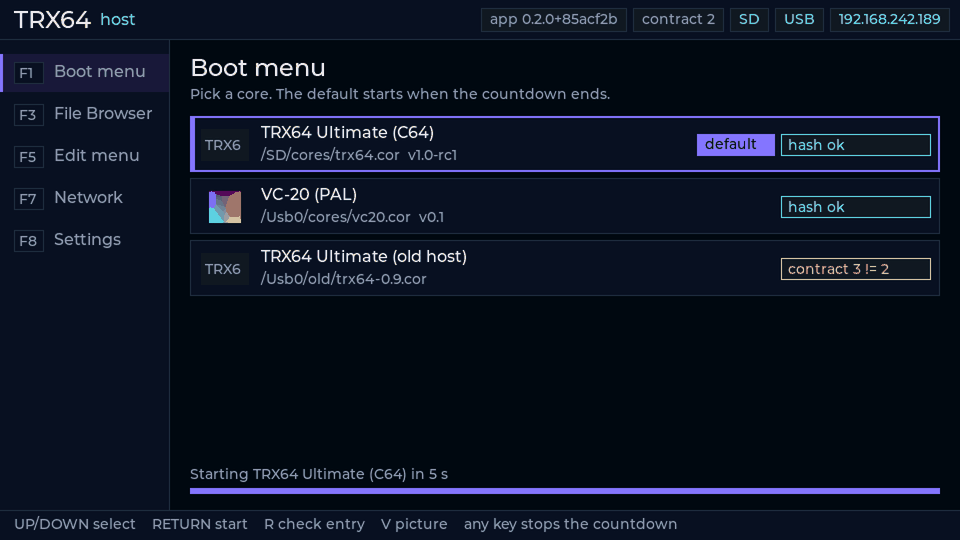
Four screens: boot menu (F1), file browser (F3), edit menu (F5), network (F7); the system page (F8) is the settings page. The figure is rendered from the real application code, with test data. More screens are on the Screenshots page.
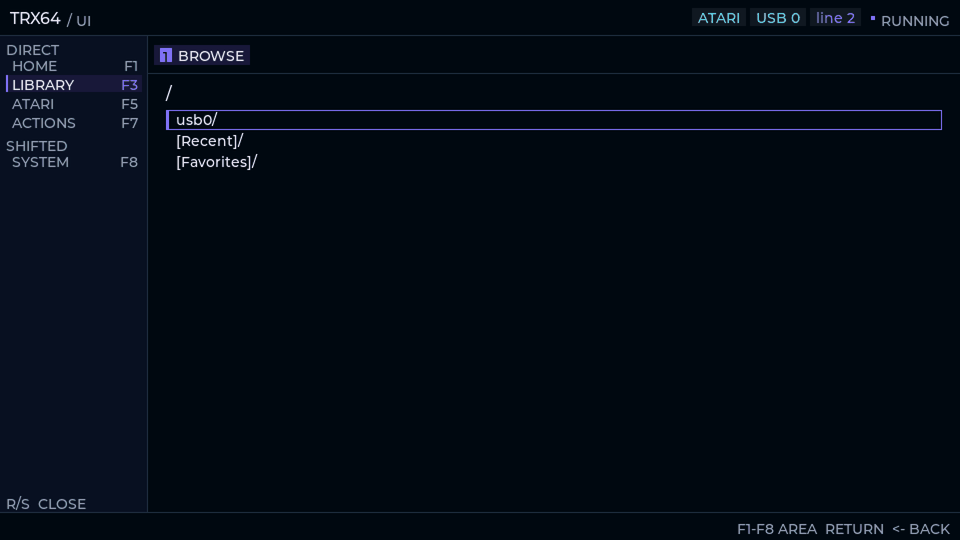
The core application builds the menu of a core from its descriptor: Home (F1), Library (F3), the machine (F5), Actions (F7), System (F8). The figure shows the library page of a core, rendered from the real core application. The entries of each core are those of the golden files tests/coreapp/golden/menu_*.txt.