
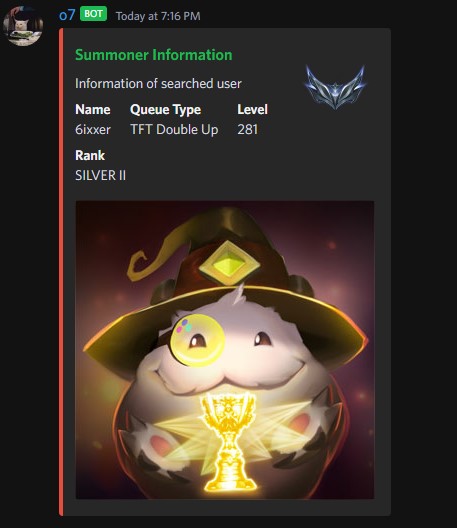

If you want, you can personally host the bot. Just include your own riot API key and discord bot token. I currently have the bot deployed on Heroku, as it's always online and easier for people to use. The bot uses slash builder commands to embed when typing /summoner compared to the usual !summoner or .summoner command style other bots use.
What does this bot do?

- The bot can send live match data and player information through Discord with API calls. Breaking down the diagram once the Summoner Bot passes through our host Heroku, it begins in main.py, where it takes in the .env of our API and bot token. It then calls to the function setup_commands. This is where our slash builder commands are developed. Currently, the two commands are /summoner and /getMatch. If the user were to input /summoner [name] the function def summoner will be called. We check if the name is valid and then proceed with the information. We split the name's tagline to coordinate with how Riot Games handles usernames. With our now split name, we call the API.py function fetch_puuid, which has the arguments game_name and tagline. Now that we have the Player Universally Unique IDentifiers (PUUID), we call the API function fetch_summoner_data. Once the data is retrieved, we collect summoner_level, profileIconId, and encrypted_summoner_id. With the encrypted_summoner_id obtained, we make an API call to the function fetch_league_data. With the data from fetch_league_data, we store it in an array where we parse through it to combine the tier and ranks. Once we have our rank, we call utils.py, where we have a hashmap of the rank's corresponding icons that we will use in the embed. Finally, with all our data gathered, it's embedded and sent back to the user. As for /getMatch, it's similar in its own way. We get the PUUID and then call the API function fetch_livegame to retrieve data about the live game. With data about the live game gathered, we also call the API function fetch_champion_data to fetch the data about the champions the players are playing. With that data, we populate 2 data structures, the blue and red teams. We store the riotId, championId, and summonerId. Using the summonerId to call the API function fetch_league_data to get the individual ranks of each player. With all the data acquired we then format it to the user and send it back through Discord
Why is it a discord bot?
- I originally made the bot for friends to use. They wanted something easy to use and didn't want to go through the process of using websites like op.gg, u.gg, etc, to see ranks. So I made it a discord bot that responds off the command /summoner [name] and /getmatch [name]
Will there be more commands?
- Yes! I want to add commands that include data about matches played, champions, and runes, but currently, the public riot API only allows certain data to be accessed. I hope with this bot, I'll be accepted into their developer program to get access to more API features, league of Legends and Valorant.
Where do you get the icons for the ranks and profile icons?
- I get the ranked icons from the League of Legends fandom wiki (https://leagueoflegends.fandom.com/wiki/Rank_(League_of_Legends)#Season_2024)
- I used riots Data Dragon API for the profile and champion icons.
Why isn't my profile icon showing?
- Currently, the profile icons are for the latest version, 14.1.1. If it's not showing, that icon is above version 14.1.1.
Why doesn't it show all my ranks?
- Discord embeds are weird; I made it only show the rank of the last ranked game that you played. I didn't have enough embed add fields to go across, and it became very cluttered if I did try to add more fields.