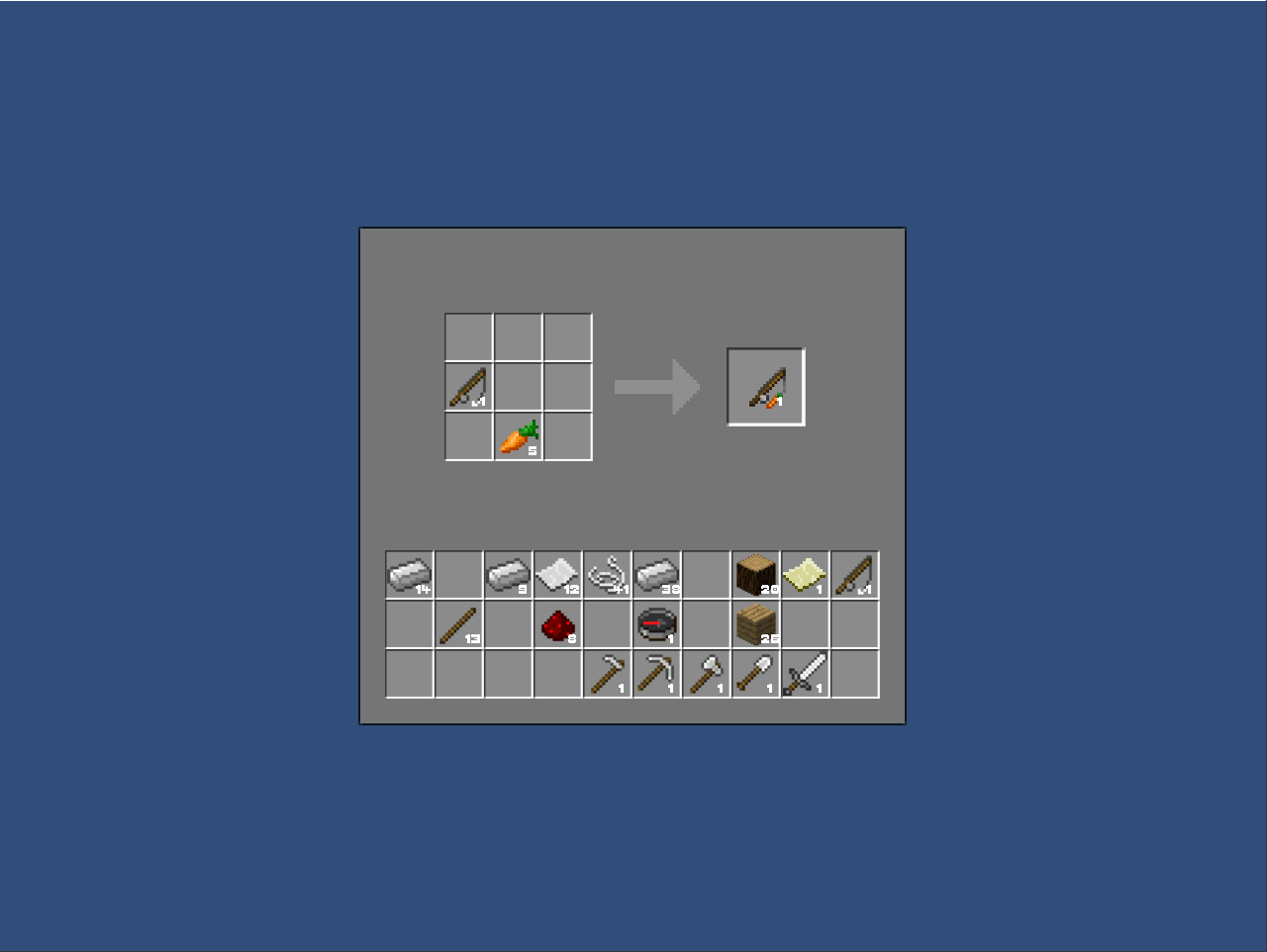
- Unity 2018 4.14 Ver.
- 2022/10/24 마우스 버그 수정
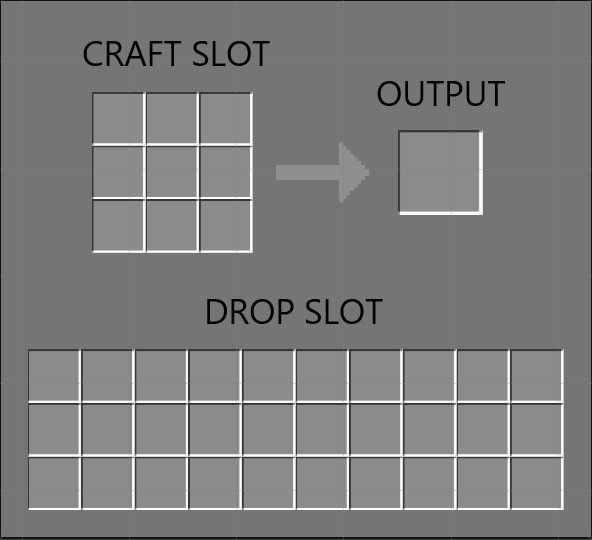
- 3종류의 아이템 슬롯을 ENUM으로 제작해 변수로 갖도록 했습니다.
- DROP = 인벤토리, CRAFT = 제작대, OUTPUT = 제작해서 나오는 아이템 슬롯
    public enum SlotType
    {
        DROP =  1,
        CRAFT = 2,
        OUTPUT = 3
    };
    public SlotType slotType = SlotType.DROP;
- 유니티 마우스 터치, 클릭 이벤트를 이용해 slot과 아이템의 정보를 가져도록 했습니다.
    public void OnPointerEnter(PointerEventData eventdata)
    {
        // 슬롯 정보 가져오기
        ClickManager.GetInstance.slot = gameObject;
    }

    public void OnPointerExit(PointerEventData eventdata)
    {
        // 슬롯 정보 초기화
        ClickManager.GetInstance.slot = null;
    }
 public void OnPointerDown(PointerEventData _eventData)
 {
    if(ClickManager.GetInstance.clickItem == null)
    {
        // 아이템의 정보를 가져온다.
        ClickManager.GetInstance.clickItem = gameObject;
    }
 }
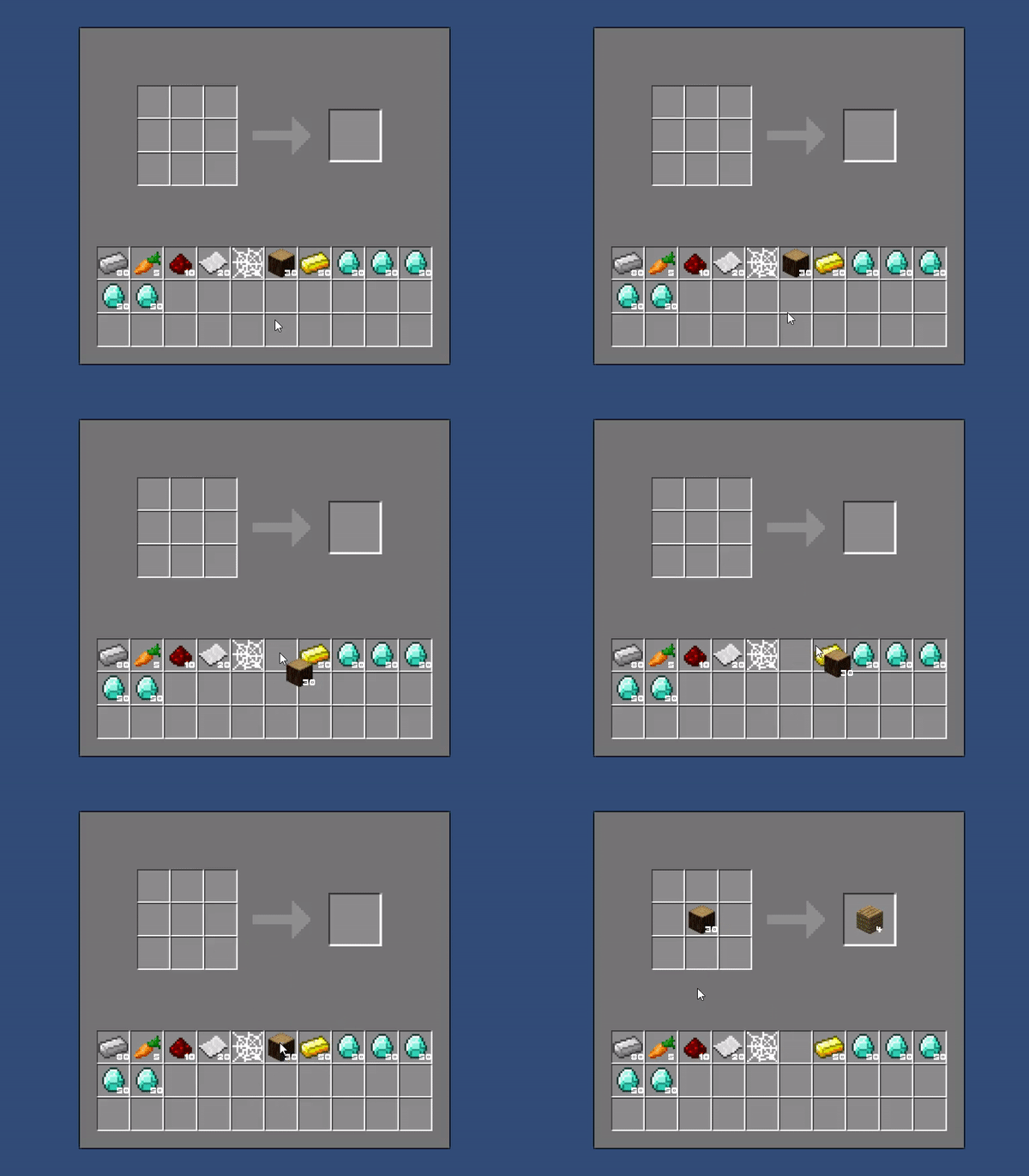
- 커서에 아이템이 없는 경우 rectTransform 변수를 저장해 아이템을 끌고 다닐 수 있도록 합니다.
    // 커서에 아이템을 들고 있지 않은 경우...
    if (slot && clickItem && !cursorOnItem)
    {
        cursorOnItem = true;
        // 아이템의 트랜스폼을 저장 및 부모 위치 조정
        rectTransform = clickItem.GetComponent<RectTransform>();
        if(rectTransform) rectTransform.SetParent(canvas.transform.GetChild(0));

        // 아웃풋 슬롯의 아이템을 가져갔다면.. 재료를 소모시킨다.
        DropSlot SlotType = slot.GetComponent<DropSlot>();
        if (SlotType && SlotType.slotType == DropSlot.SlotType.OUTPUT) onCraftEvent.Invoke();
    }
                                        .
                                        .
                                        .

    // 아이템이 커서를 따라가도록 Update문에서 실행되는 코드
    if(cursorOnItem && clickItem && rectTransform)
    {
        rectTransform.anchoredPosition =
            new Vector2((Input.mousePosition.x - canvas.transform.position.x) + CURSOR_ITEM_DISTANCE,
            (Input.mousePosition.y - canvas.transform.position.y) - CURSOR_ITEM_DISTANCE);
    }
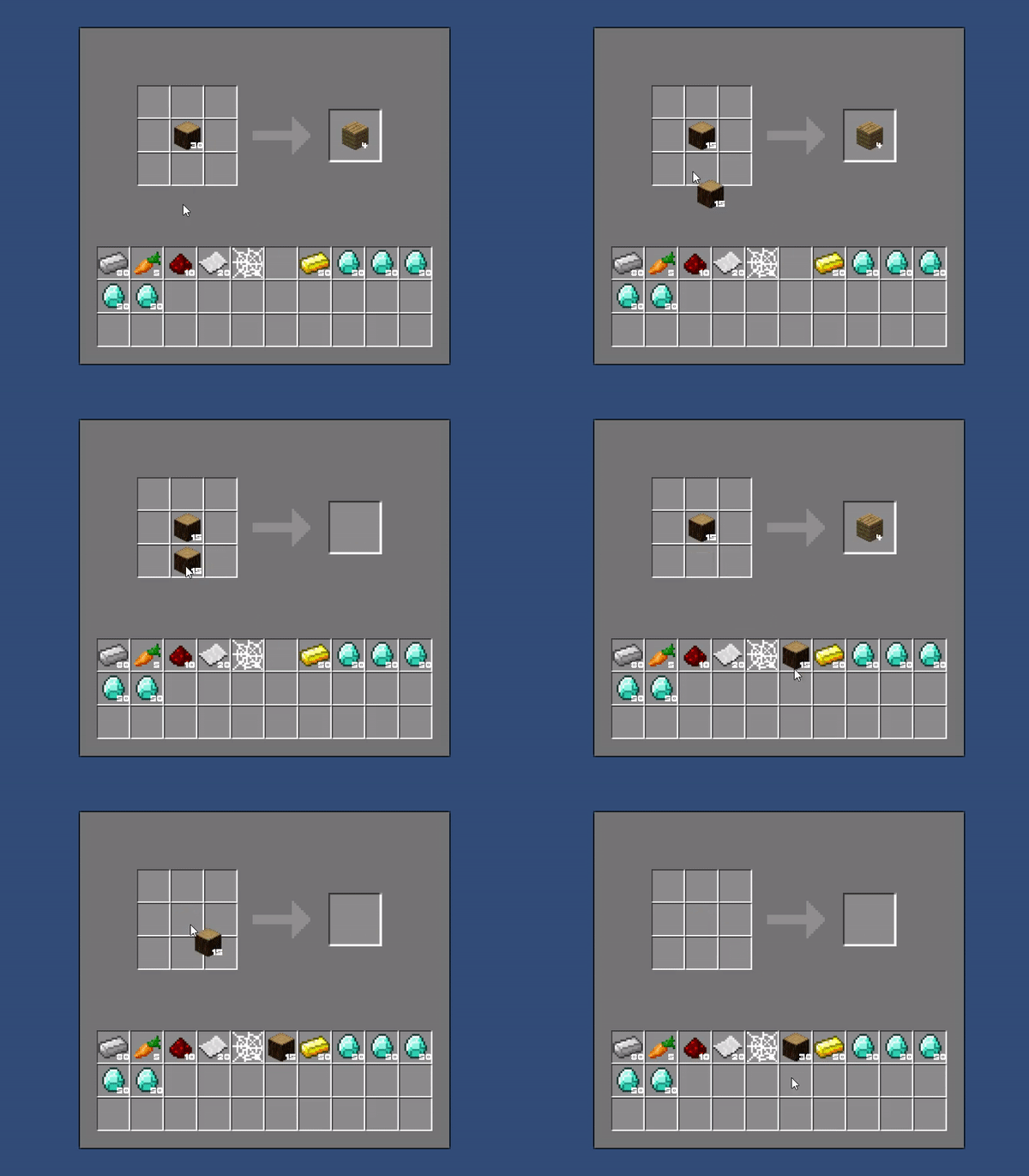
- 커서에 아이템이 있는 경우에는 분기점이 나뉩니다.
- 슬롯이 비었거나 슬롯이 아닌 곳에 둔다면 간단하게 비어있는 슬롯의 자식으로 넣어서 해결했습니다.
- 밑 코드는 슬롯 안에 아이템이 있을 경우, 같은 타입의 아이템이거나 혹은 완전히 다른 아이템일 경우의 코드입니다.
    // 같은 아이템인 경우..
    if (clickItemType.type == slotItemType.type)
    {
        GameObject temp;
        switch (SlotType.slotType)
        {
            // 아이템을 놓을 수 없는 슬롯이라면... (아웃풋 슬롯)
            // 아웃풋 슬롯의 아이템을 가져갔다면.. 재료를 소모시킨다.
            case DropSlot.SlotType.OUTPUT:
                clickItemType.count += slotItemType.count;
                clickItemType.resetcounting();
                cursorOnItem = true;
                onCraftEvent.Invoke();
                onClickEvent.Invoke();
                return;
            // 아이템을 놓을 수 있는 슬롯이라면... 아이템을 합친다.
            default:
                slotItemType.count += clickItemType.count;
                slotItemType.resetcounting();
                temp = clickItem;
                Destroy(temp.gameObject);
                break;
        }
    }
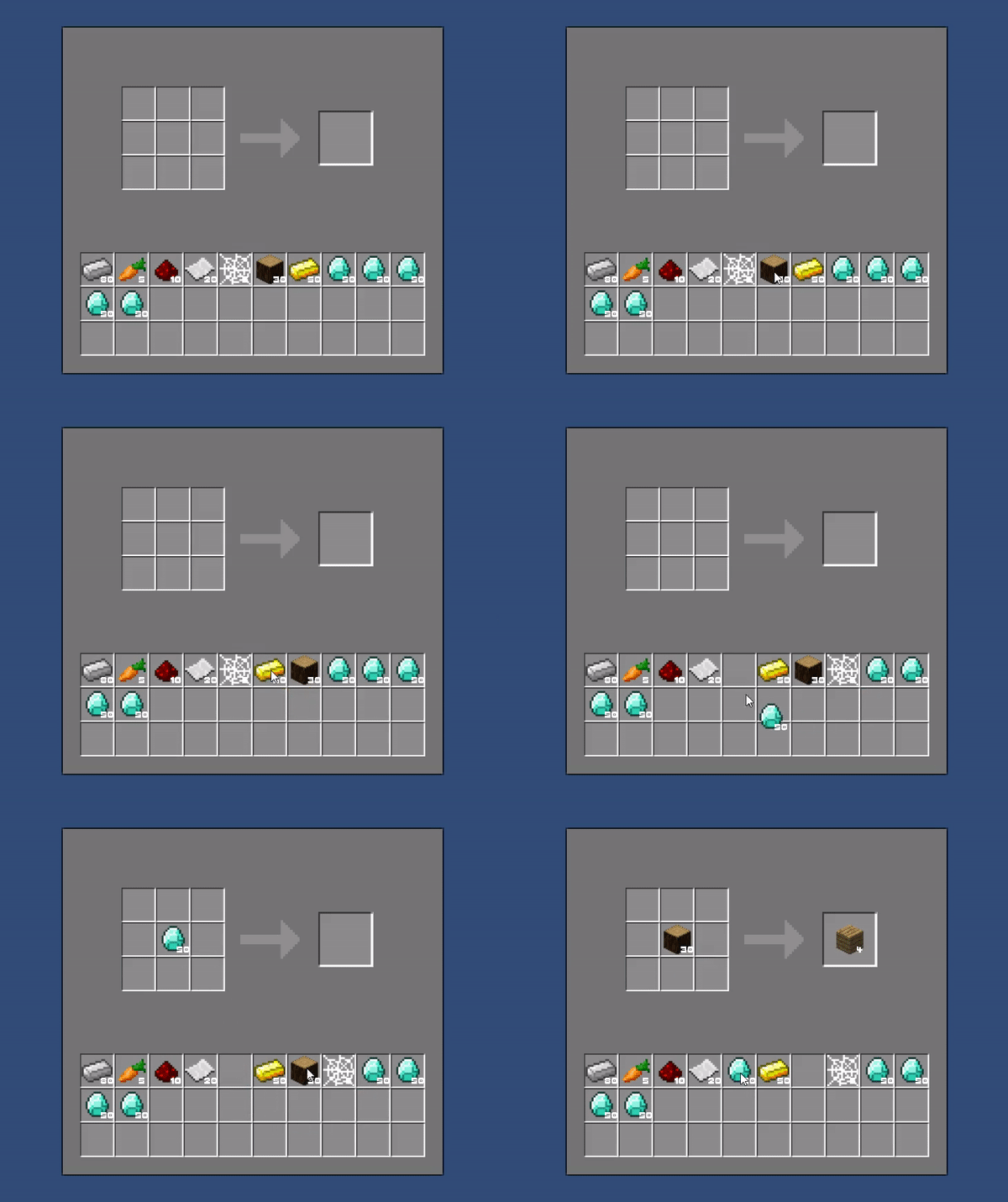
    // 다른 아이템인 경우 들고있는 아이템과 스왑
    else
    {
        cursorOnItem = true;
        switch (SlotType.slotType)
        {
            // 아이템을 놓을 수 없는 슬롯이라면... (아웃풋 슬롯)
            // 아웃풋 슬롯의 아이템을 가져갔다면.. 재료를 소모시킨다.
            case DropSlot.SlotType.OUTPUT:
                rectTransform.SetParent(InventoryUI.GetInstance.GetEmptySlot());
                rectTransform.anchoredPosition = new Vector3(0, 0, 0);
                onCraftEvent.Invoke();
                break;
            // 아이템을 놓을 수 있는 슬롯이라면...
            default:
                rectTransform.SetParent(slot.transform);
                rectTransform.anchoredPosition = new Vector3(0, 0, 0);
                break;
        }

        clickItem = slot.transform.GetChild(0).gameObject;
        rectTransform = slot.transform.GetChild(0).gameObject.GetComponent<RectTransform>();
        if (rectTransform) rectTransform.SetParent(canvas.transform.GetChild(0));
        onClickEvent.Invoke();
        return;
    }
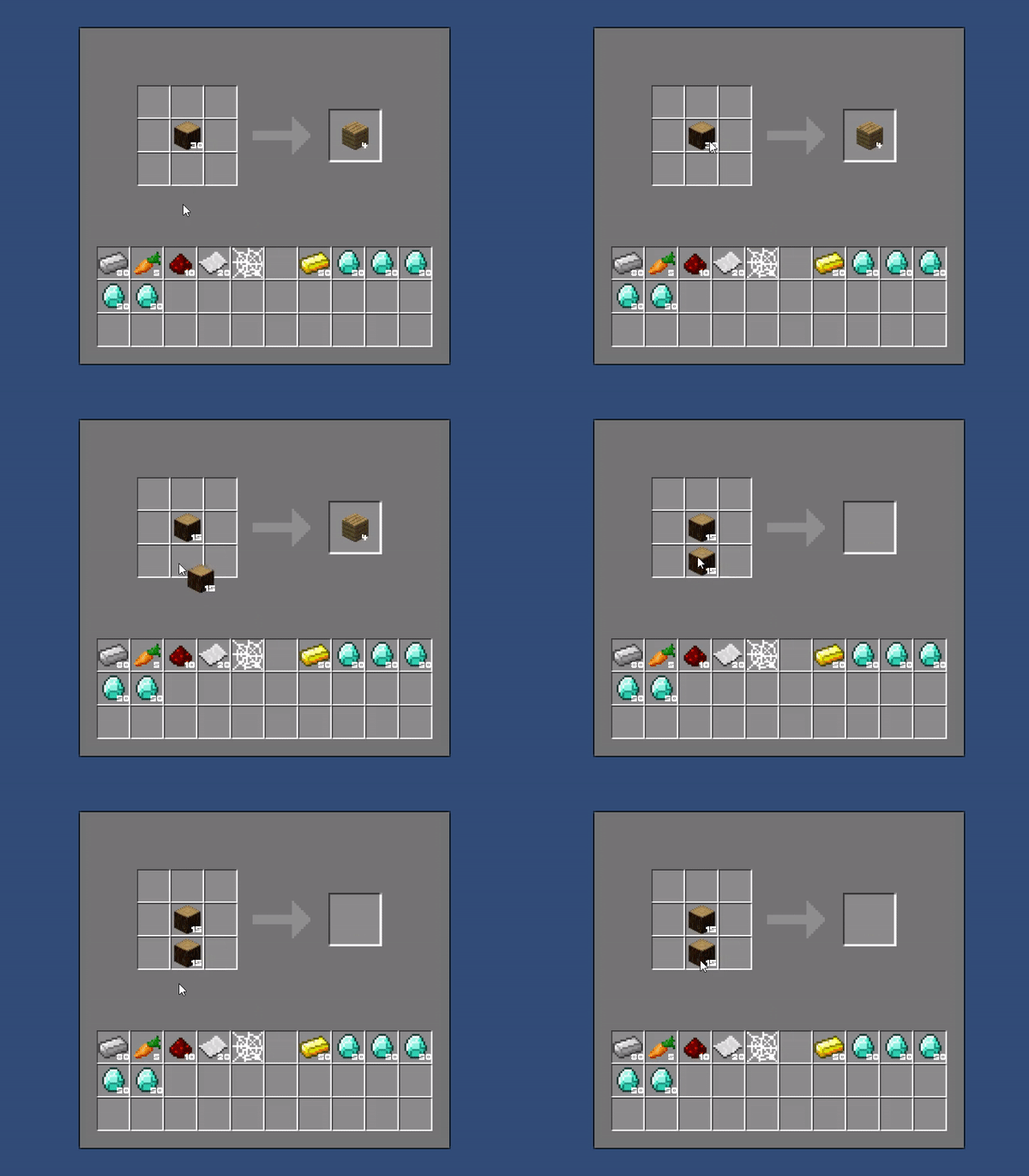
        // 아이템을 나눠야 하는 경우...
        if (SlotType && SlotType.slotType != DropSlot.SlotType.OUTPUT && OutputItem && OutputItem.count > 1)
        {
            // 커서 쪽에 아이템을 새로 만든다.
            GameObject temp = Instantiate(clickItem);
            temp.name = temp.GetComponent<Item>().type.ToString();
            temp.transform.SetParent(slot.transform);
            temp.GetComponent<RectTransform>().anchoredPosition = new Vector3(0, 0, 0);

            Item Slotitem = temp.GetComponent<Item>();

            // 슬롯과 커서쪽 아이템의 개수를 정해준다.
            if (Slotitem.count % 2 == 0)
            {
                Slotitem.count = OutputItem.count / 2;
                OutputItem.count = Slotitem.count;
            }
            else
            {
                Slotitem.count = OutputItem.count / 2 + 1;
                OutputItem.count = Slotitem.count - 1;
            }

            // UI쪽 text 설정
            Slotitem.resetcounting();
            OutputItem.resetcounting();
        }
        // 쇠 도끼 레시피
        recipe i_axerecipe = new recipe();
        i_axerecipe.output = Item.ItemType.i_axe;
        i_axerecipe.Recipe = new Item.ItemType[SIZE, SIZE];
        i_axerecipe.Recipe[0, 0] = Item.ItemType.iron_ingot;    i_axerecipe.Recipe[0, 1] = Item.ItemType.iron_ingot;    i_axerecipe.Recipe[0, 2] = Item.ItemType.none;
        i_axerecipe.Recipe[1, 0] = Item.ItemType.iron_ingot;    i_axerecipe.Recipe[1, 1] = Item.ItemType.stick;         i_axerecipe.Recipe[1, 2] = Item.ItemType.none;
        i_axerecipe.Recipe[2, 0] = Item.ItemType.none;          i_axerecipe.Recipe[2, 1] = Item.ItemType.stick;         i_axerecipe.Recipe[2, 2] = Item.ItemType.none;
- 여러 아이템의 레시피를 List에 저장합니다.
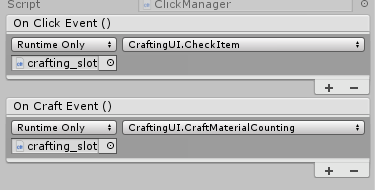
- UnityEvent로 등록해 아이템 이동(마우스 버튼 클릭 이벤트)을 할 때마다 두 함수가 작동되도록 구현했습니다. (Invoke함수 발동)
    // 크래프팅 3x3 슬롯에 아이템이 들어가거나 빠진 경우 슬롯 자리에 맞는 배열 자리에 아이템을 추가
    private Transform[,] slotArray;     // 3x3 제작 배열
    public void CheckItem()
    {
        for(int i = 0; i < CraftManager.SIZE; ++i)
        {
            for(int j = 0; j < CraftManager.SIZE; ++j)
            {
                // 슬롯 안에 아이템이 있다면...
                if (slotArray[i, j].childCount > 0 && slotArray[i, j].GetChild(0).gameObject.activeSelf)
                {
                    // 아이템을 제작 매니저에 등록
                    Item item = slotArray[i, j].GetChild(0).GetComponent<Item>();
                    if(item && item.count > 0) CraftManager.GetInstance.setItem(item, i, j);
                }
                // 아이템 삭제
                else CraftManager.GetInstance.DeleteItem(i, j);
            }
        }
        // 제작대에서 나올 아이템을 체크한다.
        OutputCheck();
    }
- CRAFT SLOT에 있는 아이템을 매니저에 등록합니다 이후 매니저에서 3x3배열로 아이템을 저장해 확인하도록 합니다.
    public void OutputCheck()
    {
        // OUTPUT 슬롯에 나올 아이템을 정해준다.
        outputType = CraftManager.GetInstance.GetRecipeOutput();
        // OUTPUT 슬롯에 나올 아이템이 없다면 함수 탈출
        if (outputType == Item.ItemType.none)
        {
            if (outputSlot.childCount > 0) Destroy(outputSlot.GetChild(0).gameObject);
            return;
        }

        int count = GetItemCount(outputType);

        // 아웃풋 슬롯에 이미 아이템이 있다면.. 타입이 다르면 삭제 후 생성
        if (outputSlot.childCount > 0)
        {
            Item slotItem = outputSlot.GetChild(0).gameObject.GetComponent<Item>();
            if(slotItem && slotItem.type != outputType)
            {
                Destroy(outputSlot.GetChild(0).gameObject);
                CreateItem(count);
            }
        }
        // 슬롯에 아이템이 없다면...
        else if(outputSlot.childCount == 0)
        {
            CreateItem(count);
        }
    }
- OUTPUT에서 나올 수 있는 아이템을 찾은 후 OUTPUT SLOT에 아이템을 생성합니다.
- 하나의 통괄 매니저를 만들어 모든 코드를 관리하도록 함 (싱글톤 활용)
- UI의 배열 설정 -> 인벤토리 아이템 생성 -> 모든 아이템 레시피 리스트 등록 -> 업데이트 문 작동(마우스 클릭 후 아이템 이동 및 제작대 탐색)
public class Manager : Singleton<Manager>
{
    // 통괄 매니저 모든 함수들
    private void Awake()
    {
        // UI의 슬롯들을 클래스의 변수 배열에 저장
        CraftingUI.GetInstance.CraftSlotInit();
        InventoryUI.GetInstance.InventorySlotInit();
    }

    void Start()
    {
        // 아이템 생성
        InventoryUI.GetInstance.AddItem(80, Item.ItemType.iron_ingot);
        InventoryUI.GetInstance.AddItem(5,  Item.ItemType.carrot);
        InventoryUI.GetInstance.AddItem(10, Item.ItemType.redstone);
        InventoryUI.GetInstance.AddItem(20, Item.ItemType.paper);
        InventoryUI.GetInstance.AddItem(5,  Item.ItemType.web);
        InventoryUI.GetInstance.AddItem(30, Item.ItemType.wood);
        InventoryUI.GetInstance.AddItem(50, Item.ItemType.gold_ingot);
        InventoryUI.GetInstance.AddItem(50, Item.ItemType.diamond_gem);
        InventoryUI.GetInstance.AddItem(50, Item.ItemType.diamond_gem);
        InventoryUI.GetInstance.AddItem(50, Item.ItemType.diamond_gem);
        InventoryUI.GetInstance.AddItem(50, Item.ItemType.diamond_gem);
        InventoryUI.GetInstance.AddItem(50, Item.ItemType.diamond_gem);

        // 레시피 생성, 캔버스 변수 저장
        CraftManager.GetInstance.recipeInit();
        ClickManager.GetInstance.CanvasInit();
    }

    private void Update()
    {
        ClickManager.GetInstance.ClickFunc();     // 마우스 클릭 이벤트
    }
}