Repository navigation
Race Calculator
The Race Calculator plans fuel, virtual energy and tyres of a race on one page: pit stop plan lap by lap, safety car and rain scenarios, several drivers, strategy comparison, and a live plan that follows the race. It replaces the former Fuel Calculator and Tyre Strategy Planner.
Open it with the Calculator entry of the navigation bar (under More when not in the bar: its + adds it), or the Tools menu.
-
Top bar:
Source(File|Game Session) with the file name or the track & class of the session, the live race status, thenUndo/Redo,Race Planmenu,Reset to Zeroand theEnabled/Disabledbutton. When the window is too narrow for every label (in any language), the buttons show their icon only, then go into a⋯menu (Enabled/Disabledalways stays a button). Menus close with a second click on their button. -
First use: three questions first (race length, pit stop time, data source), then the whole page (
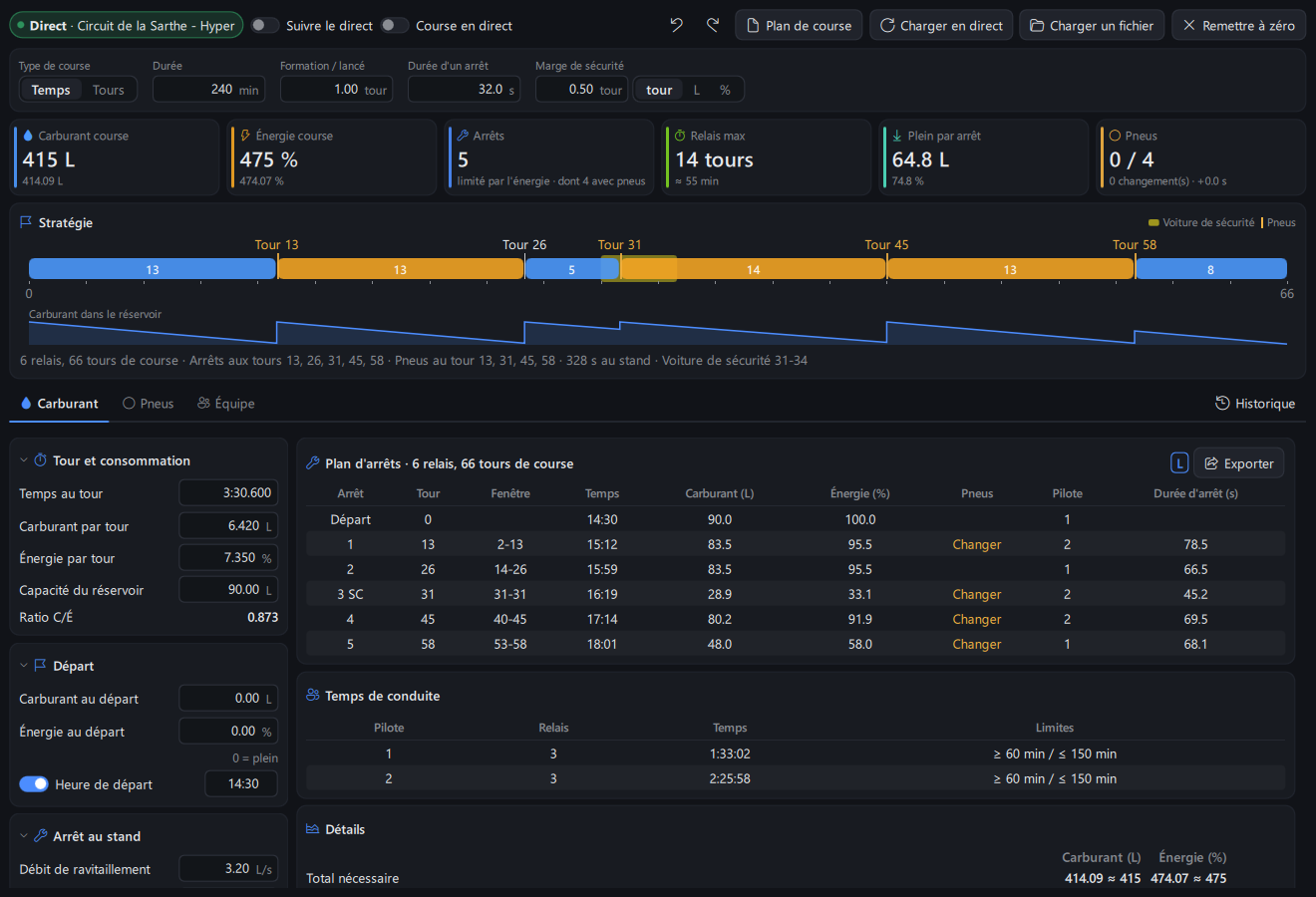
Skipshows it at once). Never asked again, nor when inputs were kept from an earlier version. - Race setup, key figures and strategy (shared by all tabs): race type and length, formation laps, pit stop time and safety margin; race fuel and energy, pit stops and what limits the stints, longest stint, average refill per stop, tyres used; then the strategy timeline with the fuel in the tank over the race.
-
Tabs:
Fuel(inputs, pit stop plan, details, scenarios, consumption history),Tyres(tyre wear, rules, tyre plan and stock),Team(line-up, driver of each stint, LMU team stints),Live(every value the game gives). The page reopens on the last tab.
On / off: the Enabled / Disabled switch (on by default, kept for next time) turns the whole page on or off, as in the Broadcast Director. Off, the page shows only Race Calculator is off and a Turn On Race Calculator button, and nothing is read from the game: no live laps, no live race plan, no class rivals, no automatic race plan of the car & track, no team stints or LMU garage screens, pit stops not counted. Inputs, tyre plan and race plan are kept for when it is turned back on, and the Race plan overlay still uses the last plan. Also from the race_calculator_toggle hotkey and the command palette (Ctrl+K, Race Calculator (On)), page open. While the page is open, its Race entry of the navigation bar has a dot: green on, grey off. Turned back on in a race, the stops made meanwhile were not counted. Turned off and hidden behind another page for 10 minutes, the page is closed to free memory, like any page, and opens again from the navigation bar (turned on, it stays open to follow the live race).
The inputs of the Fuel and Tyres tabs are grouped in sections: click a section title to fold it (it stays folded next time, its main values shown in the title). The Safety Car and Rain sections have their switch in the title. On a narrow window the key figures go on two rows and the consumption history below the plan.
A typed value is applied when you press Enter or leave the field (not at every key); everything is calculated again at once. Up / Down (or the mouse wheel once the field is selected) change the value by one step, Shift by ten steps, Esc cancels what you typed. The lap time is typed in one field: 1:59.950, or seconds (95.5). Inputs and the tyre plan are kept for next time. Fuel is shown in the unit of Settings > Units (L or gal), virtual energy in %.
-
Source>Game Session(choose it again to fill in again) fills lap time and consumption with the average of the last 5 valid laps at race pace of the live session (in and out laps left out), the race length of a live race, and every other value of theLivetab that is followed (pit stop times, tyre rules, drivers...: see Live tab). With LMU, before any valid lap, the game's own fuel and energy estimate is used. -
Source>Filereads a consumption history file (.consumptionor.csv). Once files were loaded, it opens a menu with the recent ones (up to 8; files no longer there are left out).Open Recentin theRace Planmenu and in the tyre planFilemenu does the same for race plans and tyre plans. - Drop a
.consumption,.race-planor.tyre-strategyfile on the page (or on the main window: the page opens) to load it. -
Follow Live(Livetab) updates the inputs at each new lap of the live session, and when the game data of theLivetab changes (values followed only). -
History(next to the tabs) shows the consumption history beside the plan (below on a narrow window): lap time, fuel, energy, battery, tyre wear per lap. Click a column title to sort (again: other way),Valid Laps Only, optional columns. Select laps (Ctrl+ click,Shift+ click,Ctrl+A) andAdd Selected Dataputs their average in the calculator (double click: one lap).Delete Selected(orDelete) andDelete Allremove laps from the history.
- Race type
TimeorLaps, duration, formation or rolling start laps, pit stop time (time lost in the pit lane), safety margin (in laps, fuel or %). - Lap and consumption: lap time, fuel and energy per lap, tank capacity. A car using energy only is planned on energy.
-
Start: starting fuel and energy (
0= full tank), start time of day (pit stops then shown at their time of day). -
Pit stop: refuel and energy rates (a splash costs less time than a full tank), driver change time,
Tyres Changed While Refuelling,Driver Change While Refuelling(the longest of service and driver change counts, as in LMU), in and out lap consumption. -
Race rules: mandatory stops, maximum stint time,
Balanced Stints(no short splash stint at the end),Leader Finishes First (+1 Lap)for time races. -
Pace: fuel effect on lap time, track evolution, saving cost.
Estimate from Historyfills them from your consumption history.Lap Time per °C(seconds per °C of air temperature, 0 = none) with theTemperature Trend(°C per hour, filled from the weather forecast of theLivetab) adds to the track evolution.
With 2 drivers or more, set the stints per driver and, for each driver, the lap time difference and the minimum and maximum total driving time. The Driving Time card shows stints and time of each driver, with limits not met in red.
A driver short of its minimum drives whole laps up to it before handing over (no stint just short of it, then one more stint), and the time other drivers still need, with their driver change, is kept for them. When the minimums add up to more than the race leaves to drive (pit stops take race time too), the plan is made without them and the Driving Time card says by how many minutes they are over.
-
Safety Car Scenario: a safety car (or full course yellow) period from a lap, for some laps, with consumption, lap time and tyre wear in % of race pace, and optionally a stop under safety car. -
Rain Scenario: a wet period with its consumption and lap time, and optionallyWet Tyres(stop for wets, then for slicks).
Both are compared with the plan without the scenario, and shown on the strategy timeline.
-
Safety Car Risk(switch in the title): safety cars coming at random,Safety Cars per Houron average, with the laps, consumption, lap time and pit time saved of theSafety Carsection. It shows the chance of one safety car at least over the race, the part of the race where a safety car saves one stop, and for each stint whether to stop under a safety car coming mid-stint or stay out, with the time it wins. Calculated in the background (a few tens of milliseconds for a 24 h race).
The saving target, strategy comparison, compound comparison and safety car risk are calculated on a worker thread, so typing in a long race stays smooth: only the results of the last change are shown.
- Strategy: a timeline with one block per stint (one color per driver), pit laps above (orange when tyres are changed), safety car and rain laps behind, and the fuel in the tank over the race below. Hover a stint or stop for details.
-
Pit Stop Plan: each stop with its lap, pit window (earliest and latest lap with the same number of stops), time, fuel and energy to add, tyres, driver and stop duration.
Export:Copy as Text,Copy for Discord,Export CSV…,Save Image…,Copy Picture(strategy and plan drawn at the same size whatever the window size). Once a file is written, a notice names it withShow in Folder; a file open in another program is left whole when the export fails. - Details: totals, laps a full tank lasts, what is left at stint end, consumption needed to save one stop.
- Saving target: laps per stint and consumption per lap needed for one stop less, with the time lost to saving and whether it is worth it.
- Strategy Comparison: the current plan against plans with up to 2 stops less (fuel saving) and one stop more: consumption, lap time lost, time in the pits, race time and gap. The best one is in bold.
-
Pit Menu(LMU, in a session): sets the refill of the next stop in the game pit menu, as the amount in the tank after the stop: virtual energy for a car using it (the fuel ratio is left as it is), fuel otherwise. The first setting of the menu reaching the plan amount is chosen; a notice tells what was set. It always sets the next stop still to come (Every stop of the plan is doneonce none is left), and the button is disabled outside a Le Mans Ultimate session.
While a race runs, the page proposes to plan the rest of the race from now (Plan From Now, or Not Now for this race); the switch is also in the Race in Progress card of the Live tab. Then the plan for the rest of the race is recalculated at each lap and each stop from the car (laps and time done, fuel, energy, tyres, stops done). The timeline and pit stop plan start at the current lap. Its status (top bar and Race in Progress card) also shows a safety car or full course yellow read from the game.
-
Drivers: the driver in the car and the driving time of each stint come from the race (race clock from pit exit to the next pit entry of each stop seen), not from the plan made before the race. Driver names are matched to the calculator drivers by their names in the
Teamtab line-up (names of the LMU team), else by the plan. -
Penalties & repair: a drive-through or stop & go to serve costs a pass in the pit lane (time race: fewer laps), a pending repair lengthens the next stop. Both are named on the strategy line.
-
Plan against Racecompares stints driven with the plan (laps, lap time, consumption, tyre wear), with the driver of each stint. -
Class Rivalslists the cars of your class: laps, stops, laps since their last stop and their next expected stop. Below it, where you rejoin if you stop at the end of this lap: class place, gap to the cars just ahead and behind, and how many pass you, from the race distance of each car and the time of the next stop of the plan (other cars not stopping meanwhile).
Every value of the calculator the game gives, next to the value of the calculator (in bold color when they differ), with where it comes from:
- Race: race length (race session), formation laps and start time of day (LMU session settings, or the track clock during a race), number of drivers (LMU team, names in the tooltip).
- Pace & consumption: lap time, fuel, energy and tyre wear per lap (average of the valid laps at race pace, else the game estimate), tank capacity, compound on the car.
- Race start: fuel, energy and tread of the car on the grid (race session, before the start).
- Pit stop: pit lane time (stops of the session), refuel and energy rates, driver change time, tyre change time (1-2 / 3-4 tyres), what is done while refuelling: the pit stop times of the series in LMU.
-
Tyres: tyre allocation of the race (LMU, while driving). Weather: rain from the forecast as a rain scenario (laps of the race in the wet), air temperature trend of the forecast (°C per hour, for
Lap Time per °C).
The arrow of a row fills that value in, Fill In All every value followed (the switch of each row: values left out are kept as you set them). Followed values are also filled in when Game Session is chosen as Source and by Follow Live (switch at the top of the card). Rough estimates (pit lane time from the pit lane length and speed limit, wear of the lap in progress) are never followed: fill them in by hand.
On the right, Race in Progress shows the race under way read from the game (lap, race time and time left, fuel, energy, tread, stops, safety car or full course yellow, penalties, class position, pending repair, next stop time of the game), and Tyres Available the tyres the pit menu offers (LMU): new compounds and used tyres of each wheel with their tread. Add Used Tyres to Stock puts them in the tyre stock with their own tread, to fit them by hand in the tyre plan (Propose Changes uses new tyres).
The LMU garage screens are asked every 10 seconds while the tab is shown or Follow Live is on (Refresh asks at once).
-
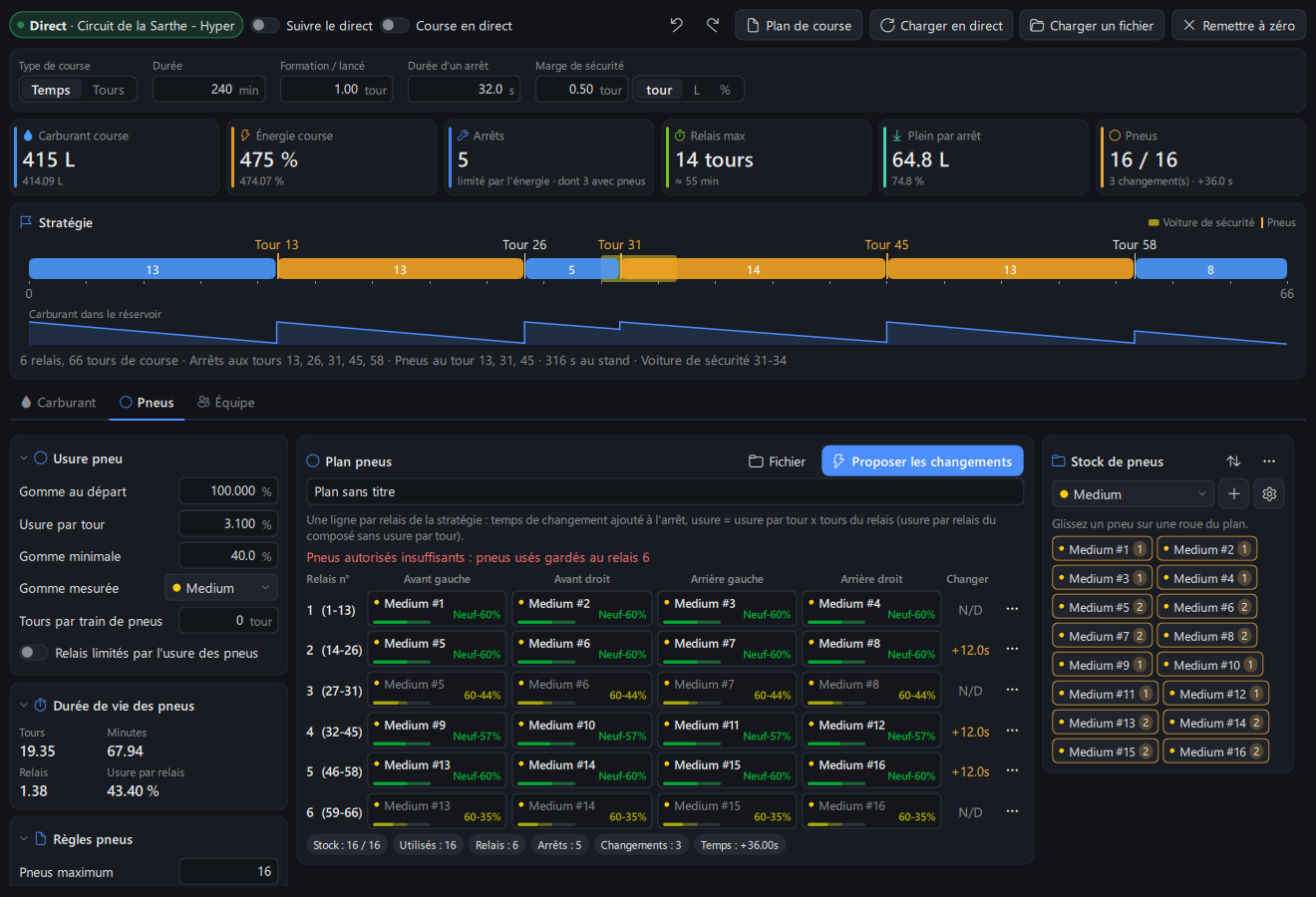
Tyre wear: starting tread, wear per lap, measured compound, minimum tread.
Laps per Tyre SetandStints Cut by Tyre Lifelimit stints to what the tyres last.Used Tyre Pace Loss: lap time lost per 10 % of tread already used when a stint starts (tyres kept for another stint, used tyres of the stock); without a tyre plan, tyres are proposed for a change when the time they would lose over the next stint is more than the time a change adds to the stop (nothing when changed while refuelling). -
Compound pace: the
Lap Time Deltaof each compound (gear button of the tyre stock, seconds, only the difference between compounds counts) slows or speeds up the stints of the tyre plan on that compound. - Compound Comparison: the whole race (or the rest of it) on Soft, Medium, Hard and the other dry compounds of the stock, with its wear and lap time difference: stops, tyre changes, time in the pits, laps, race time and gap, best in bold.
-
Tyre rules: maximum tyres for the race (
From Gamereads the LMU allocation of the session), tyre change time by number of tyres, restricted allocation (LMU rule). -
Tyre plan: one row per stint, the tyre on each wheel with its tread at the start and end of the stint (bar and text in the tread color, tyres used before shown dimmed when
Highlight New Tyreis on). Drag a tyre from the stock onto a wheel, or click a wheel to pick a tyre of the stock or take it off (Deleteon a selected wheel too). The...button of a row clears it, and without a strategy duplicates, inserts or deletes rows.Propose Changesfills the plan wheel by wheel at the stint where tread would go below the minimum, within the tyres allowed. -
Tyre stock: pick a compound (colored dot), add tyres (
+), set compound options (gear button), sort by compound or by stints, remove unused tyres or all tyres. Each tyre shows the stints it runs. - The tyre plan (
Filemenu) can be saved as a.tyre-strategyfile or exported as CSV.Ctrl+Z/Ctrl+Yundo and redo.
Plan an endurance race before it starts, then let the game fill in the real names.
-
Line-up: type the name of each driver (
Driver 2until named),Add Driverand the bin button change the number of drivers (theDriversof the race rules): a driver removed takes its pace, driving times and planned stints with it. Each driver shows its stints and driving time in the plan. -
Names from the game: with LMU, once the game gives the team of your car (garage screens or team stints, asked while the
TeamorLivetab is shown), its names replace the names typed. A name typed close to a real one keeps its place (KeennybecomesKeenny Hess), other real names take the places of names matching none, in order: the stints planned for a place stay with it. Names of the LMU team have a green check. -
Stint Plan: every stint of the plan with its laps, start time and duration, and its driver:
Autolets the plan choose (stints per driver, driving times), a driver chosen drives that stint whatever the plan changes.Keep Rotationkeeps the drivers the plan chose for every stint,All Autogives every stint back to the plan. With drivers planned, minimum driving times are checked (warning) but not used to plan. During a race, stints done show the driver seen and the stint in progress the driver in the car. - Names show in the pit stop plan, the strategy timeline, the
Driving Timecard and the exports. - On a narrow window,
Stint Plan/Team Stintsabove the cards shows one part at a time.
Reads the stints of every driver of your car from the game, teammates included: laps, fuel, virtual energy and tyre wear per lap. It refreshes every 15 seconds while shown (Refresh asks at once). Fill In Calculator copies the average of the selected stints into the inputs, with the tank capacity of the car.
The Race Plan menu:
-
Save Race Plan As…/Open Race Plan…: race setup, every input and the tyre plan in one.race-planfile, to keep or share with your team. -
Save for Current Car & TrackandOpen Plan of Car & Track Automatically: the plan comes back when you drive that car on that track. -
Undo/Redo(Ctrl+Z/Ctrl+Y) for inputs and tyre plan.
Turn on the Race Plan overlay (Overlays page) to see the next stop of your plan while driving:
- lap of the next stop and laps left (highlighted when close), fuel and energy to add, tyres to change, stops left;
- distance to the pit entry and the target consumption per lap to reach the next stop (LMU);
- a check of the game pit menu against the plan: for example
80>60Lin red when the refuel set in the game differs from the plan.
The overlay uses the last inputs of the calculator, even when the calculator page is closed, and is replanned at each lap during a race (option enable_live_replan), with the driver in the car, penalties and pending repair. With enable_live_consumption (on by default), the rest of the race is planned with the lap time and consumption of the latest 5 valid laps at race pace (3 at least), as the Game Session source, even with the page closed.
All options: Race calculator and Race plan.