Skip to content

Web Zip file importing#1062

Merged
BryonLewis merged 16 commits into
mainfrom
web/zip-upload
Jan 3, 2022
Merged

Web Zip file importing#1062
BryonLewis merged 16 commits into
mainfrom
web/zip-upload

Conversation

@BryonLewis
Copy link
Copy Markdown
Collaborator

@BryonLewis BryonLewis commented Nov 18, 2021

fixes #1033

Initial version of minimum viable product with basic functionality for uploading a zip containing flat list of media files and then running a post process on them to create a working annotation dataset.

Completed:

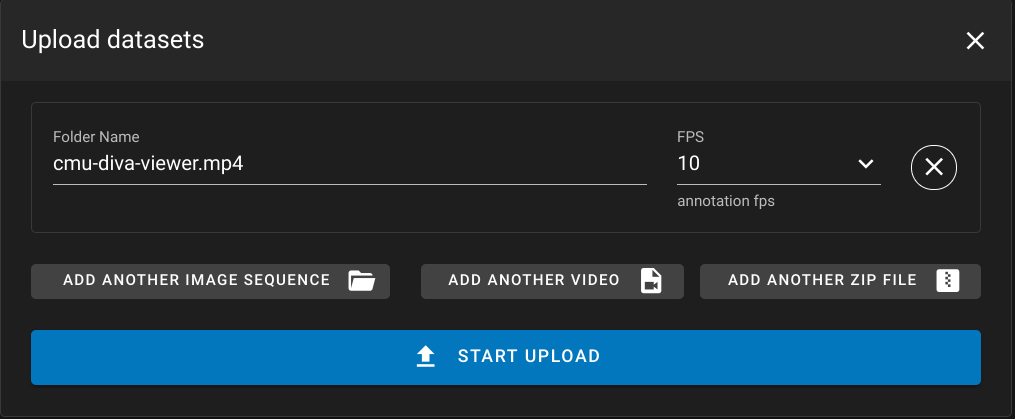
  • Added in Zip upload Button to the upload menu. This included changing the import-button component to have a small tag so the buttons better fit in the upload dialog. A Secondary fact was making it so when uploading a zip file you can only specify the folder name and the annotation FPS.
  • Post Process will now first look for a zip file which doesn't have the ZipFileExtractedMarker marker on it and will kick off a task to extract the zip file. On subsequent calls it will ignore the zip files which have this marker preventing zip files from being extracted multiple times.
  • Checks are in place for ZipBombs, based on the compression level of the zip file as well as nested Zip files. This should hopefully prevent nefarious uploads of zip files from being used.
  • Zip extraction for a single flat zip file works by checking for bad zip files (Nested or high compression ratios) and then validating the media inside of the zip file using the dive_dataset/validate_files endpoint.
  • After extracting in the worker the data is pushed to the containing folder. The zip file has the ZipFileExtractedMarker added to it and the dive_rpc/postprocess endpoint is called once again to perform any transcoding.
  • Second dive_rpc/postprocess will also move any zip files that have been processed into a source folder to keep the root of the dataset directory clean.
  • integration testing was implemented for zip files independently of the other upload/postprocess tests. New zip package was added to the testing folder for all of these files. These include tests of malformed zip files and nested zip files, as well as files which contain a high compression ratio (potential zipBombs)

Copy link
Copy Markdown
Contributor

@subdavis subdavis left a comment

Choose a reason for hiding this comment

The reason will be displayed to describe this comment to others. Learn more.

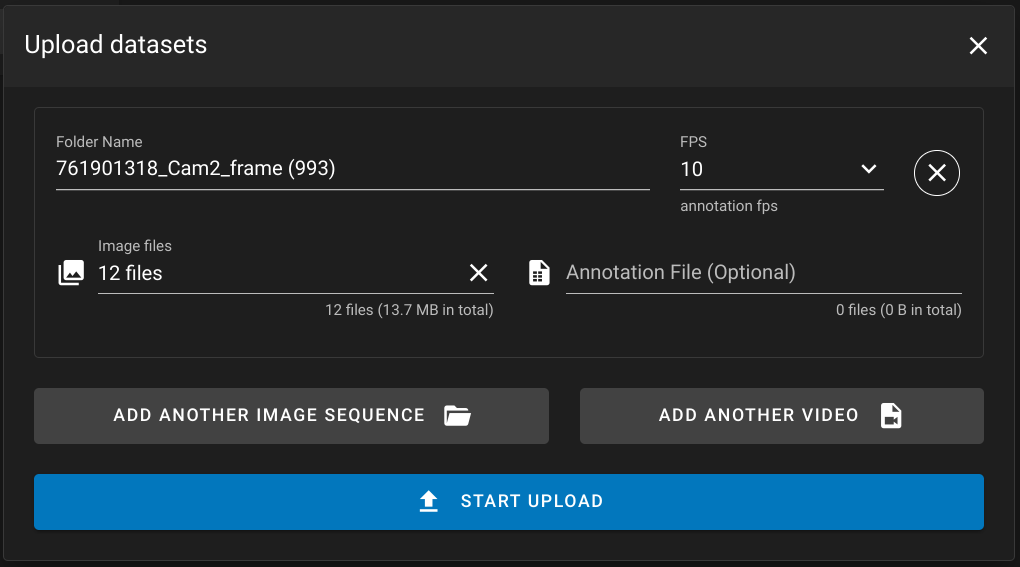
I think there's also a new UI bug: The "annotations" and "Image Files" (image type only, obvs) lines are now missing from regular video and image sequence.

Before After
Screenshot from 2021-11-29 12-00-23 Screenshot from 2021-11-29 11-59-00

Comment thread server/tests/integration/test_zip_uploads.py Outdated
Comment thread server/tests/integration/conftest.py Outdated
Comment thread client/platform/web-girder/views/Upload.vue Outdated
Comment thread docs/Web-Version.md Outdated
Comment on lines +39 to +40
Single flat annotations inside of a zip file can be uploaded as well as invidiual videos or images.
Images can be zipped together with their annotations and uploaded.
Copy link
Copy Markdown
Contributor

Choose a reason for hiding this comment

The reason will be displayed to describe this comment to others. Learn more.

I think this could be more clearly written. What can you have inside a zip file? Perhaps something like this:


A zip import can have one of the following file combinations:

  • One or more images, an optional annotation file, and an optional configuration file
  • One video with an optional annotation file and an optional configuration file

Comment thread server/dive_server/crud_rpc.py Outdated
Comment thread server/dive_tasks/tasks.py Outdated
@BryonLewis
Copy link
Copy Markdown
Collaborator Author

Addressed comments.

  • Left the zip marker in there. I like the idea of knowing explicitly that this file has been imported, also useful if we add other items into the source folder (like the fact that we don't backup source transcoded images, but do it for source videos)
  • added in Job status constants instead of the integer values
  • the girder worker task will now do the movement of the zip file to the 'source' folder
  • limited the zip file processing to only the first file found in the folder

@BryonLewis BryonLewis requested a review from subdavis December 1, 2021 14:48
Copy link
Copy Markdown
Contributor

@subdavis subdavis left a comment

Choose a reason for hiding this comment

The reason will be displayed to describe this comment to others. Learn more.

Please reorder operations in the celery task

The rest (defensive logic, eslint issues) are just suggestions you can ignore if you want.

preUploadErrorMessage.value = null;
try {
if (dstype !== 'zip') {
// eslint-disable-next-line @typescript-eslint/no-use-before-define
Copy link
Copy Markdown
Contributor

Choose a reason for hiding this comment

The reason will be displayed to describe this comment to others. Learn more.

Sorry can we do this one too? I don't know why these got in here, I'm sure there was a reason.

const openImport = async (dstype: DatasetType | 'zip') => {
const ret = await openFromDisk(dstype);
if (!ret.canceled && ret.fileList) {
// eslint-disable-next-line @typescript-eslint/no-use-before-define
Copy link
Copy Markdown
Contributor

Choose a reason for hiding this comment

The reason will be displayed to describe this comment to others. Learn more.

And this one?

Comment thread server/dive_server/crud_rpc.py Outdated
Comment thread server/dive_tasks/tasks.py
Comment on lines +606 to +656
gc.sendRestRequest(
"PUT",
f"/item/{str(itemId)}?name={item['name']}&folderId={str(created_folder['_id'])}",
json=metadata,
)
Copy link
Copy Markdown
Contributor

Choose a reason for hiding this comment

The reason will be displayed to describe this comment to others. Learn more.

I think this PUT and the metadata update should happen just before the directory upload instead of after it.

As is, you could end up in a loop where stuff keeps getting uploaded, but the zip never moves or has its metadata updated, if, for example, an exception is encountered during upload. In a worst case, this could just run over and over until disk fills up.

Then, if there's a problem, the celery task will report that it failed and it won't be able to run again.

@BryonLewis
Copy link
Copy Markdown
Collaborator Author

Importing Zip File Exports:

background:
An exported dataset in a single zip should also be imported properly into the system.
Contains auxiliary folder which can be ignored except for the most recent result.json file may be inside of it.
Can contain multiple video files (one transcoded and one source)

Logic:

  • First check subfolders (exports have a named subfolder which contains the exported data)
  • check for a root file in the subfolder "meta.json" - this indicates that this is a valid export zip.
  • base on type upload the video or imageData to the girder folder
  • If the type is 'video', upload the video["filename"] file and set the proper metadata - codec: h264, originalFps: {fps}, orignalFPsString: {fpsString}, source_video: false, transcoder:ffmpeg
  • if the type is 'video' also upload the source video and apply the proper metadata - codec:{codec}, originalFps: {fps}, orignalFPsString: {fpsString}, source_video: true
  • If the type is 'image-sequence' upload all identified images in the meta.json file
  • set the folder metadata - annotate: true, fps: {meta.fps}, type: {image-sequence | video}
  • upload the meta.json and the csv
  • Call postprocess (if everything is tagged correctly it shouldn't do anything to videos for transcoding), This should take the csv and convert it to JSON as well as import the meta.json file to set styling and confidence filters.

Erroring:

  • If anything in the above logic fails it should drop back to flat file importing.
  • So if the meta.json is missing from subfolder (without multiple subfolders it will fall back to standard import)
  • Text output in the job need to be updated to indicate that there is no meta.json located in the subfolder so it is treating it as a flat import
  • Any misalignment between the meta.json and the contents of the zipFolder should result in an error

@subdavis
Copy link
Copy Markdown
Contributor

subdavis commented Dec 2, 2021

Edit: I agree with the approach, below comments kept as record.


I'm not totally sure we want to duplicate possibly fragile logic here in the worker task.

  • We now have to keep track of another place where metadata gets set if logic changes (it sometimes does), which means more information that only exists in our brains.
  • We have new code to worry about breaking if the content of the export zip changes, which it has several times.

I think it'd be better to try and make this function as dumb as possible, leaving the decision making to postprocess where all the hard decisions about what to do with a folder full of unmarked files is already handled.

Once you know you're dealing with an export (meta.json is present) you can just push everything to the server and make the server deal with it. Postprocess could even pick the dataset type based on what it finds so the worker doesn't need to open the meta file at all.

The thing I'm mostly guarding against here is having one logical path mimic the private behavior of another, because that puts a lot of burden on us to remember that we did that.

@BryonLewis BryonLewis force-pushed the web/zip-upload branch 2 times, most recently from 16b9f3c to 99b8b1a Compare December 15, 2021 16:44
@BryonLewis
Copy link
Copy Markdown
Collaborator Author

Okay since the last review:

  • Two util function which handle upload and creation of flat media folders and dataset folder
  • Dataset upload relies on reading in the meta.json file and using that to verify data as well as set the proper video transcoded version
  • The task has been restructured to allow for multiple flat files or multiple dataset folders that are zipped into a single file. In this case it will create sub dataset folders and upload the data to each one. On completion of the subfolders it will remove the base auxiliary folder as well as remove the metadata that is initially set (type: zip and default fps)
  • Added in some more constants for auxiliary and meta.json because of their use across the project
  • integration tests are updated to attempt these new zip file formats as well.

Let me know if I've been too accommodating to the point of fragility and if I should dial back some of the support (multi-folder).

@BryonLewis BryonLewis requested a review from subdavis December 15, 2021 17:08
Copy link
Copy Markdown
Contributor

@subdavis subdavis left a comment

Choose a reason for hiding this comment

The reason will be displayed to describe this comment to others. Learn more.

There are a few more minor nits here, and one more open ended concern.

I tested with a zip file that extracts to a sub folder (IMO, most correct zip folders should not tarbomb, so I try to make zip files that contain a single sub-folder like this).

It didn't work, and I'm not sure if it is supposed to from looking at the code, but I sorta think it should?

Fetching input from 61c0a108ac730287a6f624a8 to /tmp/tmp1cc2rnha/sub_cf2e010daaf375e60dc7728ee74a683f#201106161330_8.zip...
Extracting: sub_cf2e010daaf375e60dc7728ee74a683f#201106161330_8/tmp5p6l0nzv.mp4
Extracting: sub_cf2e010daaf375e60dc7728ee74a683f#201106161330_8/result_04-04-2021_01:55:13.json
Extracting: sub_cf2e010daaf375e60dc7728ee74a683f#201106161330_8/output_tracks.csv
Message: No supported media-type files found
Invalid state transition to '3', Current state is '4'.

Also, that invalid transition exists because you shouldn't use JobStatus.ERROR directly in a celery task. You should just raise an exception and let girder worker catch it and do the transition for you.

See examples in other tasks where I raise Exception. You could also do RuntimeError -- I haven't been that consistent.

Comment thread docs/Web-Version.md Outdated
Comment thread server/dive_server/crud_rpc.py Outdated
Comment on lines +400 to +415
# only support first zip file found
return dsFolder
Copy link
Copy Markdown
Contributor

Choose a reason for hiding this comment

The reason will be displayed to describe this comment to others. Learn more.

This early return makes me a little uneasy. In the case were other files were found, there's sort of an undefined behavior where you aren't sure if there were other items in the folder that just got ignored, which other functions like download/export may encounter and either erroneously return or error on. It also doesn't give process_items the opportunity to run, which I think it should be allowed to do even though it's a no-op.

I think I'd prefer an error condition here, where you convert the cursor to a list, assert that its length is at most 1, and otherwise throw a 500 error (because at this point, the server is in an invalid state and there is no automated intervention that can fix the folder).

And if there are zipItems, I think you need to check that Folder().childItems() also returns a single item and throw an error otherwise.


@pytest.mark.integration
@pytest.mark.parametrize("user", zipUser.values())
@pytest.mark.run(order=4)
Copy link
Copy Markdown
Contributor

Choose a reason for hiding this comment

The reason will be displayed to describe this comment to others. Learn more.

Because these are all order 4, you don't know what order they'll run in. It may be an accident that these tests work. Do you know if order here is guaranteed?

Copy link
Copy Markdown
Collaborator Author

Choose a reason for hiding this comment

The reason will be displayed to describe this comment to others. Learn more.

It seems it would be better to match up user creation, data reset and upload with the other ordering for other tests.

Comment thread server/dive_tasks/tasks.py
Comment thread server/dive_tasks/tasks.py Outdated
Comment on lines +595 to +612
# validation of files in folder using dive/data
created_folder = gc.createFolder(
folderId,
constants.SourceFolderName,
reuseExisting=True,
)
gc.sendRestRequest(
"PUT",
f"/item/{str(item['_id'])}?folderId={str(created_folder['_id'])}",
)
Copy link
Copy Markdown
Contributor

Choose a reason for hiding this comment

The reason will be displayed to describe this comment to others. Learn more.

Does this comment go with these lines? Seems like this is moving the zip to source, but the comment says otherwise.

Copy link
Copy Markdown
Collaborator Author

Choose a reason for hiding this comment

The reason will be displayed to describe this comment to others. Learn more.

yeah, I must have moved stuff around and forgot about the comment.

Comment thread server/dive_tasks/tasks.py Outdated
BryonLewis and others added 2 commits December 28, 2021 17:13
Co-authored-by: Brandon Davis <brandon.davis@kitware.com>
@subdavis
Copy link
Copy Markdown
Contributor

subdavis commented Jan 3, 2022

I think #1099 is needed for this to work as expected.

* Arbitrary depth support for imports

* Respond to comments
@subdavis subdavis self-requested a review January 3, 2022 16:26
@BryonLewis BryonLewis merged commit 511872b into main Jan 3, 2022
@BryonLewis BryonLewis deleted the web/zip-upload branch January 3, 2022 16:42
Sign up for free to join this conversation on GitHub. Already have an account? Sign in to comment

Labels

None yet

Projects

None yet

Development

Successfully merging this pull request may close these issues.

Upload or Import via Zip file

2 participants