Conversation


 BryonLewis
left a comment
BryonLewis
left a comment
BryonLewis
left a comment
There was a problem hiding this comment.
Sorry about this and how it might be a mass of questions with no good answers. I think this works really well especially if we limit it to 2 selections for a merge. The things I feel may need to be addressed are the EventChart, attributes merging where possible (just like features), and making it easier for someone to know why they can't select items anymore if the merge abort button is hidden.
Here are some of my questions/comments. Feel free to say out of scope for any of these:
- Unselect items from the merge list by clicking on them again?
- Merging of attributes that don’t conflict (have code comment about this)?
- Order matters for features like interpolation and geometry but not for confidence pairs especially when they have the same value (1.00), then it is up to the sorting of types. I would guess the confidenPair editor would resolve this?
- Need some sort of indication to the user why editing isn’t working. Either a notification or something to draw attention to the merge button being active.
- In relation to above clicking on a track in the track list with the merge panel should kick you out of merge mode. At least until we have a 3-pane system. Maybe this would be fixed by the above notification indicating being in merge mode. It seems a bit unsettling that the only way to kick out of the merge mode is escape key, or using the abort button which could be come hidden.
- We may want to do some more thinking about merges and how they interact with interpolation. The end frame of the base merge track if it is after the begin frame for interpolation in the second tack could squash all interpolation. Is this what we want?
my usual out of scope ideas:
- (Definitely out of scope) - Event chart display of the merged track. Helps know what the final track would look like with the keyframes and interpolation. Even knowing the order based feature merge it's hard for me to conceptualize more complicated track structures and how they will look when merged.
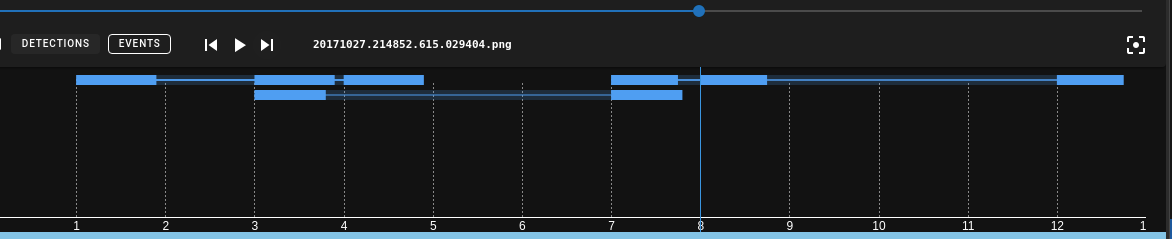
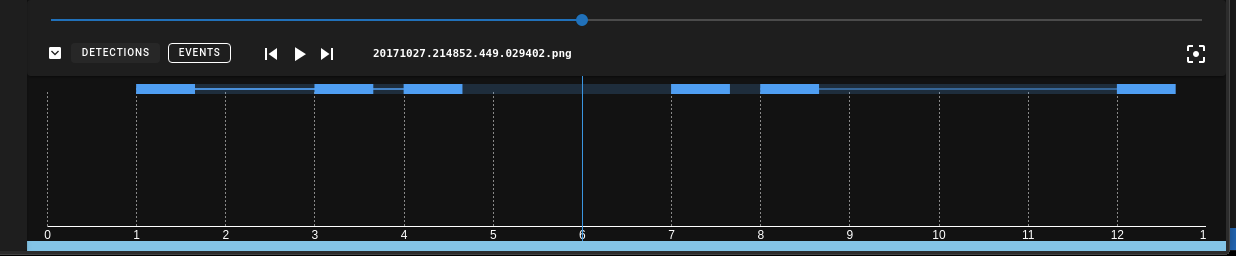
- was hard for me know that would be the outcome (ignore the minor frame scale zoom). Could be fixed by limiting to two tracks initially.
- I really enjoy multi selection and kind of wish it was built in by default and that you could just flip to the track details at anytime you had multiple items selected and perform a merge. It's nice for setting track types, deletion of items.
| <confidence-subsection | ||
| style="max-height:33vh" | ||
| :confidence-pairs="selectedTrack.confidencePairs" | ||
| :confidence-pairs="flatten(selectedTrackList.map((t) => t.confidencePairs))" |
There was a problem hiding this comment.
I like how this shows the merging of the confidence pairs. It may be a pain but think we could do the same thing with track attributes? It just seems natural that they are there so they should be displayed as well as a preview of the merge results.
There was a problem hiding this comment.
I don't think it will be possible to make that make sense. Even the relatively simple confidence pair list is a conceptual stretch. I've disabled the attributes in merge mode because all track editing should mostly be disabled during merge.

|
In addition to the inline comments:
Fixed
Fixed
Fixed sort order of appearance and confidence pair merge. Now, they only set if the merging into type is higher than the base type. See the new unit tests if you're interested.
I'm not really worried about this. You'd have to 1) accidentally turn on merge mode and 2) accidentally leave the track details panel and not know how either of them work to get confused and stuck. There isn't an event system right now to intercept and handle this stuff, though I think there should be and we've talked about it before.
You might be right, but I'm not sure. it might be that the best way to handle merge mode is to just lock into the track details panel until merge is aborted or completed? It seems weird for selection change in one context (viewer) to cause a merge stage event but in another (track list) for it to cause you to get kicked out. I made the merge button louder (red).
I make no argument that the current behavior is the best, only that it is the simplest. I think I'd like to leave it up to users to tell us if it's not what they wanted. We should follow up with Jack in particular after this launches. |
BryonLewis
left a comment
BryonLewis
left a comment
There was a problem hiding this comment.
I like the info message added when a track isn't selected in the track details page and the more prominent indication of being in merge mode.
One Small Bug:
You can swap from track details to the normal list while in merge mode. Delete a selected merge track using the trashcan icon in the track list and then when you swap back to track details it will error out because that track is no longer in the trackMap. So either disabling delete, or having the mergeList update when a track is deleted to know it should no longer attempt to the merge the removed trackId.
| }); | ||
|
|
||
| const allSelectedIds = computed(() => { | ||
| if (selectedTrackId.value) { |
There was a problem hiding this comment.
Missed it before, but caught it now. selectedTrackId = 0 means a false here. Needs to be !== null?
|
Fixed comments. I also made a change to the behavior of Thoughts? |

This was going to eventually needed to be implemented for the confidencePair editor. The assumption before was that there was nothing that called it with a value <1.0. Thanks for doing this, it future proofs it for the eventual manual setting of custom types. I don't know if we need a discussion in the future as to whether a user adjusting the type should always result in a 1.0 type? |
BryonLewis
left a comment
BryonLewis
left a comment
There was a problem hiding this comment.
Looks good and thanks for adding that update to setType
2 participants


This was way simpler than I thought it would be.
Screencast.2021-03-31.15.35.29.mp4
This is a draft because I'd like some general UI feedback from @BryonLewis
mkey toggles merge modeshift+mcommits merge.closes #241