Conversation


 subdavis
force-pushed
the
gc-rabbit-updates
branch
from
subdavis
force-pushed
the
gc-rabbit-updates
branch
from
505b672 to
a2f9158
Compare

|
build fix worked, I'm looking at it now |

|
Pushed a lint fix. Those url validators aren't very easy to use. |

There was a problem hiding this comment.
Works really well and I was easily able to get it up and running on my local machine and swap between the user/server queues for different tasks.
Only thing I think needs to be fixed in the minor Vue variable issue I have a code reference to.
These may be future changes and not part of this PR:
- Indication of job type (server vs user) in the job list.
- A way to unqueue user jobs and swap them back into the main queue? This can be resolved with job cancelling but there is that extra step of going to the /girder interface. This is a problem if I start a user queued job and don't have my worker up. Then decide I want to to turn of the user queue and use the server workers instead. If I don't cancel the job I get an error:
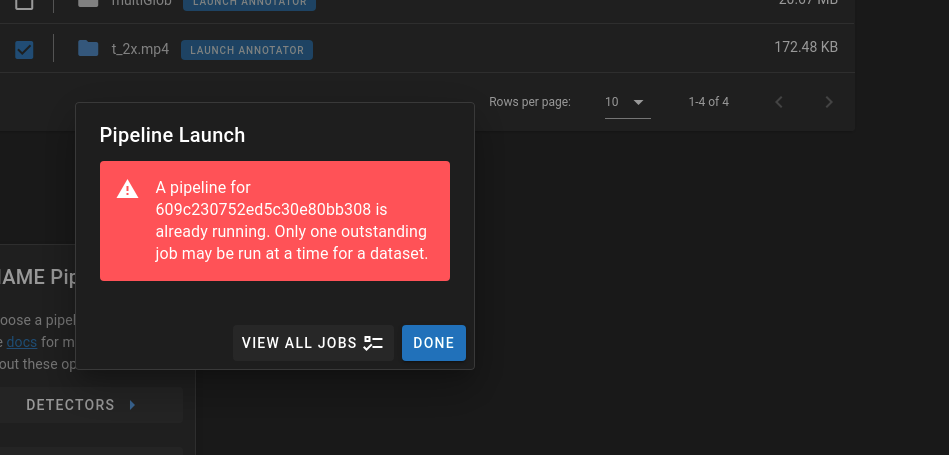
Questions:
- During the setup the user should have an understanding that using a remote worker with data stored on viame.kitware.com will require downloading all of the data from viame.kitware.com. Meaning that if someone is trying to run pipelines on cloned datasets in the public collection they will be ingesting a lot and our server will be transferring a lot?
- Cleaner Error Handling? :
- Wrong or incomplete /opt/noaa/viame folder? This will be greatly helped if we can tell the difference between user and server jobs.
Running command: . /opt/noaa/viame/setup_viame.sh && kwiver runner -s input:video_reader:type=vidl_ffmpeg -p /tmp/addons/extracted/configs/pipelines/detector_motion.pipe -s input:video_filename=/tmp/tmp51jo3wez/tmp62_fgrc0.mp4 -s downsampler:target_frame_rate=10 -s detector_writer:file_name=/tmp/tmpk1tb2mrk/detector_output.csv -s track_writer:file_name=/tmp/tmpk1tb2mrk/track_output.csv
RuntimeError: Pipeline exited with nonzero status code 255: INFO: Could not load default logger factory. Using built-in logger.
2021-05-12 20:03:45.819 INFO vital.modules.module_loader(66): Loading python modules
Caught unhandled kwiver::vital::vital_exception: The file does not exist: /tmp/addons/extracted/configs/pipelines/detector_motion.pipe, thrown from /viame/packages/kwiver/sprokit/src/sprokit/pipeline_util/pipeline_builder.cxx:104

  File "/home/worker/venv/lib/python3.7/site-packages/celery/app/trace.py", line 412, in trace_task
    R = retval = fun(*args, **kwargs)
  File "/home/worker/venv/lib/python3.7/site-packages/girder_worker/task.py", line 153, in __call__
    results = super(Task, self).__call__(*_t_args, **_t_kwargs)
  File "/home/worker/venv/lib/python3.7/site-packages/celery/app/trace.py", line 704, in __protected_call__
    return self.run(*args, **kwargs)
  File "/home/viame_girder/dive_tasks/tasks.py", line 274, in run_pipeline
    stream_subprocess(process, self, manager, process_err_file, cleanup=cleanup)
  File "/home/viame_girder/dive_tasks/utils.
The above would have me scratching my head until I figured out is a user job with a local install of VIAME which doesn't include the motion pipeline. I just know that my head wouldn't immediately jump to that and I would be thinking something is wrong with the server or /addons.
| async function setPrivateQueueEnabled(value: boolean) { | ||
| loading.value = true; | ||
| const resp = await setUsePrivateQueue(restClient.user._id, value); | ||
| privateQueueEnabled.value = resp.user_private_queue_enabled; |
There was a problem hiding this comment.
I think you need to either use a different initialization for the privateQueueEnabled or make it so that restClient refreshes the user data after setting or manually edit the restClient.user.user_private_queue_enabled to the return result (but I'm guessing that should a read-only val). I.E. If you toggle this setting go back to data and back to this page it will have the old value still stuck in restClient.user.user_private_queue_enabled instead of the new value.
|
These are great comments.
Agree that this is an issue. It doesn't have a good solution because the only way to clear a message from a queue is to read it.
Agree.
I'll address this in documentation.
Yes. In a perfect world, I'd actually want to hit https://viame.kitware.com/girder/api/v1/viame/pipelines and then check the contents of the pipeline folder to make sure it matches. Could even add checksums to the pipeline item objects. For now, some catch-all about updating your VIAME installation and making sure to install addons seems appropriate. |
 BryonLewis
left a comment
BryonLewis
left a comment
BryonLewis
left a comment
There was a problem hiding this comment.
Did a second run of tests and stuff all seems to be working and it's nice having the tagging and the better error messages for missing pipelines.
2 participants


Private job runner.
jobs page
Runner