Conversation


|
|
||
| const forceMediaTranscode = (event: boolean) => { | ||
| if (event) { | ||
| const mediaFile = `${argCopy.value.jsonMeta.originalBasePath}/${argCopy.value.jsonMeta.originalVideoFile}`; |
There was a problem hiding this comment.
I'm conflicted about this line. Nowhere else in the client code is privy to the details of how a disk path is constructed. Everywhere else, the client allows the server to provide a resource URL to media files and does not attempt to make assumptions about disk layout from information in DatasetMeta.
Also, you can't guarantee originalBasePath doesn't end with /, leaving you with "/basepath//filepath.mp4"; You need to use import npath from 'path'; npath.join(), but this is a nodejs only library, so it can't be done on the client.
Does this work on windows? Wouldn't you end up with "C:\\some\base\path/video.mp4"? And if not, what if native/common.ts changed in the future such that it was? That change should only affect the node backend code, not client code.
I think you need a new boolean force transcode flag on the import payload.
There was a problem hiding this comment.
Yeah, that's a great point. I was avoiding the npath import but didn't fully think of the implications especially when it comes to windows. I'll change it to an option on the importayload

There was a problem hiding this comment.
- I liked the effect in the previous iteration where turning on force transcoding enabled the blue transcoding alert message.
- Maybe add a short description to the switch to explain what this toggle does and why it might be necessary, though if you think this is overkill, feel free to ignore.
| Dataset will not be available until transcoding is complete. | ||
| </v-alert> | ||
| <v-alert | ||
| v-if="importData.mediaConvertList.length === 0 && argCopy.mediaConvertList.length" |
There was a problem hiding this comment.
I think this is out of date.
|
I noticed during large media file imports the screen was empty for a few seconds while the checkMedia was doing the ffprobe frame check. The length of time seems to be dependent on the file and the container. Instead of leaving the screen empty I added the dialog with a To replicate import any of the DIVA AVI videos to see the delay. |
 subdavis
left a comment
subdavis
left a comment
subdavis
left a comment
There was a problem hiding this comment.
Works as expected. Any solution to the ffprobe issue should be a separate PR since it isn't caused by this change.
2 participants


fixes #922
Added in new Transcode option under the advanced import options.
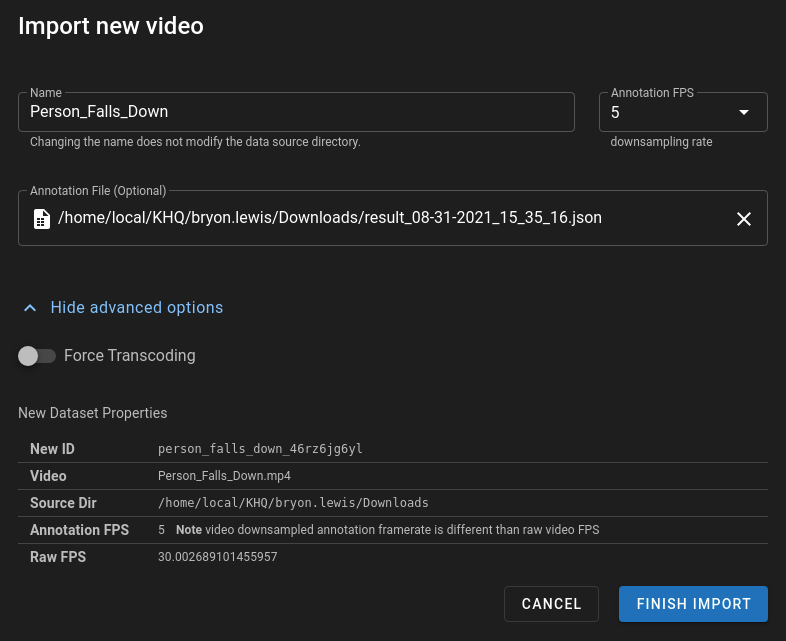
Transcode will add the video to the
mediaConvertList(The list that will determine if items are not web safe and should be transcoded, or transcoded for non-square pixels/ frame misalignment).