Repository navigation
Getting started
- Install Fabric Loader 0.19.5 or newer for Minecraft 26.3, and Fabric API. Java 25 is needed.
- Put the Billboard API jar into the
modsfolder. - On a server, install it on the server and on every client.
| Block | Recipe | Gives |
|---|---|---|
| Lua Box | 4 iron ingots in the corners, 4 redstone in the sides, 1 paper in the middle | 1 |
| Data Pipe | planks, paper, planks in a row | 8 |
| Redstone Port | 1 Data Pipe and 1 redstone dust, in any order | 1 |
All three break fastest with an axe.
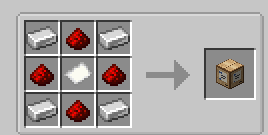
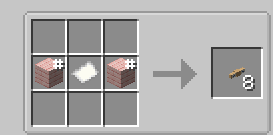

-
Place a Lua Box, and a sign right next to it.
-
Write a file called
main.luain any text editor:local sign = network.find("sign")[1] sign.setLine(1, "Hello") while true do sign.setLine(2, textutils.formatTime(os.time("ingame"), true)) sleep(1) end
-
Right-click the box and drag
main.luafrom your file manager onto its screen. The program starts at once.
The sign shows the time of the game. To change the program, change the file, drop it again and press Restart. More in Lua Box.