Repository navigation
Network and pipes
A Lua Box reaches every machine that touches it, or touches a Data Pipe or another Lua Box joined to it. That set is its network. Nothing travels through a pipe; the network is just the blocks that connect.
- Pipes join by themselves: every pipe, box, Redstone Port and machine next to them.
- To keep two networks apart, sneak-click a pipe's arm (or the side you want) with an empty hand. That side is switched off; sneak-click again to switch it on.
- A Redstone Port joins the network on all six sides, like a pipe, so it can sit inside a run of pipes.

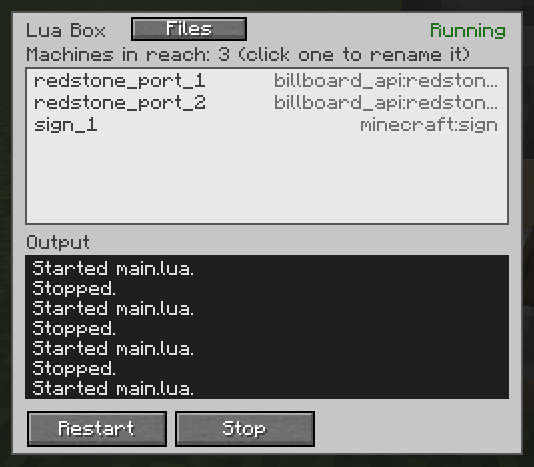
Every machine has a name. A new one gets <type>_<n>, the lowest free number: sign_1, redstone_port_2. Rename it in
the box's Network view (click a machine; a name field and a Rename button appear, and go away again after Rename or when you click elsewhere) or with setName in a program. Names are 1 to 32 letters, digits, _ or -,
and compared without case. When two networks join and a name exists twice, the newcomer is renamed and every box says so.
To see which machine has which name, look at it: the name shows just below the crosshair. With
Jade installed, Jade's box shows a line "Network name: ..." instead (it can be switched
off in Jade's plugin settings). A machine that no box has reached yet has no name and shows none. name_hint=false in
the settings turns the crosshair line off.
| Setting | Default |
|---|---|
network_max_pipes |
512 |
network_max_clients |
64 |
network_max_boxes |
8 |
Over a limit the whole network stops working, with an error that says why.
By default a box drives any machine it reaches. With network_owner_check=true in config/billboard_api.properties,
a box drives only machines placed by its own owner. Machines from before the setting went on go to the owner of the first
box that reaches them. The Network view greys out machines of other owners.