
- Inspiration
- What it does
- How it works
- Features
- Tech Stack
- Getting Started
- API Setup
- How we built it
- Challenges
- Accomplishments
- What we learned
- What's next
Small businesses often struggle to track spending patterns and inventory needs from piles of work order receipts. We wanted to build a smart assistant that not only reads those receipts but also provides actionable insights — helping owners make data-driven decisions about what to buy more of and where to cut costs.
PopoAI analyzes uploaded work order receipts and generates real-time advice on inventory management and spending optimization. It suggests which items should be restocked, which ones to reduce spending on, and produces a generated receipt summary that visually lists all recommendations.
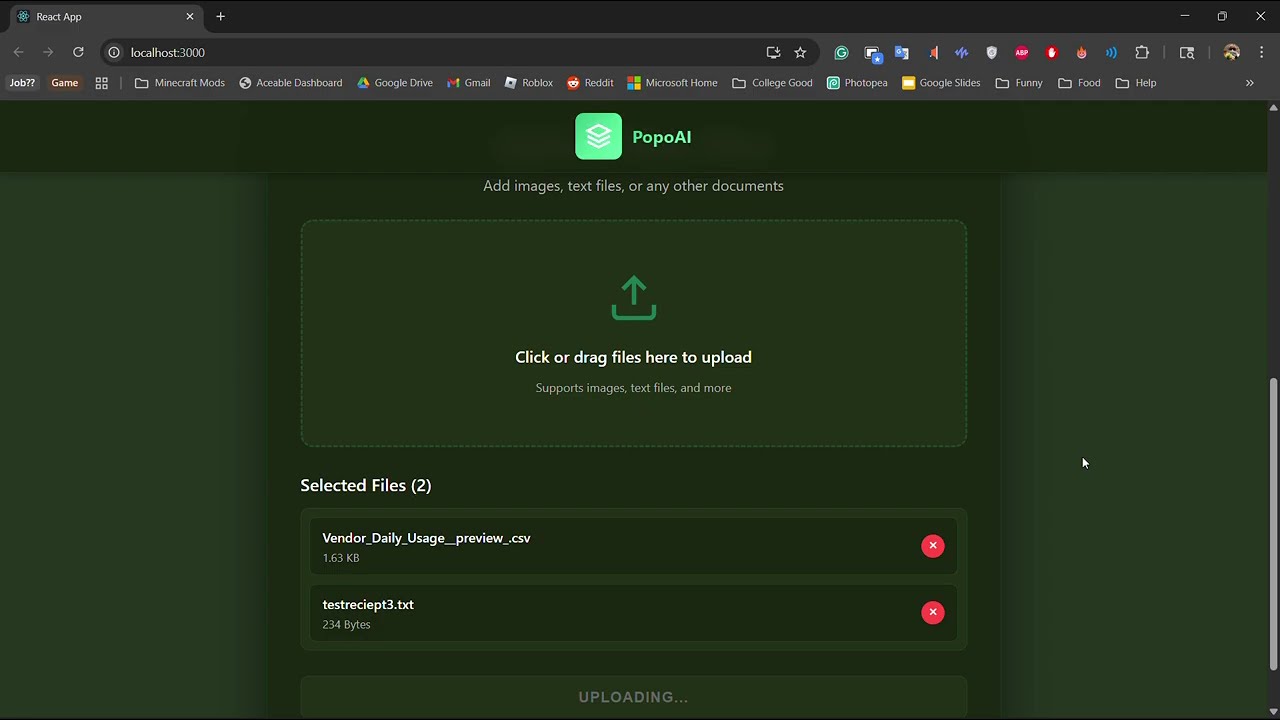
- 📄 Multi-file upload - Drag and drop or select multiple receipt files (.txt, .csv)
- 🤖 AI-Powered Analysis - Uses NVIDIA Nemotron to intelligently parse and analyze receipt data
- 📊 Prioritized Recommendations - Automatically prioritizes essential business expenses
- 📈 Business Context Awareness - Infers business type (restaurant, office, retail) from receipt items
- 🔄 Real-time Updates - Continuously updates analysis as new files are added
- 📋 Scrollable Summary - View detailed AI-generated recommendations in an easy-to-read format
- File Upload: Users upload receipt files (.txt or .csv format) through the web interface
- File Parsing: The backend reads and parses the receipt data, extracting item descriptions, quantities, and costs
- AI Analysis: The parsed data is sent to NVIDIA Nemotron AI model with a specialized prompt that:
- Identifies the business type from receipt items
- Filters out non-essential personal items
- Prioritizes essential business expenses
- Generates cost-per-unit estimates
- Recommends restock quantities based on usage patterns
- Output Generation: The AI generates a structured markdown response with:
- Summary Section: Brief analysis overview and business type inference
- Prioritized Expense Table: Detailed table with priority rankings, item descriptions, quantities, costs, and business justifications
- Display: The analysis is displayed in the "Popo's Receipt Summary" panel, which is scrollable for long summaries
- Continuous Learning: As new files are added, the AI re-analyzes all data to provide updated recommendations
The AI is pre-prompted with specific instructions to:
- Act as a financial and inventory assistant
- Infer business context from receipt items
- Filter non-essential items
- Prioritize items based on business type and perishability
- Generate structured markdown tables with priority rankings








| Category | Technologies |
|---|---|
| Frontend | React 19.2.0, JavaScript (ES6+), HTML5, CSS3 |
| Backend | Node.js, Express.js 4.18.2 |
| AI/ML | NVIDIA Nemotron (via OpenAI SDK), OpenAI API 6.8.1 |
| File Processing | Multer 1.4.5, MIME-types 2.1.35 |
| Development | Git, GitHub, VS Code, Create React App |
| Environment | dotenv 16.3.1, CORS 2.8.5 |
- Node.js (v14 or higher)
- npm (v6 or higher)
- NVIDIA API Key (see API Setup section)
-
Clone the repository
git clone https://github.com/KySm227/hackathon.git cd hackathon -
Install frontend dependencies
npm install
-
Install backend dependencies
cd Backend/Server
npm install
cd ../..
-
Set up environment variables
cd Backend/Server
cp .env.example .env  # If .env.example exists, or create .env manually
Create a
.envfile inBackend/Server/with your NVIDIA API key:NVIDIA_API_KEY=your_nvidia_api_key_here
-
Start the backend server (Terminal 1)
cd Backend/Server
npm start
The backend will run on
http://localhost:3001 -
Start the frontend (Terminal 2)
npm start
The frontend will run on
http://localhost:3000and automatically open in your browser
-
Visit NVIDIA API Portal
- Go to NVIDIA API Catalog
- Sign up or log in to your NVIDIA account
-
Create an API Key
- Navigate to your account settings
- Generate a new API key for the Nemotron model
- Copy the API key (you won't be able to see it again!)
-
Configure Your Environment
- Create a
.envfile in theBackend/Server/directory - Add your API key:
NVIDIA_API_KEY=your_actual_api_key_here
- Important: Never commit the
.envfile to version control!
- Create a
-
Verify Setup
- The backend server will automatically load the API key from the
.envfile - Check the console for any API connection errors
- The backend server will automatically load the API key from the
The application uses the NVIDIA Nemotron model through the OpenAI-compatible API:
- Base URL:
https://integrate.api.nvidia.com/v1 - Model:
nvidia/llama-3.1-nemotron-nano-vl-8b-v1 - Configuration: Set in
Backend/Server/nvidiaClient.jsandBackend/Server/server.js
- "API key not found": Ensure
.envfile exists inBackend/Server/directory - "Invalid API key": Verify your API key is correct and active
- "Rate limit exceeded": Check your NVIDIA API usage limits
- Connection errors: Verify your internet connection and NVIDIA API status
We built PopoAI using React and JavaScript for the frontend and Node.js for the backend. The NVIDIA Nemotron model powers the AI's analytical engine, interpreting text from receipts and generating intelligent spending recommendations.
┌─────────────────┐
│   React Frontend │
│   (Port 3000)    │
└────────┬─────────┘
         │ HTTP Requests
         ▼
┌─────────────────┐
│  Express Backend │
│   (Port 3001)    │
└────────┬─────────┘
         │ File Processing
         ▼
┌─────────────────┐
│  NVIDIA Nemotron │
│      API         │
└─────────────────┘
- Frontend (
src/App.js): Main React component handling file uploads, drag-and-drop, and displaying AI analysis - Backend (
Backend/Server/server.js): Express server handling file uploads, parsing, and AI integration - File Reader (
Backend/Server/utils/fileReader.js): Utility for reading and parsing .txt and .csv files - NVIDIA Client (
Backend/Server/nvidiaClient.js): Client configuration for NVIDIA API - Nemotron Model (
Backend/Server/Nvidia Model/nemotron.js): Function to send messages to NVIDIA model
For the visual aspect, we integrated dynamic UI components to create a professional interface that presents suggested inventory and cost breakdowns in an intuitive format. Git and GitHub were used to manage collaboration across our team — creating branches, reviewing pull requests, and pushing commits frequently to ensure everyone was updated and able to contribute simultaneously.
One of the biggest challenges was connecting the AI model to read and understand uploaded receipt files and outputting its responses in a structured format through the React interface. We also faced challenges in:
- File Format Parsing: Handling different receipt formats and extracting structured data
- AI Response Formatting: Ensuring consistent markdown table output from the AI model
- Real-time Updates: Synchronizing analysis results as new files are added
- Team Collaboration: Synchronizing work among multiple developers, handling merge conflicts, and keeping all branches aligned with the latest updates
- Error Handling: Managing file upload errors, API failures, and user feedback
We successfully built a working prototype that ties together multiple AI systems and a clean user interface. Seeing the AI analyze real receipts, provide accurate inventory suggestions, and automatically generate a polished summary felt like a huge step toward real-world automation.
Key achievements:
- ✅ Seamless file upload and processing pipeline
- ✅ Intelligent business type inference from receipt data
- ✅ Prioritized expense recommendations with cost analysis
- ✅ Real-time analysis updates as new files are added
- ✅ Professional, scrollable UI for displaying results
- ✅ Successful integration of NVIDIA Nemotron AI model
We learned how to integrate AI models into full-stack applications, manage real-time updates in React, and coordinate a collaborative development workflow using Git branching strategies. We also gained a deeper understanding of:
- AI Integration: How to structure prompts for consistent AI output
- File Processing: Parsing and extracting data from various file formats
- State Management: Managing complex state in React applications
- API Design: Creating RESTful endpoints for file upload and analysis
- Team Collaboration: Effective Git workflows and conflict resolution
- User Experience: Presenting AI-generated content in an intuitive format
Next, we plan to enhance PopoAI's analytics by adding:
- 📈 Trend Tracking: Track spending patterns over time
- 🏷️ Automatic Categorization: Auto-categorize expenses by type
- 💳 POS Integration: Connect with point-of-sale systems
- 📊 Advanced Analytics: Dashboard with charts and visualizations
- 🔔 Alerts & Notifications: Low stock alerts and spending warnings
- 🌐 Multi-format Support: Support for PDF and image-based receipts
- 👥 Multi-user Support: Team accounts and role-based access
- 🎯 Accuracy Improvements: Enhanced AI model fine-tuning
We also want to optimize the AI's accuracy and improve collaboration tools to make the project even more scalable for larger teams and businesses.
This project was created for HackUTD 2025. All rights reserved.
Built with ❤️ by the PopoAI team
For issues, questions, or contributions, please open an issue on GitHub.
Made with ❤️ for small businesses everywhere