
A beautiful, minimal board view for Obsidian Tasks.
Instead of scattered task queries across your notes, Tasks Overview gives you a live sidebar panel that aggregates every task in your vault and lets you slice them however you need.
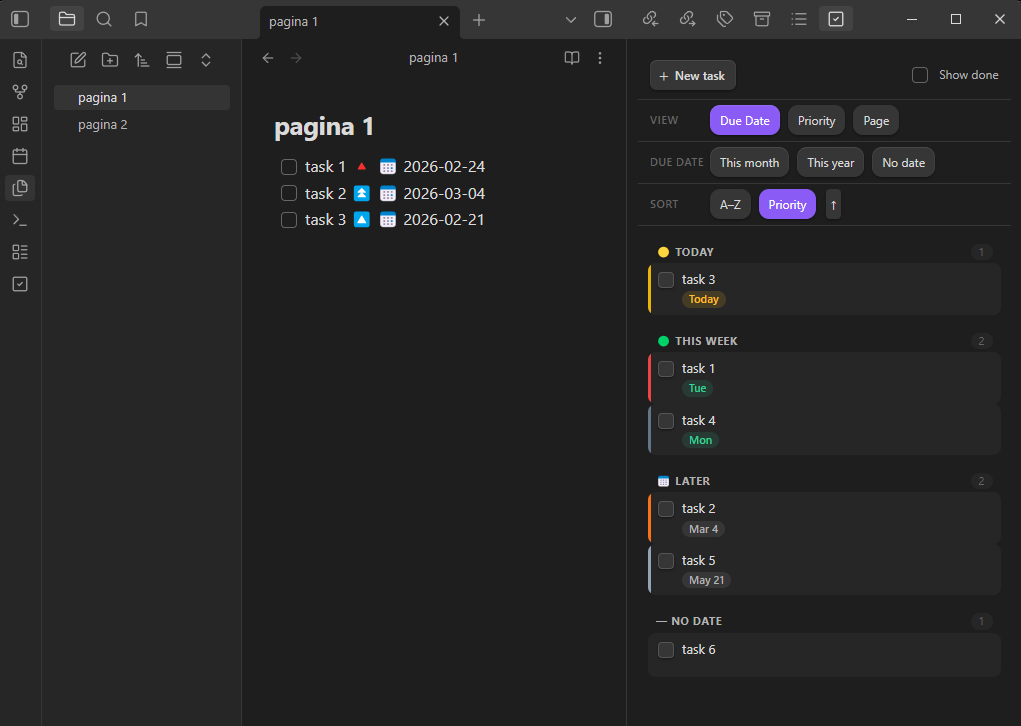
- Three view modes — organize by Due Date, Priority, or Page (source note)
- Due date filters — quickly scope to This Month, This Year, or tasks with No Date (combine freely)
- Two sort options — alphabetical (A–Z) or by priority, both ascending and descending
- Inline task editing — click ✎ to open the Tasks edit modal pre-populated with the task's existing fields (requires Tasks ≥ 7.21.0)
- Inline task completion — check off tasks directly from the board; done date is written back automatically
- Create new tasks —
+button opens a modal to set description, priority, due date, and which note to save to - Show/hide completed — toggle done tasks on or off without leaving the board
- Auto-refresh — board updates automatically whenever your vault changes
- Fully theme-aware — uses Obsidian CSS variables, looks great with any theme
- Obsidian Tasks plugin installed and enabled
- Obsidian 1.4.0 or later
- For inline editing with pre-populated fields: Tasks ≥ 7.21.0
- Open Obsidian Settings → Community Plugins
- Click Browse and search for Tasks Overview
- Click Install, then Enable
- Download
main.jsandmanifest.jsonfrom the latest release - Create the folder
<your-vault>/.obsidian/plugins/tasks-overview/ - Copy both files into that folder
- Go to Settings → Community Plugins and enable Tasks Overview
Click the check-square icon in the left ribbon, or run the command Tasks Overview: Open Tasks Overview from the command palette.
| Mode | Groups tasks by |
|---|---|
| Due Date | Overdue / Today / This week / Later / No date |
| Priority | Highest → High → Medium → Normal → Low → Lowest |
| Page | Source note (click the note name to open it) |
The Due date filter row lets you show only tasks due this month, this year, or with no date. Multiple filters combine with OR — enabling "This month" and "No date" shows tasks from either group.
Choose A–Z (alphabetical) or Priority (highest first). Click the active button again or the arrow to flip direction.
Click + New task or run Tasks Overview: Create new task from the command palette. Fill in description, priority, due date, and which note to append to. The task is saved with a ➕ YYYY-MM-DD created date.
Hover any task card and click the ✎ icon. If Tasks ≥ 7.21.0 is installed, the full Tasks edit modal opens pre-populated with all fields. Otherwise, the source file opens at the task's line.
Tasks Overview reads the standard Tasks plugin emoji format:
- [ ] Write the report 🔼 📅 2024-03-15 ➕ 2024-01-01
- [ ] Urgent thing 🔺
- [x] Done task ✅ 2024-01-20
- [ ] Recurring 🔁 every week 📅 2024-01-22
git clone https://github.com/lucasberta/tasks-overview
cd tasks-overview
# The plugin is a single compiled file — edit main.js directly
# or set up a build pipeline of your choice
To test locally, symlink the project folder into your vault's plugins directory:
ln -s $(pwd) /path/to/vault/.obsidian/plugins/tasks-overviewThen reload Obsidian.
MIT — see LICENSE