Repository navigation
Control Center and Taste Star
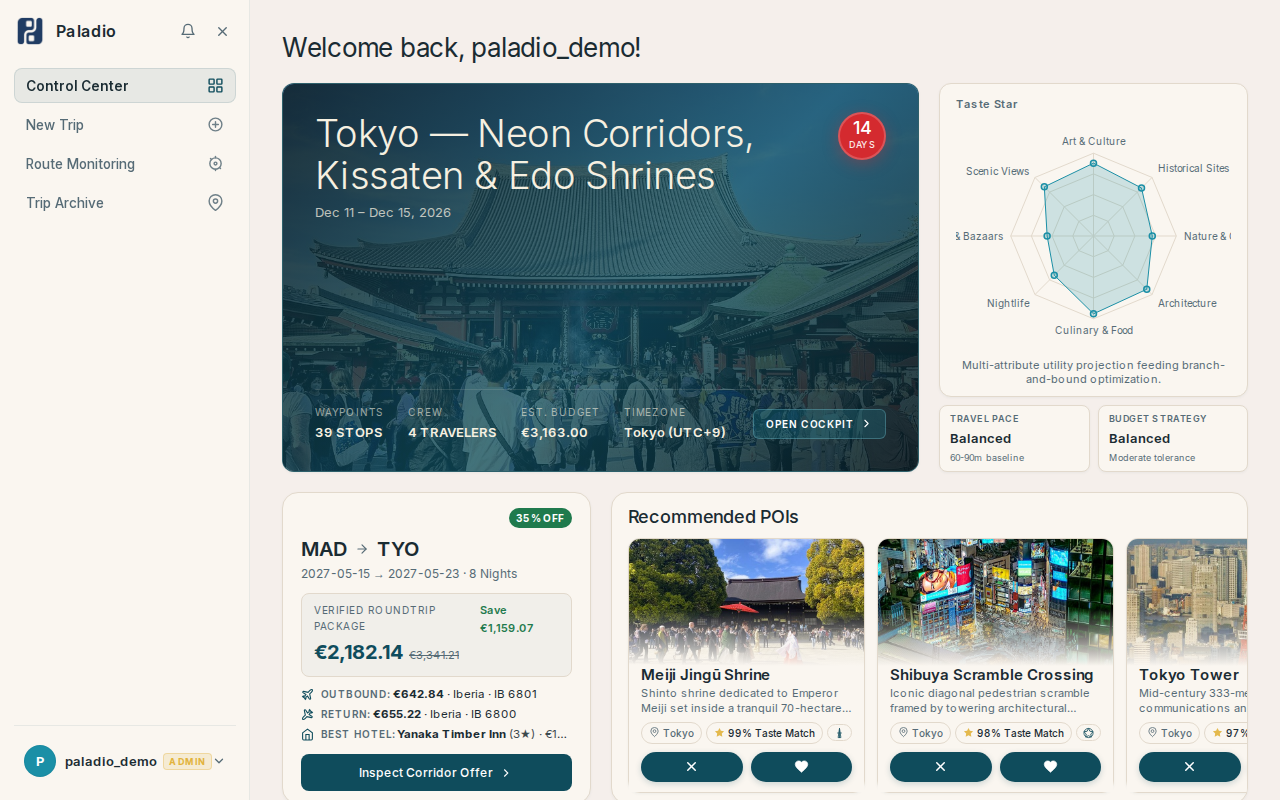
Navigate Paladio's application shell, interpret your 8-axis Taste Star radar, schedule expeditions on the operations Calendar with public holidays and Paid Time Off (PTO) markers, and manage saved Point of Interest (POI) collections from /dashboard.
Paladio adapts its global navigation, theme palette, typography, and language direction dynamically per account so the workspace matches your preferred reading density and screen size.
-
Collapsible Sidebar or Floating Dock: Switch between the left
AppSidebar(toggle withCtrl+BorCmd+B) and the bottom hover-revealFloatingDockinside Settings (/config). Both expose Control Center (/dashboard), New Trip (/engine), Route Monitoring (/monitoring), and Trip Archive (/vault), while the user menu links to Settings (/config), Help Center (/help), and Sign Out. - Pacific Jazz themes and typography: Choose Pacific Jazz Light, Pacific Jazz Dark, or Silent Waters, and pair them with Inter (universal multi-script stack) or Classic (Jost display + Inter body + JetBrains Mono).
-
10 shipped locales with RTL support: Switch between Arabic (
ar, flips<html dir="rtl">automatically), Chinese Simplified (zh-CN), English (en), French (fr), German (de), Italian (it), Japanese (ja), Korean (ko), Portuguese (pt), and Spanish (es). -
Global notifications: Click the header bell icon to open the slide-out notification center (persisted up to 100 items per user in
localStorage) for deal alerts, GTFS transit build completions, POI hydration jobs, and ticket scans.
Every widget on /dashboard pulls live state from PostgreSQL, pgvector semantic matching, and Celery Beat market telemetry.
| Widget | Source data | Primary action |
|---|---|---|
| Active Trip Ticket | Next upcoming or active trip in PostgreSQL | Click the boarding-ticket hero card to launch /trips/[id] with countdown, waypoint count, participant roster, and local timezone |
| Taste Star |
UserTasteProfileModel 8-axis preference vector |
View scores across 8 travel categories alongside Travel Pace and Budget Strategy badges |
| Best Offer Card | Lowest verified 10th-percentile (P10) deal in /monitoring
|
Inspect destination savings and jump straight to Route Monitoring or pre-fill New Trip (/engine) |
| Recommended POIs | 768-dimensional ONNX vector cosine match in pgvector | Browse personalized attractions with verified Wikimedia photos, % Taste Match, and Add to Trip
|
| Upcoming Trips | Active and draft expeditions | Open a workspace or delete an unused draft |
| Saved Collections | Global TripCollectionModel lists (trip_id IS NULL) |
Organize reusable place wishlists or import stops into a trip |
When an account starts with a neutral preference vector (0.5 across all axes), Control Center displays a calibration banner linking to /taste-calibration.
- Open
/taste-calibrationand answer up to 8 scenario prompts (first_morning,afternoon_pace,urban_form,dining_style,after_sunset,markets_craft,budget_strategy, andcrowd_discovery), skipping any dimension you want to keep neutral. - Inspect your updated radar across
art_culture,history_heritage,nature_outdoors,architecture,food_culinary,nightlife,shopping, andscenic_views. - As you bookmark POIs into collections, complete trips, or set likes and vetoes via the optional assistant, Paladio updates your
UserTasteProfileModeland retrains ranker weights nightly via Celery Beat. - Export, reset to neutral, or delete your stored taste history anytime from Settings (
/config) or the/api/users/me/tasteendpoints.
Tip
Deterministic guardrails never sacrifice logistics for taste
High % Taste Match boosts a venue's priority during candidate selection, yet the C++20 solver enforces opening hours, meal spacing, walking fatigue limits, and district clustering so schedules stay realistic.
The interactive Calendar on /dashboard overlays active trips, archived trips, monitored P10 flight deals, statutory public holidays for your configured country, and personal PTO days across both an annual dispatch grid and a focused monthly view.
- Set your statutory holiday country under Settings (
/configin Personal Account). - Enable Holiday Mode on the Calendar to click dates and toggle personal PTO days, or clear an entire year's PTO selections in one click.
- Click any open calendar date to open
/engine?start_date=YYYY-MM-DD, click any highlighted deal bar to jump directly to/monitoring?route=<route_id>, or export all trips and monitored deal windows into a single.icscalendar file.