Repository navigation
Route Monitoring and Deals
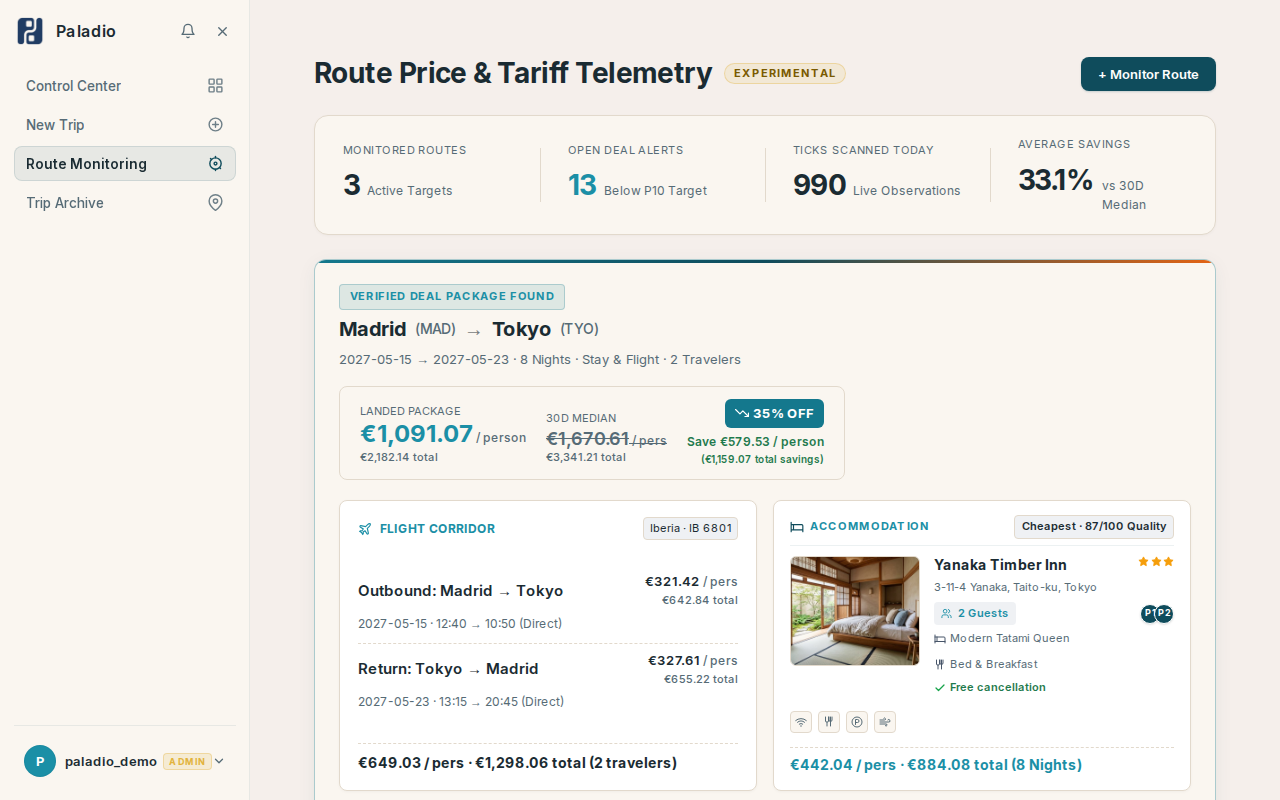
Monitor round-trip flight and lodging corridors continuously at /monitoring, evaluate fare drops against 10th-percentile (P10) quantile baselines, inspect multi-month bidirectional calendars, and convert verified packages directly into trips in /engine.
Warning
Experimental data scraping
The underlying flight and lodging data scraping in Route Monitoring is currently experimental. External provider scrapers and rate feeds may be unstable or incomplete depending on upstream changes and configured API keys.
Celery Beat triggers the daily market pipeline (daily_market_pipeline_task) at 03:00 UTC (plus on-demand corridor sweeps and backfills), storing historical price ticks inside a TimescaleDB hypertable (market_price_ticks).
| Telemetry surface | What it reports |
|---|---|
| Monitored Routes | Count of active and paused origin-to-destination corridors tracked for your account |
| Open Deal Alerts | Active corridors whose verified fare sits below the 10th-percentile (P10) baseline threshold |
| Ticks Scanned Today | Total flight and lodging price observations collected in the current sweep window |
| Average Savings | Mean percentage discount across open deals compared against each corridor's 30-day median (P50) |
Filter the route table using ALL, DEAL, ACTIVE, or PAUSED pills, or search by origin/destination IATA code. Each route renders a VerdictBadge (GREAT, GOOD, TYPICAL, HIGH, PEAK) alongside its live percentile (P<N>) and baseline maturity (building, provisional, or established).
Define airport pairs, trip duration constraints, and per-passenger ceiling budgets so the Deal Engine ignores mismatched red-eyes or budget overruns.
- Open
/monitoringand click + Monitor Route. - Choose Origin and Destination airports using live airport resolution.
- Configure either a flexible date horizon or bounded departure dates, set minimum and maximum stay nights (1 to 30), traveler count, and your per-passenger budget ceiling with the currency picker.
- Click Save (
POST /api/market/routes) to trigger initial corpus backfill (backfill_route_corpus_task) and lodging prewarming (prewarm_route_lodging_task).
Note
Configuring Aviasales / Travelpayouts keys
Flight cache sweeps and live verifiers use your Travelpayouts/Aviasales token configured in Settings (/config under API Keys & Secrets) alongside Ryanair public fares and multi-provider hotel scrapers (Booking, Google Travel, Agoda, Trip.com).
When outbound and return flight fares align with a quality-gated hotel stay and the landed package drops below the P10 target, /monitoring highlights a VERIFIED DEAL PACKAGE FOUND banner (and surfaces the best offer on Control Center).
-
Make it a Trip: Pre-fills
/enginevia query parameters with exact outbound/inbound flight dates, airport times, verified lodging anchor, and package budget so you can generate a matching daily itinerary in one pass. -
Discard Offer: Dismisses that candidate alert (
POST /api/market/deals/{deal_id}/discard) and records implicit negative deal feedback (POST /api/market/deals/{deal_id}/feedback) to refine future package verdicts.
Click Inspect on any corridor to launch RouteFullScreenView, pairing historical curve telemetry with date-by-date round-trip exploration.
- Toggle 24h, 7d, 30d, or 90d on
PriceTrendGraphto compare recent sweeps against historical quantile bands (q02throughq90). - Switch MonitoringCalendar between Outbound, Inbound, and Roundtrip modes across multiple months to spot cheap departure/return pairs visually.
- Click any calendar date to fetch live lodging rate observations (
GET /api/market/routes/{route_id}/lodging) and compare combined flight + stay totals before booking. - Pause, resume, manually scan (
POST /api/market/routes/{route_id}/scan), backfill (POST /api/market/routes/{route_id}/backfill), or delete the route from the inspection header.