Diagnosis and type checking doesn't fully show for workspaces from a directory linked with the subst command (Windows) #1629

Description

How are you using the lua-language-server?
Visual Studio Code Extension (sumneko.lua)
Which OS are you using?
Windows
What is the issue affecting?
Type Checking, Diagnostics/Syntax Checking
Expected Behaviour
- Diagnosis and type checking a file should be independent of whether the file is located in a directory on an actual drive or a "virtual" drive associated with the
substcommand.
Actual Behaviour
- Not all annotations and errors from the diagnosis show up in the file if the loaded workspace in VS Code is the associated directory (see screenhots in additional notes)
- Using "Go To Definition" on a function on the file opens the
Reproduction steps
- Associate a directory from an existing drive to a new drive letter, using the
substcommand on Windows (https://learn.microsoft.com/en-us/windows-server/administration/windows-commands/subst). - Create a Lua file inside the associated directory.
- Open the directory from the new drive letter in VS Code.
- Produce a type error in the Lua file.
- No type error shows.
Additional Notes
Example:
I created a subst from C:\Users\<Username>\Data to D:\. Inside D:\ I have a directory tts\test and inside that is the test.lua file. Adding the D:\tts\test directory to the workspace in VS Code and using this test.lua code:
---@param input number
---@param other number
local function foo(input) end

foo(1)
foo("d")
Results in only this error shown:
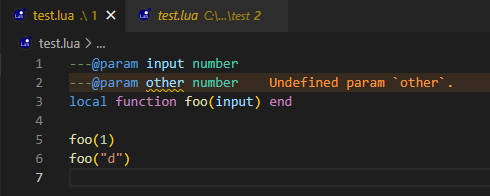
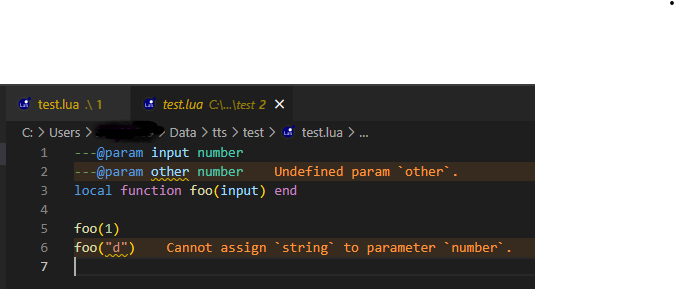
Using "Go To Definition" on foo will open a new file from C:\Users\<Username>\Data\tts\test\test.lua instead of jumping in the already opened file. There it will also show the type error:
Log File
No response