


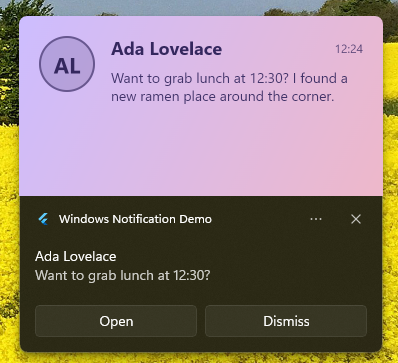
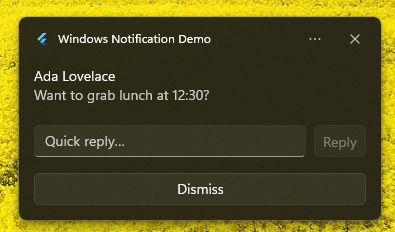
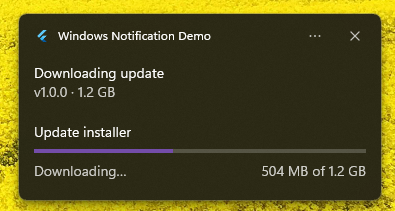
Native desktop notifications for Flutter on Windows, macOS, and Linux, behind one small API. Show a notification with a title, body, image, action buttons, and a reply field, then get a callback when the user clicks or dismisses it. On Windows you also get the full toast feature set: scenarios, sounds, progress bars, custom XML, and a hero image rendered from a Flutter widget.
pub.dev: https://pub.dev/packages/flutter_desktop_notifications
This package started as a fork and rewrite of
windows_notification by
mrtnetwork. The Windows toast engine grew from there, and macOS and Linux came
later.
 |
 |
 |
dependencies:
  flutter_desktop_notifications: ^1.1.0
import 'package:flutter_desktop_notifications/flutter_desktop_notifications.dart';One notifier for all three desktops. It speaks the common subset every platform supports: a title and body, an icon or image, action buttons, a reply field (Windows and macOS), urgency, and activation/dismissal callbacks. Each platform renders the fields it understands and ignores the rest.
final notifier = DesktopNotifier(appName: 'My App', appId: 'com.example.app');

// macOS prompts for permission the first time; Windows and Linux return true.
await notifier.requestPermission();

await notifier.setCallback((details) {
  switch (details.event) {
    case NotificationEvent.activated:
      // details.arguments    -> the clicked action's `arguments`, or the
      //                         message's `launch` value for a body tap.
      // details.userInput     -> { inputId: typed text } for a reply field.
      // details.message       -> the original NotificationMessage.
      break;
    case NotificationEvent.dismissedByUser:
    case NotificationEvent.dismissedByApp:
    case NotificationEvent.dismissedByTimeout:
      break;
  }
});

await notifier.show(
  NotificationMessage.fromPluginTemplate(
    'msg-1',
    'Build complete',
    'Works the same on Windows, macOS, and Linux.',
    actions: const [
      NotificationAction(content: 'Open', arguments: 'action:open'),
    ],
    inputs: const [
      NotificationInput.text(id: 'reply', placeholder: 'Reply…'),
    ],
  ),
);

await notifier.cancel('msg-1'); // remove one
await notifier.cancelAll();      // remove everything this app delivered
appName is the sender shown on Linux; appId is the Windows AUMID. Both are
ignored where they don't apply.
| Platform | Backend | Notes |
|---|---|---|
| Windows | WinRT toast notifications | Full feature set. For an unpackaged app, register an AUMID first (see below). |
| macOS | UNUserNotificationCenter |
Call requestPermission() once. The app must be code-signed for the OS to deliver notifications. Supports a reply field. |
| Linux | freedesktop D-Bus (org.freedesktop.Notifications) |
Pure Dart, no native code. Buttons and click/close callbacks; no reply field in the base spec. |
| Feature | Windows | macOS | Linux |
|---|---|---|---|
| Title, body | ✓ | ✓ | ✓ |
| Image / icon | ✓ | ✓ | ✓ |
| Action buttons | ✓ | ✓ | ✓ |
| Reply field | ✓ | ✓ | ✗ |
| Urgency / priority | ✓ | ✓ | ✓ |
| Click / dismiss callbacks | ✓ | ✓ | ✓ |
| Subtitle | ✗ | ✓ | ✗ |
| Scenarios, looping audio, progress, custom XML, hero-from-widget | ✓ | ✗ | ✗ |
Windows-only extras are reached through WindowsNotification (below). Building a
message with extra fields and sending it through DesktopNotifier is safe; the
macOS and Linux backends just skip what they can't show.
Everything the WinRT toast model can do. Use this directly when you are targeting Windows and want scenarios, sounds, progress, custom XML, or a hero image.
Windows will not show a toast whose AUMID is not registered, and the AUMID is how the OS looks up the sender's name and icon.
- Packaged (MSIX) apps: the manifest supplies the AUMID. Leave
applicationIdnull. - Unpackaged apps: call the helper once on startup.
Future<void> main() async {
  WidgetsFlutterBinding.ensureInitialized();
  await WindowsNotification.registerAumid(
    aumid: 'com.example.myapp',
    displayName: 'My App',
    // iconPath: r'C:\path\to\custom.ico', // optional; defaults to the exe icon
  );
  runApp(const MyApp());
}
It writes (or refreshes) a Start Menu shortcut at
%APPDATA%\Microsoft\Windows\Start Menu\Programs\{displayName}.lnk carrying
System.AppUserModel.ID. The call is idempotent. AUMIDs must be non-empty, 129
characters or fewer, and contain no whitespace.
final notifier = WindowsNotification(applicationId: 'com.example.myapp');

await notifier.showNotificationPluginTemplate(
  NotificationMessage.fromPluginTemplate(
    'reminder',
    'Leave for meeting',
    'Design review · Room 2001',
    scenario: NotificationScenario.reminder, // reminder, alarm, incomingCall, urgent
    audio: const NotificationAudio(sound: NotificationSound.Reminder),
    attribution: 'Calendar',
    progress: const NotificationProgress(value: 0.42, status: 'Downloading…'),
  ),
);WidgetToImage rasterizes any widget off-screen to a PNG, so you can drop
live-generated content into a toast. Hero images are 364 x 180.
final path = await WidgetToImage.toPngFile(
  widget: NowPlayingCard(track: track),
  size: const Size(364, 180),
  pixelRatio: 2.0,
);
await notifier.showNotificationPluginTemplate(
  NotificationMessage.fromPluginTemplate('now', 'Now playing', 'Neil Young · Harvest Moon',
      heroImage: path),
);const template = '''
<toast scenario="reminder">
<visual>
<binding template="ToastGeneric">
<text>Design review</text>
<text>Room 2001 / Building 135</text>
</binding>
</visual>
</toast>
''';
await notifier.showNotificationCustomTemplate(
NotificationMessage.fromCustomTemplate('meeting', group: 'meetings'),
template,
);The toast XML schema reference lists every supported element.
await notifier.clearNotificationHistory();              // everything from this app
await notifier.removeNotificationGroup('meetings');     // all in a group
await notifier.removeNotificationId('meeting', 'meetings'); // a single toastA full demo lives in example/. It has an accent and light/dark switcher, a
cross-platform row that runs everywhere, and the Windows-only extras (scenarios,
audio, progress, custom XML, and the widget-to-hero-image renderer).
cd example
flutter run -d windows   # or: -d macos, -d linux