Repository navigation
Webhooks
A webhook posts what happens on your server to a chat as it happens: who joined, who died and how, an advancement, a raid, a restart. WorldAPI writes to Discord, Slack (Mattermost and Rocket.Chat too), Telegram, Microsoft Teams, and Google Chat in English, Russian, Spanish, Portuguese, or German. Your own site or bot can get every event as signed JSON instead.
You make a webhook in one of four places:
-
In game, with buttons in chat:
/worldapi webhook. The fastest way: the game asks for the URL in a window of its own, so it never shows in chat or the log. - In the admin panel: Access → Webhooks.
-
In
config.yml, underwebhooks.hooks, for setups you keep in files. -
Through the API:
POST /webhooks, see Access control.
Webhooks came in 4.3.0.
Each service gives you a URL, except Telegram, which gives you a bot token. Treat both like a password: anyone who has it can post to your channel.
- Open the channel's settings (the gear next to its name) and go to Integrations → Webhooks.
- Press New Webhook, give it a name and an avatar if you like.
- Press Copy Webhook URL. It looks like
https://discord.com/api/webhooks/123…/AbC….
- Slack: open api.slack.com/apps, press Create New App → From scratch, and pick your workspace.
- Under Incoming Webhooks, turn them on, press Add New Webhook to Workspace, and pick the channel.
- Copy the URL,
https://hooks.slack.com/services/….
Mattermost (Integrations → Incoming Webhooks → Add) and Rocket.Chat (Administration → Integrations → New → Incoming) take Slack's format: choose Slack in WorldAPI and paste their URL.
- Write to @BotFather in Telegram, send
/newbot, and pick a name and a username ending inbot. - BotFather answers with a token like
123456789:AAH…. That's the bot token. - Tell the bot where to post. For yourself, write
/startto the bot. For a group, add the bot to it. For a channel, add the bot as an admin that may post. - In WorldAPI, paste the token and press Find chats. The chats that wrote to the bot during the last day show up; pick one.
WorldAPI only posts through the bot. It reads the bot's recent updates once, when you press Find chats, to list the chats.
- In the channel, open ⋯ → Workflows.
- Pick the template Post to a channel when a webhook request is received, name it, and choose the team and the channel.
- Copy the URL the last step shows.
- Open the space, click its name, and go to Apps & integrations → Webhooks.
- Press Add webhook, name it, and save.
- Copy the URL,
https://chat.googleapis.com/v1/spaces/….
Webhooks in Google Chat need a Google Workspace account, not a personal Gmail.
Any https:// address you control gets each event as JSON, signed so you can tell it came from your server. Make this kind in the panel, through the API, or in config.yml; the in-game wizard offers only chat services. See “What a JSON webhook receives” below.
Every step is a button in chat, and the secret goes into a window. You need worldapi.admin, which operators have.
- Run
/worldapi webhook. It lists your webhooks, each with [Test], [Pause], and [Delete]. Press [+ New webhook]. - Pick the service: Discord, Slack, Telegram, Microsoft Teams, or Google Chat.
- Pick the events: everything notable; joins, leaves, deaths, and advancements; server starts and stops, raids, and bosses; or chat.
- Pick the language.
- A window opens with one text field. Paste the URL (it starts with
https://), or for Telegram the bot token, and press Connect. The window hands it straight to WorldAPI: it never passes through chat or a command, so neither other players, other plugins, nor the server log see it. Closed it by accident? [Open it again] in chat brings it back. - Telegram only: write
/startto the bot or add it to a group, then press [Find chats] and pick the chat.
WorldAPI names the webhook after the service (discord, discord-2, …), saves it, and sends a test message right away. If the test doesn't arrive, it says why. A started setup waits ten minutes after your last step; [Cancel] stops it sooner.
Change its events, language, or words later in the panel.
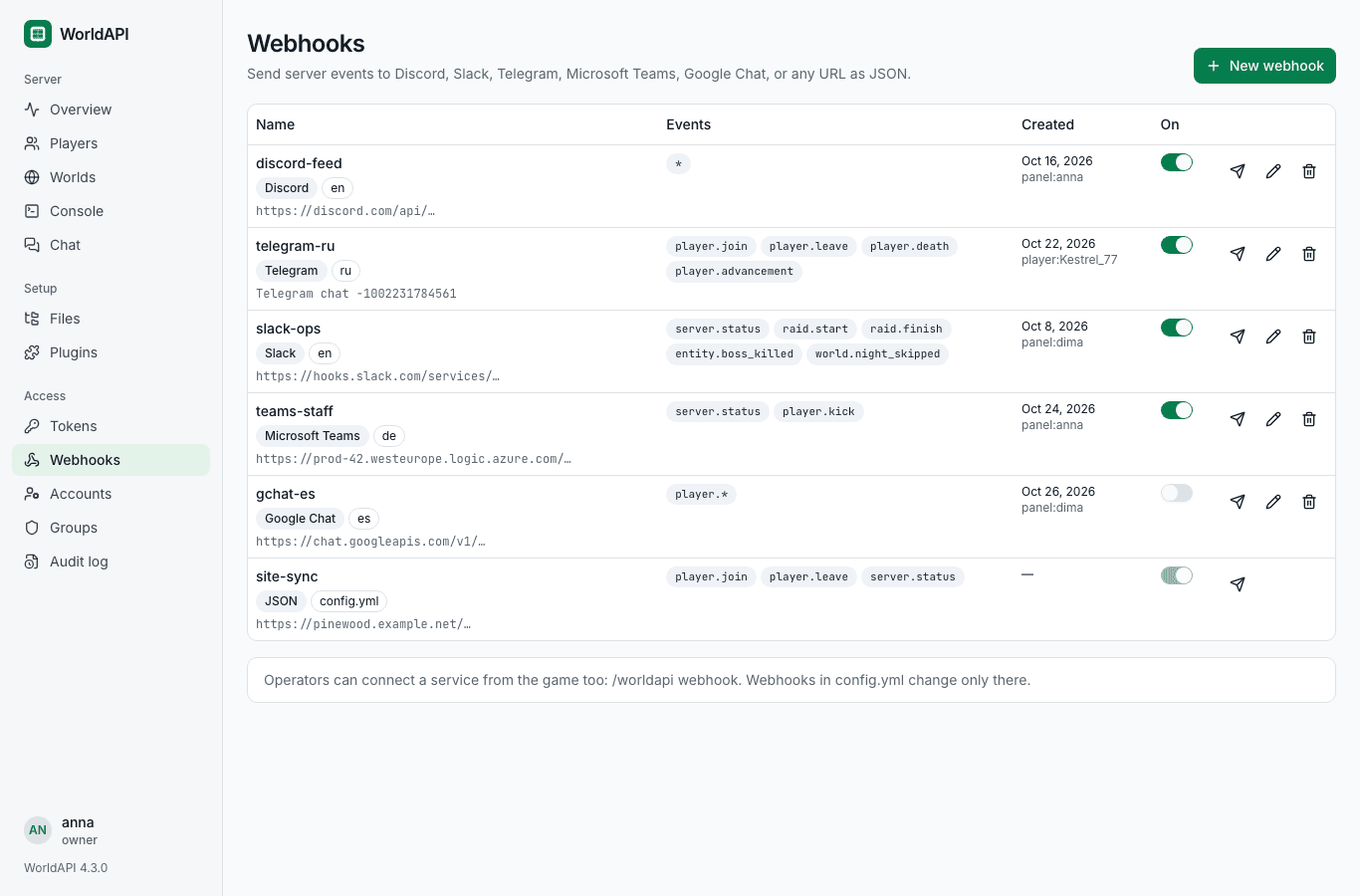
Open Access → Webhooks and press New webhook.
- Pick the Service and give it a Name: 1–32 letters, digits, dashes, or underscores.
- Paste the Webhook URL. For Telegram, paste the Bot token, press Find chats, and pick one.
- Under Events, press a preset, or open “Pick events one by one”.
- Pick the Language. Under “Your own words”, reword any message (see below).
- “What it may see” sets its permissions. The default is right for a shared channel; see “Security”.
- Press New webhook. A test message goes out at once.

Each row has a switch that pauses the webhook and keeps its settings, a button for a test message, an editor, and a delete button. A test goes out at most once every 10 seconds per webhook. A JSON webhook's signing secret shows once, right after you make it; copy it then.
Webhooks from config.yml show a config.yml badge. You can test them here, but they change only in the file.
webhooks:
  enabled: true                  # false stops every webhook and lets nobody make one
  allowPrivateAddresses: false   # see “Security”
  hooks:
    - name: deaths
      format: discord            # json, discord, slack, telegram, teams, or google_chat
      url: https://discord.com/api/webhooks/123456789/AbCdEf
      topics: [player.join, player.leave, player.death]
      language: en               # en, ru, es, pt, or de
      messages:
        player.join: "🌲 {player} wandered into the server"
    - name: telegram
      format: telegram
      botToken: "123456789:AAH-your-token-from-BotFather"
      chatId: "-1001234567890"   # or a public channel's @name
      topics: ["*"]
      language: ru
    - name: site
      format: json
      url: https://example.com/hooks/minecraft
      topics: [player.join, player.leave, server.status]
      secret: "<64 random hex characters>"   # openssl rand -hex 32
      permissions: [viewer]
/worldapi reload applies the changes. Each webhook needs a name, a format, topics, and a url, or botToken and chatId for Telegram. Webhooks in the file may use http://, for a receiver on the same machine; made ones need https://. permissions defaults to server:read, players:read, and events:read; enabled: false pauses one. To find a Telegram chatId without the panel, make the webhook in the panel once and copy the number from its row, or ask the API: POST /webhooks/telegram/chats with {"botToken": "…"}.
Webhooks from config.yml and ones made elsewhere live side by side: the file holds its own, and the database holds the rest.
topics takes the same ids as the WebSocket, in any mix:
| You write | It gets |
|---|---|
* |
Every notable event: what the event history records, joins, leaves, kicks, deaths, advancements, chat, raids, boss kills, skipped nights, the server starting and stopping, and plugins' recorded events. Not the noisy ones such as positions, damage, or blocks |
player.* |
Every topic that starts with player., but not the sampled ones and not player.command
|
player.death |
One topic |
ext.mobosses.boss.spawned |
A plugin's topic, see Extensions |
The presets in game and in the panel:
| Preset | Topics |
|---|---|
| Everything notable | * |
| Joins, leaves, deaths, advancements |
player.join, player.leave, player.death, player.advancement
|
| Server, raids, bosses |
server.status, raid.start, raid.finish, entity.boss_killed, world.night_skipped
|
| Chat | player.chat |
Sampled topics, the values the WebSocket sends every few ticks (player.move, player.health, player.inventory, world.time, world.weather, server.performance), would flood a channel, so a webhook can't take them at all. Players' commands (player.command) come only when you name that topic yourself. A webhook takes at most 64 topics; * and player.* cover many.
A webhook gets a topic only when its permissions allow it, as a token's would. Chat needs chat:read, and events.chat: true in config.yml, which records chat at all. player.command needs logs:read. Topics with places, such as deaths, keep their coordinates only with players:private; positions alone never reach a webhook without it.
A chat service gets a message only for events worth one: a saved world or an unknown status says nothing. Topics without a message of their own come as “player.fish: Steve”.
A chat webhook writes in en, ru, es, pt, or de. JSON carries data only.
Any message can take your own words instead. In the panel, open “Your own words” in the webhook's editor; in config.yml, add messages; through the API, send messages. Each one takes up to 500 characters, and an empty field brings back the default. These are the keys, with their English defaults:
| Key | Default |
|---|---|
player.join |
{player} joined the server |
player.join.first |
{player} joined the server for the first time |
player.leave |
{player} left the server |
player.kick |
{player} was kicked: {reason} |
player.death |
💀 {message} |
player.advancement |
🏆 {player} made the advancement [{title}] |
player.chat |
<{player}> {message} |
player.level_up |
{player} reached level {to} |
player.kill |
⚔️ {player} killed {victimName} |
player.gamemode |
{player} switched to {to} mode |
player.world_change |
{player} went to {to} |
entity.boss_killed |
🐉 {boss} was defeated |
world.night_skipped |
🌅 The night was skipped |
raid.start |
🚩 A raid began |
raid.finish |
🚩 The raid ended: {result} |
server.status.started |
✅ The server started |
server.status.stopping |
⛔ The server is stopping |
event |
{topic}, for any other event |
event.player |
{topic}: {player}, for any other event about a player |
Every message may use {player}, {world}, and {topic}, and any plain field of the event's data, as the WebSocket shows it: {message} for a death, {title} for an advancement. When an event lacks a field your words name, the webhook falls back to the language's default, so a message never shows a stray {placeholder}.
-
Never more than its maker. A webhook gets only permissions the person who made it has, and changing or deleting one needs every permission it holds. Making webhooks needs
webhooks:manage, which theadminandownergroups have. -
No coordinates and no chat by default. A webhook usually posts to a shared channel, so it starts with
server:read,players:read, andevents:read. Addplayers:privatefor places andchat:readfor chat only when everyone in that channel may see them. -
HTTPS, and not into your network. A webhook made in game, in the panel, or through the API needs an
https://address, and can't post to the server's own machine, a private network, or a cloud's metadata address. WorldAPI checks when you make it and before each delivery, so a name that later points inside is caught too.webhooks.allowPrivateAddresses: truelifts both, for a bot on the same machine; webhooks inconfig.ymlmay always. -
No pings, no hidden links. Players write some of the text, chat above all, so a message can't mention
@everyone: Discord gets no mentions, Slack and Google Chat get their markup escaped, and Telegram gets plain text. A Markdown link a player writes, such as[free diamonds](https://…), arrives in Discord and Teams as plain text, not as a link. -
Secrets stay secret. The API and the panel show only the host of an address (
https://example.com/…), with the first path segment for Discord, Slack, and Google Chat (https://discord.com/api/…), and a Telegram webhook as its chat. The log names a webhook, never its URL. A webhook over plainhttp://to another machine gets a warning in the log. -
Limits. The panel, the game, and the API keep at most 50 webhooks, plus those in
config.yml. Sending a test needs every permission the webhook holds, and works once every 10 seconds per webhook, so nobody can make the server spam an address. - A slow chat holds up only itself. Each webhook has its own queue of 256 events and drops the oldest when it falls behind. A failed delivery tries again after a second and after five more, except for errors a retry won't fix. A webhook that keeps failing gets one try per event, with one line in the log, until it answers again.
A json webhook gets each event as a POST with the event as the WebSocket sends it:
{"type":"player.death","at":"2026-10-28T19:41:07.512Z","atMillis":1793216467512,"player":{"uuid":"069a79f4-44e9-4726-a5be-fca90e38aaf5","name":"Steve"},"world":"world","data":{"message":"Steve was slain by Zombie"}}The headers:
| Header | Holds |
|---|---|
X-WorldAPI-Topic |
The topic, such as player.death; webhook.test for a test |
X-WorldAPI-Timestamp |
When it was sent, in epoch milliseconds |
X-WorldAPI-Delivery |
A UUID per event, the same on every retry, so you can drop duplicates |
X-WorldAPI-Signature |
sha256= and the hex HMAC-SHA256 of the timestamp, a dot, the delivery, a dot, and the body, keyed with the webhook's secret |
User-Agent |
WorldAPI/<version> |
Check the signature on the raw body, before you parse it, and refuse old timestamps so nobody replays a captured request. In Python:
import hashlib, hmac, time

def from_worldapi(secret: str, headers, body: bytes) -> bool:
    timestamp = headers["X-WorldAPI-Timestamp"]
    signed = f"{timestamp}.{headers['X-WorldAPI-Delivery']}.".encode() + body
    expected = "sha256=" + hmac.new(secret.encode(), signed, hashlib.sha256).hexdigest()
    fresh = abs(time.time() * 1000 - int(timestamp)) < 5 * 60 * 1000
    return fresh and hmac.compare_digest(expected, headers.get("X-WorldAPI-Signature", ""))
Answer with any 2xx status. A 4xx other than 429 counts as final, and WorldAPI doesn't retry it.
If your config.yml lists its own auth.groups, add "webhooks:manage" where you want it, to admin and owner as the default does. Until then, only a token or an account that lists webhooks:manage by itself can make webhooks.
Next: Configuration.