The Deepfake Bot that not only made me win my first Hackathon, but also was the topic for my Major Project and the Research Paper that followed...
Originally derived from: https://github.com/chinmaynehate/DFSpot-Deepfake-Recognition
A rudimentary Twitter Bot that interacts with a fellow user on Twitter/X (thanks Elon!) that helps in determining whether a video on the social-media platform is real or fradulent.
It does this via a four phase system that I came up with (similar to that of Automata Machines):
- Phase 1: Initializing
The Bot initializes its own Chromium Browser Instance, opens Twitter, performs a login and moves to the Notification page. - Phase 2: Standby
The Bot stays in a standby phase whereby it waits for a new notification (notification pops up when a User on the platform tags the bot under a post), The bot has a memory of its own for previously processed notifications, as such, it will only process new notifications. - Phase 3: Processing
Once a new notification arrives, the bot redirects to the post and retrieves the meta-data that contains information about the original (parent) post and the video, a short clip of the video is downloaded and passed on to the Deepfake Engine. Predictions are made within ~45 seconds, the results of which are then sent to the User as a reply to their post. - Phase 4: Termination
The bot completes the execution and terminates the script. (Currently working on a loop system where Phase 3 redirects to Phase 2, and Phase 4 becomes a Termination phase that is triggered either manually or due to Error-Handling Exceptions)
The Deepfake Engine has been ported over from @chinmaynehate's repo with lots of changes that included OS transition, upgrading Python and majority of the packages to newer more compatible versions, including the addition of more QoL features.
In summary, it is an ensemble of two models that were trained on Facebook Deepfake Detection Challenge Dataset from 2019
- Python 3.9.19
- PyTorch 2.3.0 (with CUDA acceleration)
- OpenCV 4.9.0.80 (*With a custom built wheel to include CUDA acceleration)
- Albumentations 1.4.7
- Blazeface
- Timm 1.0.3
- Selenium 4.21.0
Currently, the code is hardwired with my local system file path... (as can be seen in the main project files under the 'src' folder) I'm working on transforming it into a more dynamic environment such that it runs on any system without the hassle of getting into every single python file in the repository.
You can however contact me anytime and ask me to run a live demonstration of the Twitter script, with a video of your choice and we can have a fun interaction!
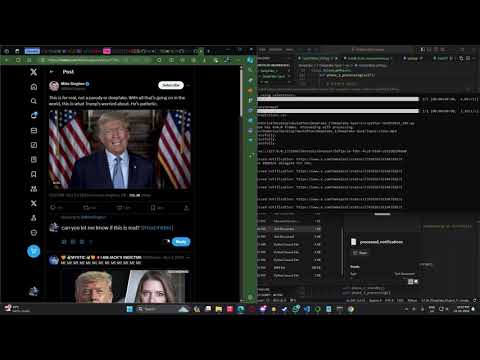
This project is by no means finished, as a matter of fact I have a notepad full of ideas and features that I'd like to implement, one of which is to turn the project from manual execution to one that can be hosted live on a server 24/7 and act as a service on Twitter (or any social-media for that matter). I've always held this project dear to me especially since it secured my win for a Hackathon that took place at MJCET, Hyderabad, India in December of 2023.
I am open to feedback, and would love to collaborate with anyone who has ideas to share!