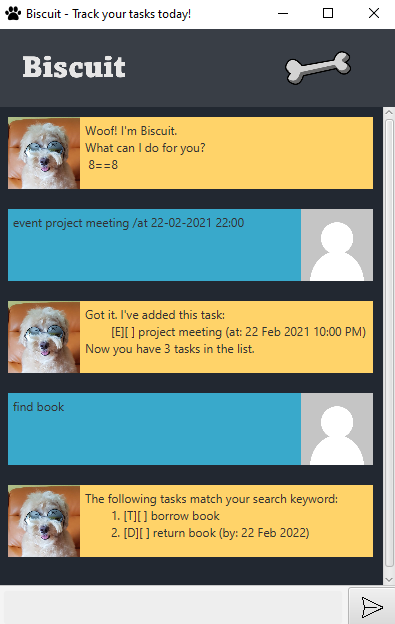
Biscuit is a desktop chat-bot app for managing tasks, optimised for use via a Command Line Interface (CLI) while still having the benefits of a Graphical User Interface (GUI). It was made as part of CS2103T's individual project component, applying the best practices learnt in CS2103T Software Engineering.
- Ensure you have Java 11 or above installed in your Computer.
- Download the latest biscuit.jar from here.
- Copy the file to the folder you want to use as the home folder for
Biscuit. - Double-click the file to start the app or run the jar with the following command from the home folder for
Biscuit:java -jar biscuit.jar. - Type in commands in the command box and press Enter to execute it.
There three types of tasks:
- To Do - A task without any fixed deadlines
- Deadline - A task with a set deadline date
- Event - A task with a date and time
Adds a todo list to the task list.
Format: todo <task description>
Examples:
todo borrow book
Adds a deadline list to the task list.
Format: deadline <task description> /by dd-MM-yyyy
Examples:
deadline return book /by 22-02-2022
Adds an event list to the task list.
Format: event <task description> /by dd-MM-yyyy HH:mm
Examples:
event project meeting /at 22-02-2021 22:00
Lists all tasks in the task list as well as the task types and status.
Format: list
Examples:
list
Marks a task in the task list as done by their task number from list.
Note: You can specify multiple tasks by adding a space between each number.
Format: done <index>
Examples:
done 1done 1 2 3
Deletes a task in the task list by their task number from list.
Note: You can specify multiple tasks by adding a space between each number.
Format: delete <index>
Examples:
delete 1delete 1 2 3
Finds all tasks in the task list matching the key word.
Format: find <key word>
Examples:
find book
Exits from the program.
Format: bye
Examples:
bye
Biscuit's task list data are saved in the hard disk automatically after any command that changes data. There is not need to save data.
- By default, files are stored in the home folder of
biscuit.jarindata/biscuit.csv - If you wish to customise the location of the save file or load a save file from a different file, run the jar with
the following command:
java -jar biscuit.jar <custom file path>- Example:
java -jar biscuit.jar custom/file/path/fileName.csv
- Example:
Q: How do I transfer mu data to another Computer?
A: Download biscuit.jar in the other computer and overwrite the empty data file it creates with the file that
contains the data of your previous biscuit.jar home folder.
| Action | Format : Examples |
|---|---|
| To Do | todo <task description> : todo borrow book |
| Deadline | deadline <task description> /by dd-MM-yyyy : deadline return book /by 22-02-2022 |
| Event | event <task description> /by dd-MM-yyyy HH:mm : event project meeting /at 22-02-2021 22:00 |
| List | list |
| Done | done <index> : done 1, done 1 2 3 |
| Delete | delete <index> : delete 1, delete 1 2 3 |
| Exit | bye |