A simple, client-side, JSON-based Graphite logical-dashboard UI built with bootstrap and underscore.js
Graphitus is pure client side, all you have to do to run it is put it under a web-server that can serve HTTP requests.
Graphitus dashboards are defined using JSON notation. These configuration snippets can be stored in a document database like couchdb or mongo and can also be files on the server.
Below is an example of global configuration (a file named config.json) using static local JSON files (the dashboards ids are the file names with a .json extension):
	{
		"graphiteUrl": "http://graphite.mysite.com",
		"dashboardListUrl": "dashboard-index.json",
		"dashboardUrlTemplate": "${dashboardId}.json"
	}
Below is an example of global configuration (a file named config.json) using couch db:
	{
		"graphiteUrl": "http://graphite.mysite.com",
		"dashboardListUrl": "http://couch.mysite.com:5984/graphitus-dashboards/_all_docs", <-- must return a JSON with a "rows" element containing an array of rows with dashboard id ("id" attribute)
		"dashboardUrlTemplate": "http://couch.mysite.com:5984/graphitus-dashboards/${dashboardId}"
	}
Below is an example dashboard configuration:
	{
		"title": "MySQL Production Cluster", <-- give a title to page
		"columns": 2, <-- the number of charts in a row side by side, mostly 2 or 4
		"user": "erezmazor", <-- owner
		"timeBack": 12h, <-- time range back from current time (can be expressed in minutes/hours/days/weeks e.g., 30m/12h/1d/2w)
		"from": "", <-- start date for the date range, prefer timeBack as any date you choose will become stale
		"until": "", <-- end date for the date range, prefer timeBack as any date you choose will become stale
		"width": 700, <-- width of each chart image, should correlate with # columns defined
		"height": 450,<-- height of each chart image
		"legend": true, <-- show the legend in chart
		"refresh": true, <-- auto refresh
		"refreshIntervalSeconds": 90, <-- auto refresh interval in seconds
		"averageSeries": false, <-- for targets that aggregate a lot of metrics prefer setting this to true as it will average many lines into one
		"defaultLineWidth": 2, <-- line width for chart lines
		"data": [ <-- charts list
			{
				"title": "Slow Queries", <-- a title for the chart image
				"target": "groupByNode(machines.${dc}dc1.mysql*.Slow_queries,2,\"nonNegativeDerivative\")", <-- the graphite target/function which defines the chart content
                "params": "areaMode=stacked&lineMode=staircase&colorList=blue,red,green" <-- specify additional parameters for this target
			},{
				"title": "Seconds Behind Master",
				"target": "groupByNode(machines.${dc}dc1.mysql*.Seconds_Behind_Master,2,\"averageSeries\")"
			},{
				"title": "Queries Per Second",
				"target": [ <-- you can specify mutliple targets for a chart as a JSON array
                    "derivative(machines.${dc}dc1.mysql*.Qps1)",
                    "derivative(machines.${dc}dc1.mysql*.Qps2)"
                ]
			}
			],
			"parameters": { <-- parameters to tokens expressed in targets with ${paramName} format
				"datacetner" : { <-- label for a select box in the UI
				"All": {	 <-- display name for a select box in the UI
					"dc": "*" <-- the token name (dc) as specified in the target name and the actual token value (*)
				},
				"New York": {
					"dc": "ny"
				},
				"LA": {
					"dc": "la"
				},
				"Chicago": {
					"dc": "chi"
				}
			}
		}
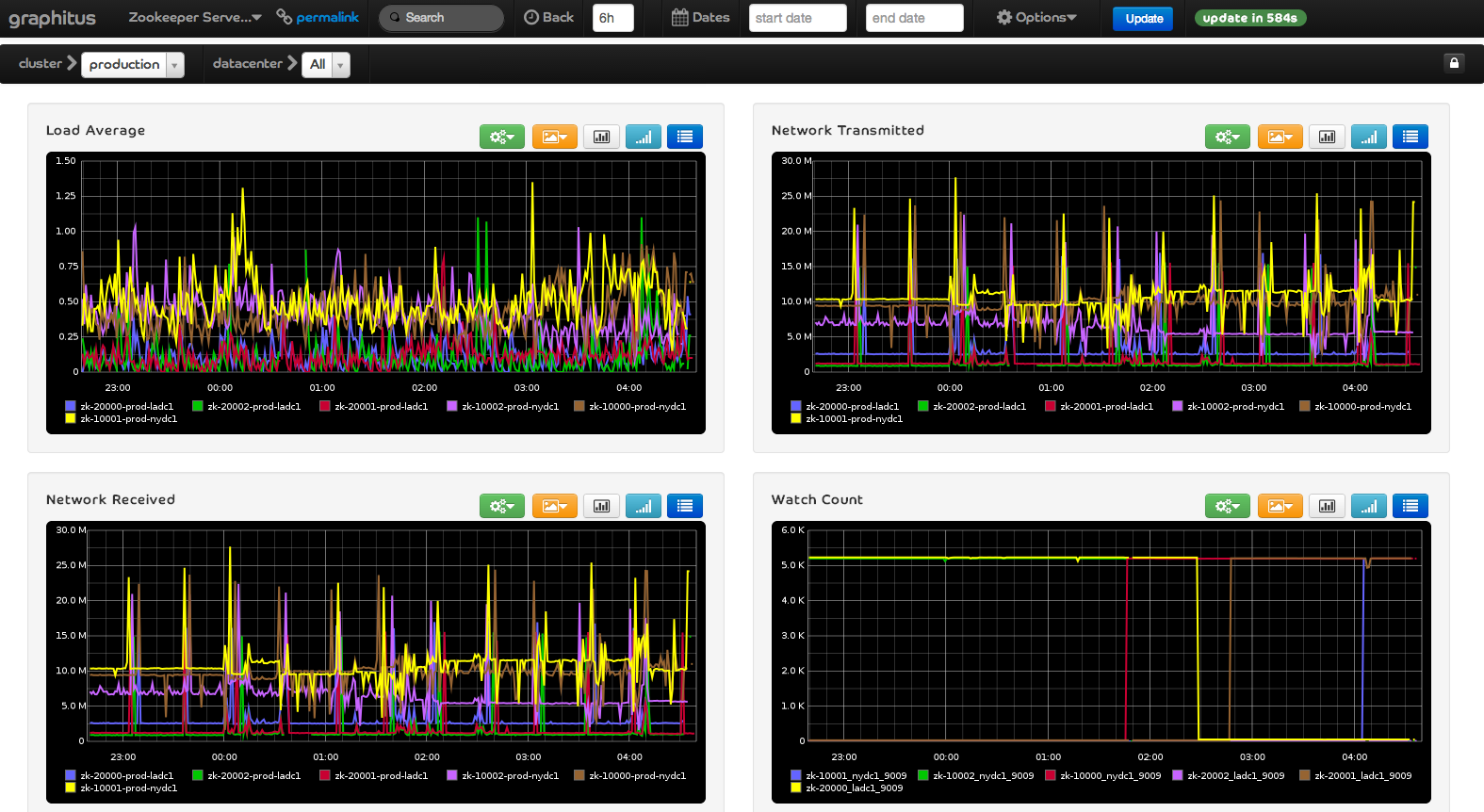
- This will generate the screen below (actual graph images are mocks):

- Override configuration with URL parameters
You can specify configuration properties in the dashboard URL to override default settings:
dashboard.html?id=grp1.dash1&defaultLineWidth=25&timeBack=20m&width=350&height=400&columns=4&legend=false
You can also specify parameter values in the URL:
dashboard.html?id=grp1.dash1&datacenter=LA
| Parameter | Required? | Description |
|---|---|---|
| title | Yes | The title of the dashboard chart |
| columns | Yes | The number of images in a row |
| user | No | Owner |
| timeBack | No | Specify timeframe back from current time to display (specify this or from and until) |
| from | No | From date/time in yyyy-MM-dd HH:MM (specify this and until or timeBack) |
| until | No | To date/time in yyyy-MM-dd HH:MM (specify this and from or timeBack) |
| width | Yes | Width of the chart from graphite (see columns) |
| height | Yes | Height of the chart from graphite |
| legend | No | Show/Hide the legend in the chart (omitting leaves it up to graphite) |
| refresh | No | Auto-refresh the charts (see refreshIntervalSeconds) |
| refreshIntervalSeconds | No | When refresh is true this will determine the refresh interval |
| defaultLineWidth | No | The line width for the generated chart |
- Dynamic Parameters
Dynamic parameters allow you to define metric selection and filtering based on dynamic graphite metric API queries. Structuring your graphite metrics tree properly can be useful to create such dashboaards.
Consider the following configuration for the parameters section of the configuration
    "service": {
        "type": "dynamic",
        "query": "services.prod.*",
        "index": 2,
        "showAll": false
    },
     "host": {
        "type": "dynamic",
        "query": "services.prod.${service}.*",
        "index": 3,
        "regex": "(.*)_",
        "showAll": true
    },
     "datacenter": {
        "type": "dynamic",
        "query": "services.prod.${service}.${host}_*",
        "index": 3,
        "regex": "_(.*)",
        "showAll": true
    }
You can then use a target like services.prod.${service}.${host}_${datacenter}.someAttribute. When graphitus loads it will generate select boxes based on the actual values returned from the graphite metric API based on the provided queries. Note that the queries themselves can be parameterized, creating a series of select boxes depending on each other in-order.
Graphitus will also consider generating the list of values from a partial path, the index and regex determine which portion and substring (regex) of the resulting path will be used to generate the values for selection. The showAll property is used to determine if graphitus will prepend a default All (translated to * in the graphite query) option to the selection