
Swipetify is a Mediapipe-to-Spotify hand tracking controller for Windows, written in Python. With it, you can control Spotify with a simple hand set of hand movements! (I'll upload a showcase video later :D)
This program is NOT polished, nor is it really ready for a public release. It functions, but definitely needs a bit of work before I'll be happy with it. More of a proof of concept than anything else.
That said, it still works smoothly 9 times out of 10, in my personal experience. One thing I can't seem to get rid of at the moment are the deprecation warnings, though. If anyone has any fixes, I'd love to see that resolved in the next version. It's likely weighing down the whole script.
- FIRST TIME ONLY: After downloading, run command prompt in the swipetify directory (folder with swipetify.py & requirements.txt)
- "py -m pip install -r requirements.txt"
- After launching Spotify, run the swipetify.py file to activate the Swipetify script (do this while Spotify is open & not playing music to ensure a good connection).
Sometimes the script can be a little finicky (I believe due to issues with Spotify) but once you can get one command through you're good to go and shouldn't experience any other issues.
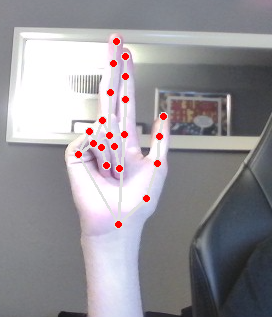
To control, make the Swipetify gesture (see SwipetifyGesture.png). Swiping from left to right skips; right to left unskips; high to low (un)pauses. Dissolving the gesture by making a fist or bringing it off camera will trigger the command.
The application hooks into Spotify with pywinauto, which allows keybinds to be sent to the Spotify application even when it's unfocused (though doing this does focus Spotify if it was minimized).
OpenCV reads camera data and feeds it to Mediapipe for hand tracking. (It is also used to display the testing window, which shows the webcam overlayed with Mediapipe's hand landmarks.
Mediapipe detects finger positions (more about that here), from which 2d coordinates are obtained for tracking key segments which are used for very simple calculations, determining whether or not the Swipetify gesture is being made. My script uses the start & end positions of the gesture as a simple way to determine what the intended action is, then sends the relevant keybind through to Spotify.
As of v1-1, most of the easily-accessed settings are in lines 8-12 of the swipetify.py script, with comments explaining how they work.
- Add (slightly) better comments (v1-2)
- Remove those pesky UserWarning messages. Yes, I know SymbolDatabase.GetPrototype() is deprecated. Please stop telling me. (v1-2)
- Create a requirements.txt to make pip installing necessary modules much easier (v1-2)
- Disable the testing webcam (or allow it to toggle on/off in options) (v1-2)
- Replace DISTANCE_MODIFIER with a more accurate system based off of the distance between key landmarks.
- Move user settings to an options.txt file (or an .ini? not sure)
- Add more actions? Suggestions for this one would be greatly appreciated.
- Sometimes, the program just doesn't hook into Spotify correctly. Not sure if this is a Spotify bug or a Swipetify one, but usually I fix it by relaunching the script, ensuring that Spotify is maximized and paused.
- Also, if you don't use Spotify Premium, you might need to edit line 10 to match the name of your Spotify window.
Having problems? Don't be a stranger! Please reach out with any bugs/fixes you've found: It's greatly appreciated!