


A fast, memory-efficient Dart library for reading, creating, and editing Excel (.xlsx) files.
Drop-in replacement for the excel package with significantly better performance on large workbooks.
- 📄 Read & Write
.xlsxfiles from bytes - 🆕 Create new Excel workbooks from scratch
- 📑 Multiple Sheets — create, copy, rename, delete, reorder
- 🔢 All Cell Types — Text, Int, Double, Bool, Date, Time, DateTime, Formula
- 🎨 Cell Styling — fonts, colors, borders, alignment, rotation, number formats
- 🔗 Merge & Unmerge cells with custom values
↕️ Row & Column — insert, remove, clear, resize- 📐 Custom Sizes — column widths and row heights with auto-fit
- 🔄 100% API Compatible with the
excelpackage - 🌍 Cross-Platform — VM, Web, mobile (Android & iOS)
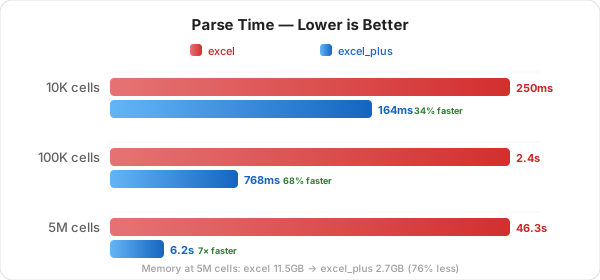
Optimized with lazy sheet loading, SAX-based parsing, and smart memory management.
dependencies:
excel_plus: ^latest// Before
import 'package:excel/excel.dart';
// After
import 'package:excel_plus/excel_plus.dart';No other code changes needed. All classes, methods, and enums are identical.
import 'dart:io';
import 'package:excel_plus/excel_plus.dart';

var file = File('path/to/file.xlsx');
var bytes = file.readAsBytesSync();
var excel = Excel.decodeBytes(bytes);

for (var table in excel.tables.keys) {
  print('Sheet: $table');
  for (var row in excel[table].rows) {
    print(row.map((cell) => cell?.value).toList());
  }
}var excel = Excel.createExcel();
var sheet = excel['Sheet1'];
sheet.updateCell(CellIndex.indexByString('A1'), TextCellValue('Name'));
sheet.updateCell(CellIndex.indexByString('B1'), TextCellValue('Age'));
sheet.updateCell(CellIndex.indexByString('A2'), TextCellValue('Alice'));
sheet.updateCell(CellIndex.indexByString('B2'), IntCellValue(30));
var bytes = excel.save();
File('output.xlsx').writeAsBytesSync(bytes!);sheet.updateCell(
CellIndex.indexByString('A1'),
TextCellValue('Bold Red Header'),
cellStyle: CellStyle(
bold: true,
fontSize: 14,
fontColorHex: ExcelColor.fromHexString('#FF0000'),
backgroundColorHex: ExcelColor.fromHexString('#FFFF00'),
horizontalAlign: HorizontalAlign.Center,
leftBorder: Border(borderStyle: BorderStyle.Thin),
rightBorder: Border(borderStyle: BorderStyle.Thin),
topBorder: Border(borderStyle: BorderStyle.Thin),
bottomBorder: Border(borderStyle: BorderStyle.Thin),
),
);sheet.merge(
CellIndex.indexByString('A1'),
CellIndex.indexByString('D1'),
customValue: TextCellValue('Merged Header'),
);sheet.insertRow(2);
sheet.removeRow(5);
sheet.insertColumn(1);
sheet.removeColumn(3);
sheet.appendRow([TextCellValue('a'), IntCellValue(1)]);
sheet.setColumnWidth(0, 25.0);
sheet.setRowHeight(0, 40.0);var excel = Excel.createExcel();
excel['Sales'].updateCell(CellIndex.indexByString('A1'), TextCellValue('Revenue'));
excel['Inventory'].updateCell(CellIndex.indexByString('A1'), TextCellValue('Stock'));
excel.rename('Sales', 'Revenue');
excel.copy('Revenue', 'Revenue Backup');
excel.delete('Inventory');
excel.setDefaultSheet('Revenue');sheet.updateCell(CellIndex.indexByString('A1'), TextCellValue('Hello'));
sheet.updateCell(CellIndex.indexByString('A2'), IntCellValue(42));
sheet.updateCell(CellIndex.indexByString('A3'), DoubleCellValue(3.14));
sheet.updateCell(CellIndex.indexByString('A4'), BoolCellValue(true));
sheet.updateCell(CellIndex.indexByString('A5'), DateCellValue(year: 2026, month: 4, day: 14));
sheet.updateCell(CellIndex.indexByString('A6'), TimeCellValue(hour: 14, minute: 30, second: 0));
sheet.updateCell(CellIndex.indexByString('A7'), DateTimeCellValue(year: 2026, month: 4, day: 14, hour: 14, minute: 30));
sheet.updateCell(CellIndex.indexByString('A8'), FormulaCellValue('SUM(A2:A3)'));import 'package:flutter/services.dart';
import 'package:path_provider/path_provider.dart';
final data = await rootBundle.load('assets/template.xlsx');
var excel = Excel.decodeBytes(data.buffer.asUint8List());
excel['Sheet1'].updateCell(CellIndex.indexByString('A1'), TextCellValue('Updated'));
final dir = await getApplicationDocumentsDirectory();
File('${dir.path}/output.xlsx').writeAsBytesSync(excel.save()!);lib/src/
core/ → Excel class, configuration constants
models/ → CellValue, CellStyle, CellIndex, enums, colors, borders
sheet/ → Sheet class with row/column and merge mixins
reader/ → SAX-based .xlsx parser with lazy sheet loading
writer/ → .xlsx encoder with span correction
utils/ → Archive, cell coordinate, and color utilities
platform/ → Conditional imports for web vs native save
MIT — see LICENSE for details.
Made with ❤️ by Masum