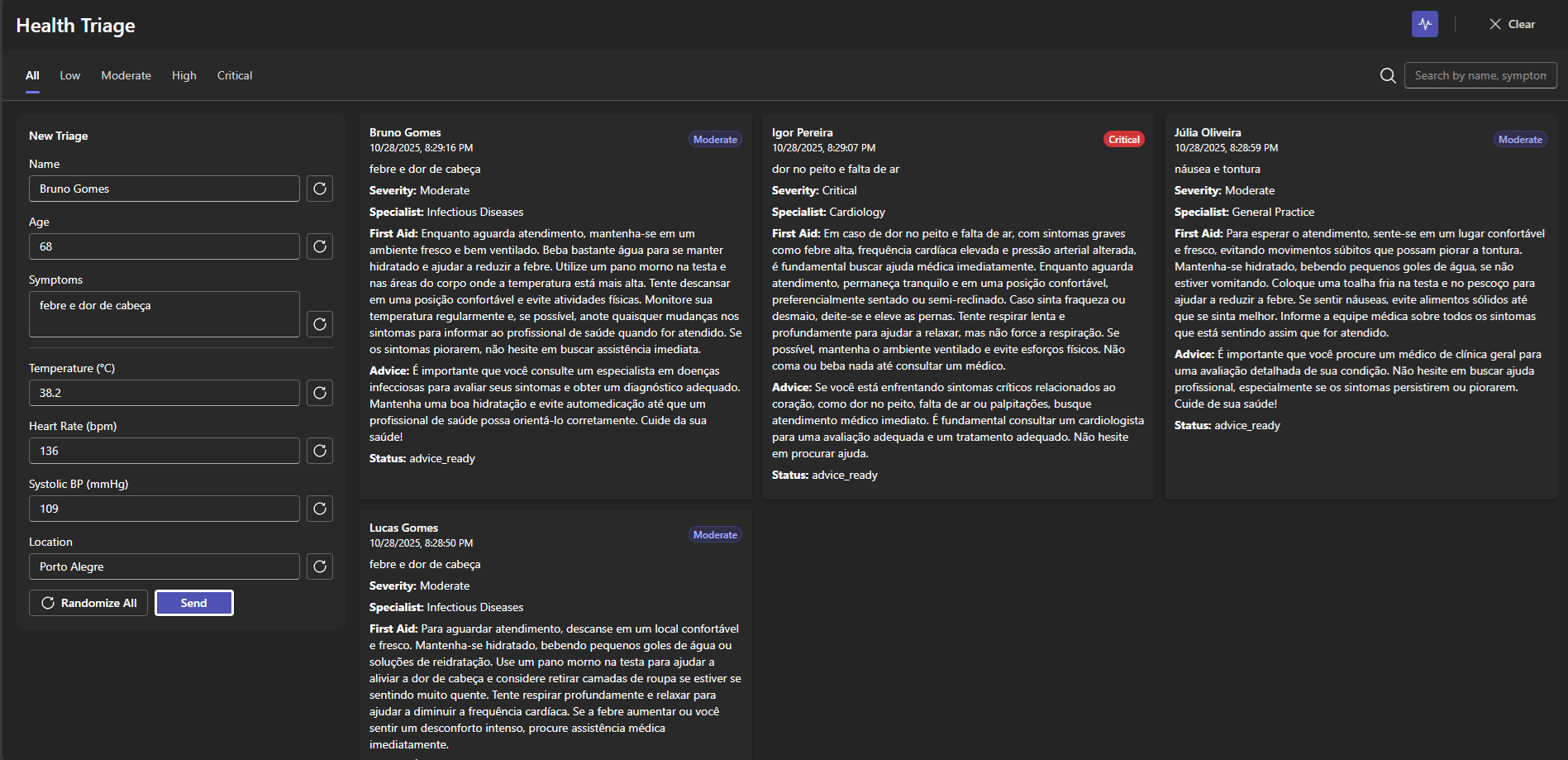
An intelligent triage system built with .NET and the Microsoft Agent Framework, simulating real-time medical evaluations powered by AI agents that assess risk, recommend specialists, and provide first-aid guidance.


HealthTriage AI is a simulated healthcare triage platform where multiple AI agents collaborate in real time to evaluate a patient’s condition.
The goal is to demonstrate how agent orchestration can solve real-world healthcare scenarios without handling sensitive medical data.
Each triage request goes through a complete evaluation pipeline:
- Risk analysis — determining urgency based on symptoms and vitals.
- Specialist recommendation — matching symptoms to the correct medical specialty.
- AI advice — generating a short and safe orientation message.
- First-aid guide — providing immediate, non-diagnostic care instructions.
All this happens live in the UI through a SignalR hub, showing how the case evolves step by step — as if multiple digital assistants were collaborating like a real medical team.
| Layer | Technologies |
|---|---|
| Backend | .NET 10 + Microsoft Agent Framework + SignalR |
| Frontend | React + Fluent UI + Vite |
| AI Connectors | OpenAI (GPT) |
| Testing | xUnit + custom hub capture for SignalR calls |
| Architecture | Clean Architecture with service orchestration pattern |
src/
 ├─ HealthTriageAI.ApiService/      → Core API + Agent Orchestration
 │                                   - Hosts SignalR hub (/hubs/triage)
 │                                   - Coordinates 5 agents (Symptom, Risk, Specialist, Advice, FirstAid)
 │                                   - Exposes endpoints for case reporting (/api/triage/report)
 │                                   - Uses Microsoft Agent Framework for LLM orchestration
 │
 ├─ HealthTriageAI.Web/             → Frontend (React + Fluent UI)
 │                                   - Real-time dashboard for triage cases
 │                                   - Displays live case flow (symptom → risk → specialist → advice)
 │                                   - Responsive layout with filtering and search
 │                                   - Connects directly to SignalR hub
 │
 └─ HealthTriageAI.Tests/           → Automated Tests (xUnit)
                                     - Unit tests for RiskAgent, SpecialistAgent, TriageCoordinator
                                     - Custom fake hub context for SignalR message capture
- 🔄 Real-time triage pipeline via SignalR
- 🧩 Agent orchestration using Microsoft Agent Framework
- 💬 GPT integration for dynamic and contextual medical advice
- 🧪 Extensive testing without external API costs (mocked advice agents)
- 🩹 First-aid assistant with contextual pre-care messages
- 💻 Modern Fluent UI dashboard with responsive layout and filtering
- The user submits a triage form (name, age, symptoms, vitals).
- The backend triggers a TriageCoordinator that orchestrates five agents:
- SymptomAgent → extracts key data from text.
- RiskAgent → classifies the urgency level.
- SpecialistAgent → selects the correct specialty.
- AdviceAgent → generates safe instructions.
- FirstAidAgent → produces immediate non-diagnostic care tips.
- Each step emits real-time updates to the UI via SignalR.
- The frontend displays the evolution of each case visually — from report to advice.
Unit and integration tests ensure system stability without incurring AI usage costs.
| Test Area | Description |
|---|---|
| RiskAgentTests | Evaluates risk classification logic based on vitals. |
| SpecialistAgentTests | Maps symptom keywords to medical specialties. |
| TriageCoordinatorTests | Validates SignalR sequence and orchestration flow using a fake hub context. |
AI agents are mocked in tests via
FakeAdviceAgentandFakeFirstAidAgentto prevent token usage.
Before starting, you have to create a new file in HealthTriageAI.ApiService project named "appsettings.json", and put this value inside:
{
  "Logging": {
    "LogLevel": {
      "Default": "Information",
      "Microsoft.AspNetCore": "Warning"
    }
  },
  "AllowedHosts": "*",
  "OpenAI": {
    "ApiKey": "<ApiKey>",
    "Model": "gpt-4o-mini"
  }
}
Please, make sure you go change "" for your real api key from OpenAI, follow site to get it: OpenAI Api keys
cd HealthTriageAI.ApiService
dotnet runcd HealthTriageAI.Web
npm install
npm run devcd HealthTriageAI.Tests
dotnet test🔗 https://healthtriage.mathszoke.com
📧 Email: matheusszoke@gmail.com
💼 LinkedIn: linkedin.com/in/matheusszoke
Made with 💚 by Matheus Szoke — powered by the Microsoft Agent Framework