Summary
The test script automates the stopping distance test on the pmb2 platform
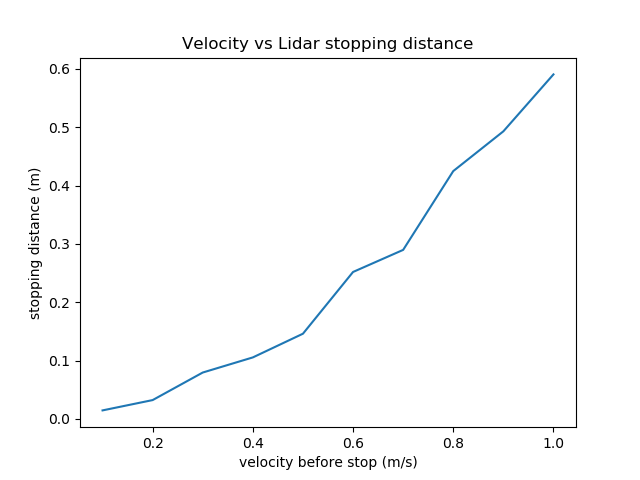
Linear x velocity is tested in a range from 0.1 - 1 m/s stopping distance is measured using the onboard SICK TiM571 lidar
The large corridor is used to measure relative distace to a wall from spawn position SICK TiM571 Specifications:
- 15 Hz refresh rate
- accuracy of +-20mm
- Resolution angle 0.33 deg
The Tester.py script has the following steps:
- pmb2 is spawned at 0 x,y,z position and orienation
- Desired test velocity is published to cmd_vel linear x
- Velocity is meaured from Odometery Twsit topic
- Once desired velocity is measured, 0 velocity is published to cmd_vel
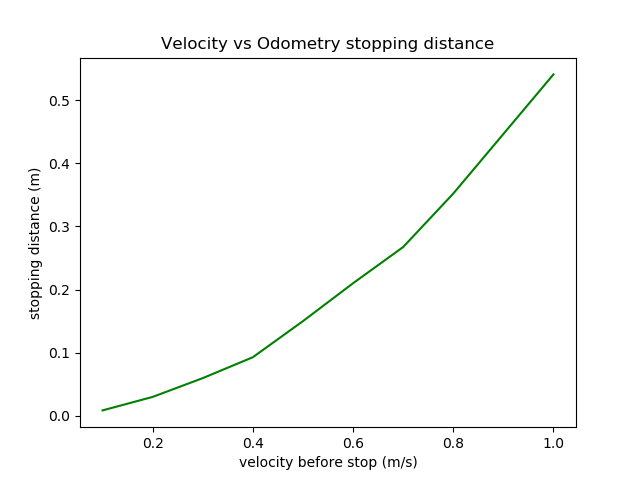
- Distance traveled is measured using Odom and Lidar
- Lidar distance is determined by averaging 7 central range measurements with cos of angle increment
- Results are published on stop_test_results topic
Logger.py is used to log data to csv file for each run:
- Logger.py must be run in the stop_dist_test directory
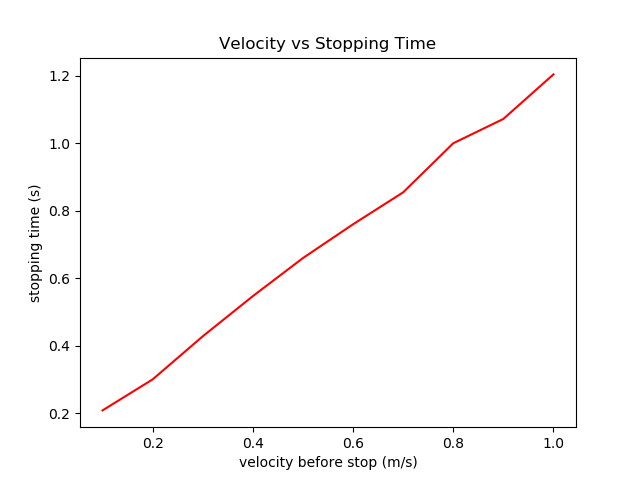
- Rostime, surface type, velocity before brake, stop distance lidar, stop distance odom and stop time is written to the log file
Analysis.py is run once a log is generated to graph results:
- path to log may edited with os.chdir("path")
- data_frame is set with the log file name self.data_frame1 = pd.read_csv("file_name")
- figures for velocity vs stop time, velocity vs lidar stop distance and velocity vs odom stop distace are generated and saved within the log folder
Videos :
- video_with_voice.mp4 has an explination of the testing procedure
- compressed video.mp4 is a short run of the simulation
compressed_video.mp4
Log :
- stop_dist_test-30_10_2021_16_43_59.csv contains a filtered run of results
- graphs output by Analysis.py saved
Future work:
- Add more surfaces with varying friction
- Adjust weight on the pmb2 platform
- determine stopping distance for reverse actions (negative velocity)
- include angular movements
- include obstructing elements to block line of sight to the wall
Run procedure:
- install simulation from http://wiki.ros.org/Robots/PMB-2/Tutorials/Installation/PMB2Simulation
- clone stop dist_test in pmb2_public_ws/src folder
- perform catkin build in workspace
- perform bash source: source ./devel/setup.bash
- roslaunch pmb2_gazebo pmb2_gazebo.launch public_sim:=true world:=large_corridor
- rosrun stop_dist_test Logger.py within the pmb2_public_ws/src/stop_dist_test folder
- rosrun stop_dist_test Tester.py
- once log is generated rosrun stop_dist_test Analysis.py