Repository navigation
Lua Script API: General Functions
Makes a character do the idle dance.
-
character- The character type to be used; Can be either:boyfriend,dadorgf.
Sets the current x position value of a character group to a new value. This will also move all precached characters from the same type into the position you want.
-
type- The character type to be used; Can be either:boyfriend,dadorgf. -
value- The new x value of the character position.
Sets the current y position value of a character group to a new value. This will also move all precached characters from the same type into the position you want.
-
type- The character type to be used; Can be either:boyfriend,dadorgf. -
value- The new y value of the character position.
Gets the current x position value of a character group; Returns a float number.
-
type- The character type to be used; Can be either:boyfriend,dadorgf.
Gets the current y position value of a character group; Returns a float number.
-
type- The character type to be used; Can be either:boyfriend,dadorgf.
Adds the value parameter to the current song score total and recalculates the rating; Default value: 0.
Adds the value parameter to the current song miss total and recalculates the rating; Default value: 0.
Adds the value parameter to the current song hit total and recalculates the rating; Default value: 0.
Adds the value parameter to the current song health total; Default value: 0.
Sets the value parameter of the current song score total with a new value and recalculates the rating; Default value: 0.
Sets the value parameter of the current song miss total with a new value and recalculates the rating; Default value: 0.
Sets the value parameter of the current song hit total with a new value and recalculates the rating; Default value: 0.
Sets the value parameter of the current song health total with a new value; Default value: 0.
Sets the current rating percent to a new value, in case you want to do your own rating calculation.
-
value- The new accuracy rating percent, Goes from0to1.
Sets the current rating name to a new value, in case you want to do your own rating calculation.
-
value- The new rating string name.
Sets the current rating combo name to a new value.
-
value- The new rating combo name.
Gets the current songs score total current value; Returns an int number.
Gets the current songs miss total current value; Returns an int number.
Gets the current songs hit total current value; Returns an int number.
Gets the current songs health total current value; Returns a float number.
Makes the camera focus on the target.
-
target- The character type to target; Can be either:boyfriendordad.
Makes the camera shake.
-
camera- The camera state to apply to; Can be either:camGame,camHUDorcamOther. -
intensity- The intensity of the shaking of the camera; Recommended value:0.05. -
duration- The duration length of the camera shaking to manually end.
Makes the camera flash.
-
camera- The camera state to apply to; Can be either:camGame,camHUDorcamOther. -
color- The flash color to display. -
duration- The duration length of the camera flash to manually end. -
forced- If set totrue, the flash will restart if there's already a flash currently happening.
Makes the camera fade into the color.
-
camera- The camera state to apply to; Can be either:camGame,camHUDorcamOther. -
color- The fade color to display. -
duration- The duration length of the camera fade to manually end. -
forced- If set totrue, the fade will restart if there's already a fade currently happening.
Starts the dialogue stuff. When the dialogue is finished, both the startCountdown() or endSong() functions will be executed depending on where you started the dialogue.
-
dialogueFile- The dialoguejsonfile to load; Must be relative to:data/song-namefolder. -
music- An optional parameter, plays a background music while being in a dialogue without having to useplayMusic()function; Must be relative to:mods/musicorassets/musicfolders; Default value:nil.
Starts a video.
-
videoFile- Themp4video file to play; Must be relative tomods/videosfolder.
Starts the countdown immediately, if you want to skip the annoying dialogue or video manually.
Loads a new song.
Warning
The function will failed to execute, if the week's json difficulty list is different from one another.
-
name- An optional parameter, the name of the song to be loaded. If the argument value isn't present, it will load the song itself; basically it resets; Default:nil. -
difficultyNum- An optional parameter, the difficulty ID number to set when loaded. If the argument value isn't present, it will load the its difficulty ID number; Default:-1.
Restarts the song.
-
skipTransition- An optional parameter, Whether a fade transition plays when reseting the song; Default value:false.
Exits the song to story mode or freeplay; Not to be confused with the endSong() function.
-
skipTransition- An optional parameter, Whether a fade transition plays when exiting the song; Default value:false.
Ends the song.
Gets the hexadecimal color value of an object by pixel size. And returns it into a 32-bit decimal integer, if converted into a hexadecimal number it will formatted as: FFFFFFFFAARRGGBB.
-
obj- The object tag to get the color. -
x- The x position value on the object tag's pixel. -
y- The y position value on the object tag's pixel.
Parses the hexadecimal color within a string and returns the corresponding FlxColor value. You can use either values to parse: 0xff0000, #ff0000, or red it can be in upper-cases or not.
-
color- The hexadecimal color value to parse.
Parses the hexadecimal color within a string and returns the corresponding FlxColor value. The only difference about getColorFromName() function that it doesn't require # or 0x at the start.
-
color- The hexadecimal color value to parse.
Sets the health bar background-colors with a new color on each sides.
-
left- The opponent's health bar to set the hexadecimal color. -
right- The player's health bar to set the hexadecimal color.
Sets the time bar background-colors with a new color on each sections.
-
left- The percentage bar to set the hexadecimal color. -
right- The background-color to set the hexadecimal color.
Displays a debug text at the top-left corner of the screen, and disappears in a few seconds.
Tip
If you want to display multiple values at the same time, you should use a table containing the values on the text argument.
-
text- The text content to display, usually just values. -
color- An optional parameter, The color of the debug text to display. Could be used for error messages or other stuff.
Examples:
function onCreate()
     local curBF = getProperty('boyfriend.curCharacter')  -- gets the current bf character
     debugPrint("Current boyfriend character: " .. curBF) --> Current boyfriend character: 'bf'
end
function onCreate()
local curBFX = getProperty('boyfriend.x') -- gets the current bf's x position
local curBFY = getProperty('boyfriend.y') -- gets the current bf's y position
debugPrint({curBFX, curBFY}) --> [770, 450]
endImmediately stops the script that is currently being in use. This is only recommended to execute this on stage scripts since they usually aren't being used anymore.
Caution
Do not execute this function anywhere if the said script needs to be constantly updated or has constantly updating stuff for something. For instance, if the script has: onUpdate(), onStepHit(), onSpawnNote() callbacks.
Triggers an execution of an event. Basically an alternative way of triggering an event without going to the chart editor.
-
name- The said name of the event to trigger. -
arg1- The first argument value for the event to use, if it even requires one. -
arg2- The second argument value for the event to use, if it even requires one.
Gets the mod settings' element from a json file current values.
-
saveTag- The settings'jsonelement tag to get the current value. -
modName- An optional parameter, The local mod file that it will only get thejsonfile; Default:nil.
changePresence(details:String, state:Null<String>, ?smallImageKey:String, ?hasStartTimestamp:Bool, ?endTimestamp:Float)
Changes your current Discord RPC status.
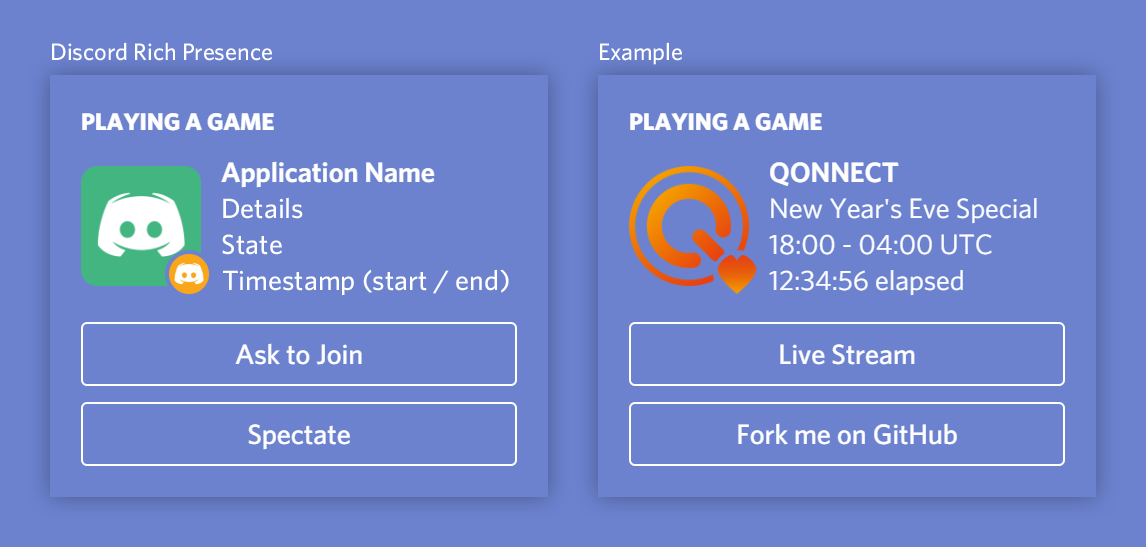
-
details- The current details on what you're doing inside the game. -
state- The description of the said detail. -
smallImageKey- An optional parameter, The image key to display at the bottom-left corner. -
hasStartTimestamp- An optional parameter, Whether your Discord RPC should have a time stamp or not. -
endTimestamp- An optional parameter, How many decimal numbers to be shown.
Returns the current song position in milliseconds; Shortcut to: getPropertyFromClass('backend.Conductor', 'songPosition').
Deprecated Original Shortcut: getPropertyFromClass('Conductor', 'songPosition')
Is the page in some way inaccurate? an error, a typo, or outdated data? To report it, use the "Issue Tab". Or do you wish to include a new function or add new information? use the "Pull Request Tab". Help is always appreciated!
- Event Callbacks
- Custom Sprite
- Custom Text
- Object Functions
- General Functions
- Scripting & File Functions
- Game Input Control Functions
- Language Translation
- HScript Functions
- Custom Substates
- Custom Shaders
- Deprecated & Removed Functions
- Sound & Music Functions
- Tweens & Timers Functions
- Reflection Functions
- Variables