Skip to content

Comments

DietPi systemd order | Resolve some systemd unit order quirks#2357

Merged
MichaIng merged 28 commits intodevfrom
boot-order
Dec 21, 2018
Merged

DietPi systemd order | Resolve some systemd unit order quirks#2357
MichaIng merged 28 commits intodevfrom
boot-order

Conversation

@MichaIng
Copy link
Owner

@MichaIng MichaIng commented Dec 17, 2018

Status: Ready

Testing:

  • Stretch
  • Jessie
  • Buster
  • RPi

Reference: https://github.com/Fourdee/DietPi/issues/2356

Commit list/description:

  • DietPi-FS_partition_resize | Run as early as possible, after root mount only, respectively it's remount, e.g. after systemd-fsck. Especially run before swap creation.
    • Actually it would be great to run this even before RootFS is mounted (writeable), but of course RootFS needs to be mounted for systemd to even read this systemd unit 😉. It is mounted R/O first, where fdisk fails because of this.
    • And tee to log file is not possible of course, tee >(systemd-cat -t DietPi-FS_partition_resize -p 5) would have been possible instead to write log to journald/journalctl, which can then be found via systemctl -t DietPi-FS_partition_resize afterwards.
    • And I learned that cmd <<< 'string' (here string) respectively cmd << _EOF_ ... _EOF_ (here document) actually temporarily create a file based on string on mounted drive, which then fails as well. Not sure, if this file is created within /tmp (not yet tmpfs at this early boot state) or current working dir.
    • Piping (echo 'string' | cmd) creates the string file in-kernel, so that this is possible without RootFS R/W, but much slower, not only because of echo, but also because piping creates a sub shell, which takes much time in bash.
  • DietPi-FS_partition_resize | Pull in local-fs-pre.target, which is special static systemd target, that is only reached, if actively pulled in. On fresh DietPi it is pulled already, but we are fail-safe with it.
  • DietPi-FS_partition_resize | "-f" short for "--force" forces changes, even if drive is mounted/swap active, but "--no-reread" will simply skip the test, where we know the outcome on RootFS. To be fail-safe we leave both options inside.
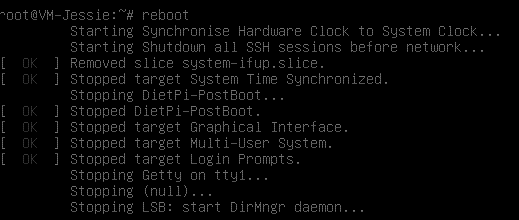
  • DietPi-RAMdisk | Simplify: "After=local-fs.target" is added via default dependencies, and all mounts have to finish to reach this target; "StandardOutput=tty" does not make sense, if we forward everything to log file
  • DietPi-RAMdisk | Fix "dietpi-ramdisk.log" being overwritten on boot, rendering shutdown log useless. For now stay with adding logs to final log location directly.
  • DietPi-RAMlog | Simplify: "After=local-fs.target" is added via default dependencies, and all mounts have to finish to reach this target; "StandardOutput=tty" does not make sense, if we forward everything to log file
  • DietPi-RAMlog | Fix "dietpi-ramlog.log" being overwritten on boot, rendering shutdown log useless. For now stay with adding logs to final log location directly.
  • DietPi-FS_partition_resize | Pre-create log dir to be fail-safe
  • DietPi-PreBoot | Log STDERR to log file as well
  • DietPi-Boot | Log STDERR to log file as well
  • DietPi-Boot | Run "Before=getty", and with this on idle (can happen early by chance) login prompts
    • getty-pre.target exists on Buster, but not yet on Stretch, which assures that Before=getty-pre.target runs before all getty@.service instances are started. For now we stay with getty.target (reached AFTER all getty instances started) and getty@ttyq1.
  • DietPi-Boot | Do not run "After=network-online.target", since this can delay boot much and DietPi-Boot has it's own optional (dietpi.txt) network wait mechanism. Furthermore "network-online.target" is not pulled in by default, but an "active" unit, thus consumer services need/should pull it via Wants=. "apt-daily.service" e.g. does this, but we mask this one.
  • DietPi-PreBoot | "network-pre.target" is a passive unit that needs to be pulled in (Wants=) by services, otherwise it is not active. Currently for this reason, network interfaces are raised, before/while dietpi-ramdisk/log/preboot.
  • DietPi-PostBoot | Remove "Before=rc[.-]local.service", since those are meant to run before login prompt (Before=getty.target). rc-local is enabled, login prompt will run after postboot, thus over-prompt our banner.
  • DietPi-PostBoot | Oder "After=multi-user.target", which is the last actual login prompt target and assures, that out banner is shown after login prompt TTY clearing.
  • DietPi-PostBoot | Avoid /bin/bash sub shell call, which is not required, since we do no stream redirection here
  • DietPi-Kill_SSH | Avoid running in sub shell /bin/bash call. Not required, since we do not redirect streams
  • DietPi-Kill_SSH | "Before/After=network.target" has no order effect for this service, which is called only on shutdown, since this target is not "reached" on shutdown. "shutdown.target" is the very last target reached on shutdown, so too late anyway. Best results (earliest execution) during my tests was without declaring any ordering.
  • DietPi-Drive_Manager | Add fsck flag to /boot as well
  • DietPi-Drive_Manager | Remove nofail and x-systemd.automount from boot as well

+ DietPi-FS_partition_resize | Run unit before local-fs and swap targets reached, but after local-fs-pre.target to have all initial R/O root mounts and remounts done
+ DietPi-FS_partition_resize | Pull in local-fs-pre.target, which is special static systemd target, that is only reached, if actively pulled in. On fresh DietPi it it reached already, but we need to be failsafe
@MichaIng MichaIng added this to the v6.20 milestone Dec 17, 2018
@MichaIng MichaIng self-assigned this Dec 17, 2018
+ DietPi-FS_partition_resize | Run as early as possible, after root mount only, respectively it's remount, e.g. after systemd-fsck. Especially run before swap creation.
DietPi-FS_partition_resize | "-f" short for "--force" forces changes, even if drive is mounted/swap active, but "--no-reread" will simply skip the test, where we know the outcome on RootFS. To be fail-safe we leave both options inside.
+ DietPi-FS_partition_resize | Minor
+ DietPi-RAMdisk | Simplify: "After=local-fs.target" is added via default dependencies, and all mounts have to finish to reach this target; "StandardOutput=tty" does not make sense, if we forward everything to log file
+ DietPi-RAMdisk | Fix "dietpi-ramdisk.log" being overwritten on boot, rendering shutdown log useless. For now stay with adding logs to final log location directly.
+ DietPi-RAMlog | Simplify: "After=local-fs.target" is added via default dependencies, and all mounts have to finish to reach this target; "StandardOutput=tty" does not make sense, if we forward everything to log file
+ DietPi-RAMlog | Fix "dietpi-ramlog.log" being overwritten on boot, rendering shutdown log useless. For now stay with adding logs to final log location directly.
+ DietPi-FS_partition_resize | Pre-create log dir to be fail-safe
+ DietPi-PreBoot | Log STDERR to log file as well
+ DietPi-Boot | Log STDERR to log file as well
+ DietPi-Boot | Run "Before=getty", and with this on idle (can happen early by chance) login prompts
+ DietPi-Boot | Do not run "After=network-online.target", since this can delay boot much and DietPi-Boot has it's own optional (dietpi.txt) network wait mechanism. Furthermore "network-online.target" is not pulled in by default, but an "active" unit, thus consumer services need/should pull it via Wants=. "apt-daily.service" e.g. does this, but we mask this one.
+ DietPi-PreBoot | "network-pre.target" is a passive unit that needs to be pulled in (Wants=) by services, otherwise it is not active. Currently for this reason, network interfaces are raised, before/while dietpi-ramdisk/log/preboot.
+ DietPi-RAMdisk | Minor
+ DietPi-RAMlog | Minor
+ DietPi-PostBoot | Remove "Before=rc[.-]local.service", since those are meant to run before login prompt (Before=getty.target). rc-local is enabled, login prompt will run after postboot, thus over-prompt our banner.
+ DietPi-PostBoot | Oder "After=multi-user.target", which is the last actual login prompt target and assures, that out banner is shown after login prompt TTY clearing.
+ DietPi-PostBoot | Avoid /bin/bash sub shell call, which is not required, since we do no stream redirection here
+ DietPi-Kill_SSH | Avoid running in sub shell /bin/bash call. Not required, since we do not redirect streams
+ DietPi-Kill_SSH | "Before/After=network.target" has no order effect for this service, which is called only on shutdown, since this target is not "reached" on shutdown. "shutdown.target" is the very last target reached on shutdown, so too late anyway. Best results (earliest execution) during my tests was without declaring any ordering.
@MichaIng MichaIng requested a review from Fourdee December 18, 2018 05:36
@MichaIng
Copy link
Owner Author

MichaIng commented Dec 18, 2018

🈯️ Killing SSH now done nearly as first step on shutdown/reboot, although not sure why it was later with Before/After, which otherwise had no effect, at least not the desired one.
1


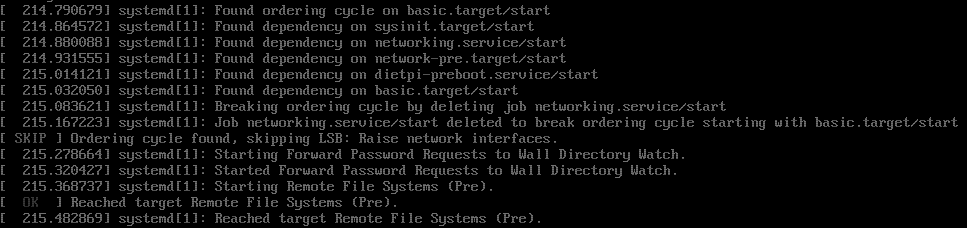
🈴 Jessie: Ordering cycle with networking.service (re)appeared:
1
Well known: systemd/systemd#3829
Reason:

root@VM-Jessie:~# systemctl show -p Before networking.service
Before=sysinit.target shutdown.target network.target dietpi-boot.service
  • sysinit.target is default dependency for all systemd services, unless DefaultDependencies=no is defined:
root@VM-Jessie:~# systemctl show -p After dietpi-preboot.service
After=dietpi-ramdisk.service dietpi-ramlog.service basic.target system.slice
root@VM-Jessie:~# systemctl show -p After basic.target
After=sysinit.target sockets.target timers.target paths.target slices.target
  • So it is impossible to run a custom systemd service before networking on Jessie, at least without DefaultDependencies=no, respectively before network-pre.target. Pulling this with this PR (re)enabled the loop.
root@VM-Jessie:~# cat /run/systemd/generator.late/networking.service
# Automatically generated by systemd-sysv-generator

[Unit]
SourcePath=/etc/init.d/networking
Description=LSB: Raise network interfaces.
DefaultDependencies=no
Before=sysinit.target shutdown.target
After=mountkernfs.service local-fs.target urandom.service
Conflicts=shutdown.target

[Service]
Type=forking
Restart=no
TimeoutSec=0
IgnoreSIGPIPE=no
KillMode=process
GuessMainPID=no
RemainAfterExit=yes
SysVStartPriority=12
ExecStart=/etc/init.d/networking start
ExecStop=/etc/init.d/networking stop
ExecReload=/etc/init.d/networking reload
  • Auto created by systemd generator. Must have something to do with init.d service header:
root@VM-Jessie:~# cat /etc/init.d/networking
#!/bin/sh -e
### BEGIN INIT INFO
# Provides:          networking ifupdown
# Required-Start:    mountkernfs $local_fs urandom
# Required-Stop:     $local_fs
# Default-Start:     S
# Default-Stop:      0 6
# Short-Description: Raise network interfaces.
# Description:       Prepare /run/network directory, ifstate file and raise network interfaces, or take them down.
### END INIT INFO

# Default-Start: S has this effect, being translated by systemd-sysv-generator into Before=sysinit.target, thus before all default systemd units:

root@VM-Jessie:~# grep 'Default-Start:' /etc/init.d/*
/etc/init.d/bootlogs:# Default-Start:     1 2 3 4 5
/etc/init.d/bootmisc.sh:# Default-Start:     S
/etc/init.d/checkfs.sh:# Default-Start:     S
/etc/init.d/checkroot-bootclean.sh:# Default-Start:     S
/etc/init.d/checkroot.sh:# Default-Start:     S
/etc/init.d/console-setup:# Default-Start:     S
/etc/init.d/cron:# Default-Start:     2 3 4 5
/etc/init.d/dirmngr:# Default-Start:     2 3 4 5
/etc/init.d/dropbear:# Default-Start:     2 3 4 5
/etc/init.d/halt:# Default-Start:
/etc/init.d/hostname.sh:# Default-Start:     S
/etc/init.d/hwclock.sh:# Default-Start:     S
/etc/init.d/kbd:# Default-Start:     S
/etc/init.d/keyboard-setup:# Default-Start:     S
/etc/init.d/killprocs:# Default-Start:     1
/etc/init.d/kmod:# Default-Start:     S
/etc/init.d/motd:# Default-Start:     1 2 3 4 5
/etc/init.d/mountall-bootclean.sh:# Default-Start:     S
/etc/init.d/mountall.sh:# Default-Start:     S
/etc/init.d/mountdevsubfs.sh:# Default-Start:     S
/etc/init.d/mountkernfs.sh:# Default-Start:     S
/etc/init.d/mountnfs-bootclean.sh:# Default-Start:     S
/etc/init.d/mountnfs.sh:# Default-Start:     S
/etc/init.d/networking:# Default-Start:     S
/etc/init.d/procps:# Default-Start:     S
/etc/init.d/rc.local:# Default-Start:     2 3 4 5
/etc/init.d/README:# Default-Start:     2 3 4 5
/etc/init.d/reboot:# Default-Start:
/etc/init.d/resolvconf:# Default-Start:     S
/etc/init.d/rmnologin:# Default-Start:     2 3 4 5
/etc/init.d/sendsigs:# Default-Start:
/etc/init.d/single:# Default-Start:     1
/etc/init.d/skeleton:# Default-Start:     2 3 4 5
/etc/init.d/sudo:# Default-Start:     2 3 4 5
/etc/init.d/udev:# Default-Start:     S
/etc/init.d/udev-finish:# Default-Start:     S
/etc/init.d/umountfs:# Default-Start:
/etc/init.d/umountnfs.sh:# Default-Start:
/etc/init.d/umountroot:# Default-Start:
/etc/init.d/urandom:# Default-Start:     S
root@VM-Jessie:~# systemctl show -p Before bootmisc
Before=
root@VM-Jessie:~# systemctl show -p Before console-setup
Before=sysinit.target
root@VM-Jessie:~# systemctl show -p Before kbd
Before=sysinit.target console-setup.service
root@VM-Jessie:~# systemctl show -p Before procps
Before=networking.service sysinit.target shutdown.target
root@VM-Jessie:~# systemctl show -p Before bootlogs
Before=
root@VM-Jessie:~# systemctl show -p Before cron
Before=shutdown.target
root@VM-Jessie:~# systemctl show -p Before skeleton
Before=
root@VM-Jessie:~# systemctl show -p Before sudo
Before=shutdown.target
  • We definitely want to preboot to pre-configure network settings, so interfaces should be started afterwards.
  • 🈴 Manually overriding Before= does not work, most likely because it's a generated systemd unit 🤔.
root@VM-Jessie:~# cat /etc/systemd/system/networking.service.d/dietpi-fix_order.conf
# Default-Start: S within /etc/init.d/networking leads to this being executed: Before=sysinit.target.
# Removing this allows DietPi-PreBoot to run before networking, while keeping default dependencies: After=sysinit.target.

[Unit]
Before=
Before=shutdown.target

Copy link
Collaborator

@Fourdee Fourdee left a comment

Choose a reason for hiding this comment

The reason will be displayed to describe this comment to others. Learn more.

@MichaIng

Looking good, nice work 👍

@MichaIng
Copy link
Owner Author

MichaIng commented Dec 18, 2018

🈯️ Resolved deps cycle on Jessie:

root@VM-Jessie:~# cat /etc/init.d/networking | grep Default-Start
# Default-Start:     1 2 3 4 5
  • Actually S should match run level 1 (single user mode: https://en.wikipedia.org/wiki/Runlevel), but practically it doesn't. Also it can be seen that /etc/rc1.d|rcS.d are separated with different content.
  • systemctl daemon-reload does not really update sysv service run level states. The following was required to remove the script from all run levels first, then add according to script file header:
root@VM-Jessie:~# insserv -v -r networking
insserv: remove service /etc/init.d/../rc0.d/K04networking
insserv: remove service /etc/init.d/../rc1.d/S01networking
insserv: remove service /etc/init.d/../rc2.d/S01networking
insserv: remove service /etc/init.d/../rc3.d/S01networking
insserv: remove service /etc/init.d/../rc4.d/S01networking
insserv: remove service /etc/init.d/../rc5.d/S01networking
insserv: remove service /etc/init.d/../rc6.d/K04networking
insserv: creating .depend.boot
insserv: creating .depend.start
insserv: creating .depend.stop
root@VM-Jessie:~# insserv -v -d networking
insserv: enable service ../init.d/networking -> /etc/init.d/../rc0.d/K04networking
insserv: enable service ../init.d/networking -> /etc/init.d/../rc1.d/S01networking
insserv: enable service ../init.d/networking -> /etc/init.d/../rc2.d/S01networking
insserv: enable service ../init.d/networking -> /etc/init.d/../rc3.d/S01networking
insserv: enable service ../init.d/networking -> /etc/init.d/../rc4.d/S01networking
insserv: enable service ../init.d/networking -> /etc/init.d/../rc5.d/S01networking
insserv: enable service ../init.d/networking -> /etc/init.d/../rc6.d/K04networking
insserv: creating .depend.boot
insserv: creating .depend.start
insserv: creating .depend.stop
  • Since dependencies are updated accordingly, running this the first time changes much other sysv services. Looks like on fresh Debian Jessie, current run levels do not match the ones defined in service files, or APT updates changed them, but did not run the above to update /etc/rcX.d links...
    1

+ DietPi-Patch | Resolve networking service order cycle on Jessie
@MichaIng
Copy link
Owner Author

MichaIng commented Dec 18, 2018

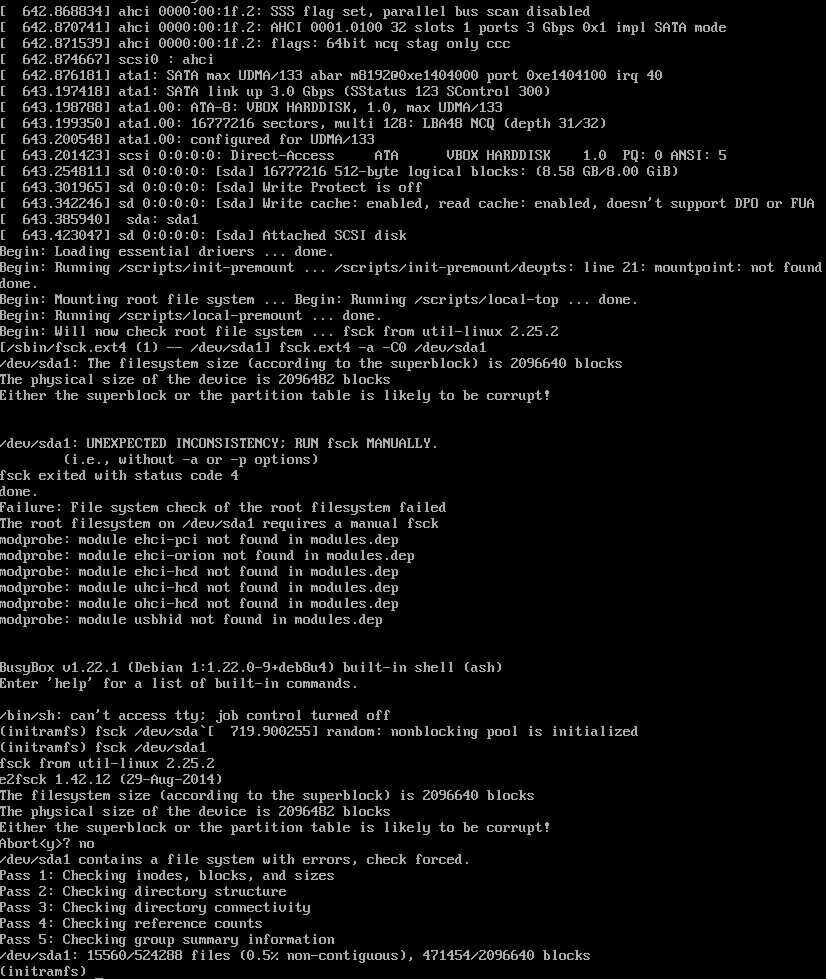
🈴 DietPi-FS_partition_resize breaks boot due to wrong super block. No chance to fix via e2fsck:
1

  • Recheck on current dev 🈴 Same issue, no not related to this PR:
root@VM-Jessie:~# cat /var/tmp/dietpi/logs/fs_partition_resize.log

Disk /dev/sda: 1044 cylinders, 255 heads, 63 sectors/track
Old situation:
Units: cylinders of 44032 bytes, blocks of 1024 bytes, counting from 0

   Device Boot Start     End   #cyls    #blocks   Id  System
/dev/sda1         23+ 195083- 195061-   8387584   83  Linux
                start: (c,h,s) expected (23,70,1) found (0,32,33)
                end: (c,h,s) expected (1023,85,1) found (20,85,1)
/dev/sda2          0       -       0          0    0  Empty
/dev/sda3          0       -       0          0    0  Empty
/dev/sda4          0       -       0          0    0  Empty
New situation:
Units: cylinders of 8225280 bytes, blocks of 1024 bytes, counting from 0

   Device Boot Start     End   #cyls    #blocks   Id  System
/dev/sda1          0+   1044-   1044    8385930   83  Linux
/dev/sda2          0       -       0          0    0  Empty
/dev/sda3          0       -       0          0    0  Empty
/dev/sda4          0       -       0          0    0  Empty
Successfully wrote the new partition table

Re-reading the partition table ...
Filesystem at /dev/sda1 is mounted on /; on-line resizing required
  • New partition resize method has different result. New partition is smaller than old one, thus resize2fs fails (not possible on mounted device) and this also breaks FS consistency/super block.
  • Why there are three empty partitions?? "Broken" pre-image? fdisk does not show them:
Disk /dev/sda: 8 GiB, 8589934592 bytes, 16777216 sectors
Units: sectors of 1 * 512 = 512 bytes
Sector size (logical/physical): 512 bytes / 512 bytes
I/O size (minimum/optimal): 512 bytes / 512 bytes
Disklabel type: dos
Disk identifier: 0x159e0d92

Device     Boot Start      End  Sectors Size Id Type
/dev/sda1        2048 16777215 16775168   8G 83 Linux

root@VM-Jessie:~# sfdisk /dev/sda -l

Disk /dev/sda: 1044 cylinders, 255 heads, 63 sectors/track
sfdisk: Warning: The partition table looks like it was made
  for C/H/S=*/86/1 (instead of 1044/255/63).
For this listing I'll assume that geometry.
Units: cylinders of 44032 bytes, blocks of 1024 bytes, counting from 0

   Device Boot Start     End   #cyls    #blocks   Id  System
/dev/sda1         23+ 195083- 195061-   8387584   83  Linux
                start: (c,h,s) expected (23,70,1) found (0,32,33)
                end: (c,h,s) expected (1023,85,1) found (20,85,1)
/dev/sda2          0       -       0          0    0  Empty
/dev/sda3          0       -       0          0    0  Empty
/dev/sda4          0       -       0          0    0  Empty
  • Using fdisk d > n > ... leads to same result...
root@VM-Jessie:~# sfdisk -fN1 /dev/sda <<< ',+,,,'
sfdisk: Checking that no-one is using this disk right now ...
sfdisk: BLKRRPART: Device or resource busy
sfdisk:
This disk is currently in use - repartitioning is probably a bad idea.
Umount all file systems, and swapoff all swap partitions on this disk.
Use the --no-reread flag to suppress this check.

Disk /dev/sda: 1044 cylinders, 255 heads, 63 sectors/track
Old situation:
sfdisk: Warning: The partition table looks like it was made
  for C/H/S=*/78/1 (instead of 1044/255/63).
For this listing I'll assume that geometry.
Units: cylinders of 39936 bytes, blocks of 1024 bytes, counting from 0

   Device Boot Start     End   #cyls    #blocks   Id  System
/dev/sda1         26+ 215092- 215067-   8387584   83  Linux
                start: (c,h,s) expected (26,20,1) found (23,70,1)
                end: (c,h,s) expected (1023,77,1) found (523,77,1)
/dev/sda2          0       -       0          0    0  Empty
/dev/sda3          0       -       0          0    0  Empty
/dev/sda4          0       -       0          0    0  Empty
New situation:
Units: cylinders of 8225280 bytes, blocks of 1024 bytes, counting from 0

   Device Boot Start     End   #cyls    #blocks   Id  System
/dev/sda1          0+   1044-   1044    8385930   83  Linux
/dev/sda2          0       -       0          0    0  Empty
/dev/sda3          0       -       0          0    0  Empty
/dev/sda4          0       -       0          0    0  Empty
sfdisk: Warning: partition 1 does not end at a cylinder boundary
sfdisk: Warning: no primary partition is marked bootable (active)
This does not matter for LILO, but the DOS MBR will not boot this disk.
Successfully wrote the new partition table

Re-reading the partition table ...
sfdisk: BLKRRPART: Device or resource busy
sfdisk: The command to re-read the partition table failed.
Run partprobe(8), kpartx(8) or reboot your system now,
before using mkfs
sfdisk: If you created or changed a DOS partition, /dev/foo7, say, then use dd(1)
to zero the first 512 bytes:  dd if=/dev/zero of=/dev/foo7 bs=512 count=1
(See fdisk(8).)
root@VM-Jessie:~# partprobe
root@VM-Jessie:~# fdisk -l

Disk /dev/sda: 8 GiB, 8589934592 bytes, 16777216 sectors
Units: sectors of 1 * 512 = 512 bytes
Sector size (logical/physical): 512 bytes / 512 bytes
I/O size (minimum/optimal): 512 bytes / 512 bytes
Disklabel type: dos
Disk identifier: 0x159e0d92

Device     Boot Start      End  Sectors Size Id Type
/dev/sda1        2048 16773907 16771860   8G 83 Linux

root@VM-Jessie:~# fdisk /dev/sda1

Welcome to fdisk (util-linux 2.25.2).
Changes will remain in memory only, until you decide to write them.
Be careful before using the write command.

/dev/sda1: device contains a valid 'ext4' signature, it's strongly recommended to wipe the device by command wipefs(8) if this setup is unexpected to avoid possible collisions.

Device does not contain a recognized partition table.
Created a new DOS disklabel with disk identifier 0xac24657e.

Command (m for help):

@MichaIng
Copy link
Owner Author

MichaIng commented Dec 18, 2018

@Fourdee
Okay, that is critical, independently from this PR or DietPi-FS_partition_resize, sfdisk <<< ',+,,,' breaks the partition table on Jessie, were initially created (or re-created) with fdisk.

Reading:

File system and "primary partition" information are not preserved. Furthermore obsolete c,h,s check and manipulation is done, no idea what it is, but according to above link it is removed on current sfdisk (Stretch+?). Perhaps this is responsible for the issue.
I couldn't find any way to create a valid primary partition via sfdisk on Jessie. Needs replication on other Jessie systems however, since it is quite strange that a system core package breaks partitions... In case we need to revert to fdisk, until Jessie support is completely dopped...

🈯️ Rechecked on Stretch, no issue there.


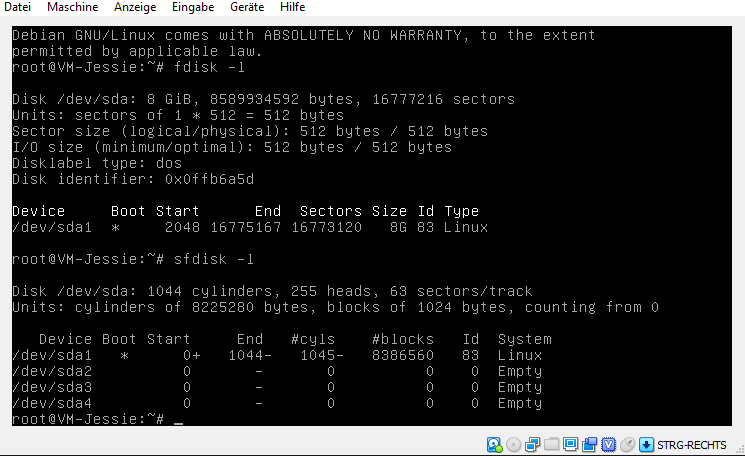
Fresh Debian Jessie situation:
1
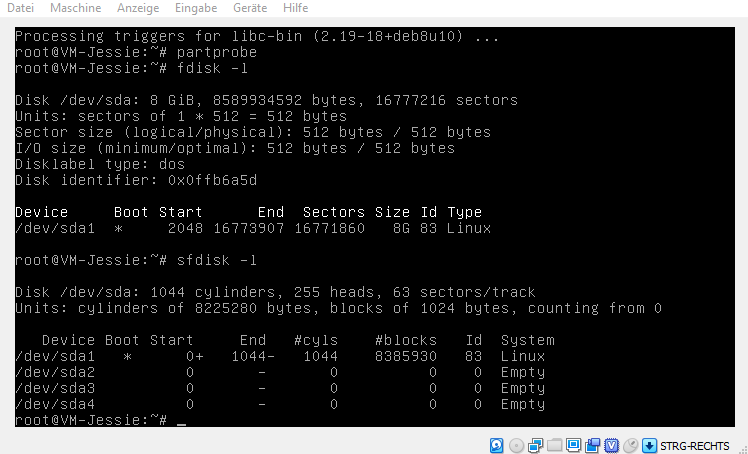
After sfdisk -fN1 /dev/sda <<< ',+,,,':
1

  • cyls 1 lower, amount of sectors lower.
    🈴 Same superblock error on reboot: Bug independent from DietPi!

  • Mounting the disk to a Stretch system and running exactly the same sfdisk command fixes this, allowing to boot the Jessie system again...

  • Not sure, but it might be indeed the only issue, that the partition size is reduced, which cannot be done on a mounted partition, thus new partition table is only half written or something. This would mean that this issue should only appear on VM, where we do not shrink partition size for image creation, so no expansion is actually done, but a tiny partition size reduction as above...

  • Check with increasing VM partition size, then run sfdisk.

    • Lol, resizing vmdk is not possible with VBox?? Conversion to VDI required...
    • Copy drive as VDI and reattach works fine, resizing possible then. Should we create VBox images with VDI by default?
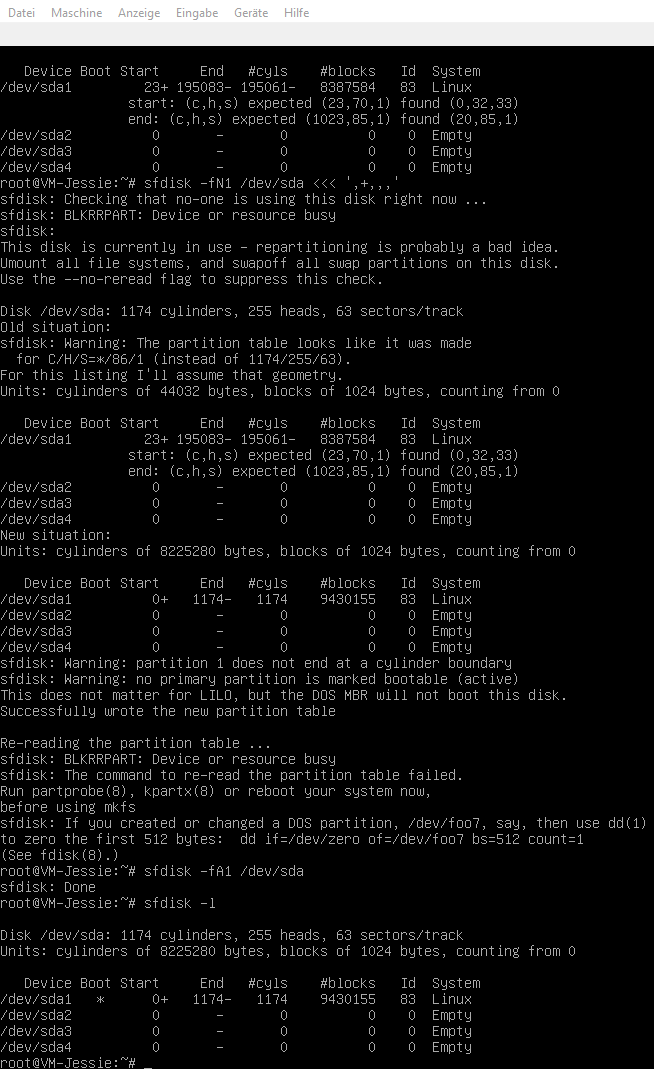
    • Boot flag missing as well, strange since this was not the case above. sfdisk -fA1 /dev/sda to add it:
      1
    • VBox error when running resize2fs. Resuming possible. Reboot works but mass I/O errors.... fsck on reboot does not resolve. Something got broken...
    • Btw: Boot flag missing on working DietPi image as well. Seems like fdisk + sfdisk expansion both do not create it without any nagative effect.
    • Adding boot flag on the other hand does not resolve issue with sfdisk shrinking partition size and failing reboot.
  • Btw I run VBox 6 (RC1), so it might work on VBox 5...
    🈴 Increasing disk size, doing partition resize via fdisk, running partprobe and finally resize2fs fails as well, same VBox error and I/O errors during reboot...

  • Test the same on Stretch
    🈯️ Lol, on Stretch, the same errors appear already on first boot after increasing (VDI) disk size. Same error on resize2fs, but no errors anymore after reboot then... 🈴 Okay, again reboot, then errors DO show up...

@MichaIng
Copy link
Owner Author

Since it is unrelated, moved all the disk/resize issues to: https://github.com/Fourdee/DietPi/issues/2358

Will do final tests for boot order on Buster as well, then merge.

+ DietPi-Kill_SSH | Run killall regardless or pgrep result, since pgrep is slower than an unsuccessful killall attempt. Script file not required anymore.
+ DietPi-Kill_SSH | Run killall without prior pgrep check, since pgrep check is slower than an unsuccessful killall attempt. "-q" to hide output. Rename to "dietpi-kill_ssh.service" for DietPi script naming consistency
+ DietPi-Patch | Patch DietPi-Kill_SSH service rework
+ DietPi-Patch | Doubled empty line
+ DietPi-Kill_SSH | Do not throw failure state, if killall command fails
+ CHANGELOG | DietPi systemd unit boot order/dependencies
+ Conflict merge alignment fix
+ DietPi-WiFi-Monitor | Shorten "Description" to have better syslog entries; Move explanation to comment
+ DietPi-WiFi-Monitor | Since this systemd unit prints to syslog/journald, reduce output to connection loss + reconnect only. Print connection checks only in debug mode.
@MichaIng
Copy link
Owner Author

MichaIng commented Dec 20, 2018

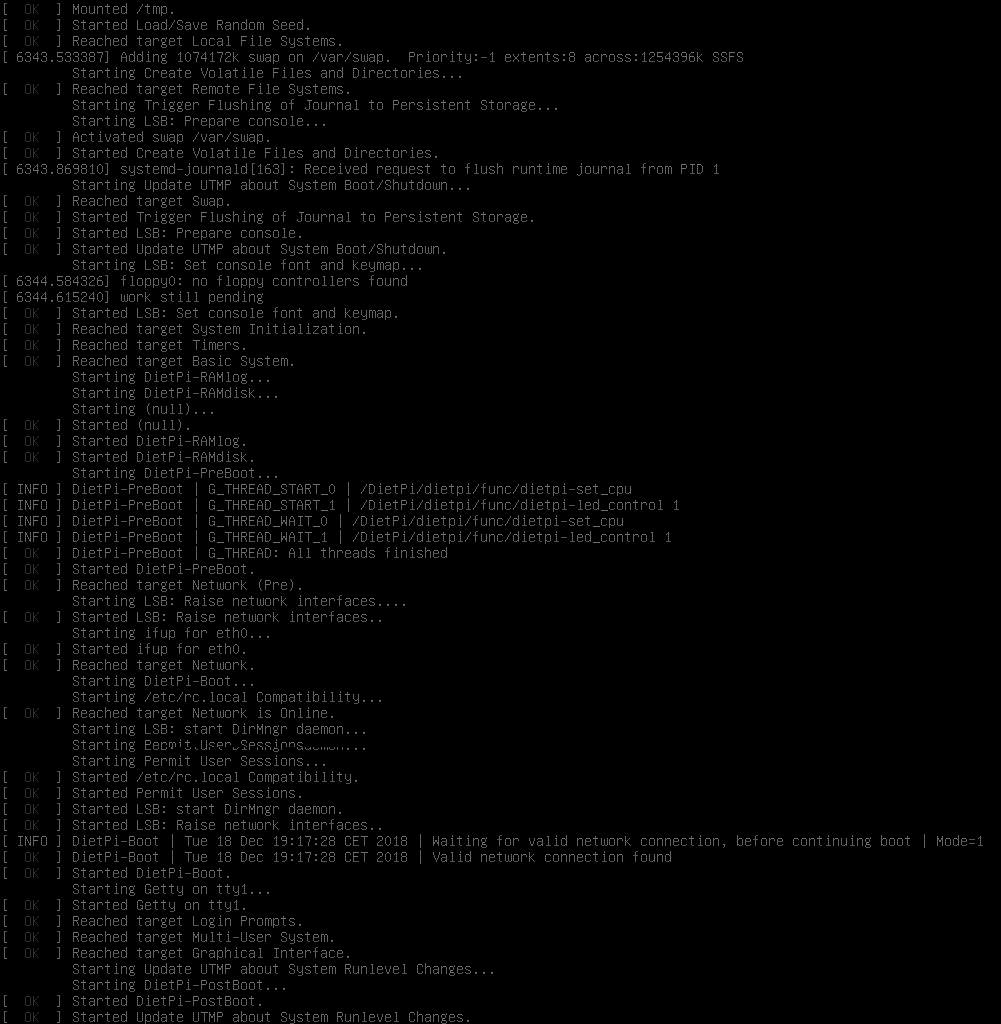
🈴 Not sure if this was the case before, but on RPi, the boot mount was due to x-systemd.automount not part of local-fs.target. In cases /boot was mounted after RAMdisk init. On boot, boot.automount is triggered then, so copy to RAMdisk does not fail. But on shutdown /boot is unmounted before RAMdisk stops (and local-fs.target), to copy back to disk fails:

Thu 20 Dec 23:42:37 CET 2018 | DietPi-RAMdisk: Starting...
Thu 20 Dec 23:42:37 CET 2018 | DietPi-RAMdisk: Completed
Thu 20 Dec 23:52:54 CET 2018 | DietPi-RAMdisk: Stopping...
cp: target '/boot/' is not a directory
Thu 20 Dec 23:52:56 CET 2018 | DietPi-RAMdisk: Completed

I first though it was due to removed After=boot.mount, but this didn't help, I guess since the actually active mount is boot.automount. Finally I found that x-systemd.automount mounts are not added to local-fs.target, which also somehow makes sense. Removing this from fstab, resolved the issue, making /boot being mounted before all other drives and most importantly assured before local-fs.target is reached. Not sure if this was the case, before, at least never had an issue with this, perhaps due to recent systemd update on Buster. Wasn't able to recognize on VM, since boot is not a dedicated partition.

So simple solution: string_options+=',nofail,x-systemd.automount' exclusion not only for root but also /boot, since DietPi simply requires boot mount. Also the fsck flag is okay for boot. It is checked very fast (very small) and even more important to be free from corruption than root.

+ DietPi-Drive_Manager | Add fsck flag to /boot as well
+ DietPi-Drive_Manager | Remove nofail and x-systemd.automount from boot as well
+ DietPi-Patch | Remove "nofail" and "x-systemd.automount" options from fstab on update
@MichaIng
Copy link
Owner Author

Will merge, passt local testing on VM (all distros) and RPi (Buster, /boot mount)

@MichaIng MichaIng merged commit b518b01 into dev Dec 21, 2018
@MichaIng MichaIng deleted the boot-order branch December 21, 2018 20:46
MichaIng referenced this pull request Jan 3, 2019
+ DietPi-Patch | Adjust "rc-local.service" to match current order and style and remove DietPi from requirements: https://github.com/Fourdee/DietPi/pull/2357
@Fourdee Fourdee mentioned this pull request Jan 15, 2019
Sign up for free to join this conversation on GitHub. Already have an account? Sign in to comment

Projects

None yet

Development

Successfully merging this pull request may close these issues.

2 participants