In today's lab, you will use a common technique called bit banging to communicate with the display that you have been using throughout the lecture.
Bit banging is a term of art that describes a method of digital data transmission as using general-purpose input/output (GPIO) instead of computer hardware that is intended specifically for data communication. Controlling software is responsible for satisfying protocol requirements including timing which can be challenging due to limited host system resources and competing demands on the software.
(source: Wikipedia)
So, basically Bit Banging describes a way to realize a serial (or parallel) interface via software instead of dedicated hardware. Think of the laboratory for serial communication. There we used a dedicated module of our microcontroller to realize the communication via UART. If we would have used bit banging instead you would have needed to take care of Rx' and Tx' logical levels via software. Which is especially complicated as we used USART asynchronous, so the timing is essential and communication must not be interrupted.
Today we will use this technique to realize a more forgiving communication. Therefore, we will realize a SPI communication using Bit Banging to send data to our display. The following chapter recapitulates the communication using a Serial Peripheral Interface. Afterward, your exercise is described.
Remember the structure of SPI. For this interface we need 3+n wires, where n is the number of slaves. Why do we need 3+n wires? Try to answer this question. Below image might help with that.

(source: Wikipedia)

Before we proceed to check which lines are used on our laboratory board for this kind of communication, we need to first make clear to understand the purpose of each line and to know potential different names for those. Therefore, complete below table (use the script or google if necessary, avoid using ChatGPT!).
| Signal / Line | Name | Purpose | Alternative name |
|---|---|---|---|
| (not) Chip Select |
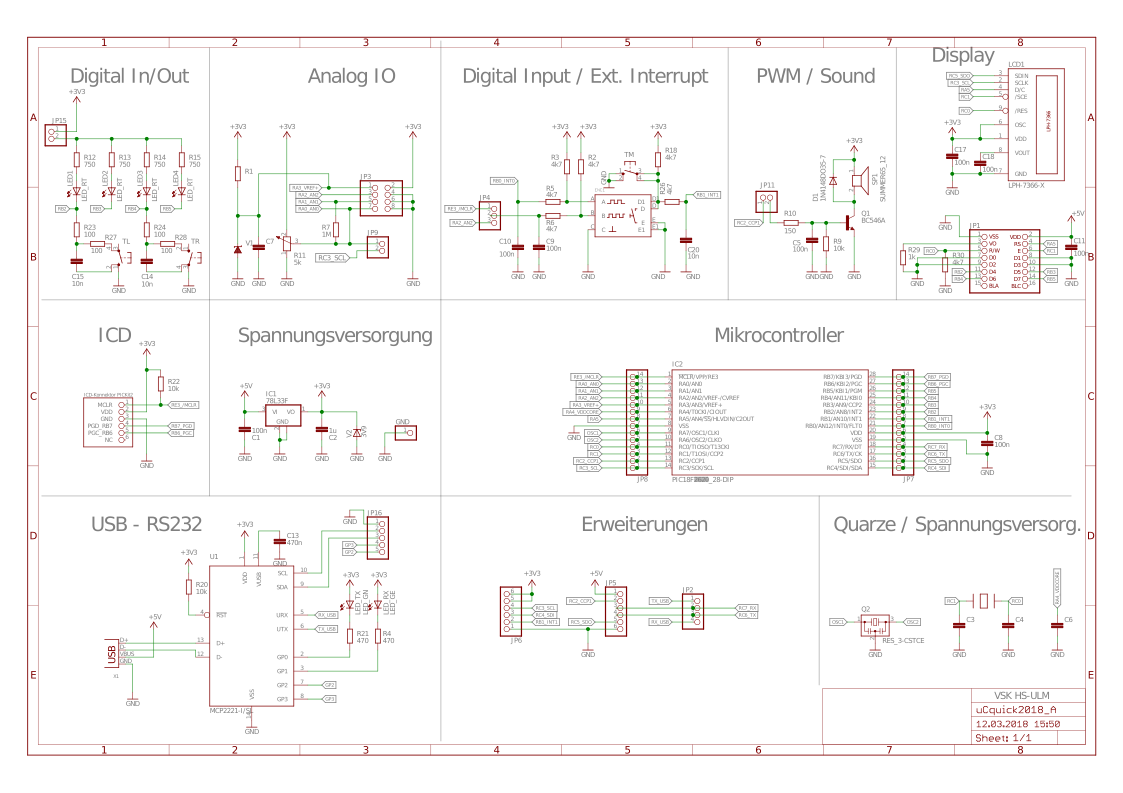
Know, that we know the purpose of our lines, we need to check the corresponding connections on our laboratory board. Open the board's schematic and check the "Display" section of it. There you will find all pins connected to the display.
Important
The logical not, notated using a horizontal bar above a signals name (e.g.
Note the displays corresponding SPI signals with their connected pins in below table.
Tip
The D/C input of the display is control input, to inform the display about wether __D__ata or __C__onfiguration is send. /RES is quite obvious. ;)
| Signal / Line | Display's signal name | Connected Pin |
|---|---|---|
Now that we know the names of our signals and the pins to be used, we should once again clarify the timing for SPI communication.

(source: embeddedrelated.com)
As shown in above picture, the following requirements for a communication between SPI-Master and SPI-Slave need to be fulfilled:
- /CS needs to be pulled down (logical 0)
- Values are read on each rising edge of the clock (clock does not need to tick regularly, as long as /CS is low and 8 bit are send)
- The order in that the bits are sent is very relevant! You must send the MSB (bit 7) first and the LSB (bit 0) last!
To sum it up, you need to pull down the corresponding /CS pin and SCLK pin, set the level for the MSB on the pin related to the display's SDI line and set the SCLK pin's logical level to one, afterward. This way the MSB is read. Now continue with pulling down SCLK, setting the required value (or level, i.e. 0 or 1) and raising SCLK to high afterward. Do this for all 8 bit and set /CS to high again, to end communication.
For today, there is only on exercise - implement the necessary Bit Banging to make the display usable (again). Therefore, you need to implement "GLCD_Bit_Banging()" at the end of the main.c-file.
Lab8_Bit_Banging/Lab8_Bit_Banging.X/main.c
Lines 42 to 46 in bc4483f
Note
You won't find any other GLCD related code within main.c. Honestly, what you're doing today is not good practice in C-programming. But it enables you to focus on the Bit Banging itself, without the need to understand any other parts of the GLCD library. If you want to know more about it, feel free to ask your laboratory supervisor for help!
Use the corresponding pins you've found before and set their levels according to the SPI timing explained above. Keep in mind to activate the SPI-Slave before and de-activate it after sending the single bits. As soon as you think you've got the right solution, test it by starting the code in Debug mode.
If your Bit Banging is implemented correctly, try to calculate the duration necessary to send one byte to the display. After that switch to the Simulator configuration and test your result using the stopwatch.