Ability to customize model download / installation path #95


Description

Product and Version [VS/VSCode]: VSCode
OS Version [macOS/Windows]: Linux / NixOS
IntelliCode Extension Version: 1.1.6
Target Platform or Language [e.g. Node.js]: v10.2.0
Hi,
I'm using IntelliCode in a setup where VSCode + extensions are managed by my system's package manager. As such the IntelliCode extension will be installed in a read-only file system path.
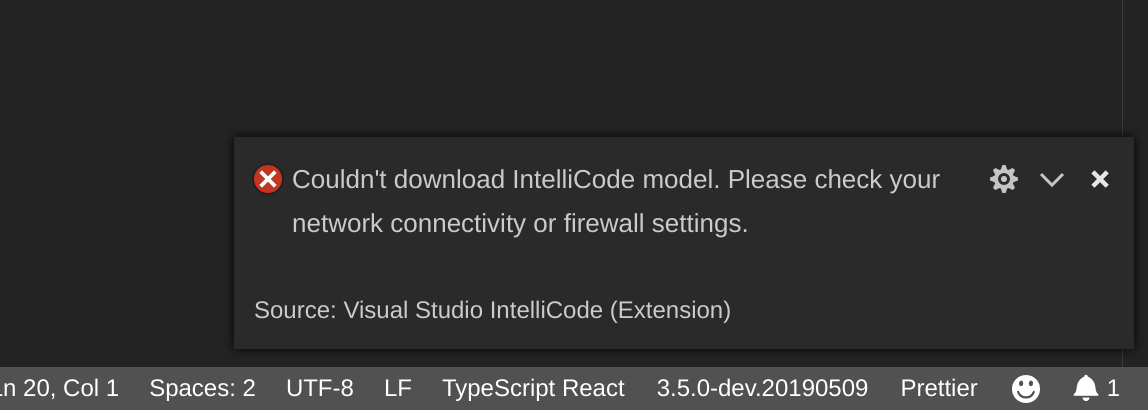
I haven't come across any issues with any of the other VSCode extensions I'm using in this setup, but IntelliCode won't work as it tries (and fails) to store the IntelliCode models under the same read-only path as where the extension is installed.
If possible - and if it's an easy change, can you provide us with an extension setting inside VSCode which allows customizing the model download and installation path? This way the IntelliCode extension will work for the (admittedly small number :-)) of users who run a system-wide installation of VSCode + extensions like this, who could now set the model path pointing to somewhere in our home directory.
Steps to Reproduce / Scenario:
- Install the extension in a path where users only have read access
- Launch VSCode as an unprivileged user, observe the following error message pops up: