Releases: MineTrainDevelopment/Pommes-KSP-Countdown
Release list
Version: 2.00

This is the Version: 2.00
Changelog Version 2.00a
- Build the entire Program from Scratch new!
- Due to the entire program rework are many bugs goan!
- RAM usage decreased by ~20%
- Convert .exe bag to .jar due to Compatibility problems!
- 4K Resolution autodetection
- New Extensive storage system!
Saves everything you can set / use! See a screenshot from the file -->database.yml - Improved sound design!
from now on you can change between SpaceX, MyVoice and a random scheduler - And a lot of technical stuff. That would be unnecessary to announce here...

Changelog Version 2.00b
- Fixes a rare bug.
System Infos
Installation Folder: C:\ProgramData\MineTrainDev\Pommes_KSP_Countdown
Operating system: For now only tested in Windows 10 {Java1.8 Required!}
Programm Infos:
Control frame {With Original SpaceX voices}
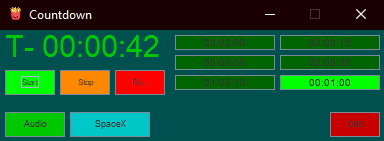
OBSframe {For put it over your game frame}

Version: 1.10b
This is the Version: 1.10b
Changelog:
-Convert .jar to .exe
-Change .exe icon

Installation Folder:
C:\ProgramData\MineTrainDev\Pommes_KSP_Countdown
operating system:
-For now only tested in Windows 10 {Java1.8 Required!}
Control frame {With Original SpaceX voices}
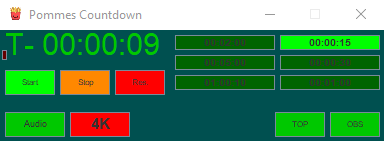
OBSframe {For put it over your game frame}

Version: 1.10a
This is the Version: 1.10a
Changelog:
-Added drag to move for OBSframe
-Added an image.ico for the Installer
-Removed 4K mode for now bcs it's broken
-Added Save state´s for:
---Control frame location
---OBSframe location
---Your coundnown typ choice
---if OBSframe is enabled or disabled
---If frames are always on top or not
Installation Folder:
C:\ProgramData\MineTrainDev\Pommes_KSP_Countdown
operating system:
-For now only tested in Windows 10 {Java1.8 Required!}
Control frame {With Original SpaceX voices}
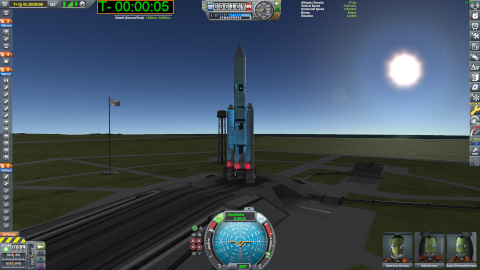
OBSframe {For put it over your game frame}
Serviervorschlag^^ {Serving suggestion}
Version: 1.09c
This is the Version: 1.09c
Changelog:
-Sound sync with timer
Installation Folder:
C:\ProgramData\MineTrainDev\Pommes_KSP_Countdown
operating system:
-For now only tested in Windows 10 {Java1.8 Required!}
Version: 1.09b
This is the Version: 1.09b
Changelog:
-Sound on/off Switch fixt
Installation Folder:
C:\ProgramData\MineTrainDev\Pommes_KSP_Countdown
operating system:
-For now only tested in Windows 10
Version: 1.09a
This is the Version: 1.09a
Changelog:
-Sound files completely new
-New Sound files Added
Installation Folder:
C:\ProgramData\MineTrainDev\Pommes_KSP_Countdown
operating system:
-For now only tested in Windows 10
Version: 1.08b
This is the Version: 1.08b
Changelog:
-Hopefully sound files will reset properly
Installation Folder:
C:\ProgramData\MineTrainDev\Pommes_KSP_Countdown
operating system:
-For now only tested in Windows 10
Version: 1.08a
This is the Version: 1.08a
Changelog:
-Sound files updated
Installation Folder:
C:\ProgramData\MineTrainDev\Pommes_KSP_Countdown
operating system:
-For now only tested in Windows 10
Version: 1.07b
This is the Version: 1.07a
Changelog:
-Fixt Window Format bug
Installation Folder:
C:\ProgramData\MineTrainDev\Pommes_KSP_Countdown
operating system:
-For now only tested in Windows 10
Version: 1.07a
This is the Version: 1.07a
Changelog:
-Automatic switch removed and Replaced with OBS-TOP switch
-Toggle the AlwaysOnTop state frome OBS-Window
-AlwaysOnTop state frome OBS-Window now automatic Aktiv at Programm start
Installation Folder:
C:\ProgramData\MineTrainDev\Pommes_KSP_Countdown