A simple and user-friendly application to manage and create vCards using a graphical user interface (GUI). Built with Tkinter, this application allows for easy management of contact information such as names, phone numbers, addresses, emails, and professional details.
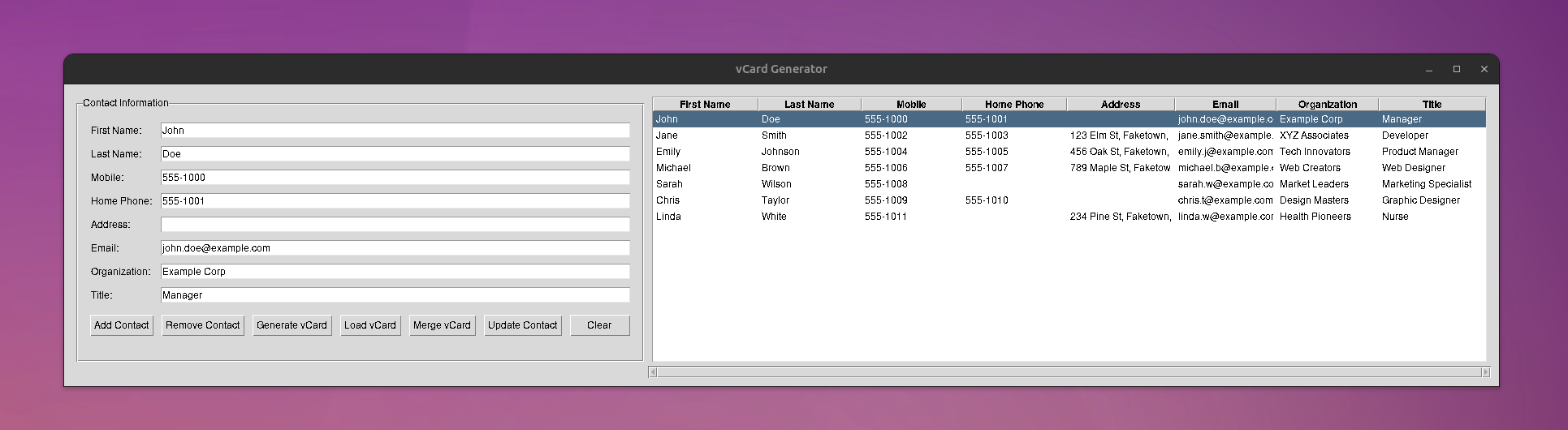


- Manually add contacts by entering details like First Name, Last Name, Mobile Number, Home Phone, Address, Email, Organization, and Title.
- Load existing vCards into the application.
- Option to merge the loaded vCard contacts with the existing contacts in the application.
- Modify the details of a selected contact and update the information as needed.
- Select and remove contacts from the application.
- Export the contact information from the application into a vCard file which can be shared and used in other applications and devices.
- Easy to merge multiple vCards into one.
- An option to clear all input fields, preparing for a new contact entry.
- Contacts are displayed in a treeview which makes it easy to view and select contacts.
- Run the application and use the GUI to manage contacts and vCards.
- Use the buttons provided to add, remove, update, and export contact information.
- Use the
Load vCardbutton to load existing vCards into the application. You can choose to merge the loaded vCards or replace the existing entries.
- When loading vCards, the application will only process and display specific properties. Additional properties in the vCard that are not explicitly handled by the application will be ignored.
- Tkinter: A standard GUI library for Python is used to build the application interface.
This project is licensed under the MIT License.

