Repository navigation
Installation and Quickstart
Documentation home · Quickstart · Lifecycle
On this page
- Overview
- Workflow at a glance
- Requirements and platform selection
- Install GPT-QModel
- Check the environment before downloading a model
- End-to-end quickstart: GPTQ W4A16
- Calibration inputs accepted by the native text workflow
- Choose method, format, and backend independently
- Apple Silicon: native MLX path
- Public APIs and implementation internals
- Troubleshooting and edge cases
- Source files
- See also
GPT-QModel provides model loading, post-training quantization, checkpoint saving, and quantized inference. Start by choosing hardware/runtime dependencies and a quantization configuration, then prepare a dense model with GPTQModel.load(..., quantize_config=...). The GPTQ quickstart below calls model.quantize(calibration), saves the result, reloads the saved checkpoint, and generates text.
Calibration is method-dependent: supported calibration-free lifecycles can use model.quantize() without a dataset. Inference from an already quantized checkpoint starts at loading and needs no quantization job. See the recipe table below before adapting the GPTQ example to another method.
This page documents GPT-QModel 7.7.0, verified against source revision 17d4a422a5163608a86c8d62e7b54e1df89b8402. Requirements below are the declarations in that revision, not a claim that an older PyPI release has identical dependencies or that every dependency publishes a wheel for every platform. Always inspect the requirements for the release you actually install.
For the meaning of W4A16, scales, grouping, and activation precision, first read What is Quantization?.
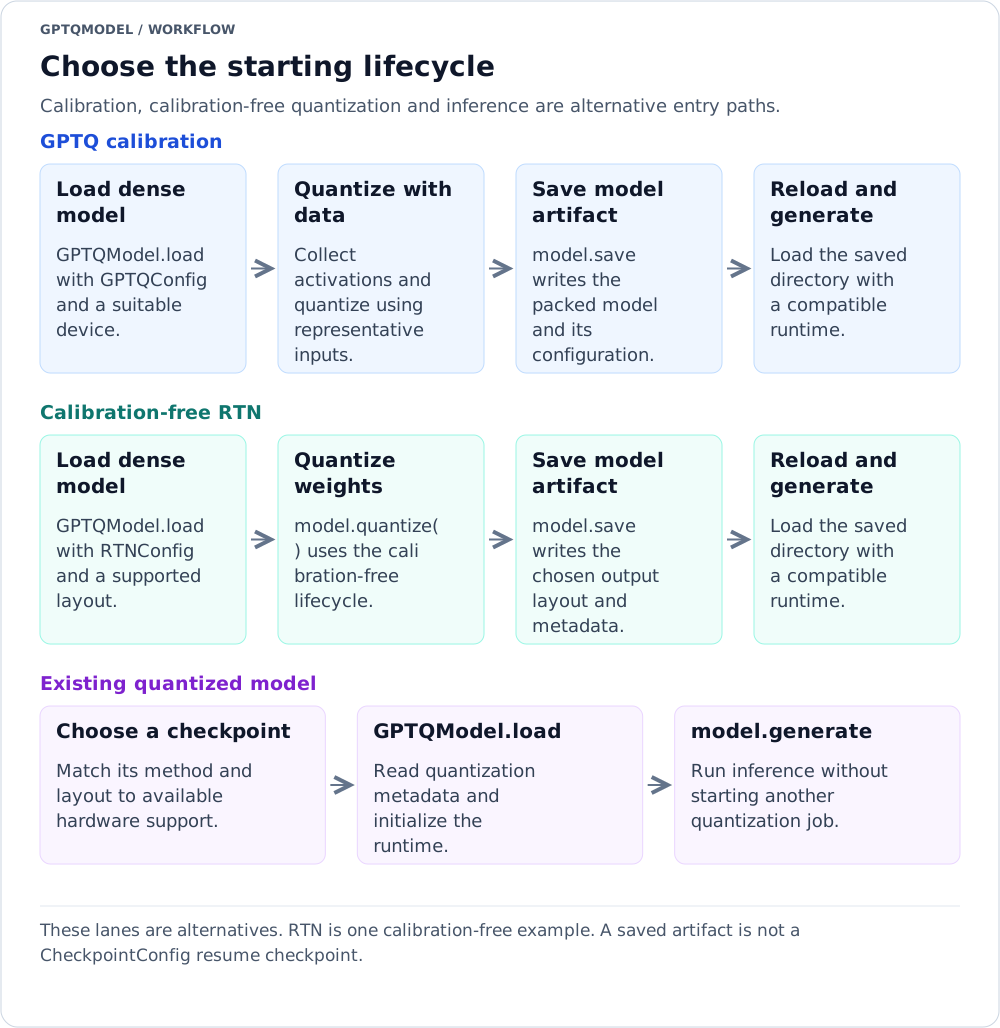
Reading the diagram: These lanes are alternatives. RTN is one calibration-free example. A saved artifact is not a CheckpointConfig resume checkpoint.
Text version of the workflow
- GPTQ calibration: Load dense model → Quantize with data → Save model artifact → Reload and generate.
- Calibration-free RTN: Load dense model → Quantize weights → Save model artifact → Reload and generate.
- Existing quantized model: Choose a checkpoint → GPTQModel.load → model.generate.
pyproject.toml declares Python >=3.10. Its classifiers list Python 3.10 through 3.14. Python eligibility does not imply that every optional backend has wheels for the same versions.
Runtime dependencies come from requirements.txt. The exact declarations in this revision are:
| Dependency | Requirement |
|---|---|
torch |
>=2.14.1 |
transformers |
>=5.20.2 |
accelerate |
>=1.15.0 |
numpy |
>=2.2.6 on Python <3.11; >=2.4.6 on >=3.11,<3.12; >=2.5.4 on >=3.12 |
safetensors |
>=0.8.0 |
filelock |
>=4.1.0 on Python <3.11; >=4.2.4 on >=3.11 |
threadpoolctl |
>=3.7.0 |
packaging |
>=26.3 |
device-smi |
>=0.5.7 |
protobuf |
>=7.36.2 |
pillow |
>=12.3.0 on Python <3.11; >=13.0.0 on >=3.11 |
requests |
>=2.34.2 |
pypcre |
>=0.6.4 |
tokenicer |
>=0.0.14 |
logbar |
>=0.4.15 |
jinja2 |
>=3.1.6 |
ninja |
>=1.13.2 |
maturin |
>=1.15.0 |
datasets |
>=5.1.0 |
pyarrow |
>=25.0.1 on Python <3.11; >=26.0.0 on >=3.11 |
dill |
>=0.4.1 |
torchao |
>=0.18.0 |
defuser |
>=0.0.28 |
The package build uses setuptools.build_meta with setuptools>=84.2.1,<85. setup.py reads the version from gptqmodel/version.py, discovers packages, and includes extension sources. It does not compile every inference kernel during pip install; many native extensions are built on first use.
The README's platform matrix lists the following support. This is a platform overview, not a statement that every named kernel works on every device in a row. Each kernel validates its own dtype, bit width, layout, shape, architecture, and optional dependencies.
| Platform / device | Stated hardware or software baseline | Initial runtime guidance |
|---|---|---|
| Linux / NVIDIA | Turing+ (sm_75+) in the general support matrix |
Start with a matching CUDA Torch build and BACKEND.AUTO; use a method-specific Torch backend to diagnose compatibility. Some specialized kernels require newer architectures. |
| Linux / AMD |
7900XT+, ROCm 6.2+ |
Install a matching ROCm Torch build. Start with the method-specific Torch backend; selected AWQ paths explicitly declare ROCm. GPTQ_TRITON, GPTQ/AWQ ExLlama V2, and Marlin do not declare ROCm support in this revision. |
| Linux / Intel XPU | Arc or Datacenter Max | Use a Torch installation exposing XPU; available Torch/fused paths depend on method and shape. |
| Linux / Huawei Ascend | Ascend 910B with torch-npu / CANN |
Native Torch methods are the documented route. Follow the device vendor's environment requirements. |
| Linux / Intel or AMD CPU | AVX/AMX entries in the support matrix | Portable Torch first; optimized INT8, ATen INT4, AVX512-BF16, and other paths have their own feature checks. |
| macOS / Apple Silicon | M1+ | Torch MPS/CPU, or optional MLX conversion/native MLX quantization. MLX requires Apple Silicon and Metal availability. |
| Windows 11 / NVIDIA or CPU | NVIDIA/CPU entries in the support matrix | The README lists Torch. Do not assume the Linux CUDA-kernel matrix applies unchanged. |
Install the Torch distribution appropriate to your driver, accelerator, OS, and Python version, following the official PyTorch installation selector. GPT-QModel's base requirement is a Torch version lower bound, not a universal CUDA/ROCm wheel index or driver minimum. The repository's uv configuration sets torch-backend = "auto"; confirm the installed build instead of assuming that a resolver chose the desired accelerator.
On ROCm, PyTorch uses the torch.cuda API and device names such as cuda:0; inspect torch.version.hip to distinguish a HIP build from NVIDIA CUDA. ROCm pip SDK installations exposing _rocm_sdk_core as ROCM_HOME need the matching rocm-sdk-devel package and rocm-sdk init before JIT builds, as documented in the README.
The experimental W4A FP8 stream requires Linux CUDA SM89+ and Triton with the Gluon mma_v2 FP8 GEMM (the API first appears in Triton 3.6.0); activation packing runs on older Triton builds, but the GEMM launch raises a named error. The NVFP4 stream documents the GB10/SM121 path; its validator requires compute capability >=12.1 and native Torch FP4/block-scaled GEMM APIs, and its plain-tl.jit packer does not need Gluon. These are not the requirements for ordinary GPTQ W4A16. See FP8 and NVFP4.
Use one environment per application or serving engine. In particular, vLLM and SGLang impose their own Torch/Transformers constraints; do not install every engine extra into one environment and assume their requirements are compatible.
The documented base install is:
pip install -v gptqmodelFor an explicit interpreter and an isolated environment on a POSIX shell:
python -m venv .venv
source .venv/bin/activate
python -m pip install -v gptqmodel
python -m pip check
On Windows, activate the environment using the activation script appropriate to your shell, or invoke its Python executable directly. A successful package installation does not establish accelerator availability or compile all JIT kernels.
The README also documents:
uv pip install -v gptqmodelA complete environment setup is:
uv venv .venv
source .venv/bin/activate
uv pip install -v gptqmodel
uv pip check
Use either pip or uv for the environment you are maintaining; the two base install commands are alternatives, not required sequential steps.
git clone https://github.com/ModelCloud/GPTQModel.git
cd GPTQModel
git checkout --detach 17d4a422a5163608a86c8d62e7b54e1df89b8402
python -m pip install -v .
The checkout pins the source revision documented on this page; omit it only when intentionally installing another revision and checking that revision's API and requirements.
On Debian/Ubuntu systems where Python development headers are missing, the README lists the system package:
apt install python3-devInstalling system packages requires the appropriate OS permissions. Other operating systems use their own compiler and Python-header installation procedures. Native JIT extensions additionally require the relevant C++/CUDA/HIP toolchain; installing Python headers alone is not a complete GPU build setup.
An optional dependency can be selected for a source installation in the same way as a wheel installation:
python -m pip install -v ".[bitblas]"For developer tooling:
python -m pip install -v ".[test,quality]"There is no need to copy older installation flags merely because an old release used setup-time CUDA compilation. In this revision, package installation and runtime JIT extension builds are distinct stages.
Extras install Python packages; they do not promise that the backend accepts your model or hardware.
| Extra | Packages declared in pyproject.toml
|
Purpose / caveat |
|---|---|---|
bitblas |
bitblas==0.1.0.post1 |
BitBLAS integration; use compatible method/layout/hardware |
bitsandbytes |
bitsandbytes>=0.50.2 |
Native BitsAndBytes 4-/8-bit recipes |
gguf |
gguf>=0.19.0, llama-cpp-python>=0.3.36
|
GGUF tooling and llama.cpp integration; wheel/build accelerator support is separate |
triton |
triton>=3.8.0 on Python <3.15 |
Triton kernels, including paths that explicitly require Triton |
vllm |
vllm>=0.31.0 on Python <3.11; vllm>=0.32.0 on >=3.11,<3.15 |
External serving engine; dedicated environment |
sglang |
sglang[srt]>=0.5.21 on Python <3.11; sglang[srt]>=0.5.22 on >=3.11 |
External serving engine; dedicated environment |
mlx |
mlx>=0.32.4; mlx_lm>=0.31.3 on Python <3.11, otherwise mlx_lm>=0.32.2
|
Apple Silicon / Metal |
marlin-cuda12 |
nvidia-cuda-runtime-cu12==12.9.79, nvidia-cublas-cu12==12.9.2.10, nvidia-cusparse-cu12==12.5.10.65, nvidia-cusolver-cu12==11.7.5.82
|
CUDA 12 wheel-provided runtime/developer headers; does not install a local nvcc
|
marlin-cuda |
nvidia-cuda-runtime>=13.4.92, nvidia-cublas>=13.8.1.7, nvidia-cusparse>=12.8.6.72, nvidia-cusolver>=12.3.5.3
|
CUDA 13+ wheel-provided runtime/developer headers; does not install a local nvcc
|
hf |
optimum>=2.3.0 |
Hugging Face integration |
eval |
Evalution>=0.0.17 |
Evaluation integration; this is the package spelling declared by the project |
openai |
uvicorn>=0.54.0, fastapi>=0.161.1, pydantic>=2.14.1
|
OpenAI-compatible serving dependencies |
test |
pytest>=9.1.1, pytest-timeout>=2.4.0, parameterized>=0.9.0
|
Tests |
quality |
ruff==0.14.2 |
Code quality tooling |
Examples:
python -m pip install -v "gptqmodel[bitblas]"
python -m pip install -v "gptqmodel[triton]"
python -m pip install -v "gptqmodel[mlx]"
Run only the commands relevant to the chosen environment. The Python markers matter: for example, the vLLM extra has no dependency entry for Python >=3.15 in this revision. The base Python lower bound is not an optional-backend support matrix.
| Backend / integration | What to install or provide | Important distinction |
|---|---|---|
| Portable GPTQ/AWQ Torch | Base GPT-QModel plus the correct Torch build | A baseline for diagnosing packed-layout/device issues; not necessarily the fastest path |
| BitBLAS | gptqmodel[bitblas] |
Installing BitBLAS does not convert arbitrary packed weights or make unsupported dtypes valid |
| ExLlama V2 | Bundled source integration plus C++/CUDA build prerequisites and Ninja | There is no exllama or exllamav2 extra in this pyproject.toml. The integration uses first-use torch.ops JIT builds. Its GPTQ/AWQ kernel declarations exclude ROCm despite HIP-related build code. |
| ExLlama V3 / EXL3 | Bundled integration, compatible CUDA/HIP toolchain, and Python pydantic used by its utility code |
There is no exl3 extra in this revision. EXL3 quantization uses the ExLlama V3 integration; EXL3_TORCH is an inference alternative, not the EXL3 quantizer. |
| Marlin | NVIDIA CUDA: GPTQ requires compute capability >=7.5 (FP16 only on 7.5); AWQ requires >=8.0. Matching headers/libraries, a local nvcc, C++ compiler, Ninja |
CUDA runtime wheels alone do not provide the entire compiler toolchain; ROCm is explicitly rejected |
| vLLM |
gptqmodel[vllm] in an engine-aligned environment |
Engine support for a method/layout is independent of native GPT-QModel support |
| SGLang |
gptqmodel[sglang] in an engine-aligned environment |
Same dependency-isolation and format-compatibility considerations |
| MLX |
gptqmodel[mlx] on Apple Silicon with Metal available |
Converted/native MLX runtime, not a CUDA backend |
If the bundled EXL3 path reports a missing pydantic import, install it in that same environment:
python -m pip install pydanticThis is an integration import requirement, not a separately declared EXL3 extra or a promise that base installation pins it.
Marlin's build helper chooses its missing-header hint from torch.version.cuda: CUDA major 12 maps to marlin-cuda12; major >=13 maps to marlin-cuda. Choose the matching command, not both:
# For a CUDA 12 Torch environment missing the relevant developer headers:
python -m pip install "gptqmodel[marlin-cuda12]"

# Alternative for a CUDA 13+ Torch environment:
python -m pip install "gptqmodel[marlin-cuda]"
The checked headers include cuda_runtime_api.h, cusparse.h, cublas_v2.h, cublasLt.h, and cusolverDn.h. The helper still requires a local nvcc on PATH. The shared is_nvcc_compatible() check tests for nvcc >=12.8 when choosing supported build flags; it is not a declaration that every backend, every Torch build, or every GPU has the same CUDA minimum. Use a mutually compatible Torch/toolkit/driver combination.
JIT kernels are cached under ~/.cache/gptqmodel/torch_extensions by default. The cache is shared safely across processes through a cross-process build lock, but first use can still take appreciably longer than subsequent loads. Diagnose build errors from their compiler output; repeatedly reinstalling the Python package does not fix a missing compiler or a wrong architecture.
See Kernel Backends Reference and Troubleshooting and FAQ for detailed contracts and diagnostics.
import platform
import sys

import torch
import transformers
import gptqmodel

print("Python:", sys.version)
print("Platform:", platform.platform())
print("GPTQModel:", gptqmodel.__version__)
print("Transformers:", transformers.__version__)
print("Torch:", torch.__version__)
print("Torch CUDA build:", torch.version.cuda)
print("Torch HIP build:", torch.version.hip)
print("CUDA/HIP devices available:", torch.cuda.is_available())
if torch.cuda.is_available():
    for index in range(torch.cuda.device_count()):
        print(index, torch.cuda.get_device_name(index))
        if torch.version.hip is None:
            print("  compute capability:", torch.cuda.get_device_capability(index))
if hasattr(torch.backends, "mps"):
    print("MPS available:", torch.backends.mps.is_available())
if hasattr(torch, "xpu"):
    print("XPU available:", torch.xpu.is_available())
This reports availability; it does not prove that a particular model/backend combination is supported. gptqmodel.__version__ is the public package version imported from gptqmodel/version.py. The startup banner also reports GPT-QModel, Transformers, and Torch versions.
For package metadata without importing GPT-QModel's runtime:
python -m pip show GPTQModel torch transformers
python -m pip check
In a source checkout, also record:
git rev-parse HEADRecord the exact model revision, quantization configuration, dataset selection, Python and package versions, driver/toolkit, device, and backend with any quality or performance report.
This recipe uses the supported dense causal model Qwen/Qwen3-0.6B on one CUDA/HIP-visible GPU, following the repository's quantization guide. The explicit native GPTQ Torch backend favors a transparent baseline over maximum throughput. NVIDIA and AMD installations still need their appropriate Torch build and model/kernel compatibility. The example requires model/dataset download access; gated models additionally require access approval and authentication.
The configuration below uses the public QuantizeConfig factory. With the default method and format, it constructs a GPTQConfig. Constructing the config before loading the dense model tells the loader to prepare it for quantization; the reloaded quantized checkpoint supplies its own saved configuration.
import gc

import torch
from datasets import load_dataset
from gptqmodel import BACKEND, GPTQModel, QuantizeConfig

model_id = "Qwen/Qwen3-0.6B"
quant_path = "Qwen3-0.6B-GPTQ-W4A16"
device = "cuda:0"
model_dtype = torch.float16
backend = BACKEND.GPTQ_TORCH

quantize_config = QuantizeConfig(
    bits=4,
    group_size=128,
    sym=True,
    desc_act=False,
)

calibration = None
if quantize_config.requires_calibration_dataset():
    dataset = load_dataset(
        "allenai/c4",
        data_files="en/c4-train.00001-of-01024.json.gz",
        split="train",
        streaming=True,
    )
    calibration = [row["text"] for row in dataset.take(256)]

model = GPTQModel.load(
    model_id,
    quantize_config=quantize_config,
    device=device,
    dtype=model_dtype,
)
if calibration is not None:
    calibration = [
        model.tokenizer(text, truncation=True, max_length=512, return_tensors="pt")
        for text in calibration
    ]
model.quantize(calibration, batch_size=1, backend=backend)
model.save(quant_path)

del model
del calibration
gc.collect()
torch.cuda.empty_cache()

loaded = GPTQModel.load(
    quant_path,
    device=device,
    dtype=model_dtype,
    backend=backend,
)
output_ids = loaded.generate(
    "The capital of France is",
    max_new_tokens=16,
    do_sample=False,
)[0]
print(loaded.tokenizer.decode(output_ids, skip_special_tokens=True))
The decoded sequence includes the prompt under the ordinary Transformers generation path. The sample disables sampling and uses the default tensor return, so indexing [0] selects the first generated sequence. Other generation options or external engines can return different objects; do not assume this exact indexing works with return_dict_in_generate=True.
The 256 examples, each truncated explicitly to at most 512 tokens before quantization, are a bounded starting recipe, not a universal quality recommendation. Choose a finite representative dataset for your workload and hold out separate evaluation data. Use a new output directory for each recipe. A generated sentence confirms basic operation, not acceptable perplexity or downstream accuracy.
After validating the native checkpoint, try a compatible optimized backend. If continuing in the same process, release the previous runtime before loading another copy:
del loaded
gc.collect()
torch.cuda.empty_cache()
Then reload with auto selection:
from gptqmodel import BACKEND, GPTQModel

loaded = GPTQModel.load(
    "Qwen3-0.6B-GPTQ-W4A16",
    device="cuda:0",
    backend=BACKEND.AUTO,
)
Do not pass the dense-model quantization configuration again just to load the saved checkpoint. GPTQModel.load detects recognized saved quantization metadata and dispatches to quantized loading.
If you already have a supported quantized model ID or local checkpoint, no calibration is required to run it:
from gptqmodel import GPTQModel

model = GPTQModel.load("Qwen3-0.6B-GPTQ-W4A16", device="cuda:0")
tokens = model.generate("The capital of France is", max_new_tokens=16)[0]
print(model.tokenizer.decode(tokens, skip_special_tokens=True))
Use the directory produced above, or replace it with a compatible quantized repository ID. Do not invent a repository suffix and assume that checkpoint exists. For batching, tokenized inputs, adapters, and device placement, see Loading and Inference.
BaseQModel.quantize delegates ordinary text preparation to prepare_calibration_dataset in gptqmodel/utils/calibration.py. Its runtime normalization supports more shapes than the older public type annotation alone suggests.
| Input form | Example structure | Behavior / requirement |
|---|---|---|
| List of strings | ["representative passage ...", ...] |
Tokenized with the model's tokenizer |
| List of text dictionaries | [{"text": "representative passage ..."}, ...] |
Uses the text field |
| Token dictionaries | [{"input_ids": [1, 2, ...], "attention_mask": [1, 1, ...]}, ...] |
Converts IDs to long tensors; a missing mask is filled with ones |
| List of token sequences | [[1, 2, ...], [1, 8, ...]] |
Each inner integer list/tuple is one sample |
| Tensor samples | A list of 1D or 2D ID tensors | Converted to 2D long tensors; invalid ID ranks are rejected |
| Chat dictionaries | [{"messages": [{"role": "user", "content": "..."}]}] |
Prefers apply_template; otherwise uses apply_chat_template only when a chat template is available. Without a usable template function, a supplied text field can be used as fallback |
Hugging Face Dataset / IterableDataset
|
Rows with a supported structure | Materialized into a list; select a bounded subset before passing a large stream |
| Other finite iterables | Iterable yielding supported samples | Materialized before preparation; not an unbounded streaming quantizer |
Text examples, including chat examples, require a usable tokenizer. Pretokenized IDs must correspond to the model's tokenizer and intended prompt formatting.
# Example for a model already loaded with a quantization config.
texts = [
    "Use complete, representative passages from the target application here.",
    "Include the languages and prompt structures the deployed model will see.",
]
tokenized = [model.tokenizer(text, return_tensors="pt") for text in texts]
model.quantize(tokenized, batch_size=1)
This illustrates input structure, not a sufficient two-example calibration set. Run quantization once on a freshly prepared model, not again on an already quantized instance.
Important edge cases:
- A single bare string is rejected as the dataset. Wrap samples in a collection.
- Although the public annotation includes
List[int], the ordinary normalization helper iterates samples and rejects scalar token IDs. UseList[List[int]]or dictionaries for token sequences, not a single flat dataset of integers. - An empty dataset is rejected. With the default
calibration_data_min_length=10, samples with token length <=10 are removed; filtering can leave no useful calibration data. - Default
calibration_sort="desc"sorts by descending sample length."asc"and"shuffle"are also implemented;Nonepreserves the prepared order. -
calibration_concat_sizedefaults toNone. When configured, it controls sequence concatenation/block formation, not the number of calibration samples. -
batch_size=1is the default. Some model definitions disable batching and override larger values. For batch-capable models, batching counts outer dataset items; a 2D sample can contribute multiple token rows. Prefer one sequence per item when controlling the number of rows per batch. - The helper trims rows exceeding the model-config context limit it detects, keeping the left or right end according to
tokenizer.padding_side. Set an explicit tokenizermax_lengthandtruncation=Trueto impose a smaller calibration budget;batch_sizealone does not bound sequence length. - Multimodal preparation is model-specific. Use the model's processor and required image/audio/video inputs rather than assuming the generic text forms cover every model.
- For configurations returning
requires_calibration_dataset() == False, the supported weight-only lifecycle can usecalibration=None.
See Quantization Lifecycle and Multimodal and MoE Models.
The method describes the quantization recipe, the format describes serialized tensors, and the backend selects a runtime implementation. A compatible combination must satisfy all three axes plus dtype, dimensions, and device.
| Starting recipe | Configuration | Calibration | Initial backend / layout guidance |
|---|---|---|---|
| GPTQ W4A16 | GPTQConfig(bits=4, group_size=128) |
Required | Default gptq layout; GPTQ_TORCH baseline, then AUTO or a validated optimized GPTQ kernel |
| AWQ W4A16 | AWQConfig(bits=4, group_size=128, sym=False) |
Required | Default gemm; AWQ_TORCH baseline |
| Round-to-nearest | RTNConfig(bits=4, group_size=128) |
Not required | Default GPTQ export; no Hessian compensation and potentially different quality |
| QQQ W4A8 | QQQConfig(bits=4, group_size=128, sym=True, desc_act=False) |
Required |
qqq layout; QQQ accelerated or QQQ_TORCH native alternative; no GPTQ-style activation reordering |
| FP8 weights | FP8Config(bits=8, format="float8_e4m3fn", weight_scale_method="row") |
Not required |
FP8_TORCH; this is not an activation-quantization switch |
| GGUF | GGUFConfig(bits=4, format="q_k_m") |
Not required | GGUF block layout; GGUF_TORCH baseline, other GGUF engines subject to their own contract |
| BitsAndBytes NF4 | BitsAndBytesConfig(bits=4, format="nf4", compress_statistics=False) |
Not required |
BITSANDBYTES; see its reload caveat below |
| EXL3 | EXL3Config(bits=4.0, codebook="mcg") |
Required |
EXL3_EXLLAMA_V3 for quantization; fractional target average bitrate, not uniform INT4 |
| VPTQ | VPTQConfig(vector_lens=[-1, 8], num_centroids=[-1, 4096], num_res_centroids=[-1, 16]) |
Required |
VPTQ_TORCH baseline; codebook sizes determine nominal bits per weight |
| ParoQuant | ParoConfig(bits=4, group_size=128) |
Required, with optimization |
paroquant layout; compatible CUDA/Triton runtime and optimization budget |
The configuration classes in the table are importable from gptqmodel.quantization:
from gptqmodel.quantization import AWQConfig, GPTQConfig, RTNConfig

qcfg = GPTQConfig(bits=4, group_size=128)
# Or choose one of these instead, before loading a fresh model:
awq_cfg = AWQConfig(bits=4, group_size=128, sym=False)
rtn_cfg = RTNConfig(bits=4, group_size=128)
Use qcfg.requires_calibration_dataset() when sharing workflow code across methods. The term “weight-only lifecycle” in the code means calibration-free lifecycle, not every recipe that leaves inference activations in floating point.
| Setting | Current GPTQ default / rule | Why it matters |
|---|---|---|
bits |
4; GPTQ accepts 2, 3, 4, 5, 6, 7, 8 |
Optimized backends can accept narrower subsets. Five-/six-/seven-bit GPTQ automatically uses gptq_p. |
group_size |
128 |
Config accepts a positive value or -1; fresh GPTQ with -1 requires act_group_aware=False. A backend can reject unsupported groups or shapes. |
sym |
True |
Not every backend accepts asymmetric weights. AWQ examples commonly set False explicitly. |
desc_act |
Declared None, resolves to False for GPTQ |
This is activation ordering, not activation precision. |
act_group_aware |
Resolves to True for GPTQ |
Explicit desc_act=True disables the default group-aware policy; explicitly enabling both is rejected. |
pack_dtype |
torch.int32 |
A packed container dtype; it is not the effective weight width. |
format |
gptq |
New quantization with legacy FORMAT.MARLIN is rejected. Use GPTQ output plus a Marlin runtime when supported. |
activation |
None |
Ordinary GPTQ is not automatically the experimental FP8/NVFP4 activation path. |
backend |
BACKEND.AUTO in the public load and quantize APIs |
Auto selection does not install optional packages or override format/hardware incompatibilities. |
BACKEND.TORCH is a legacy generic identifier normalized according to method. Prefer explicit GPTQ_TORCH, AWQ_TORCH, or another method-specific identifier when diagnosing a workflow. AUTO_TRAINABLE and PROFILE are separate runtime choices, not quantization methods. See Inference Backends.
The repository's BitsAndBytes recipe warns that FP16 scale casting and compressed 4-bit statistics can cause reload issues. Its conservative NF4/FP4 recipe disables statistics compression and reloads with dtype=torch.float32; that reload is not W4A16. Do not silently substitute it into the FP16 quickstart above without retaining its dtype override. See BitsAndBytes.
For vLLM and SGLang, validate the engine's supported checkpoint method, format, bits, dtype, and hardware before deployment. A native GPT-QModel success does not establish external-engine compatibility. See Serving, HuggingFace Integration, and Packing Formats and Compatibility.
MLX is optional and is validated for Darwin/arm64 with Metal available. Install:
python -m pip install "gptqmodel[mlx]"The README's direct dense-to-MLX quantization entry point is:
from gptqmodel import GPTQModel

GPTQModel.quantize_mlx(
    "Qwen/Qwen3-0.6B",
    "./qwen3-mlx-gptq",
    method="gptq",  # "awq" is also supported by this entry point
    bits=4,
    group_size=64,
    num_samples=128,
)
The output is an MLX-LM checkpoint and can be loaded with mlx_lm.load. For this path GPTQ uses MLX calibration/weight updates, with Cholesky factorization on the CPU stream; AWQ uses MLX-LM's scale/clip search. A custom calibration_data MLX token array can be supplied; it must be a nonempty 2D array, not the Torch workflow's list of text strings. AWQ additionally requires a model type present in MLX-LM's AWQ_MODEL_CONFIGS. This entry point is separate from the ordinary Torch model.quantize quickstart. Native checkpoint conversion/inference through BACKEND.MLX has additional format/group/shape constraints. See MLX Apple Silicon.
The public forwarding signature in gptqmodel/models/auto.py is:
@staticmethod
def quantize_mlx(model_id_or_path: str, output_path: str, method: str = "gptq", **kwargs):
    ...
It forwards to gptqmodel/quantization/mlx_native.py, whose signature supplies the additional defaults:
def quantize_mlx(
    model_id_or_path: str,
    output_path: str,
    method: str = "gptq",
    bits: int = 4,
    group_size: int = 64,
    num_samples: int = 128,
    sequence_length: int = 512,
    trust_remote_code: bool = False,
    calibration_data=None,
    seed: int = 123,
    **kwargs,
):
    ...
This path accepts method="gptq" or method="awq". Native MLX GPTQ validates bits in 2, 4, 8 and requested group_size in 32, 64, 128. These are separate from the native Torch GPTQ defaults and from BACKEND.MLX checkpoint-conversion rules.
Signature copied from gptqmodel/models/auto.py:
@classmethod
def load(
        cls,
        model_id_or_path: Optional[str],
        quantize_config: Optional[QuantizeConfig | Dict] = None,
        device_map: Optional[Union[str, Dict[str, Union[str, int]]]] = None,
        device: Optional[Union[str, torch.device]] = None,
        backend: Union[str, BACKEND] = BACKEND.AUTO,
        profile: Union[str, int, PROFILE] = PROFILE.AUTO,
        trust_remote_code: bool = False,
        allow_remote_adapter: bool = False,
        adapter_revision: Optional[str] = None,
        adapter_sha256: Optional[str] = None,
        **kwargs,
):
    ...
This is a source-signature excerpt; the typing names are defined/imported in its source module. dtype in the quickstart is forwarded through **kwargs, not a separately declared argument here. A dict quantize_config is normalized through the factory. The loader normalizes backend/profile, detects recognized saved quantization metadata, and dispatches to from_pretrained for a dense source or from_quantized for a recognized quantized checkpoint.
trust_remote_code=False is the default. Enable remote code only for a model that requires it and whose code you have reviewed. The loader's resolve_trust_remote_code helper can downgrade an explicit True to False when the installed Transformers already has a native causal-LM implementation for that model. Remote-adapter loading has separate controls; enabling model remote code is not a blanket adapter trust policy. Direct GPTQModel(...) construction intentionally raises; use its load/from-pretrained/from-quantized entry points.
Signature copied from gptqmodel/models/base.py, with source comments omitted:
def quantize(
    self,
    calibration: Optional[Union[List[Dict[str, Union[List[int], torch.LongTensor]]], List[str], List[int]]] = None,
    calibration_concat_size: Optional[int] = None,
    calibration_sort: Optional[str] = "desc",
    batch_size: int = 1,
    tokenizer: Optional[PreTrainedTokenizerBase] = None,
    backend: Optional[BACKEND] = BACKEND.AUTO,
    adapter: Adapter = None,
    adapter_calibration_dataset: Union[List[Dict[str, Union[List[int], torch.LongTensor]]], List[str], List[int]] = None,
    calibration_data_min_length: int = 10,
    calibration_concat_separator: Optional[str] = None,
    embed_quant_config: Optional[Union[QuantizeEmbedConfig, QuantizeEmbed]] = None,
    embed_quant_mode: Optional[QuantizeEmbed] = None,
    checkpoint: Optional["CheckpointConfig"] = None,
) -> Dict[str, List[Dict[str, str]]]:
    ...
This mutates the prepared model into a quantized model and returns quantization logs; assign model = GPTQModel.load(...), not model = model.quantize(...). The lifecycle rejects ordinary re-quantization of an already quantized instance and requires a valid configuration. Method-specific processing, model module definitions, packing, and finalization are coordinated underneath this API. See Quantization Lifecycle, Looper Processors, and Model Definitions and Module Tree.
BaseQModel.save dispatches to quantized saving when self.quantized is true; quantized writing is implemented in gptqmodel/models/writer.py. Use the save API rather than manually copying only one weight file: the checkpoint's configuration and associated files must remain consistent with its tensors.
The save signature in gptqmodel/models/base.py is:
def save(
        self,
        save_dir: str,
        safetensors_metadata: Optional[Dict[str, str]] = None,
        max_shard_size: Optional[Union[int, str]] = DEFAULT_MAX_SHARD_SIZE,
        meta_quantizer: Optional[str] = None,
        eora_path: Optional[str] = None,
        split_by: Optional[str] = None,
        **kwargs,
):
    ...
DEFAULT_MAX_SHARD_SIZE is "4GB" in gptqmodel/models/_const.py. This is a checkpoint-sharding default, not a bound on quantization or inference memory.
The public generation wrapper signature is:
def generate(self, inputs=None, **kwargs):
    ...
The wrapper runs under torch.inference_mode(). For string inputs or a list of strings it requires a tokenizer, tokenizes with left padding, moves inputs to the underlying model's device, and delegates generation. It also accepts tokenized mappings and tensor inputs. A missing tokenizer makes string generation fail; tokenized inputs need correct device placement. Runtime-specific generation can be used when an external runtime hook is installed.
| Source component | Responsibility |
|---|---|
gptqmodel/models/auto.py |
Model-family selection and dense/quantized dispatch |
gptqmodel/models/base.py |
Quantization entry point, model lifecycle, generation wrapper, save dispatch |
gptqmodel/quantization/config.py |
Factory and concrete configs, defaults, method/format validation, calibration requirement query |
gptqmodel/utils/calibration.py |
Runtime text/token/chat normalization and batching |
gptqmodel/utils/backend.py |
Backend/profile values and compatibility-name normalization |
gptqmodel/extension.py and gptqmodel/utils/cpp.py
|
Extension registry, shared first-use JIT loading and cache policy |
gptqmodel/utils/marlin.py, gptqmodel/utils/exllamav2.py, gptqmodel/exllamav3/ext.py
|
Backend-specific native extension builds |
gptqmodel/nn_modules/qlinear/mlx.py |
Apple Silicon/Metal and packed-layout validation |
| Symptom | What to check first |
|---|---|
| Resolver cannot satisfy requirements | Confirm the installed release/source revision and Python markers; do not replace source-declared versions with guessed older pins. Keep external engines isolated. |
| CUDA/HIP device unavailable | Check the actual Torch build, driver/runtime visibility, and torch.version.cuda / torch.version.hip. A CPU Torch installation is not made GPU-capable by a backend enum. |
| First load is slow or fails to compile | Check Ninja, C++ compiler, Python headers, CUDA/HIP compiler and headers, target architecture, and compiler error output. Distinguish a fresh JIT build from model download time. |
| Marlin missing headers | Install matching local developer headers or the matching CUDA extra; still provide nvcc. Marlin does not run on ROCm. |
| “No compatible kernel” or backend validation error | Inspect method, format, bits, group size, symmetry, activation ordering, pack dtype, floating dtype, dimensions, and device together. Try the matching native Torch backend if that combination is supported. |
act_group_aware=True requires group_size > 0
|
For per-output-channel GPTQ, use GPTQConfig(group_size=-1, act_group_aware=False). Config acceptance of -1 alone does not disable ordering. |
| Calibration empty or too short | Pass a collection of supported samples, not one string or a flat integer sequence; check length-filter logs and finite dataset selection. |
| Quantization OOM | Begin with batch size 1, shorten calibration sequences, and inspect offload/multi-GPU controls. Quantization working memory can exceed inference memory. |
| Saved model generates poor answers | Establish an unquantized baseline with identical tokenizer/prompt formatting and evaluate on held-out data; do not diagnose quality solely from one generated sentence. |
| A native model fails in an external engine | Check that engine's exact format/method/dtype/hardware support, not merely the native backend table. |
device/device_map select placement; backend selects implementation. Do not confuse either with a format conversion. Never “fix” incompatibility by changing only saved format, bits, group_size, sym, or desc_act metadata: packed tensors must match their metadata.
For memory placement and offload, see Memory Offload and Multi-GPU. For broad diagnostics, see Troubleshooting and FAQ.
Paths are relative to the verified source revision:
-
README.md— installation commands, hardware matrix, optional-engine isolation, JIT cache notes, and direct MLX example. -
pyproject.toml— Python/build-system declarations, extras, dependency markers, and uv Torch backend setting. -
requirements.txt— exact base runtime requirements. -
setup.py— package discovery, package data, and source version lookup. -
gptqmodel/__init__.pyandgptqmodel/version.py— public exports, version, and startup banner. -
gptqmodel/models/auto.py—GPTQModel.load,from_pretrained,from_quantized,quantize_mlx, and checkpoint detection. -
gptqmodel/models/base.py—quantize,prepare_dataset,generate, andsave. -
gptqmodel/models/_const.py— default checkpoint shard size. -
gptqmodel/quantization/gptq.py— group-aware ordering's positive-group-size requirement. -
gptqmodel/quantization/mlx_native.py— native MLX entry-point defaults, calibration and GPTQ validation, CPU-stream Cholesky, and MLX-LM AWQ dispatch. -
gptqmodel/models/writer.py— quantized checkpoint writing. -
gptqmodel/quantization/config.py— concrete configs, factory dispatch, defaults, export-format contracts, andrequires_calibration_dataset. -
gptqmodel/utils/calibration.py— accepted data forms, context-limit trimming, filtering, sorting, concatenation, and batching. -
gptqmodel/utils/data.py— row flattening and padding during calibration batching. -
gptqmodel/utils/hf.py— native Transformers support detection and remote-code trust normalization. -
gptqmodel/utils/backend.py— method-specific backend normalization and profile selection. -
gptqmodel/extension.pyandgptqmodel/utils/cpp.py— native extension registry/JIT loader and toolchain support. -
gptqmodel/utils/marlin.pyandgptqmodel/utils/exllamav2.py— native backend requirements and sources. -
gptqmodel/exllamav3/ext.pyandgptqmodel/exllamav3/util/memory.py— bundled ExLlama V3 extension andpydanticimport. -
gptqmodel/nn_modules/qlinear/mlx.py— MLX hardware/runtime validation. -
docs/quantization-guide.md— complete recipes and method-specific caveats.