
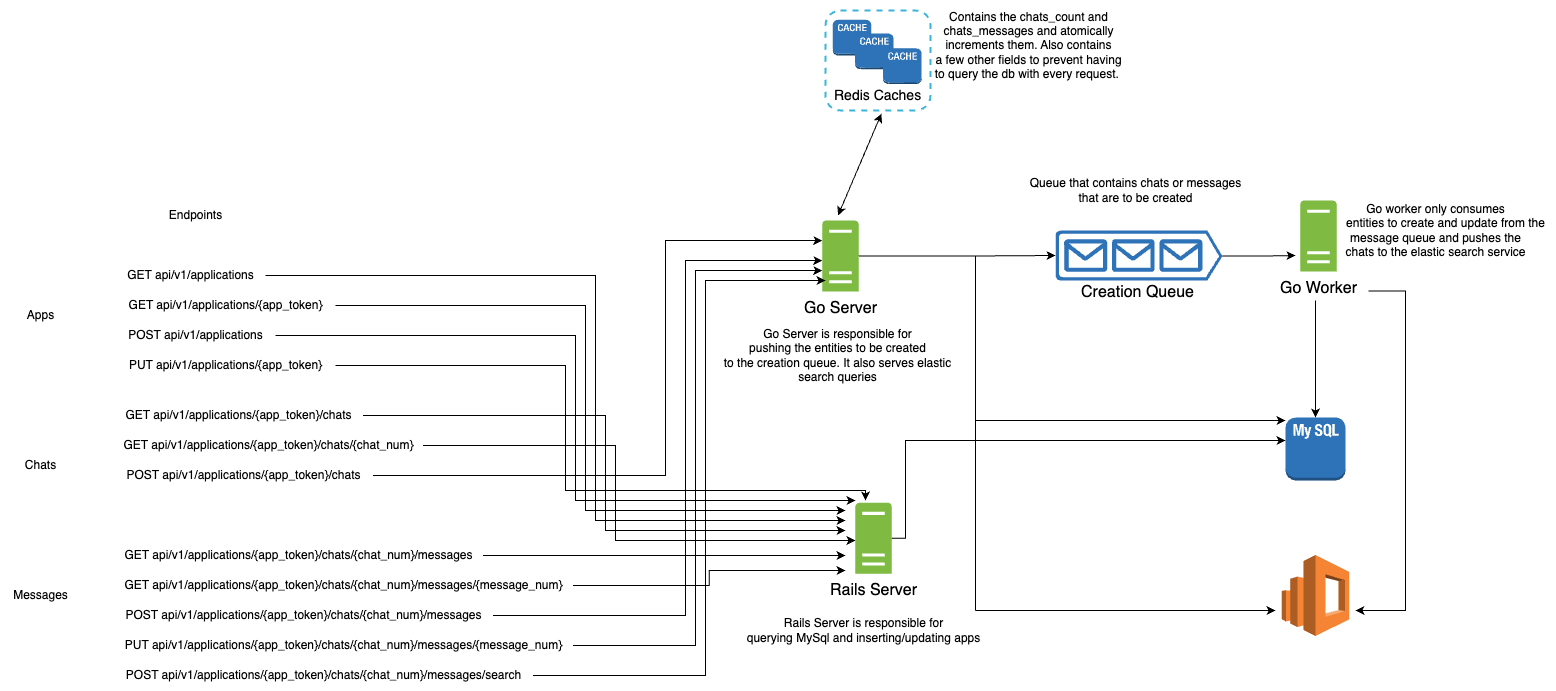
This Chat System is a my implementation of the Backend Engineering Task for Instabug. The system components are designed to be stateless and can thus be distributed quite easily. All you need to do is spin up a few instances and add them behind a load balancer, and it would scale. The system is not fault tolerant, since I didn't cover any possible failures (no time to). I will however mention some of the failures and how we can reliably deal with them.
- Cache is a single point of failure, so it needs to be distributed. Although the latency may suffer, it is crucial that the cache cluster almost never fails, since it contains all the atomic counters which multiple servers use. If it fails, the servers would have to query the db repeatedly and the load may be too high to handle.
Workers may die after pulling a job from the queue, so the job may be lost. To combat this, I created a huge performance bottleneck. I don't acknowledge the job until after I am done with inserting it to the db. With multiple workers, the queue would be a huge source of contention, and may fill up quite quickly. A solution might be to accept a job from the queue, log it locally or in a distributed file system, and then immediately acknowledge the job. Afterwards, the worker processes the job, and them marks the job as done in the logs. If a worker dies while holding a job, it won't be lost and other workers can finish this job instead. (assuming the job log is stored in a distributed environment)Incorrect. RabbitMq doesn't block until a message is acknowledged. It sends out data normally to other consumers. If a consumer crashes while holding an unacknowledged message, it simply gets returned to the queue.- Uuid token may actually collide with another (0.00001% chance), so it isn't absolutely unique. A better method needs to be used for generating the token.
- Before accepting a chat, I first need to check if the application is present or not. So I will probably need to query the db. This can be easily solved by mainting the key in cache, and querying the cache first to check if it is there. If not, then I will have to query the db. If there, then I will set the key in cache for future requests, else, reject the chat since the token is invalid.
- The same concept above applies when accepting a message, when I need to make sure the token is valid.
- When updating a message though, things get quite interesting. See the system is allowed to lag in the insertion process (bulk insert for higher performance), which means a user may update a message that is actually still in the queue and hasn't been inserted. I could simply rely on the cache as a source of truth, and ensure that the message has been seen before. But this is a risk I am not willing to take. I don't want the cache to be my source of truth. So I will reject the update request if the message hasn't yet been inserted, and the client is responsible for retrying the request after a timeout.
- A very complex design decision is maintaining the counter(number returned when creating a message or a chat). The corner case that drove me nuts is as follows: We have a few go servers running, with the chats_number = 100. The value is currently stored in redis. Redis dies, and then the servers die as well. The only place that knows what the max number is, is the db. The go servers are then woken up along with Redis. At this point, Redis doesn’t have a key called chats_number. So the solution is, for every go server, when it encounters a new chat that it hasn’t served before, it first queries the db for the maximum chats_number. It then attempts to set the key chats_number in Redis to the correct value. After doing so, it calls INCR to get the new number. Here is the race condition: Two servers do the same sequence of events. A server “A” calls MySQL, while the other “B” has called MySQL, set the ctr, and incremented it appropriately. Why did both call MySQL? Because this is the first time both have seen this chat for this app. So they aren’t sure if it is in Redis or not. The issue is that now server “A” attempts to set the ctr to the value it obtained from MySQL. This is wrong, because the ctr has already been set and incremented. This would result in duplicate numbers. So the solution is to use SETNX (if key doesn’t exist, then calling INCR to get the appropriate counter). In essence, whenever a server receives a request to create a chat for the first time for a specific app, or a message for a specific chat for the first time, it has to call MySQL, SETNX the key, and then INCR it to get the actual correct result.
- In the chats table, I chose the foreign key to be on the application_token, rather than the application_id. This was a hard choice. Pros: Only 1 query to get the applications chat. Cons: Indexing a varchar, which means that the index may grow in size quite a bit in the future. Comparing varchars is indeed slower than ints, but if I opt for using the application_id, the first query would still have to compare tokens to use the index. So it makes more sense to decrease the queries sent to the db which may already be under alot of load due to the messages.
- When sending all the messages_count and chats_count to be updated in bulk to the server, we need to make sure that the operation isn't blocking. (Redis may block if we load all keys in memory) Thus we use an iterator, rather than load the complete result in memory which would block.
- There are alot of single points of failure, like the db, the queue, and elastic-search. Those will all need to be appropriately distributed.
Note:
-
You need to have Docker installed
-
To start the whole system:
cd /Chat_System
docker-compose up
- To stop the whole system:
cd /Chat_System
docker-compose stop
docker-compose rm -f
docker-compose down --rmi local
API Calls:
Applications:
curl -X POST \
    localhost:3000/api/v1/applications \
    -H 'cache-control: no-cache' \
    -H 'content-type: application/json' \
    -d '{
            "name": "app1"
        }'
- Result
{"name":"app1","token":"e9d1799d-6377-4828-a28a-442938690e96","chats_count":0}
curl -X PUT \
    localhost:3000/api/v1/applications/e9d1799d-6377-4828-a28a-442938690e96 \
    -H 'cache-control: no-cache' \
    -H 'content-type: application/json' \
    -d '{
            "name": "new name for app1"
        }'
- Result
{"success":"ok"}
curl -X GET \
    localhost:3000/api/v1/applications/ \
    -H 'cache-control: no-cache' \
    -H 'content-type: application/json'
- Result
[{"name":"new name for app1","token":"e9d1799d-6377-4828-a28a-442938690e96","chats_count":0}]
curl -X GET \
    localhost:3000/api/v1/applications/e9d1799d-6377-4828-a28a-442938690e96 \
    -H 'cache-control: no-cache' \
    -H 'content-type: application/json'
- Result
{"name":"new name for app1","token":"e9d1799d-6377-4828-a28a-442938690e96","chats_count":0}
Chats:
curl -X POST \
    localhost:5555/api/v1/applications/e9d1799d-6377-4828-a28a-442938690e96/chats \
    -H 'cache-control: no-cache' \
    -H 'content-type: application/json'
- Result
{"number":1}
curl -X GET \
    localhost:3000/api/v1/applications/e9d1799d-6377-4828-a28a-442938690e96/chats \
    -H 'cache-control: no-cache' \
    -H 'content-type: application/json'
- Result
[{"number":1,"messages_count":0}]
curl -X GET \
    localhost:3000/api/v1/applications/e9d1799d-6377-4828-a28a-442938690e96/chats/1 \
    -H 'cache-control: no-cache' \
    -H 'content-type: application/json'
- Result
{"number":1,"messages_count":0}
Messages:
curl -X POST \
    localhost:5555/api/v1/applications/e9d1799d-6377-4828-a28a-442938690e96/chats/1/messages \
    -H 'cache-control: no-cache' \
    -H 'content-type: application/json' \
    -d '{
          "body": "message 1 for chat 1 in app 1"
        }'
- Result
{"number":1}
curl -X PUT \
    localhost:5555/api/v1/applications/e9d1799d-6377-4828-a28a-442938690e96/chats/1/messages/1 \
    -H 'cache-control: no-cache' \
    -H 'content-type: application/json' \
    -d '{
          "body": "new body :) message 1 for chat 1 in app 1"
        }'
- Result
{"number":1,"body":"new body :) message 1 for chat 1 in app 1"}
curl -X GET \
    localhost:3000/api/v1/applications/e9d1799d-6377-4828-a28a-442938690e96/chats/1/messages \
    -H 'cache-control: no-cache' \
    -H 'content-type: application/json'
- Result
[{"number":1,"body":"new body :) message 1 for chat 1 in app 1"}]
curl -X GET \
    localhost:3000/api/v1/applications/e9d1799d-6377-4828-a28a-442938690e96/chats/1/messages/1 \
    -H 'cache-control: no-cache' \
    -H 'content-type: application/json'
- Result
{"number":1,"body":"new body :) message 1 for chat 1 in app 1"}
curl -X POST \
    localhost:5555/api/v1/applications/e9d1799d-6377-4828-a28a-442938690e96/chats/1/messages/search \
    -H 'cache-control: no-cache' \
    -H 'content-type: application/json' \
    -d '{
          "body": "message 1"
        }'
- Result
[{"number":1,"body":"new body :) message 1 for chat 1 in app 1"}]