

Catch risky npm dependency changes before they merge.
No API key · No account · Free, including private repos


Official integrations: ChatGPT · Claude
Listed in ChatGPT and Anthropic's official Claude directory via the npmscan MCP integration.
Every pull request that changes package.json or a lockfile is checked for:
- Known vulnerabilities and known malware from OSV.dev and GitHub Advisories
- New install scripts: a dependency that suddenly runs code on
npm install, the usual sign of a hijacked package - Repointed lockfile entries: the same version now downloading a different tarball, an entry whose tarball is actually a different package, or an upgrade that switches to an unknown server. CVE scanners don't check for this.
- Changes to your own install scripts and overrides, which can run code or force a version without touching the dependency list
npmscan posts one PR comment, marks each finding on its line in Files changed, and fails the check when something meets your thresholds.
Add .github/workflows/npmscan.yml:
name: npmscan
on:
  pull_request:
    paths: [package.json, package-lock.json, yarn.lock, pnpm-lock.yaml]
permissions:
  contents: read
  pull-requests: write
jobs:
  scan:
    runs-on: ubuntu-latest
    steps:
      - uses: actions/checkout@v7
      - uses: npmscan/npmscan-action@v1
That's it. Using pnpm or Yarn? Add with: { file: pnpm-lock.yaml } (or yarn.lock).
Want to try it before it blocks anything? Add with: { mode: warn }.
A real comment from a PR that downgrades lodash to a vulnerable version (here in mode: warn):
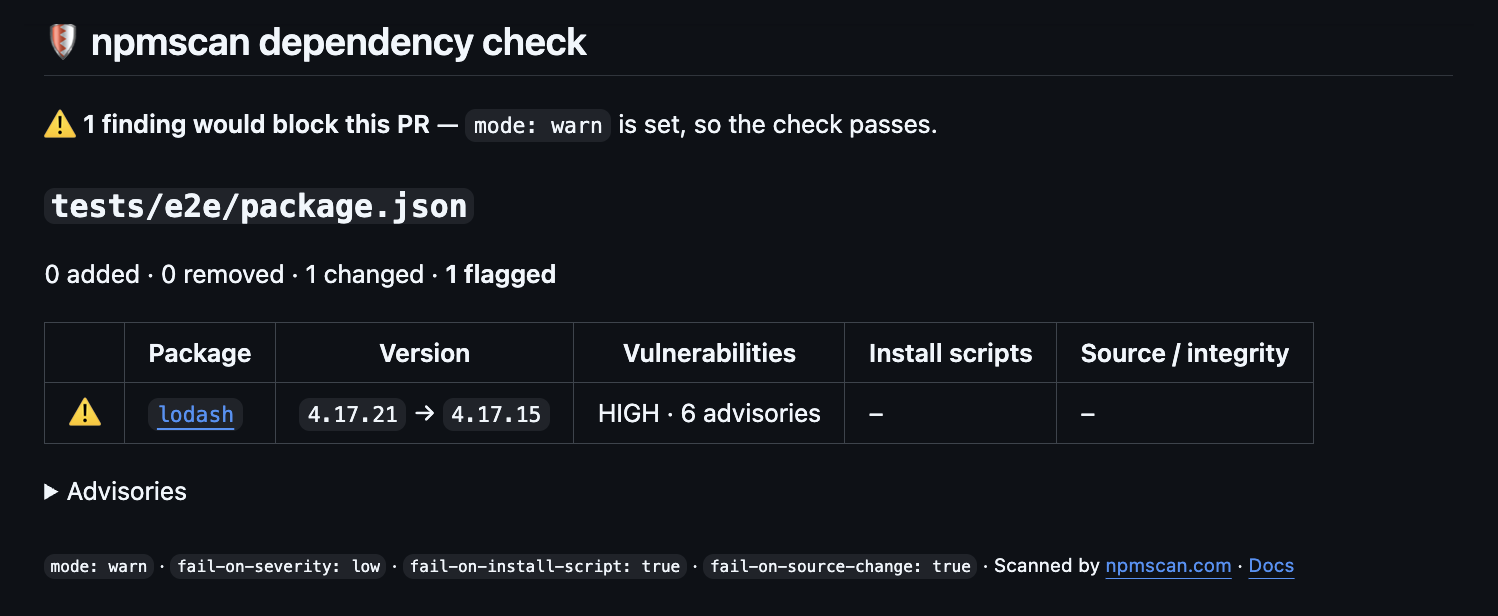
The comment is edited in place on every push, and the same report goes to the job summary.
| Finding | Blocks by default | To stop it blocking |
|---|---|---|
| Known malware (a malicious-package advisory) | always | only mode: warn |
| Known vulnerability | any severity | fail-on-severity: high (or critical, none) |
A dependency gains a preinstall / install / postinstall script, or a new dependency has one |
yes | fail-on-install-script: false |
Your own root preinstall / install / postinstall / prepare script is added or changed |
yes | fail-on-install-script: false |
| The same version now resolves to a different tarball URL or integrity hash, the tarball is a different package or version than the lockfile declares, or an upgrade moves to a different host | yes | fail-on-source-change: false |
An overrides / resolutions entry is added or changed |
yes | fail-on-source-change: false |
Findings below your thresholds are still reported. They just don't fail the check.
Ordinary upgrades (new version, new tarball from the same registry) are not flagged as source changes.
A dependency's prepare script is not counted: npm never runs it when the package is installed from the registry.
Known malware blocks even with fail-on-severity: none: these advisories are often rated only HIGH, and no threshold should let one through.
Scan package.json next to your lockfile. The lockfile lists every installed package, but only package.json
has your own install scripts, and with npm and Yarn only it has your overrides / resolutions. A lockfile-only
scan misses a PR that adds a root postinstall or repoints an override. pnpm copies overrides into
pnpm-lock.yaml, so there it misses only the root scripts. See Quiet on clean PRs.
- Private repos are free. GitHub's own Dependency Review action only runs on private repositories that have GitHub Code Security or Advanced Security. npmscan needs neither.
- It looks beyond CVEs. New install scripts and repointed tarballs are how npm supply-chain attacks usually work, and they have no CVE until someone notices.
- There's no secret to configure, so it also works on Dependabot PRs and PRs from forks, where repository secrets aren't available.
- You can read all of it in five minutes. It's a short bash script and a jq template, with nothing to download or build at run time.
| Input | Default | Description |
|---|---|---|
file |
package-lock.json |
package.json, package-lock.json, npm-shrinkwrap.json, yarn.lock (classic or Berry) or pnpm-lock.yaml, relative to the repo root |
files |
Several files, one per line or comma-separated. Overrides file. |
|
mode |
block |
block fails the check on findings that meet the thresholds; warn only reports them |
fail-on-severity |
low |
Lowest severity that blocks: low, moderate, high, critical, or none. Known malware blocks regardless. |
fail-on-install-script |
true |
Block on new install scripts (see the table above) |
fail-on-source-change |
true |
Block on repointed or swapped tarballs and changed overrides |
fail-on-error |
false |
Fail when the scan itself can't run (npmscan.com unreachable, file over 8 MB). By default this is a warning, so an outage never blocks your merges. If the API hangs, the action gives up within about 5 minutes per file, so give the job at least 5 minutes per scanned file plus some slack (10 for one file, 20 for three). Otherwise a timed-out job fails the check anyway. |
comment |
always |
When to post the PR comment: always, on-findings (only when something is flagged or the scan fails) or never. With on-findings, an earlier comment is still updated, so fixed findings don't linger. The report always goes to the job summary. |
github-token |
${{ github.token }} |
Token used to post the PR comment |
fail-on-flagged |
true |
Deprecated: false is the same as mode: warn |
| Output | Description |
|---|---|
flagged-count |
Findings across all scanned files (empty if nothing was scanned) |
blocking-count |
Findings that meet the thresholds. These fail the check in mode: block. |
error-count |
Files that could not be scanned |
      - uses: npmscan/npmscan-action@v1
        with:
          mode: warn
The comment marks what would have blocked. Switch to mode: block when you trust it.
on:
  pull_request:
    paths: [package.json, package-lock.json]
# ...
      - uses: npmscan/npmscan-action@v1
        with:
          files: |
            package.json
            package-lock.json
          comment: on-findings
PRs with nothing to report get no comment, just the report in the job summary. A finding or a failed scan
still comments, and a later clean push updates that comment. Useful when package.json changes often for
reasons that have nothing to do with dependencies.
      - uses: npmscan/npmscan-action@v1
        with:
fail-on-severity: highon:
pull_request:
paths: ['**/package.json', '**/package-lock.json']
# ...
- uses: npmscan/npmscan-action@v1
with:
files: |
package-lock.json
packages/web/package-lock.json
packages/api/package-lock.jsonAll files are reported in one comment, and files the PR doesn't touch are skipped without an API call. Separate npmscan steps each keep their own comment.
npmscan works as a security reviewer for dependency-bot PRs. Dependabot PRs run with a read-only token
unless the workflow asks for more, so keep the permissions block from the quick start:
permissions:
  contents: read
  pull-requests: write
Renovate PRs come from a branch in your repo and need nothing extra.
Fork PRs always get a read-only token, so npmscan can't comment. The full report is in the job summary, and findings still show up as annotations and still fail the check.
      - id: npmscan
        uses: npmscan/npmscan-action@v1
        with:
          mode: warn
      - if: fromJSON(steps.npmscan.outputs.blocking-count || '0') > 0
run: echo "npmscan found ${{ steps.npmscan.outputs.blocking-count }} blocking finding(s)"@v1 always points to the latest v1.x.y release, so you get fixes automatically. If your policy
requires immutable references, pin to the full commit SHA of a release instead:
- uses: npmscan/npmscan-action@de14168f65640a4ed1f0e82ad3ad8c80483d360d # v1.3.0Pick the SHA of the latest release, or print it with
git ls-remote https://github.com/NPMscan/npmscan-action refs/tags/v1.3.0. To keep a pinned SHA up to date,
let Dependabot do it:
# .github/dependabot.yml
version: 2
updates:
  - package-ecosystem: github-actions
    directory: /
    schedule:
interval: weekly- Only the dependency file being scanned, as it is on the base branch and in the PR, is sent over HTTPS to
https://npmscan.com/api/analysis/dependency-diff. - Never your source code, other files, environment variables, secrets, or the GitHub token.
- Nothing is stored. The files are used to compute the diff and then discarded.
- To check vulnerabilities and install scripts, npmscan looks up the package names and versions from that diff on the public npm registry and OSV.dev. For private packages, this means their names reach those services.
Requests share a public rate limit of 30 per minute per IP. Files can be up to 8 MB, and up to 100 changed packages per run are checked in depth. See the privacy policy and security policy.
- Found a bug or a wrong result? Open an issue.
- Want to change something? See CONTRIBUTING.md.
- Found a vulnerability? Please report it privately. See SECURITY.md.
The action itself is action.yml plus scripts/. The outreach/ folder holds maintainer notes and tooling
(see outreach/README.md). It isn't part of the action, and its Node dev dependencies are
never installed or run in your workflow.
MIT License · Made by BlockHacks.io · Powered by npmscan.com