A problem that labels are not normally created when using custom-config #479

Description

The template below is mostly useful for bug reports and support questions. Feel free to remove anything which doesn't apply to you and add more information where it makes sense.
1. Quick Debug Checklist
- Are you running on an Ubuntu 18.04 node?
- Are you running Kubernetes v1.13+?
- Are you running Docker (>= 18.06) or CRIO (>= 1.13+)?
- Do you have
i2c_coreandipmi_msghandlerloaded on the nodes? - Did you apply the CRD (
kubectl describe clusterpolicies --all-namespaces)
1. Issue or feature description
When a single strategy is applied like all-1g.10gb, the k8s label value is normally generated.
However, when applied using all-balanced, custom-config, gpu.product is changed to NVIDIA-A100-SXM4-80GB-MIG-INVALID and the normal label value is not added. In addition, for mixed strategies such as all-balanced and custom config, count and memory, gi, ci information must be generated for each profile, but only a label value of 0 is generated.
However, if you check by executing the nvidia-smi command, mig is normally applied.
2. Steps to reproduce the issue
- kubectl label node
nodeName"nvidia.com/mig.config=all-balanced" --overwrite - kubectl describe node
nodeName| grep "nvidia.com/" - watch node labels
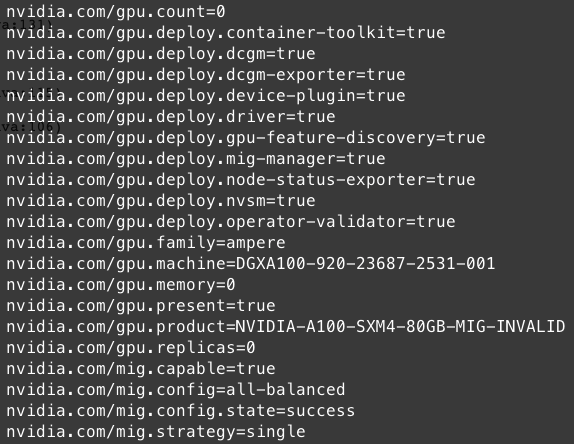
3. Information to attach (optional if deemed irrelevant)
-
kubernetes pods status:
kubectl get pods --all-namespaces -
kubernetes daemonset status:
kubectl get ds --all-namespaces -
If a pod/ds is in an error state or pending state
kubectl describe pod -n NAMESPACE POD_NAME -
If a pod/ds is in an error state or pending state
kubectl logs -n NAMESPACE POD_NAME -
Output of running a container on the GPU machine:
docker run -it alpine echo foo -
Docker configuration file:
cat /etc/docker/daemon.json -
Docker runtime configuration:
docker info | grep runtime -
NVIDIA shared directory:
ls -la /run/nvidia -
NVIDIA packages directory:
ls -la /usr/local/nvidia/toolkit -
NVIDIA driver directory:
ls -la /run/nvidia/driver -
kubelet logs
journalctl -u kubelet > kubelet.logs