Releases: NVIDIAGameWorks/rtx-remix
Release list
remix-1.5.2

For the full release notes for RTX Remix, please visit https://docs.omniverse.nvidia.com/kit/docs/rtx_remix/latest/docs/changelog/remix-releasenotes.html
RTX Remix 1.5
RTX Remix Release 1.5 Notes (June 16, 2026)
We recently introduced Remix Skills, text-based context files that transform AI agents into intelligent collaborators. By lowering the barrier to entry, these agents are already helping the community add features and make previously unsupported titles compatible with RTX Remix. With today's RTX Remix 1.5 update, we are significantly increasing the performance and compatibility for both the Remix Runtime and Toolkit, so you and your coding agents can accelerate the modding pipeline.
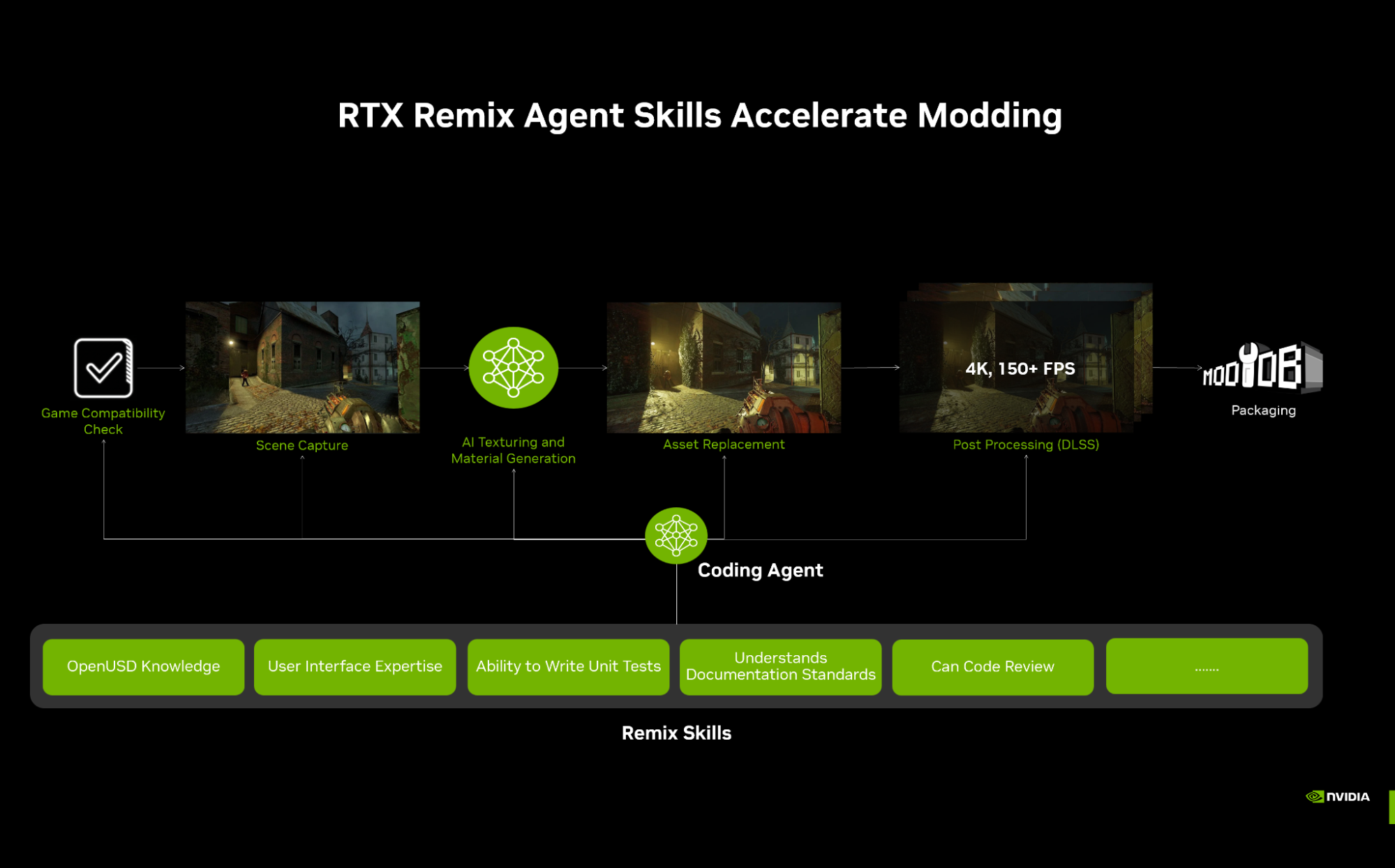
RTX Remix 1.5 is headlined by a suite of Toolkit features designed to streamline packaging and Runtime improvements that bolster path-tracing stability. From automatic geometry smoothing to massive scene optimization, version 1.5 empowers modders to tackle larger, more complex projects with greater efficiency.
With these new tools, modders and their coding agents can:
- Reduce Packaging Size: Utilize RTX IO high-performance storage technology.
- Customize Viewport Lights: Setup and control light manipulators easier.
- Accelerate Geometry Remastering: Automatically smooth out legacy geometry.
- Have Greater Peace of Mind: New optional auto-save system.
🛠️RTX Remix Toolkit 1.5 Release Notes
Advanced Packaging & Automation
The Toolkit now features an enhanced packaging workflow to handle the growing scale of modern remasters.
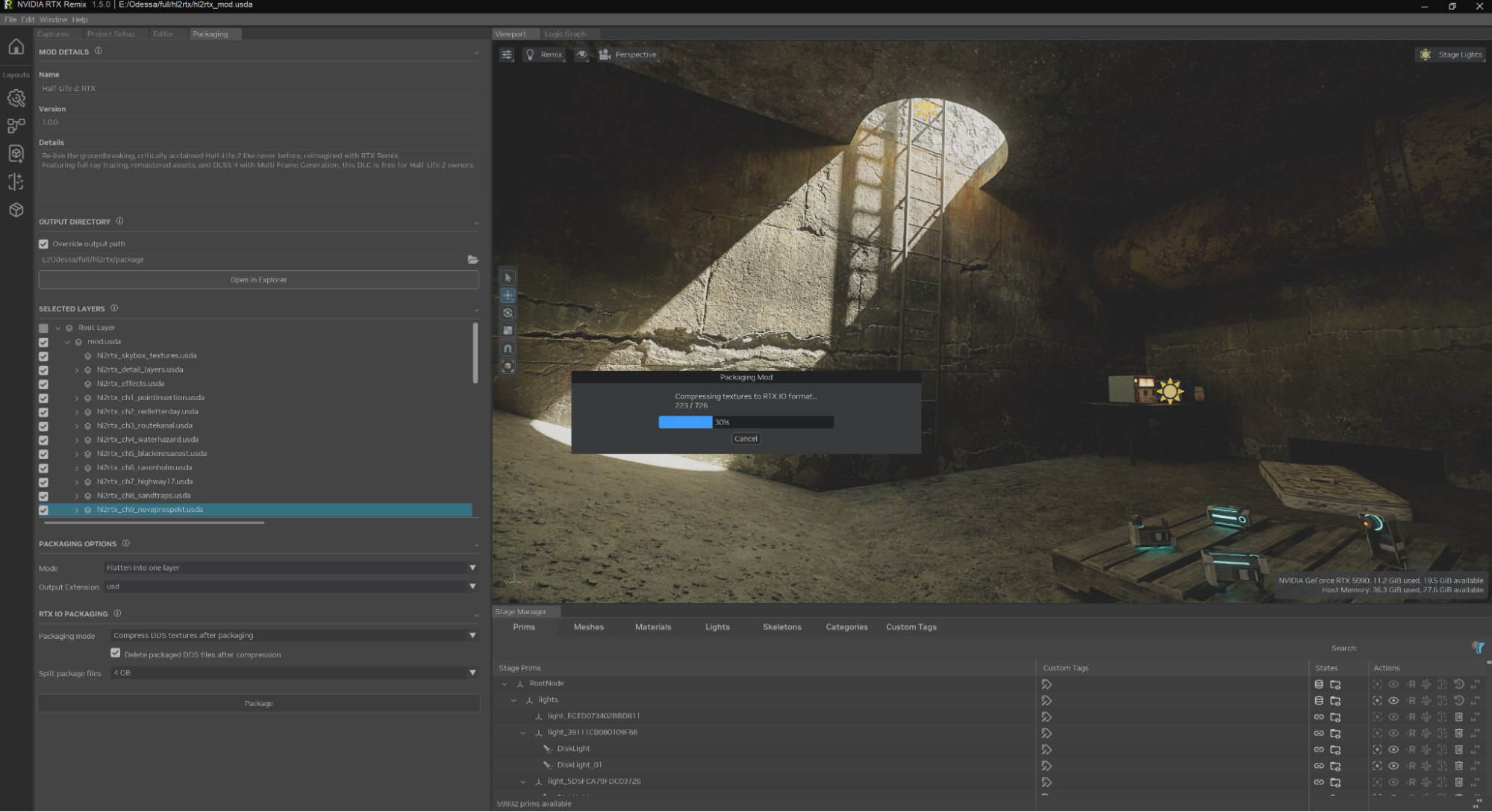
- RTXIO Compression: Added native support for texture packing and extraction using RTXIO, significantly reducing the footprint of high-resolution assets.
- Override Flattening: A new option allows modders to collapse complex multi-layer overrides into a single, optimized output for the final release.
- Auto-Save Extension: To prevent data loss during long sessions, the Toolkit now includes configurable auto-save intervals.
More information about mod packaging is available here.
UX & Workflow Improvements
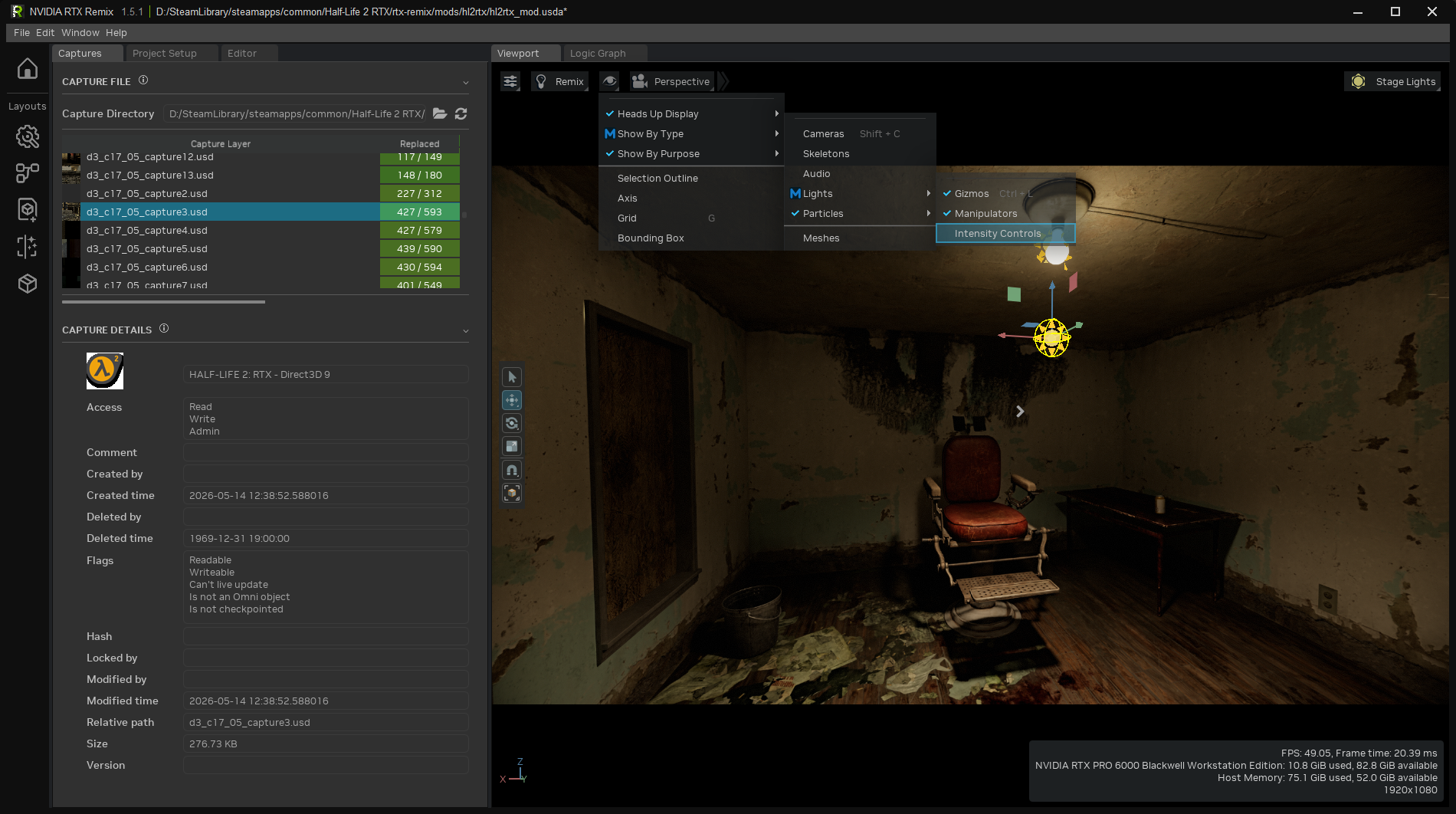
- Unified Lights Menu: Access all light manipulators from a single viewport menu, allowing for quick toggles of manipulator visibility and persistent intensity adjustments.
- Stage Manager Enhancements: Added a "Deleted Reference" filter and improved mesh visibility toggles. Property input tooltips are now "field-aware," specifically helping with complex particle settings.
- Interactive Response: USD notices are now grouped to reduce redundant viewport updates, making the manipulation of large scenes feel much more responsive.
Performance & Stability
- Batched Stage Manager: We rewrote the Stage Manager filtering system to use single-threaded batched execution. This results in significantly faster refresh rates when working with massive scenes.
- Throttled Writes: Particle editor drag writes are now throttled to prevent FPS drops during real-time editing.
- Bugfixes: Fixed a variety of regressions, including "Recent Projects" list corruption, undo/redo command stacking, and viewport framing issues in the Selection panel.
🎮 RTX Remix Runtime 1.5 Release Notes
Smooth Normals & Geometry Stability
A core focus of 1.5 is improving how legacy geometry interacts with modern path-traced lighting.
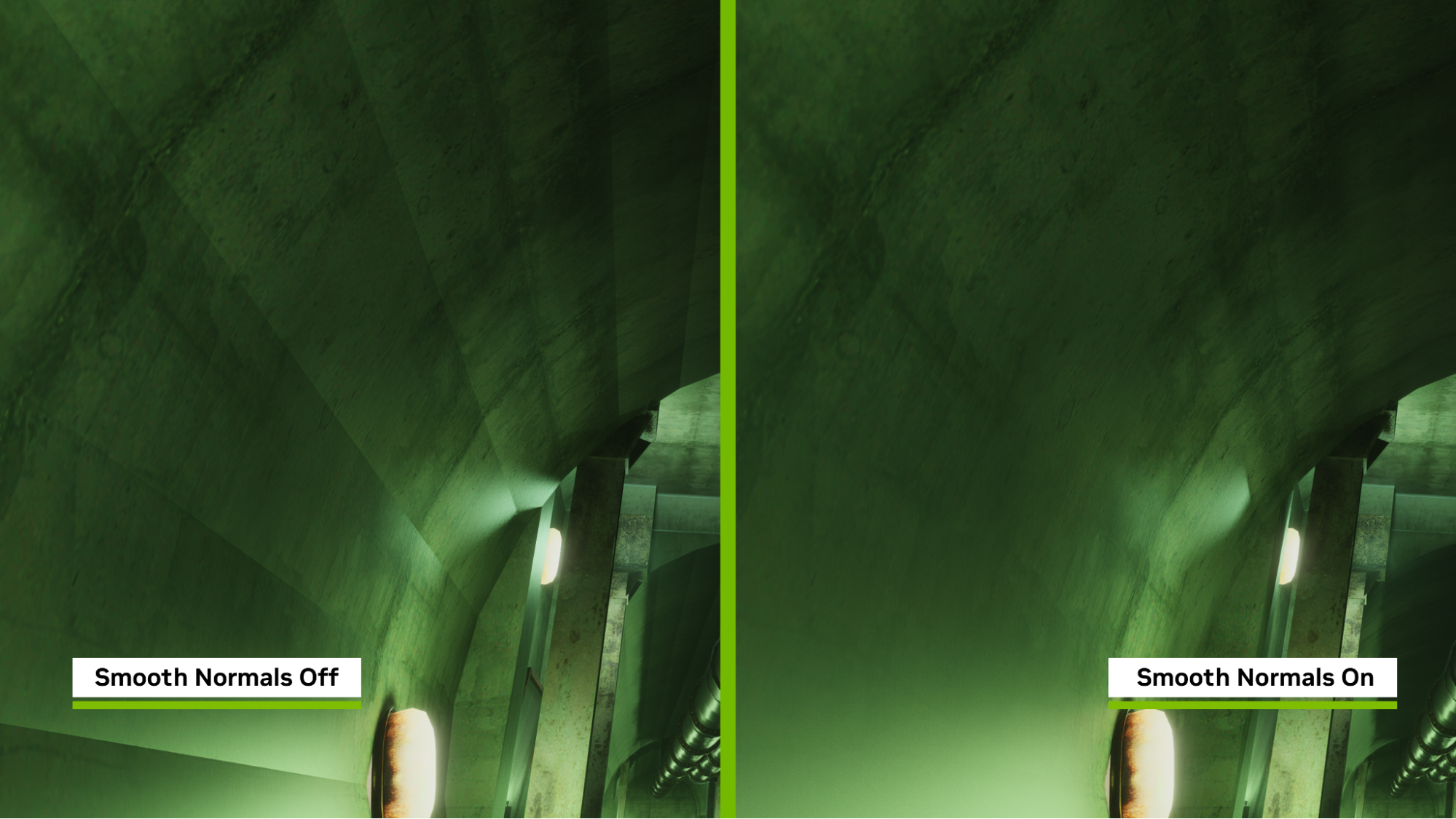
- GPU/CPU Smooth Normals: Remix can now generate smooth normals for D3D9 geometry on the fly. This eliminates the "faceted" or blocky look on surfaces where original vertex normals were unavailable. This is an opt-in feature via texture tagging.
- 32-Bit Index Buffers: Added support for 32-bit index buffers during triangle list generation, resolving geometry corruption in games with exceptionally large buffers (e.g., Brutal Legend).
- PointInstancer Culling: Added GPU-driven culling for PointInstancers with configurable distance and fade-out, enabling stable performance in scenes with up to ~2 million objects.
Advanced Rendering & Volumetrics
- Translucent Transmission: Light rays in the volumetrics system now support transmission through water and glass, allowing for realistic underwater lighting and refractive shadows.
- NRC Boost Emissives: Enabled by default, this feature restores missing emissive lighting on indirect bounces when using Neural Radiance Caching (NRC).
- Refined Parallax & IOR: Added per-direction POM displacement scaling and a global IOR scale factor to give modders finer control over the "look" of translucent and textured materials.
Particle System
We have refined the particle architecture introduced in the previous version to ensure better visual consistency.
- Unified Orientation: Fixed a bug causing particles to appear upside-down; all particle types now share a consistent orientation.
- Migration Tools: Added automatic migration paths for projects moving from Particle 1.0 to 2.0, along with a fix for particles failing to render on non-replacement meshes.
- Precision Spawning: Fixed clumping and trailing artifacts in dust particle systems when used at non-unity scene scales.
Compatibility & Global Support
- Unity Support: Fixed a long-standing issue where Unity games rendered upside-down due to negative Y-axis clip-space projection.
- Localization: Remix now preserves valid UTF-8 characters in game metadata, ensuring proper display for Cyrillic and CJK (Chinese, Japanese, Korean) languages.
- Performance Optimization: DebugView statistics processing was reduced from 42 ms to just 1 ms at 4K resolution.
Code & Community Contributions
This release features numerous fixes driven directly by community reports on GitHub:
- Rendering Fixes: Addressing SSS resolution scaling, NRC emissive lighting, and NEE Cache flickering during camera movement.
- Stability: Resolved the "Alt-Tab" use-after-free crash and crashes related to skinned meshes with excessive bone counts.
- Community Credits: Special thanks to the contributors who helped resolve the OutRun 2006 capture crash and the sky auto-detection logic for shared-camera worlds.
How to Report an Issue:
Prerequisite: You need to have a (free) GitHub account
- Go the RTX Remix Github Issues page
- Click the green "New Issue" button
- Select the bug template (Runtime, Documentation, Toolkit, Feature Request) and click "Get Started"
- Fill out the form template, providing as much detailed information as you can, including attaching files and/or images
- Click the green "Submit new issue" to send a ticket directly to the RTX Remix Team!
Need to leave feedback about the RTX Remix Documentation? Click here!
remix-1.4.2
For the full release notes for RTX Remix, please visit https://docs.omniverse.nvidia.com/kit/docs/rtx_remix/latest/docs/changelog/remix-releasenotes.html
RTX Remix 1.4.2
RTX Remix Release 1.4.2 Notes (4/21/2026)
We are thrilled to unveil the official release of RTX Remix 1.4.2. This update marks a significant milestone in visual fidelity and modding workflow, headlined by the debut of Advanced Particle VFX. This overhaul transforms how environmental effects and combat visuals are handled, giving modders the power to create complex, cinematic particle behaviors that were previously impossible.

Beyond particles, we've focused on the "soul" of game characters with specialized eye shaders, offering unprecedented realism for digital humans. Combined with a 55% performance boost in RTX Skin and a fully unified UI styling between the Toolkit and Runtime, version 1.4.2 makes the path to a path-traced masterpiece smoother and more performant than ever.
With these new tools, modders can:
- Evolve Particle Animations: Use the new Curve Editor to transition particle color, size, and velocity over their entire lifetime.
- Create Realistic Characters: Implement parallax depth and spherical normals for eyes, bringing a new level of life to NPCs.
- Optimize Heavy Scenes: Enjoy massive performance gains in scenes utilizing skin or wax-like materials thanks to RTX Skin optimizations.
- Iterate Faster: Hot-reload textures instantly without restarting the game.
🛠️RTX Remix Toolkit 1.4.2 Release Notes
Particle Curve Editor
The centerpiece of the Toolkit update is the new Curve Editor. Modders can now precisely orchestrate particle properties over time.

- Supports full Bezier and Hermite curves with custom tangent types.
- Allows for granular control over color gradients, rotation speeds, and velocity scaling.
- Visualizes lifetime data for more detailed control and VFX creation.
UX & Workflow Improvements
- Prim Nicknames: Added a "Nickname" attribute for prims in the selection tree and Stage Manager, making it easier to track specific assets in complex scenes.
- Enhanced Stage Manager: Added Instance Group and Mesh Group filter plugins with new section headers for faster navigation.
- Scan Folder Validation: Improved the reliability of model ingestion and fixed multiselect checkbox handling in the Scan Folder tool.
Bugfixes/Minor Changes
- Fixed Stage Manager refresh logic to ensure items populate correctly before the UI displays.
- Updated Stage Manager’s Mesh Prim Filter to correctly exclude light sources from mesh-only filters.
- Resolved an issue where the viewport selection would fail to "frame" the selected objects in the Skeleton Tab.
🎮 RTX Remix Runtime 1.4.2 Release Notes
Advanced Particle VFX
A major overhaul of the particle system provides a modernized foundation for all Remix effects, including full backwards compatibility for existing USD and Hydra assets.

- Physics & Interaction: Added Physical Attractors to pull or repel particles from specific points, and Drag/Air Resistance to simulate realistic friction.
- Collision Modes: Particles can now be set to Bounce, Stop, or Kill upon hitting geometry.
- Sprite Sheet Animation: New flipbook modes allow for animated textures on particles, including random sprite selection to break up visual repetition.
- Screenspace Culling: Replaced world-space culling with a screenspace heuristic, preventing particles from "popping" out of existence when the player zooms in or gets too close.
- 2D Sizing: Particles now support independent X and Y dimensions for non-square effects like sparks or debris.
Advanced Rendering & Visuals
- Specialized Eye Shaders: Opaque shaders now support parallax depth on the iris and smooth spherical normals on the whites (sclera), creating depth and realistic reflections.
- RTX Skin Optimization: RTX Skin or Subsurface Scattering (SSS) is now up to 55% faster. We achieved this by masking SSS instances, enabling backface culling, and implementing a single-scattering transmission heuristic.
- Texture Hot-Reload: You can now toggle an option to listen for filesystem changes, allowing textures to update live in-game as you save them in your image editor.
UI & Configuration Refactor
- Unified Styling: The Runtime UI now uses the Toolkit's styling, including improved spacing, hover states, and a new bold font for better readability.
- RtxOption Layers: We have refactored how settings are saved. Local user changes are now strictly separated into user.conf, while mod-specific defaults live in rtx.conf. A new migration flow ensures your existing settings are moved to the correct layers automatically.
Code & Community Contributions
- Enhanced Particles: Massive thanks to @RuneStorm for the initial Request for Enhancement and feedback that shaped the Particle System 2.0 architecture.
- Stability Fix: Thanks to @xoxor4d for fixing a serialization bug that previously caused particle systems to fail during creation via the Remix API.
- Build Optimization: Added precompiled header support to the build system, significantly reducing compile times for contributors.
Bugfixes/Minor Changes
- Fixed a long-standing orientation bug where billboard particles appeared upside down.
- Fixed "glow" corruption on far alpha-blended geometry by scaling hit distances to prevent Float16 overflow.
- Resolved texture blur "pops" that occurred when exiting full-screen menus.
- Fixed crashes when attempting to capture/export to write-protected directories; a warning dialog now appears instead.
- Blocked mouse/keyboard input when the game window is out of focus to prevent accidental setting changes.
How to Report an Issue:
Prerequisite: You need to have a (free) GitHub account
- Go the RTX Remix Github Issues page
- Click the green "New Issue" button
- Select the bug template (Runtime, Documentation, Toolkit, Feature Request) and click "Get Started"
- Fill out the form template, providing as much detailed information as you can, including attaching files and/or images
- Click the green "Submit new issue" to send a ticket directly to the RTX Remix Team!
Need to leave feedback about the RTX Remix Documentation? Click here!
Contributors


Assets 12
remix-1.3.6
For the full release notes for RTX Remix, please visit https://docs.omniverse.nvidia.com/kit/docs/rtx_remix/latest/docs/changelog/remix-releasenotes.html
RTX Remix 1.3.6
🛠️RTX Remix Toolkit 1.3.6.2 Release Notes
New Features
Remix Logic Graph Editor
Added support for RTX Remix Logic system, which allows modders to dynamically alter Remix settings based on detected game state.
Modders add Remix Logic into their mods by opening the "Logic Graph" tab, selecting a Light or Mesh Prim, and creating a "New Graph" in either the "Logic Properties" pane, the top left of the "Logic Graph" tab, or the center of the "Logic Graph" tab (see image below).

Added Dockable and Customizable Layouts
- All panels are now window based and can be repositioned for your ideal workflow
- Left bar now possesses various layouts, pre-arranging windows and tabs in useful configurations, leaving more room for the viewport
- Under "Window" drop down, modders can now hide and unhide specific panels
- Under "Window" drop down, modders can save and load custom layouts
Stage Manager Filtering
Added a search bar and customizable filters to the Stage Manager.
Community Contributions
- Changed modding tabs to vertical layout from @Simon-Lajoie PR 7
Bugfixes/Minor Changes
- Added a check to use the project directory if no capture directory is found
- Fixed symlink validation and repair when no deps dir exists
- Fixed particle properties panel not preserving expansion state across refreshes
- Fixed auto scrolling logic on some Stage Manager Tabs
- Removed waypoint support
Known Issues
- Graph Editor Node Validation
After deleting a node in graph editor, some node port inputs do not get correctly validated. Restarting application fixes the issue for now. - Graph Editor Connection Validation
After deleting a connection between nodes in the graph editor, some connections will incorrectly display as connected. Re-opening the graph will update the visual connection.
🎮 RTX Remix Runtime 1.3.6 Release Notes
New Features
Remix Logic & New Conf Files
Added support for RTX Remix Logic system, including developing a layering system for juggling and transitioning between multiple “.conf” files, each loaded with a unique set of RTX Remix Runtime options. Modders can define the relative “blend strength” of each layer, allowing smooth interpolation between values for fine-grain control.
To help streamline mod creation, Remix has introduced three types of config files.
- RTX.conf files. These haven’t changed. They are core to a modder’s workflow for making a game “Remix Compatible”. Modders can adjust how a game renders to make it work best with Remix, save it to the rtx.conf file, and share it in places like ModDB to make it easier for other modders to get started with their mod.
- User.conf files. These are new, and meant to store a user’s personal graphics settings, like their graphical preset, and whether they play with Frame Generation on. These should be tailored to the player, and reflect the best graphical settings for them.
- New.conf file. For Remix Logic graphs, modders can export a new.conf file. This conf file is meant to be temporarily loaded in reaction to a change in the game state.
When modders save their Runtime settings on the “User Graphics Menu”, it automatically saves to the user.conf. Additionally, on the “Advanced Developer Menu”, modders will see a new drop-down near the save button:

Creating Conf Files for Remix Logic
Important
If you plan to create “new.conf” files for Remix Logic, you need to ensure your user.conf contains only your personal graphics settings, to prevent accidentally changing a player’s personal graphics settings when they experience your mod.
To set this up:
- Delete any existing user.conf you might have in your file structure.
- In-game, launch the Runtime graphics settings menu and hit save (without going to the advanced developer menu). Now all of your personal graphics settings are written to your “user.conf” file, and won’t be duplicated to the new.conf file being used by Remix Logic.
- Relaunch the game.
As mentioned, Remix Logic will let you blend between multiple new.conf files in response to a change in game state. The process generally follows these steps:
- Modify your Remix Runtime settings to reflect the visual state you want to change to
- Save the settings to a “new.conf” file. The save settings should look like this when you do:

The new.conf file can be found in your file structure next to the rtx.conf file.
Modders should rename the new.conf file, maintaining the “.conf” extension. They should then manually move it to their mod folder (in the root or any subfolder).

In the Remix Toolkit, modders create a graph that features an “RTX Option Layer Action” Node. From the Logic Properties pane, they should point this node to the new .conf file they want to transition the visuals to. When a particular game event is detected, the current config file will fade into the new.conf file, enacting a visual change at whatever strength the modder has specified.

Modders can view their active Logic Graphs from the “Enhancements” tab, where they can see what parameters are being tuned, and review the current game state.

Quality of Life Improvements
- Implemented a new overlay-based GUI input system independent of the original game, ensuring consistent and reliable Remix UI interactions. Resolved issues where certain games would swallow keyboard or mouse inputs, previously causing the Remix GUI to become unresponsive. Introduced an always-on-top, transparent overlay window for advanced and seamless in-game UI input handling (enabled by default, configurable at launch).
- Improved RTX Remix Pathtracer. Fixed math errors and infinities in material calculations, sanitized invalid normals and texture coordinates. Improved miss ray motion vector accuracy and added safeguards against division by zero.
- Improved DLSS Multi Frame Generation stability with resizing game windows, and changing display settings. DLSS Frame Generation now synchronizes the compute shader thread when switching presenters and checks output window extents on dispatch, resetting the FG context if needed.
- Improved compatibility by fixing precision issues in vertex shader based games. The precision issues would previously manifest as vertex wobbling or explosions.
- Extended particle system to include constant particle mode and support for multiple billboard geometry generation modes. Increased supported ranges for a few particle system values in the GUI.
- Implemented vertex color as baked lighting as a per surface property. Added a heuristic for legacy materials based on FF state. Disabled this feature for particles (where we know the vertex color is not baked lighting).
- RTX Option change callbacks (including cascading changes) are now applied in the same frame on the resolved value for consistent behavior.
Community Contributions

- Remade entire Remix Runtime UI thanks to @xoxor4d [PR 105]. Added a UI theme selector with three themes, compact/spacious modes, large GUI toggle, and background alpha slider. Made multiple changes to improve menu look and feel
- Added XeSS 2.1 SR Upscaler thanks to @sambow23 [PR 100]
Bug Fixes / Minor Changes
- Fixed clamping of ev option’s min max values in Debug View options.
- Fixed a rare artificial tint being applied to secondary bounces / indirect lighting.
- Fixed virtual key binding issue to require ',' as delimiter instead of '+'.
- Fixed graphics preset dropdown to apply the correct preset. There was a bug where the preset would update to the previously selected one rather than the active one on a change.
- Fixed errors when overriding DLSS profile to Full Resolution (DLAA) via the Nvidia App.
- Fixed slightly incorrect DLSS input resolution and PerfQuality determination for a given DLSS profile (addresses Github issue #900).
- Fixed an issue where particles sometimes rendered without texture color due to legacy material inheritance, now allowing explicit legacy setup for particle rendering.
- Fixed fallback directional light to detect and respond to changed settings.
- Fixed clamping when evMin/evMaxValues are set for Debug Views using onChange callbacks.
- Fixed Acceleration Structure resource tracking to prevent resources getting destroyed while still being bound by dxvk.
- Fixed serialization of missing volumetricRadianceScale in Bridge.
Known Issues
- When saving your mod, avoid leaving the “Save Changed Settings Only” unchecked, and keep the “Override configs” option unchecked. It can lead to problematic beh...
Contributors


Assets 12
remix-1.2.4

For the full release notes for RTX Remix, please visit https://docs.omniverse.nvidia.com/kit/docs/rtx_remix/latest/docs/changelog/remix-releasenotes.html
RTX Remix Runtime 1.2.4 Release Notes:
New Features
-
RTX Remix Particle System: Remix now includes a path-traced particle system, allowing for realistic VFX in over 165 games. Path tracing particles is a rarity in games, giving Remix particles the unique ability to cast real time lighting, shadows, and reflections. Remix supports two workflows for adding particles:
-
Make particles while you play: From the Game setup tab of the RTX Remix Runtime, tag any texture you see as a “Particle emitter”. Then, define global properties for particles to change how they animate (Rendering Tab > Particles). This is great for prototyping or implementing a handful of particles in your mod. See an example in this video.
Note: the texture driving the look of these particles will be the same texture emitting it.
-
Author particles in the Toolkit: Add particles to any prim, load particle systems from USDA files, a trail system for advanced visuals, and new controls for collisions, velocity, rotation, and color range. You can also adjust parameters directly through the GUI.
-
-
Change particles however you like: the look, size, quantity, light emission, and physics, including turbulence and gravity–It’s easy to start making particles, with a lot of controls to master.

-
Settings Clamping: We added support for clamping in RTX Options, which means developers can set valid ranges for settings. This prevents you from entering invalid or out-of-range values, making configuration safer and more user-friendly.
-
SPIR-V Shader Compilation: The shader compilation process now generates SPIR-V directly from Slang, enabling support for new shader functionalities like cooperative vector intrinsics for neural shading.
Performance and Memory Optimizations
- Improved Build Stability and Speed: We've improved Remix project build stability and reduced compilation times.
- Better Rendering Efficiency: The renderer now has more robust calculations, fixing several sources of invalid values throughout the pipeline.
- Efficient Resource Management: Remix now tracks replacements for instances and lights, which lays the groundwork for future features and more efficient resource management.
Image Quality & Compatibility
- Order-Independent Transparency: Remix now supports order-independent transparency, which greatly improves how it handles scenes with many overlapping, alpha-blended objects like smoke or foliage.
- Expanded Bloom Effect: You can now control the blooming radius (with the
rtx.bloom.stepsoption) and we've increased the maximum number of bloom steps from 5 to 8, allowing for a wider, more expansive bloom filter effect. - Vertex Color Improvements: We've improved the vertex color support for the emissive channel.
- Vertex Capture Precision: We've improved vertex capture by performing the perspective divide earlier, significantly increasing precision in games that rely on vertex shaders. This makes new titles like OutRun 2006: Coast 2 Coast more compatible.
- System Information Logging: Remix log files now include system details (CPU, memory, OS, etc.) to help with various actions including diagnosing and categorizing user issues more effectively.
For Developers/Contributors
- Improved Shader Compilation Logging: Runtime shader compilation now outputs to
stdout/stderr, so you can see the output directly in the IDE debugger. - Unified Global Time System: A new unified global time system ensures consistent timing queries across the code.
Community Contributions
- Ignore Baked Vertex Color Lighting: Thanks to @watbulb (NVIDIAGameWorks/dxvk-remix#99), you can now ignore all baked vertex color lighting in vertex processing via the
rtx.conffile (rtx.ignoreAllVertexColorBakedLighting). This simplifies workflows for games with inconsistent baked lighting, removing the need to manually tag many textures.
Bug Fixes
-
Rendering Fixes:
- Fixed an issue where users couldn't create materials with controllable emissive parameters for alpha-blended objects.
- Fixed a bug where emissive materials from USD files would only be emissive at runtime if they specified a non-default intensity.
- Fixed an issue that prevented some texture categories from being applied.
- Fixed flickering artifacts and unexpected image scaling in certain games when DLSS-FG was enabled.
- Fixed an issue with volumetric atmosphere incorrectly centering around the origin instead of the camera.
- Fixed a bug where a BLAS (Bottom-Level Acceleration Structure) wouldn't update, causing geometry to remain fixed in place.
-
Stability & Crash Fixes:
- Fixed several rare crashes in the RTX Neural Radiance Cache, including a race condition and a regression where switching presets failed.
- Fixed a rare use-after-free bug related to replacement instance objects.
- Fixed a crash that could occur when a replacement light was overridden by an unrelated game light.
- Fixed a crash in a corner case where different draw calls shared the same object and transform.
- Fixed several Vulkan validation errors to improve stability.
- Fixed crashes in the light manager by ensuring the debugger UI doesn't access deleted lights.
- Fixed a crash when the number of replacement prims attached to a light changes.
How to Report an Issue:
Prerequisite: You need to have a (free) GitHub account
- Go the RTX Remix Github Issues page
- Click the green "New Issue" button
- Select the bug template (Runtime, Documentation, Toolkit, Feature Request) and click "Get Started"
- Fill out the form template, providing as much detailed information as you can, including attaching files and/or images
- Click the green "Submit new issue" to send a ticket directly to the RTX Remix Team!
Need to leave feedback about the RTX Remix Documentation? Click here!
Contributors

Assets 11
remix-1.1.0

For the full release notes for RTX Remix, please visit https://docs.omniverse.nvidia.com/kit/docs/rtx_remix/latest/docs/changelog/remix-releasenotes.html
RTX Remix Runtime 1.1.0 Release Notes:
Improvements and extensions
- Created Contributing.md guide with information on how to effectively contribute. (NVIDIAGameWorks/dxvk-remix#70 by @anchorlightforge)
- Refactored and cleaned up RtxOptions to better support future RTX Remix features. Simplified and standardized the RtxOption API.
- Support external memory for dxvk buffers.
- Readded Runtime Shader Recompilation support.
- Added support to update BLAS (rather than build) where possible for better performance.
- Optimized memory and performance of BVH building by utilizing instancing.
- For lower VRAM GPUs, Opacity Micro-Map will now consume less VRAM
- Reparametrized NRC to tighten training dimensions and perform more practical number bounces during training.
- Added support to specify path to NRC CUDA DLL dependencies path for RTX Toolkit.
- Added animated water to disocclusion mask for RR, added blur support to it to handle instabilities on mask boundaries.
- Implemented Resource Aliasing GUI to help developers find resource aliasing opportunities. Aliased more resources saving additional 25MB at 1080p.
- Sorted texture hashes before storing them in rtx.conf for easier diffing.
- Extended Nan/Inf debug view to cover more resources and support accumulation.
- Extended Composite Debug Views to automatically generate composite debug views for all debug views.
- Added an additional ACES transform for a more precise conversion between color spaces.
- Migrated Bridge into the dxvk-remix repo.
- Migrated MDL files into the dxvk-remix repo.
- Added invalidation of volumetrics history buffer on camera cuts.
- Heterogeneous Fog/Noise Improvements.
- Made animated water with translucent materials work without a texture transform.
- Added DLAA to show in User Graphics Menu.
- Added a limit to max bones per vertex to improve skinning performance. There is a new config option rtx.limitedBonesPerVertex which defaults to 4.
Fixes
- Added Gitignore tests/rtx/dxvk_rt_testing/apics to remove them from git tracking both internally and externally. (NVIDIAGameWorks/dxvk-remix#81 by @xoxor4d)
- Documentation fixes (NVIDIAGameWorks/dxvk-remix#85 by @EliteCombineSoldier)
- Correct VirtualKeys parsing for custom keybinds. (NVIDIAGameWorks/dxvk-remix#95 by @skurtyyskirts)
- Path Termination Fixes. Fixed invalid direction samples being used to continue the path. Fixed Russian Roulette to take recent sampled direction's throughput into account.
- Fixed green corruption issue in SSS and optimized SSS textures.
- Removed verbose printing to improve Toolkit performance.
- Disabled Anti-Culling when free camera is activated to prevent artifacting as this mode is not supported.
- Fixed parsing of USD vertex color and vertex opacity attributes.
- Fixed Vulkan Validation Layer errors.
- Fixed resource aliasing bug when taking a screenshot via Developer Menu.
- Fixed incorrect secondary sky reflections in PSR
- Volumetric Attenuation Fixes. Fixed bugs with attenuation calculations. Fixed heterogeneous fog time scale.
- Fixed translated world space for atmospheric volumetrics.
- Fixed thread pool task result memory order for weakly-ordered systems.
How to Report an Issue:
Prerequisite: You need to have a (free) GitHub account
- Go the RTX Remix Github Issues page
- Click the green "New Issue" button
- Select the bug template (Runtime, Documentation, Toolkit, Feature Request) and click "Get Started"
- Fill out the form template, providing as much detailed information as you can, including attaching files and/or images
- Click the green "Submit new issue" to send a ticket directly to the RTX Remix Team!
Need to leave feedback about the RTX Remix Documentation? Click here!
Contributors


Assets 11
remix-1.0.0
For the full release notes for RTX Remix, please visit https://docs.omniverse.nvidia.com/kit/docs/rtx_remix/latest/docs/remix-releasenote.html
RTX Remix Runtime 1.0.0 Release Notes:
DXVK:
- DLSS4: multi-frame frame generation, transformer model for ray reconstruction
- Neural Radiance Cache (NRC): a live-trained AI approach that estimates indirect light more accurately and performantly
- RTX Skin: ray traced subsurface scattering support, using the RTX Character Rendering SDK.
- RTX Volumetrics: higher quality volumetrics with more detailed light shafts. RTX Remix runtime now exposes variables to manipulate atmospheric characteristics, with presets (heavy fog, mist, smoke, etc.)
- Volumetric light intensity multiplier: enables modifying volumetric contribution on a per light basis. (Note that this is not a physically-based parameter and may cause odd visuals if the contribution is biased too far away from the original physical quantity.)
- New Texture streaming system: optimizes VRAM usage to maximize texture quality within the available video memory budget
- USD GeomPointInstancer support: reduces CPU cost for rendering many copies of a replacement mesh. This improves performance when rendering props like grass, where many instances of the same object are typically used.
- Various performance improvements and memory usage optimizations:
- Optimized memory and performance of BVH builds by utilizing instancing
- Limited max bones per vertex for skinned meshes
- Improved OMM budgeting to work better in scenarios using most of VRAM
- Added runtime normal compression for replacement assets to reduce memory usage
- Removed unnecessary resource allocations based on active graphics features
- Disabled rendering passes that are not needed for active graphics features
- More reuse of compatible resources' memory across different rendering passes
- Used VK_BUILD_ACCELERATION_STRUCTURE_LOW_MEMORY_BIT_KHR on lower memory GPUs
- Tweaked RTXDI quality settings for more performance when RayReconstruction is enabled
- Switched from host visible to device local allocations for mesh replacement buffers
- Optimized CPU cost of CreateSurfaceMaterial by caching and reusing RtSurfaceMaterial within the same frame
- Reused instance matching and projection decomposition to lower per instance CPU cost
- Improved Ray Reconstruction responsiveness with animated textures.
- Remix will now only prewarm shaders that are actually being used, improving shader compilation time at first launch. Note that this may lead to shader compile stalls when changing Remix options that require different shader permutations.
- Added asynchronous shader compilation functionality and a progress UI
- Updated NRD to 4.13 for better performance, sharper and more stable denoising
- animatedWaterTexture now works for translucent materials
- Fixed flickering in reflection & refraction rays that hit the sky
- Fixed incorrectly hidden meshes after hide / show is used in Usd Composer
- Added support for rays starting underwater or inside other translucent materials based on the game's fog state
- Fixed bugs with terrain and displace_out interactions
- Improved free camera keyboard turning controls
- Added max light intensity for light conversion
Bridge:
- Corrected an issue where inputs would sometimes not be forwarded.
- Added support for AddDirtyBox(), AddDirtyRect() and SetSoftwareVertexProcessing() API call forwarding.
- Corrected an issue where certain bridge messaging systems ignored that timeouts were disabled, which could cause timeout related crashes if the default value was too low for the host application.
- Corrected an issue where the bridge server or client could hang indefinitely when timeouts are disabled.
How to Report an Issue:
Prerequisite: You need to have a (free) GitHub account
- Go the RTX Remix Github Issues page
- Click the green "New Issue" button
- Select the bug template (Runtime, Documentation, Toolkit, Feature Request) and click "Get Started"
- Fill out the form template, providing as much detailed information as you can, including attaching files and/or images
- Click the green "Submit new issue" to send a ticket directly to the RTX Remix Team!
Need to leave feedback about the RTX Remix Documentation? Click here!
remix-0.6.0
For the full release notes for RTX Remix, please visit https://docs.omniverse.nvidia.com/kit/docs/rtx_remix/latest/docs/remix-releasenote.html
RTX Remix Runtime 0.6.0 Release Notes:
DXVK:
- Several CPU and GPU performance improvements
- Fixed crash and memory leaks when switching Ray Reconstruction on/off
- Added Remix API examples
- Quality improvements for skyboxes and DLSS
- UI option to enable/disable ray tracing is now exposed (NVIDIAGameWorks/dxvk-remix#32 by @watbulb)
- Fixed capture light positions for some games that use left-handed coordinate systems
- Allow overriding vertex and pixel shader versions independently (NVIDIAGameWorks/dxvk-remix#68 by @Xenthio)
- Stability and image quality improvements in NEE cache
- Fixed a crash on window focus change that caused a dialog box with an error message to pop up
- Enabled offsetting of the player model, allowing adjustments to the position of the shadow / reflection of the player model relative to the camera
- Improved bloom filter, to better preserve finer details
- Improved depth sorting with overlapping decals
- Enabled ray tracing and replacements for skybox geometry (part of NVIDIAGameWorks/dxvk-remix#73 by @KingDavidW)
- Fixed crash when toggling eye adaptation
- Added texture tag to ignore alpha channel (NVIDIAGameWorks/dxvk-remix#76 by @xoxor4d)
- Added yaw/pitch controls to free camera navigation (addresses NVIDIAGameWorks/dxvk-remix#534)
- Initial render target support, enables forwarding of rays through surfaces with render targets as textures (e.g., TV screens)
- Fixed geometry corruption in some shader-based games
Bridge:
- More robust winproc handling, fixes Remix menu not working in some games
- More robust DirectInput handling, addressing several issues with mouse and keyboard input
- Fixed bug causing full screen borderless windows to be placed off-center when using non-native resolutions
- Added support for Remix API forwarding through the bridge, enabling 32-bit games to use the Remix API (NVIDIAGameWorks/bridge-remix#12 by @xoxor4d)
- Server will now display a message box and exit gracefully on fatal error
- Compatibility fixes for dxwrapper DX7
- Addressed bug that caused some in-game screenshots to render black
- CPU performance improvements
How to Report an Issue:
Prerequisite: You need to have a (free) GitHub account
- Go the RTX Remix Github Issues page
- Click the green "New Issue" button
- Select the bug template (Runtime, Documentation, Toolkit, Feature Request) and click "Get Started"
- Fill out the form template, providing as much detailed information as you can, including attaching files and/or images
- Click the green "Submit new issue" to send a ticket directly to the RTX Remix Team!
Need to leave feedback about the RTX Remix Documentation? Click here!
Contributors


Assets 11
remix-0.5.4
For the full release notes for RTX Remix, please visit https://docs.omniverse.nvidia.com/kit/docs/rtx_remix/latest/docs/remix-releasenote.html
RTX Remix Runtime 0.5.4 Release Notes:
DXVK:
- Fixed an issue that caused incorrect distant light orientation between captures and replacement assets. Note that this requires updates to existing data files, as the data contained in captures was incorrect. A tool is provided with the latest toolkit release to apply these corrections automatically.
- Fixed a use-after-free bug in descriptor set writes that caused GPU crashes and device lost errors
- Fixed a synchronization issue leading to GPU crashes and device lost errors when toggling eye adaptation
- Updated minimum required NVIDIA driver version to 560.81
How to Report an Issue:
Prerequisite: You need to have a (free) GitHub account
- Go the RTX Remix Github Issues page
- Click the green "New Issue" button
- Select the bug template (Runtime, Documentation, Toolkit, Feature Request) and click "Get Started"
- Fill out the form template, providing as much detailed information as you can, including attaching files and/or images
- Click the green "Submit new issue" to send a ticket directly to the RTX Remix Team!
Need to leave feedback about the RTX Remix Documentation? Click here!
remix-0.5.1
For the full release notes for RTX Remix, please visit https://docs.omniverse.nvidia.com/kit/docs/rtx_remix/latest/docs/remix-releasenote.html
RTX Remix Runtime 0.5.1 Release Notes:
DXVK:
- Fixed an issue preventing the Remix runtime from starting on AMD hardware with the latest Windows drivers
How to Report an Issue:
Prerequisite: You need to have a (free) GitHub account
- Go the RTX Remix Github Issues page
- Click the green "New Issue" button
- Select the bug template (Runtime, Documentation, Toolkit, Feature Request) and click "Get Started"
- Fill out the form template, providing as much detailed information as you can, including attaching files and/or images
- Click the green "Submit new issue" to send a ticket directly to the RTX Remix Team!
Need to leave feedback about the RTX Remix Documentation? Click here!
remix-0.5.0
For the full release notes for RTX Remix, please visit https://docs.omniverse.nvidia.com/kit/docs/rtx_remix/latest/docs/remix-releasenote.html
RTX Remix Runtime 0.5.0 Release Notes:
DXVK:
- Added DLSS 3.5 Ray Reconstruction support
- Added the d3d8to9 wrapper to the runtime release
- Changes to texture tagging flow (NVIDIAGameWorks/dxvk-remix#49 by @xoxor4d)
- Improved vertex capture system
- Introduced dithering to local tonemapper and temporal accumulation to resolve visual artifacts
- Added config options to hide Remix splash banner and display custom welcome message on startup
- Added option to pass original game cubemaps to Remix backend for texture tagging (without rendering them)
- Added ability to ignore baked lighting associated with certain textures
- Added option to configure scene world space coordinate system (NVIDIAGameWorks/dxvk-remix#65 by @jdswebb)
- Adds option to use AABBs to differentiate instances (NVIDIAGameWorks/dxvk-remix#67 by @xoxor4d)
- Default to RT pipelines for RADV (NVIDIAGameWorks/dxvk-remix#63 @pixelcluster)
- Fix distant light orientation (NVIDIAGameWorks/dxvk-remix#66 by @mmdanggg2)
- Fixed issues with texture capture, capture stutter and capture corruption
Bridge:
- Enabled function logging in DebugOptimized builds
- Added "logServerCommands" option, which logs commands sent to the server in the bridge log file
- Added additional logging mode "logAllCommands", which logs both server commands as well as additional status information
- Improved build system reliability
- Added client-side validation for SetTransform calls
- Fixed issue that caused a deadlock when the client emits an API call with a null pointer as argument
- Fixed a bug that caused data queue corruption on queue overflow
- Disabled server timeouts to avoid terminating the bridge prematurely in certain cases
- Bridge client now closes down properly when the server unexpectedly terminates
How to Report an Issue:
Prerequisite: You need to have a (free) GitHub account
- Go the RTX Remix Github Issues page
- Click the green "New Issue" button
- Select the bug template (Runtime, Documentation, Toolkit, Feature Request) and click "Get Started"
- Fill out the form template, providing as much detailed information as you can, including attaching files and/or images
- Click the green "Submit new issue" to send a ticket directly to the RTX Remix Team!
Need to leave feedback about the RTX Remix Documentation? Click here!


