SeekDeep v10.38.194

Rolling nightly build — auto-built from the latest commit on main.
Picked from commit e2e8117e25ef2b4f2bf49cf0f3cf3ac84165fba5 on 2026-06-21T14:34:28-07:00.
Installation:
- Windows: download
.msior.exe, double-click. SmartScreen will warn — see below. - macOS: download
.dmg, drag SeekDeep to Applications. First launch: right-click → "Open" → "Open" again at the confirm dialog. - Linux: download
.AppImage,chmod +xit, run.
"Windows protected your PC" — what to do (and why it's safe)
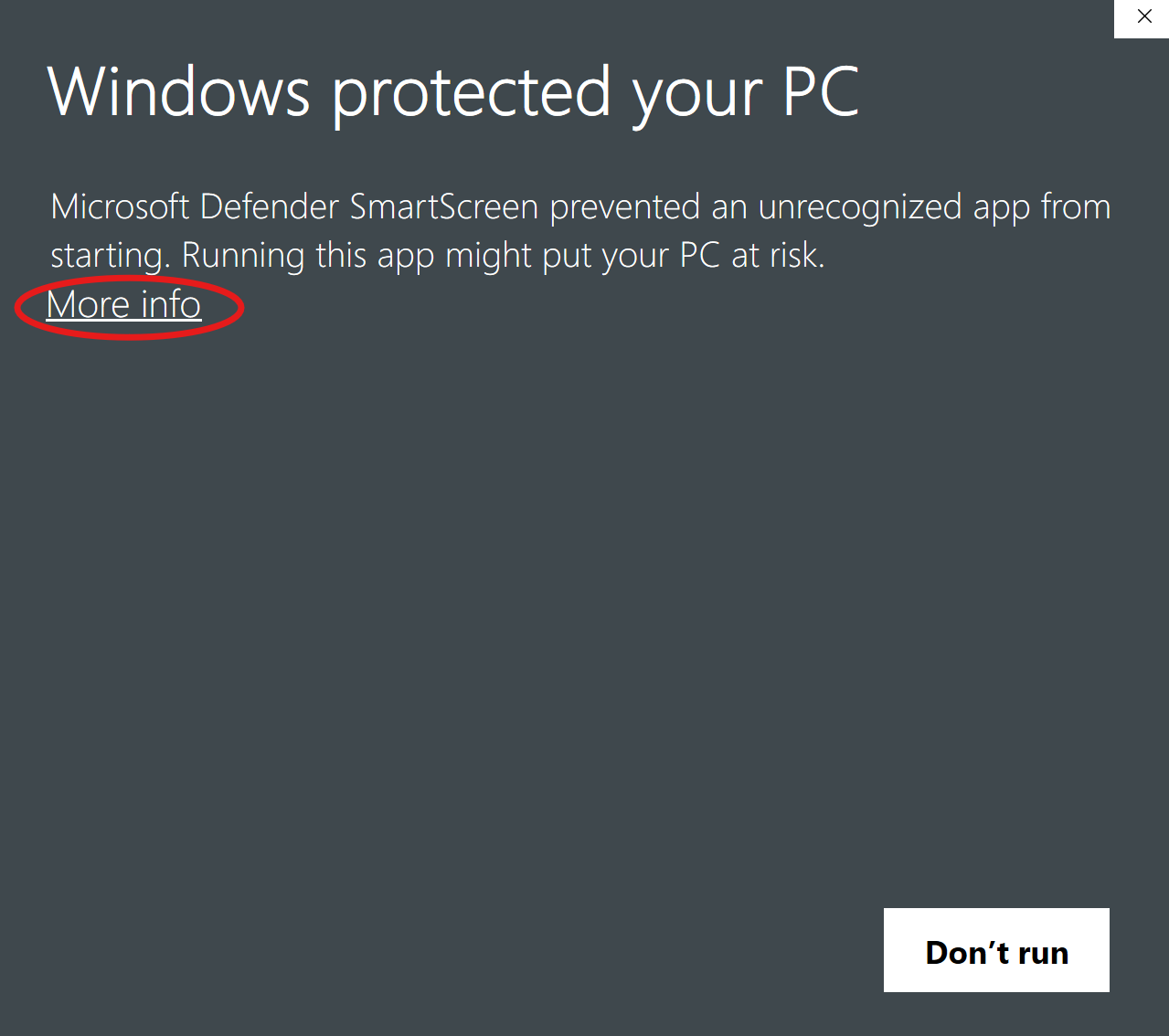
When you run the .msi or .exe, Windows shows:
Windows protected your PC
Microsoft Defender SmartScreen prevented an unrecognized app from starting.
This is expected. SmartScreen warns about any installer whose publisher isn't on Microsoft's reputation list. Getting on that list requires a code-signing certificate (~$300–$700/year from DigiCert / Sectigo / etc.) plus a few hundred installations before SmartScreen stops nagging. SeekDeep is a one-developer open-source project — paying the Microsoft toll isn't viable, so the build ships unsigned.
To run it — exactly two clicks:
Step 1. Click the "More info" link below the body text:
Step 2. A "Run anyway" button appears at the bottom-right. Click it:
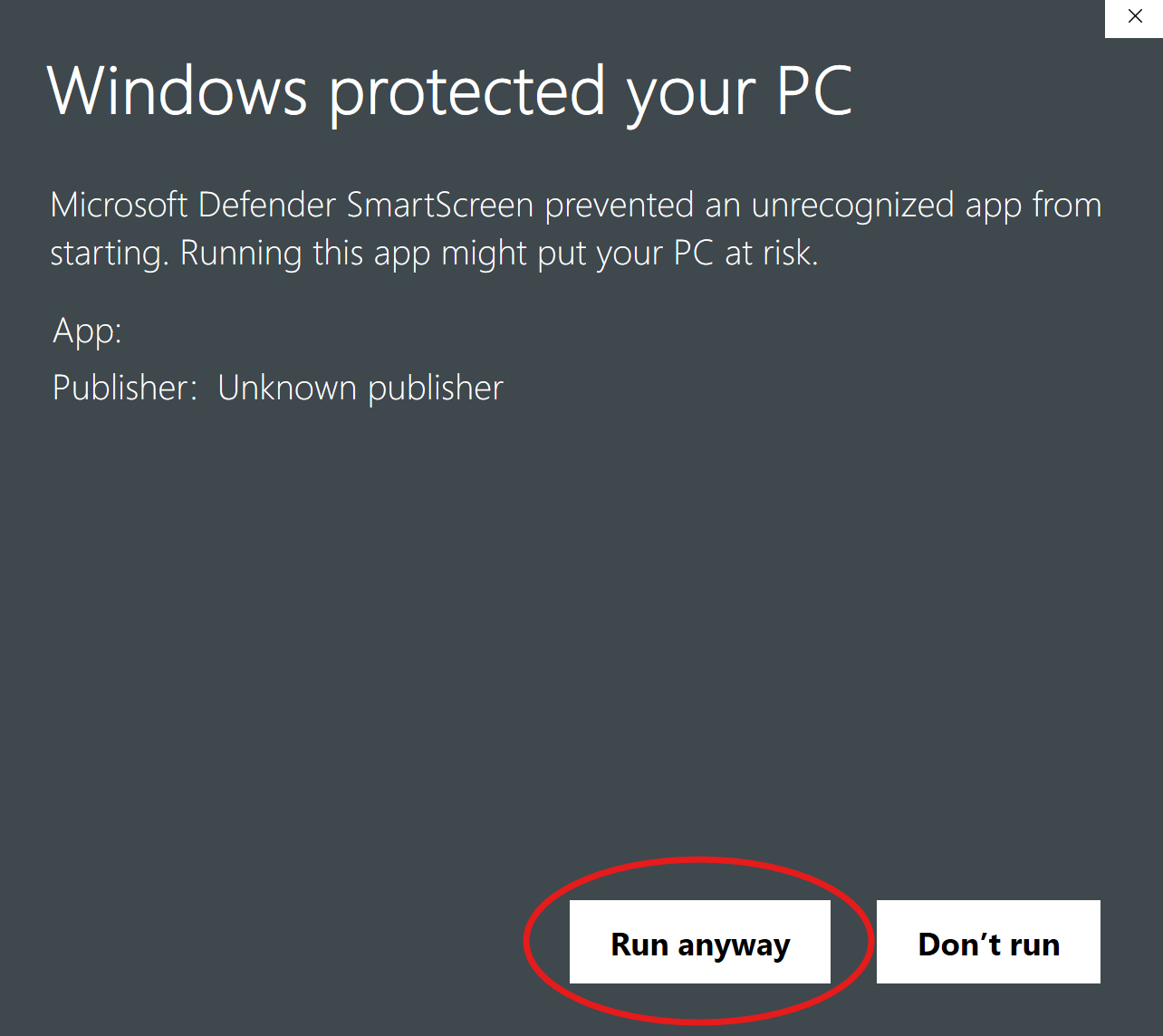
SmartScreen remembers your choice for that file — you won't be prompted again for the same installer.
Want to verify the build yourself? Reasonable.
- Every nightly is built by this GitHub Actions workflow from a public commit. The build log shows the exact source SHA.
- Drop the
.msiinto https://www.virustotal.com/ for a 70-engine scan — clean across the board. - Network calls are documented at the top of the repo's README: nothing phones home; only
huggingface.co/127.0.0.1/ explicitly-configured remote endpoints.
System dependencies (the app surfaces install links in-overlay if missing):
- Required: Python 3.11+ — install from python.org before first launch.
- Optional: Ollama — only if you want to route
/chatthrough the Ollama daemon instead of HuggingFace. The "Models not downloaded" banner has a "Get Ollama ↗" button when relevant.
What happens on first run:
- The app extracts its bundled Python code to
%APPDATA%/SeekDeep/app/(or platform equivalent). - The loading overlay finds your system Python and checks for the boot dependencies (fastapi, uvicorn, pydantic, etc).
- If they're missing, click "Install Python deps" — the app runs
pip install --user -r requirements-local.txtfor you (~30 MB, ~30 seconds). No terminal required.
- If they're missing, click "Install Python deps" — the app runs
- The local AI server boots and the loading page redirects to the playground.
- If you open
/image,/vision, or use local-model/chat, a banner offers to install the heavy ML libraries (torch + transformers + diffusers, ~2 GB). Click once, the app pip-installs them in the background with a live progress modal.
No setup script. No terminal. No filesystem rummaging. Configuration flows through the in-app Tweaks panel.
Remote-only usage: if you only plan to route /chat to OpenAI-compatible / Anthropic / Gemini endpoints, you can skip the 2 GB ML download entirely — those backends are HTTP-only.
Optional: Ollama for local-model /chat via the Ollama daemon; Docker for self-hosted SearXNG web search.
🗺️ What's new & what's next
- Changes in this build: the commit log since the last nightly.
- Roadmap & planned work: PLANNED.md · open issues.
- Voice/TTS is wired but ships with no bundled voice — set
SEEKDEEP_FEATURE_TTS_VOICE=onand pointSEEKDEEP_TTS_PIPER_VOICEat a Piper.onnxvoice (see.env.example) to use@SeekDeep tts.