Access list "Satisfy All" requiring BasicAuth on trusted subnet. #420

Description

UPDATE NOTE: Having thought about this a little more I've identified the issue. The redirected hosts are currently being proxied by cloudflare. As I am running all DNS through cloudflare and don't have any of these addresses defined in my local dns server even though I'm home, I'm going out to cloudflare to come back in. Thus I think the only way to accomplish what I'm after would be to define the local dns entries I need. While it would be nice to not have to do this I understand why it's happening.
Unless I'm missing something as to a way Nginx PM can read my local IP address even coming through cloudflare when I'm here at home, this issue can be closed.
Checklist
- Have you pulled and found the error with
jc21/nginx-proxy-manager:latestdocker image?
Yes - Are you sure you're not using someone else's docker image?
Yes - If having problems with Lets Encrypt, have you made absolutely sure your site is accessible from outside of your network?
Not an LE issue.
Describe the bug
Selecting "satisfy any" on an access list with both authorization and ip range entered, browsing from a machine on the 10.1.1.0/24 subnet which is defined in the access tab of the access list settings still prompts me for authorization.
- What version of Nginx Proxy Manager is reported on the login page?
2.2.4
To Reproduce
- Define authorization user
- Define allowed ip range (I'm using 10.1.1.0/24)
- Select satisfy any on main tab.
- Attach access list to redirected host
- Attempt to access redirected host from machine on 10.1.1.0/24 subnet
- Prompted for username and password.
Expected behavior
When satisfy any for the access list is selected, and I'm browsing from an allowed subnet, in this case 10.1.1.0/24 I would expect NOT to be prompted for login.
Screenshots
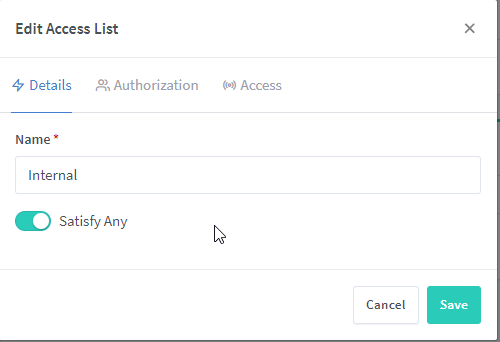
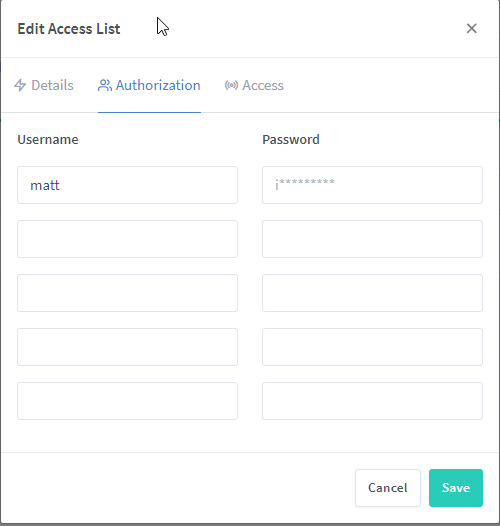
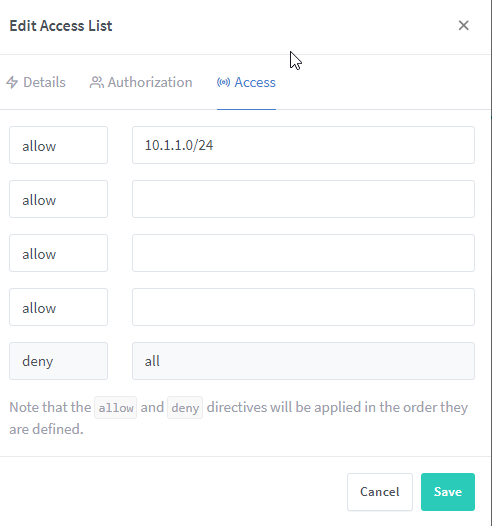
Operating System
Docker image running on ubuntu 20.04
Additional context
N/A