📺 View the Architectural Decision Record detailing our choice of Cyclic Graphs for safety-critical reasoning.
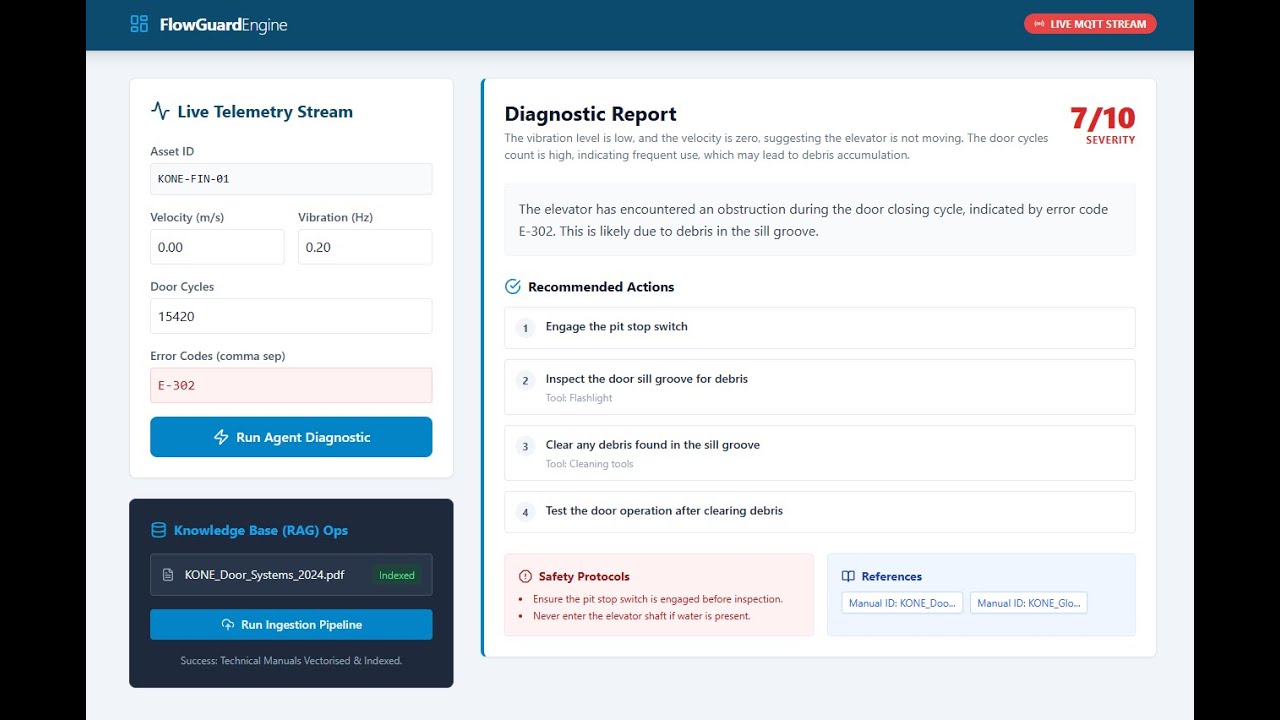
FlowGuard-Engine is a reference architecture for a Safety-First "Digital Twin" Intelligence Bridge. Unlike generic RAG chatbots, FlowGuard is purpose-built for the high-stakes environment of "People Flow." It correlates real-time elevator telemetry with technical documentation to automate predictive maintenance reporting, enforcing strict safety protocols via cyclic agentic workflows.
FlowGuard-Engine solves the specific challenge of applying Generative AI to industrial hardware: How do we ensure the AI is grounded, safe, and structured?
Beyond simple text generation, FlowGuard acts as an Automated Diagnostic Engineer. It ingests raw sensor data (JSON), retrieves specific technical manuals (RAG), and produces strict, actionable maintenance plans. It utilizes a "Reflexive Retry" mechanism to self-correct if safety guardrails are violated.
| Core Challenge | FlowGuard's Solution | Operational Impact |
|---|---|---|
| Safety Compliance | Reflexive Guardrails detect missing safety warnings (e.g., "Lock Out Power") and force the AI to retry its reasoning loop. | Reduces liability risk and ensures technician safety protocols are never hallucinated away. |
| Data Hallucination | Strict Pydantic Schemas enforce structured JSON outputs. The AI cannot "guess" fields; it must adhere to the data contract. | Ensures downstream systems (ERP/Work Orders) receive valid, machine-readable data every time. |
| Context Switching | Vector-Grounded RAG correlates cryptic error codes (E-302) directly to specific PDF pages in the Maintenance Manual. |
Reduces "Time-to-Fix" by providing technicians with instant, relevant documentation. |
| Real-Time Analysis | Async FastAPI Backend handles high-frequency telemetry streams without blocking. | Enables scalable monitoring of elevator fleets in a microservices environment. |
We utilize the C4 model to visualize how FlowGuard bridges the gap between Physical Telemetry and GenAI.
The high-level data flow between the Technician, the Digital Twin Interface, and the Agentic Core.
graph LR
    IoT[IoT Telemetry / Simulator] -- "MQTT/JSON" --> UI[React Digital Twin]
    UI -- "POST /diagnose" --> API[FastAPI Gateway]

    subgraph "FlowGuard Agentic Core (Docker)"
        API --> Graph[LangGraph Orchestrator]
        Graph --> Retriever[Vector Service]
        Retriever <--> Qdrant[Knowledge Base]
        Graph --> LLM[GPT-4o-mini]
        Graph --> Guard[Safety Validator]
        Guard -- "Retry Loop" --> Graph
    end

    style IoT stroke:#333,stroke-width:2px
    style UI stroke:#007ac9,stroke-width:2px
    style API stroke:#009c48,stroke-width:2px
    style Graph stroke:#333,stroke-width:2px
    style Guard stroke:#e63946,stroke-width:2px
Unlike linear chains, FlowGuard utilizes a Cyclic State Graph. This allows the system to "think again" if the output is unsafe or malformed.
sequenceDiagram
    participant T as Telemetry Stream
    participant A as Agent (LangGraph)
    participant V as Qdrant (RAG)
    participant G as Guardrail (Pydantic)

    T->>A: { "error": "E-302", "vibration": 4.5 }
    A->>V: Search("E-302", "High Vibration")
    V-->>A: Retrieve Manual Chunk (Pg 42)

    loop Reflexive Reasoning
        A->>A: Generate Diagnostic Report
        A->>G: Validate Safety & Schema
        alt Critical Safety Warning Missing
            G-->>A: REJECT: "Add Lock-Out Protocol"
            A->>A: Self-Correct & Regenerate
        else Validation Passed
            G-->>A: Approved
        end
    end

    A-->>T: JSON Diagnostic Report
FlowGuard replaces generic "chat" with specialized engineering nodes.
- Input: Raw JSON Sensor Data (Velocity, Door Cycles, Error Codes).
- Logic: Converts numerical anomalies into natural language search queries.
- Impact: Bridges the gap between "Structured Data" (Sensors) and "Unstructured Data" (Manuals).
- Problem: LLMs can be forgetful about safety protocols.
- Solution: A deterministic Python node that scans the output for severity scores > 7.
- Action: If a high-severity fault is detected but keywords like "Lock Out", "Power Off", or "Safety" are missing, the system rejects the payload and forces the LLM to retry with specific instructions.
- Problem: Manuals change versions.
- Solution: An admin-facing ingestion pipeline exposed via the UI.
- Action: Parsing technical PDFs, chunking by "Maintenance Procedure," and indexing into Qdrant with metadata filters.
Key architectural trade-offs made to satisfy Industrial IoT constraints.
| Component | Decision | Alternatives Considered | Justification (The "Why") |
|---|---|---|---|
| Orchestration | LangGraph | LangChain Chains | Safety Loops: Linear chains cannot retry. We need a cyclic graph to implement the "Reflexive Retry" logic essential for safety-critical systems. |
| Validation | Pydantic V2 | JSON Schema | Strictness: Pydantic provides runtime type enforcement in Python. It ensures the API never returns invalid JSON to the Frontend, preventing UI crashes. |
| Vector DB | Qdrant | Pinecone / Chroma | Performance: Qdrant is written in Rust, container-native, and highly performant for high-throughput IoT RAG lookups. |
| Model | GPT-4o-mini | GPT-4 | Speed & Cost: Industrial diagnostics require low latency. GPT-4o-mini offers the best balance of reasoning capability and speed for structured tasks. |
An analysis of cost-efficiency for high-frequency diagnostics.
- Telemetry Parsing: JSON inputs are token-dense. Using
gpt-4o-minireduces cost by ~20x compared to GPT-4 while maintaining high accuracy for structured data. - Vector Filtering: By pre-filtering chunks based on
error_codemetadata, we reduce the context window size, ensuring we only pay to process relevant manual pages.
We utilize a rigorous "Test-Driven Development" (TDD) approach, essential for industrial software.
We verify not just the "Happy Path" but the failure modes.
-
Backend (Pytest):
-
Unit: Verifies Pydantic boundaries (e.g., Severity cannot be 11).
-
Logic: Mocks the Guardrail to ensure it blocks unsafe advice.
-
Integration: Tests the full FastAPI request/response cycle.
-
Frontend (Vitest):
-
Verifies the Dashboard renders correctly.
-
Tests the "Live Simulation" toggle logic.
-
Ensures forms submit data correctly to the API.
- Backend: Python 3.11, FastAPI (Async), LangGraph (Agentic), Pydantic V2
- AI/RAG: LangChain, OpenAI (GPT-4o-mini), Qdrant (Vector Store)
- Frontend: React 18, TypeScript, Vite, Tailwind CSS V3
- Infrastructure: Docker Compose (Microservices Architecture)
Prerequisites: Docker, Docker Compose, OpenAI API Key.
# 1. Clone the repository
git clone https://github.com/Nibir1/FlowGuard-Engine.git
cd FlowGuard-Engine

# 2. Configure Environment [Create a .env file in the root directory]
OPENAI_API_KEY=sk-your-key-here
ENVIRONMENT=development
PROJECT_NAME=FlowGuard-Engine

# 3. Build & Launch (The "Make" command handles Docker builds)
make build
Run the comprehensive test suite (Backend + Frontend):
make test
# Runs Pytest (Backend Coverage) and Vitest (Frontend Components)
- Digital Twin Dashboard: http://localhost:5173
- API Documentation: http://localhost:8000/docs
- Vector DB Console: http://localhost:6333/dashboard
FlowGuard includes a Telemetry Simulator.
- Go to the Dashboard.
- Click the "SIMULATION OFF" toggle in the top-right.
- The system will begin streaming simulated MQTT data (Velocity, Vibration) with occasional injected faults to demonstrate the AI's diagnostic capabilities.
To ground the AI, you must populate the vector database.
- Locate the "Knowledge Base (RAG) Ops" panel on the left.
- Click "Run Ingestion Pipeline".
- This triggers the ETL process to vectorise mock KONE manuals.
"Smart cities require smart maintenance."
FlowGuard-Engine demonstrates that Generative AI can be more than a chatbot—it can be a rigorous, safety-conscious engineering tool. By combining the flexibility of LLMs with the strictness of Agentic Loops and Type Safety, we bridge the gap between "Move Fast" and "Stay Safe."
Architected by: Nahasat Nibir AI Engineer Candidate