


A native VS Code editor experience for the Pi coding agent. Runs Pi inside VS Code — not in a terminal — with full access to your editor state, diagnostics, symbols, and more.
- Install Pi:
npm install -g @mariozechner/pi-coding-agent - Set an API key: Run PiGui: Set Up API Key / Login from the command palette (
Ctrl+Shift+P), or setANTHROPIC_API_KEY/OPENAI_API_KEYin your environment. - Open the chat: Click the Pi icon in the activity bar, or run PiGui: Code Agent from the command palette.
- Start prompting: The agent can see your editor, check diagnostics, read files, and make edits.
The Pi coding agent is a powerful AI pair programmer, but the default terminal TUI clashes with the editor workflow — you end up juggling a split terminal, switching contexts, and copy-pasting file paths. This extension embeds Pi directly in VS Code's native UI:
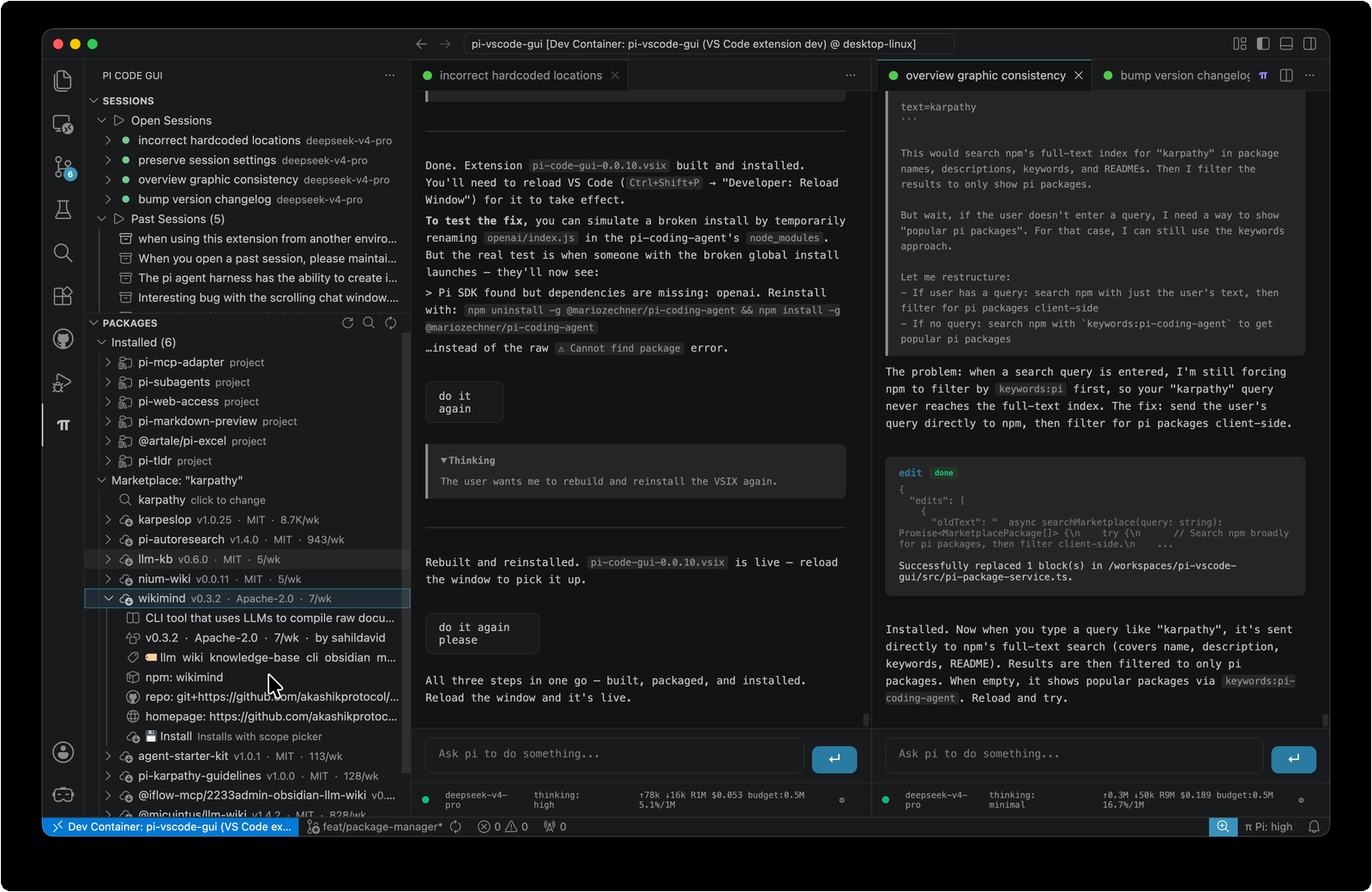
- In-editor chat — streaming responses, thinking blocks, and tool execution results rendered in a webview panel, not a terminal buffer.
- Native VS Code bridge — 17 tools that call VS Code APIs directly. The agent can inspect your active editor, check diagnostics, find symbols, look up types, apply edits, and format code, all through the same APIs VS Code uses.
- Session persistence — conversation history survives VS Code restarts. Sessions are stored in Pi's standard
.jsonlformat alongside your project. - Multi-session support — multiple chat sessions in separate panels, each with independent model and thinking level settings.
| Feature | Description |
|---|---|
| 💬 Chat panel | Streaming text, collapsible thinking blocks, tool call/result rendering, markdown with syntax-highlighted code blocks |
| 🧰 Editor bridge | Agent reads open editors, checks diagnostics, inspects symbols/types, applies edits, formats code — all through VS Code APIs |
| 🔄 Session history | Auto-saved conversations can be resumed or deleted. Find with text search |
| 🪟 Multi-session | Multiple independent chat panels, each with its own model, thinking level, and conversation tree |
| 🔐 Flexible auth | Runtime API key overrides via VS Code settings, env vars, or the built-in auth config |
| 🔧 Settings | Toggle auto-compaction, auto-retry, skills loading, context files, and prompt templates from the UI |
- Not all TUI behaviours map well into VSCode's UX. For instance, having new UI widgets spawned by extension packages. I did a best effort implementation, but there is definitely room for improvement.
Pi Code Gui loads the @mariozechner/pi-coding-agent SDK at runtime from your global npm install. This means pi update --self picks up new SDK versions without an extension update.
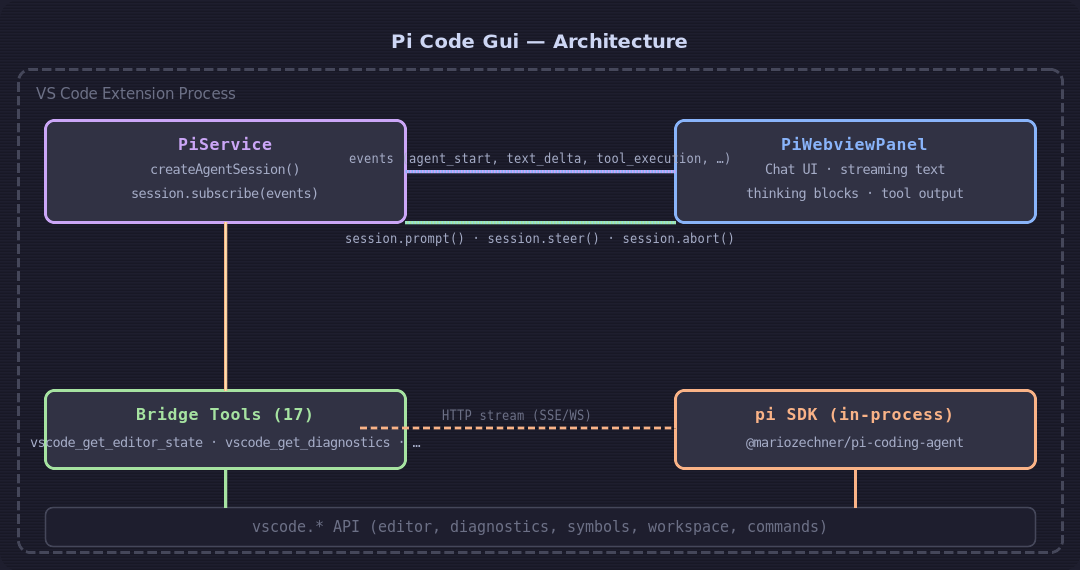
- PiService manages the agent lifecycle: creates the SDK session, subscribes to events, translates them into chat UI messages, handles model/thinking/settings changes, and tracks usage stats.
- PiWebviewPanel renders a webview chat UI. It subscribes to PiService events and re-renders streaming text, thinking blocks, tool execution, bash output, compaction summaries, and custom messages in real time.
- Bridge tools are registered as SDK
customToolsconstructed withdefineTool()and Typebox schemas, the same way the SDK's own built-in tools are defined.
| Setting | Type | Default | Description |
|---|---|---|---|
pi-code-gui.promptToInstall |
boolean | true |
Prompt to install Pi if not found |
pi-code-gui.anthropicApiKey |
string | "" |
Runtime Anthropic API key (overrides env var, not persisted to disk) |
pi-code-gui.openaiApiKey |
string | "" |
Runtime OpenAI API key (overrides env var, not persisted to disk) |
pi-code-gui.systemPromptAppend |
string | "" |
Additional instructions appended to the system prompt |
pi-code-gui.enableSkills |
boolean | true |
Load project and global pi skills |
pi-code-gui.enableContextFiles |
boolean | true |
Inject project context files |
pi-code-gui.enablePromptTemplates |
boolean | true |
Register custom slash commands |
- VS Code 1.118+
- No manual Pi install required — the extension prompts you to install
@mariozechner/pi-coding-agentautomatically on first launch - At least one API key (Anthropic, OpenAI, DeepSeek, Gemini, etc.) — run PiGui: Set Up API Key / Login or see the Pi quickstart
pnpm install          # Install dev dependencies
pnpm run compile      # Type-check, lint, and build with esbuild
pnpm run watch        # Watch mode for development
Press F5 in VS Code to launch the Extension Development Host.
To package a .vsix:
pnpm run vsix # Creates pi-code-gui-x.x.x.vsixMIT — see LICENSE for details.